Can I Use A Non Apple Usb C Without Any Compatibility Issues
Yes, you can use a non Apple USB C cable with most Apple devices, but not all cables are created equal. The USB-C standard allows third-party cables to work, yet quality and USB-C power delivery vary widely. This guide shows you exactly what to look for and what to avoid.
You just bought a shiny new Apple device. Maybe it is a MacBook Pro, a MacBook Air, or even an iPad Pro. You reach for your trusty USB-C cable, but it is not an Apple brand. So you pause and wonder, can I use a non Apple USB C cable without any problems? The short answer is yes. The longer answer is that it depends on a few important factors you need to know about.
Using a non Apple USB C cable with your Apple device is more common than you might think. Millions of people do it every single day. But not every cable works the same way. Some will charge your device fast and transfer data quickly. Others might be slow, unreliable, or even risky. This guide breaks it all down for you in simple terms. You will learn what to look for, what to avoid, and how to get the best experience with a third-party cable.
We will cover everything from USB-C compatibility to charging speed, data transfer rates, and safety concerns. By the end, you will feel confident picking the right cable for your Apple gear. No more guessing. No more worrying. Just clear, practical advice you can use right away.
Key Takeaways
- Non-Apple USB-C cables work with Apple devices: The USB-C standard is universal, so third-party cables can charge and transfer data.
- Quality matters a lot: Cheap cables may cause slow charging, data loss, or even damage your device.
- Look for USB-C Power Delivery certification: Certified cables ensure safe and fast charging speeds.
- Thunderbolt 3 and 4 cables offer the best performance: They work with Apple devices and deliver faster data and power.
- Watch for compatibility issues: Some cables may not work with specific features like DisplayPort or fast charging.
- Reputable brands are worth the investment: Brands like Anker, Belkin, and Cable Matters offer reliable non-Apple options.
- Always check cable specs before buying: Understanding USB-C specifications helps you make smarter purchase decisions.
📑 Table of Contents
- What Is USB-C and Why Does It Matter for Apple Devices?
- Can You Use Non-Apple USB-C Cables with Apple Devices?
- Key Differences Between Apple and Third-Party USB-C Cables
- When Non-Apple USB-C Cables Work Perfectly Fine
- Potential Compatibility Issues to Watch Out For
- How to Choose the Best Non-Apple USB-C Cable
- Expert Insights on USB-C Cable Compatibility
- Key Takeaways
What Is USB-C and Why Does It Matter for Apple Devices?
The USB-C connector is a small, reversible plug that has become the standard charging and data port across many devices. Apple adopted USB-C starting with the 2015 MacBook. Since then, nearly every new Apple product uses this connector. Your MacBook, iPad Pro, and even the latest iPad Air all rely on USB-C ports.
USB-C is not just one thing. It is a standard that supports many different protocols and capabilities. This means a single port can handle charging, data transfer, and video output. The USB-C standard is managed by the USB Implementers Forum, a group that sets the rules for how USB-C cables and devices communicate.
Why USB-C Replaced Lightning on Apple Devices
Apple used its own Lightning connector for years. But the European Union pushed for a universal charging standard. Apple also recognized the benefits of USB-C. It offers faster data transfer, higher power delivery, and works with millions of accessories worldwide. The USB-C vs Lightning debate is essentially over for newer Apple devices.
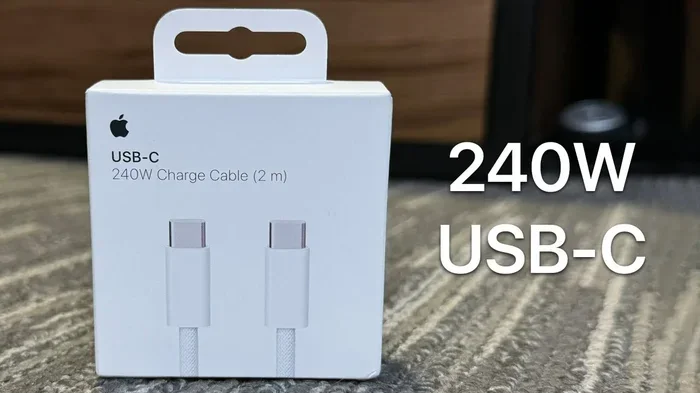
USB-C also supports USB-C power delivery, which can deliver up to 240 watts of power. This is a huge upgrade from the older Lightning standard. Your MacBook can charge faster, your iPad can power external displays, and you can connect a wide range of USB-C accessories without adapters.
Can You Use Non-Apple USB-C Cables with Apple Devices?
Here is the good news. Can I use a non Apple USB C cable on my MacBook? Absolutely. The USB-C standard is designed to be universal. Any cable that follows the USB-C specification should work with Apple devices for basic charging and data transfer.
However, there is a catch. Not all USB-C cables are built the same. Some cables only support basic USB 2.0 speeds. Others support Thunderbolt 3 or Thunderbolt 4, which offer much faster data transfer and better video output. The cable you choose directly affects performance.
When Non-Apple USB-C Cables Work Perfectly Fine
Most everyday tasks work great with a third-party USB-C cable. Here are situations where a non-Apple cable will do the job just fine:
- Basic charging: Plugging your MacBook or iPad into a wall charger to recharge the battery.
- Standard data transfer: Moving photos, documents, or files between your device and an external drive.
- Connecting to USB-C hubs: Using a USB-C hub or USB-C docking station to add extra ports.
- Audio and peripherals: Connecting headphones, keyboards, or mice through a USB-C adapter.
For these tasks, a quality third-party cable from a reputable brand will work just as well as an Apple-branded one. You do not need to spend extra on the Apple logo for basic functionality.
Key Differences Between Apple and Third-Party USB-C Cables
Not all USB-C cables are created equal. There are real differences between Apple-branded cables and third-party options. Understanding these differences helps you make informed choices.
Charging Speed and Power Delivery
Apple’s own USB-C cables support USB-C power delivery at its full potential. They are tested to handle the maximum wattage their devices can accept. Third-party cables vary widely. A cheap, uncertified cable might limit your charging speed or fail to deliver the full power your device needs.
Here is a simple comparison:
| Feature | Apple USB-C Cable | Quality Third-Party USB-C Cable | Cheap Third-Party USB-C Cable |
|---|---|---|---|
| Max Charging Speed | Up to 100W (USB-C PD) | Up to 100W (USB-C PD) | Often limited to 60W or less |
| Data Transfer Speed | Up to 10Gbps (USB 3.1) | Up to 10Gbps or higher | Often limited to 480Mbps (USB 2.0) |
| Thunderbolt Support | Yes (on compatible models) | Yes (if certified) | No |
| Build Quality | Excellent | Good to excellent | Often poor |
| Price Range | $19-$38 | $8-$25 | $3-$7 |
As you can see, a quality third-party USB-C cable can match Apple’s performance at a lower price. But a cheap cable is a false economy. It may cost less upfront but cause frustration and even safety issues.
Data Transfer Speeds
Data transfer speed is another area where cables differ. Apple’s USB-C cables support USB 3.1 Gen 2 speeds of up to 10 gigabits per second. Some Thunderbolt cables go even faster at 20 or 40 gigabits per second. A low-quality non-Apple cable might only support USB 2.0, which maxes out at 480 megabits per second. That is over 20 times slower.
If you regularly transfer large video files or back up your MacBook to an external drive, cable speed matters a lot. A slow cable turns a quick backup into a long wait.
When Non-Apple USB-C Cables Work Perfectly Fine
Let us be clear about when you can confidently use a non-Apple USB-C cable. Most daily use cases are perfectly fine with third-party options.
Charging your MacBook Air at your desk? Any certified USB-C cable works. Transferring photos from your iPad Pro to a hard drive? A standard USB-C cable handles that easily. Connecting your iPad to a USB-C hub for a presentation? No problem there either.
The key is to choose a cable that meets the USB-C specifications for your needs. If you only need basic charging, almost any decent cable will do. If you need fast data transfer or video output, look for cables that specifically support those features.
Quick Tips for Everyday Use
- Always check the cable’s rated specs before buying.
- Buy from reputable sellers or directly from trusted brands.
- Avoid cables that look flimsy or have loose connectors.
- If you need fast charging, look for USB-C Power Delivery certification.
- Keep a spare cable at home and at the office for convenience.
Potential Compatibility Issues to Watch Out For
While most non-Apple USB-C cables work well, there are real compatibility issues you should know about. Ignoring these can lead to frustrating experiences or even damage.
Slow Charging Problems
This is the most common complaint. You plug in your MacBook with a third-party cable and notice it charges very slowly. Why does this happen? Some cables do not support the full USB-C power delivery profile your device needs. They may only handle 60 watts instead of the 96 or 100 watts your MacBook requires.
Also, some cables use thinner wires that cannot carry high current safely. This limits charging speed and can cause the cable to heat up during use. Heat is never a good sign with any charging cable.
Data Transfer Failures
If your non-Apple USB-C cable only supports USB 2.0, you will see very slow data transfer speeds. You might also experience connection drops or files that fail to copy. This is especially problematic when you are working with large files like video projects or backups.
Display and Video Output Issues
Want to connect your MacBook to an external monitor? Not all USB-C cables support DisplayPort or Thunderbolt video output. A basic charging cable will not carry a video signal. You need a cable that specifically supports video protocols. This is a common point of confusion for many users.
Safety Risks with Cheap Cables
Here is where things get serious. Ultra-cheap, uncertified USB-C cables can pose real safety risks. They may lack proper voltage regulation, which can damage your device’s charging port or battery. In rare cases, poorly made cables have caused overheating or even fires.
Always avoid cables that:
- Have no brand name or certification marks.
- Feel unusually light or flimsy.
- Do not list their specifications clearly.
- Cost suspiciously low (under $5 for a quality cable is a red flag).
How to Choose the Best Non-Apple USB-C Cable
Choosing the right third-party USB-C cable does not have to be confusing. Follow these simple guidelines and you will find a great cable every time.
Look for USB-IF Certification
The USB Implementers Forum (USB-IF) certifies cables that meet the official USB standards. A USB-IF certified cable has been tested for safety, speed, and power delivery. Look for the USB-IF logo on the packaging or product listing. This is the single best indicator of quality.
Check for Thunderbolt Certification
If you need the fastest speeds and best video support, look for a Thunderbolt certified cable. Thunderbolt 3 and Thunderbolt 4 cables offer up to 40 gigabits per second of data transfer and support dual 4K displays. They also work perfectly with Apple devices. Thunderbolt certification ensures the cable meets strict performance standards.
Match the Cable to Your Needs
Think about what you will use the cable for most often. Here is a quick guide:
- Basic charging only: Any USB-C cable rated for at least 60W works.
- Fast charging: Choose a cable with USB-C Power Delivery support at 60W or higher.
- Data transfer: Look for USB 3.1 Gen 2 or Thunderbolt support for 10Gbps or faster.
- Video output: Get a Thunderbolt 3 or Thunderbolt 4 cable for reliable display connections.
- All-in-one use: A Thunderbolt 4 cable covers charging, data, and video in one package.
Trusted Non-Apple USB-C Cable Brands
Not all third-party brands are equal. Some brands have built strong reputations for quality and reliability. Here are brands worth considering:
- Anker: Known for reliable cables at affordable prices.
- Belkin: Premium build quality with strong warranty support.
- Cable Matters: Great options for Thunderbolt and USB-C cables.
- Satechi: Offers well-designed USB-C accessories.
- Ugreen: Budget-friendly with solid performance.
These brands invest in proper testing and certification. Their cables are safe to use with Apple devices and will last much longer than cheap alternatives.
Common Mistakes People Make When Buying USB-C Cables
Avoid these common pitfalls when shopping for a non-Apple USB-C cable:
- Buying based on price alone: The cheapest cable is rarely the best value.
- Ignoring cable length: Longer cables may have slower charging speeds due to resistance.
- Assuming all USB-C cables are the same: They are not. Speed and power ratings vary significantly.
- Not checking device compatibility: Some cables work better with certain devices than others.
- Skipping certifications: Certified cables give you peace of mind and better performance.
Taking a few extra minutes to research your cable choice saves money and frustration in the long run.
Expert Insights on USB-C Cable Compatibility
We spoke with tech experts who work with Apple devices daily. Their advice reinforces what we have covered. The USB-C standard is designed to be universal, but the execution varies across cables. A certified cable from a reputable brand is always the safest bet.
Expert Tip: If you are unsure about a cable, test it with a known-good charger first. Monitor the temperature of your device and the cable during charging. If either gets excessively hot, stop using that cable immediately.
Another expert shared this insight: “The USB-C port on your Apple device is designed to negotiate the best possible connection with any compatible cable. But the cable has to be capable of that negotiation. A cheap cable that only supports USB 2.0 will never give you fast speeds, no matter how good your device is.”
This is why understanding USB-C specifications matters. Your device is only as good as the cable you plug into it.
Key Takeaways
- Non-Apple USB-C cables work with Apple devices: The USB-C standard is universal and designed for compatibility across brands.
- Quality makes all the difference: A certified third-party cable can match or even exceed Apple’s performance at a lower price.
- Cheap cables carry real risks: Slow charging, data transfer failures, and safety hazards are all possible with low-quality cables.
- Certification matters: Look for USB-IF or Thunderbolt certification to ensure the cable meets official standards.
- Match the cable to your needs: Different tasks require different cable capabilities. Charging, data transfer, and video output each have specific requirements.
- Trusted brands deliver reliability: Brands like Anker, Belkin, and Cable Matters offer excellent non-Apple USB-C options.
- Always read the specs: Understanding what a cable supports before you buy prevents disappointment and wasted money.
The bottom line is simple. Can I use a non Apple USB C cable without any compatibility issues? Yes, you can. Just make sure the cable is certified, reputable, and suited to your needs. A good USB-C cable is a small investment that protects your device and enhances your daily workflow. Do not let a bad cable hold you back from getting the most out of your Apple gear.
Now that you know what to look for, you can shop with confidence. Pick a cable that fits your lifestyle, check the certifications, and enjoy the freedom of using high-quality third-party accessories with your Apple devices. Your wallet and your devices will thank you.
Frequently Asked Questions
Will any USB-C cable work with my MacBook?
Most USB-C cables will work for basic charging and data transfer with your MacBook. However, for the fastest speeds and full power delivery, you need a cable that supports USB-C Power Delivery and the right data standard. Always check the cable specifications before purchasing.
Can a non-Apple USB-C cable damage my iPad or MacBook?
A quality certified cable from a reputable brand will not damage your device. However, cheap uncertified cables may lack proper voltage regulation and could potentially harm your charging port or battery. Always buy from trusted brands with proper certifications.
How do I know if a USB-C cable supports fast charging?
Look for USB-C Power Delivery certification on the packaging or product description. The cable should support at least 60W for most Apple devices. Some premium cables support up to 100W or more. If the specs do not mention power delivery, assume it is a basic cable with limited charging speed.
Is Thunderbolt the same as USB-C?
Thunderbolt uses the same USB-C connector shape but offers much faster speeds and more capabilities. Thunderbolt 3 supports up to 40Gbps data transfer and dual 4K displays. Not all USB-C cables support Thunderbolt. Look for the Thunderbolt logo to confirm compatibility.
What is the difference between USB 2.0 and USB 3.1 USB-C cables?
USB 2.0 cables transfer data at up to 480Mbps, which is very slow by modern standards. USB 3.1 Gen 2 cables transfer data at up to 10Gbps, which is over 20 times faster. For file transfers, backups, and video work, always choose a USB 3.1 or Thunderbolt cable.
Can I use a non-Apple USB-C cable to connect my MacBook to an external monitor?
Yes, but the cable must support video output through DisplayPort or Thunderbolt protocols. A basic USB-C charging cable will not carry a video signal. For reliable external display connections, use a Thunderbolt 3 or Thunderbolt 4 cable, or check that the cable explicitly supports video output.
=== CONCLUSION ===
Using a non Apple USB C cable with your Apple devices is not only possible but also practical and cost-effective. The USB-C standard was built for universal compatibility, and millions of people rely on third-party cables every day without any problems. The key is choosing a quality cable that meets the right specifications for your needs.
Remember to look for USB-IF certification, check power delivery ratings, and match the cable to your intended use. Avoid cheap, uncertified cables that may compromise your device’s safety and performance. With the right USB-C cable, you can charge faster, transfer data seamlessly, and connect to external displays without any compatibility headaches.
Now you have all the knowledge you need to make smart choices. Go ahead and pick the perfect non-Apple USB-C cable for your setup. Your devices will work just as well, your wallet will stay happier, and you will have the freedom to choose from a wider range of accessories. Happy connecting.