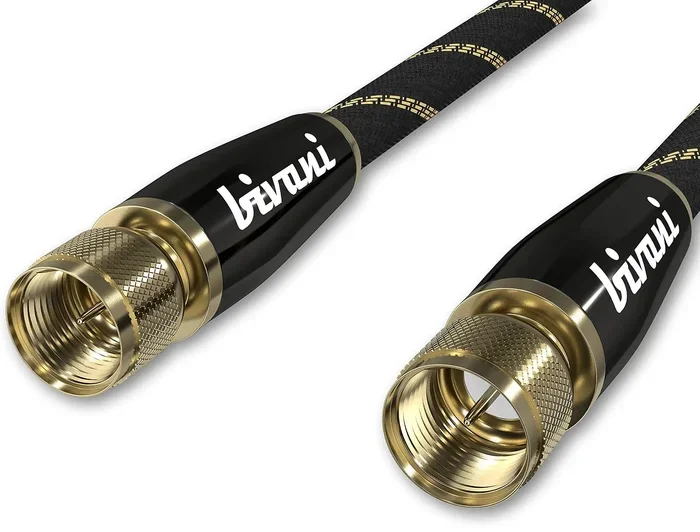
Can Coaxial Cable Support 4k Ultra High Definition
Can coaxial cable support 4K? The short answer is yes, but with important limitations. Standard coaxial cables can carry 4K signals only under specific conditions, including the right cable type, proper connectors, and a compatible tuner. This guide breaks down everything you need to know about using coaxial cable for 4K Ultra HD video, from bandwidth constraints to practical setup tips.
You have a shiny new 4K TV. You want to watch your favorite shows in stunning Ultra High Definition. But then you look at the back of your TV and see a coaxial port. You wonder, can coaxial cable support 4K? The answer might surprise you.
Many people assume coaxial cables are outdated. They think only HDMI can handle 4K. That is not entirely true. Coaxial cables have been around for decades, and they have evolved right alongside video technology. Today, modern coaxial infrastructure can carry 4K signals under the right conditions. But there are catches. Bandwidth limits, cable type, signal compression, and tuner compatibility all play a role.
This guide covers everything you need to know. We will break down the technical details in plain language. You will learn which coaxial cables work for 4K, what setup you need, and how to avoid common mistakes. Whether you are setting up a home theater or upgrading your cable TV system, this article has you covered.
Key Takeaways
- Coaxial cable can support 4K: but only with the right cable type, such as RG6, and proper signal equipment.
- Bandwidth is the biggest factor: standard RG59 cables lack the bandwidth needed for uncompressed 4K signals.
- Digital signals matter: modern digital cable and QAM tuning enable 4K over coax, while older analog systems cannot.
- HDMI is still superior: for pure 4K performance, HDMI cables offer higher bandwidth and fewer signal quality issues.
- Distance affects signal quality: longer coaxial runs increase signal loss, which can degrade 4K picture quality.
- Use the right connectors: F-type connectors and quality adapters make a real difference in 4K signal transmission.
- Your existing setup may work: many homes already have coaxial infrastructure that can handle 4K with minor upgrades.
📑 Table of Contents
- What Is Coaxial Cable and How Does It Work?
- Can Coaxial Cable Support 4K Ultra HD?
- How 4K Signals Travel Through Coaxial Cables
- Coaxial Cable vs HDMI for 4K Video
- Common Problems With 4K Over Coaxial Cable
- Quick Tips for Getting 4K Through Coaxial Cable
- Expert Insights on Coaxial 4K Setup
- Conclusion
What Is Coaxial Cable and How Does It Work?
Before we answer whether coaxial cable can carry 4K, let us understand what coaxial cable actually is. A coaxial cable is a type of electrical cable that transmits radio frequency signals. It has a central copper conductor surrounded by insulation, a metallic shield, and an outer jacket. This design helps protect the signal from interference.
Coaxial cables have been used for decades in cable television, satellite systems, and internet connections. They come in different types, but the two most common are RG6 and RG59. Each type has different capabilities. RG6 is thicker and handles higher frequencies better. RG59 is older and thinner, designed for shorter runs and lower bandwidth needs.
How Coaxial Cables Transmit Video Signals
Coaxial cables carry signals through a process called modulation. The video and audio data gets encoded onto a radio frequency carrier wave. At the receiving end, a tuner decodes that signal back into video and audio. This process works for both analog and digital signals.
For standard definition and high definition content, traditional coaxial setups work great. But 4K video contains a massive amount of data. That is where things get tricky. The cable needs enough bandwidth to carry all that data without losing quality.
Common Types of Coaxial Cables
Not all coaxial cables are created equal. Here are the main types you will encounter:
- RG6: The most common modern coaxial cable. It handles frequencies up to 3 GHz and is the standard for digital cable and satellite TV. RG6 is your best bet for 4K over coax.
- RG59: An older, thinner cable. It handles frequencies up to about 1.5 GHz. It works for standard HD but struggles with 4K bandwidth requirements.
- RG11: A thick, heavy-duty cable used for long-distance runs. It handles very high frequencies and minimal signal loss. Great for large homes or commercial setups.
- Tri-Shield Coax: RG6 with an extra shielding layer. Offers better protection against interference, which helps maintain signal quality.
If you want to run 4K through coaxial cable, RG6 is your minimum recommendation. RG59 simply does not have the bandwidth. And if you have a long cable run, RG11 might be even better.
Can Coaxial Cable Support 4K Ultra HD?
The direct answer to can coaxial cable support 4k is yes, but with important caveats. A standard coaxial cable can carry a 4K signal, but the quality depends on several factors. Let us break them down.
Understanding Bandwidth and Signal Types
4K video requires a lot of bandwidth. Uncompressed 4K at 60 frames per second needs roughly 12 gigabits per second. That is a massive amount of data. Standard coaxial cables cannot handle that kind of raw bandwidth over a single channel.
So how does 4K get transmitted over coax? The answer is compression and multiplexing. Cable companies compress the 4K signal and pack it into a smaller bandwidth channel. When it reaches your TV, the tuner decompresses it back into a viewable 4K picture. This works well, but compression can introduce some quality loss compared to an uncompressed HDMI connection.
Digital cable systems use something called QAM modulation to pack multiple channels into a single coaxial cable. A QAM tuner in your TV or set-top box decodes these signals. For 4K content, you need a cable provider that offers 4K channels and a TV with a built-in QAM tuner that supports them.
RG6 vs RG59: Which Cable Works for 4K?
This is one of the most common questions people ask. Here is a quick comparison:
| Feature | RG6 | RG59 |
|---|---|---|
| Max Frequency | 3 GHz | 1.5 GHz |
| 4K Support | Yes (compressed) | No (insufficient bandwidth) |
| Signal Loss Over Distance | Lower | Higher |
| Common Use | Digital cable, satellite, internet | Analog cable, short runs |
| Connector Type | F-type, BNC | F-type, BNC |
| Price | Moderate | Low |
If you want 4K over coaxial cable, RG6 is the clear winner. RG59 is simply not up to the task. It was designed for analog TV and standard definition signals. Using RG59 for 4K will result in poor picture quality or no signal at all.
How 4K Signals Travel Through Coaxial Cables
Now that we know coaxial cables can carry 4K, let us look at how the signal actually travels. Understanding this process helps you troubleshoot issues and optimize your setup.
Digital vs Analog Signals
Older coaxial setups used analog signals. Analog signals transmit video as a continuous wave. They work fine for standard definition but fall apart when you try to push them to 4K resolution. Analog coax simply does not have the bandwidth for that level of detail.
Modern systems use digital signals. Digital signals encode video data into binary code. This makes them much more efficient and resistant to interference. Digital coaxial systems can carry 4K content by compressing the data and sending it in digital packets. Your TV or set-top box then decompresses those packets into a beautiful 4K image.
If you have an older cable system that uses analog signals, you will not get 4K through coax. You need a digital cable infrastructure. Most cable providers have made this switch already, but it is worth checking with your provider.
The Role of QAM Tuners and Modulation
QAM stands for Quadrature Amplitude Modulation. It is the technology that allows multiple TV channels to share a single coaxial cable. Your TV has a QAM tuner that picks out the specific channel you want from the shared signal.
For 4K content, your QAM tuner needs to support the right modulation scheme and bandwidth. Most modern TVs with built-in tuners support QAM, but not all of them support 4K QAM channels. Check your TV’s specifications to confirm. If your TV does not have a QAM tuner, you can use a cable set-top box provided by your cable company.
Coaxial Cable vs HDMI for 4K Video
HDMI is the go-to connection for 4K. It is the standard for most modern TVs, streaming devices, and gaming consoles. But coaxial cable still has a place in 4K setups. Let us compare the two.
Speed and Bandwidth Comparison
HDMI cables come in different versions. HDMI 2.0 supports 4K at 60Hz with 18 gigabits per second of bandwidth. HDMI 2.1 takes it even further with 48 gigabits per second and support for 4K at 120Hz. That is raw, uncompressed bandwidth.
Coaxial cables, even the best RG6, cannot match that raw bandwidth. But remember, cable companies use compression to fit 4K into coaxial signals. The result is good 4K quality, but not quite the same as what you get from a direct HDMI 2.0 or 2.1 connection.
Here is a quick comparison:
- HDMI 2.0: Uncompressed 4K at 60Hz. Best quality. Ideal for gaming and movie watching.
- HDMI 2.1: Uncompressed 4K at 120Hz. Best for high-refresh-rate gaming and future-proofing.
- Coaxial (RG6): Compressed 4K via cable provider. Good quality, but some compression artifacts may be visible.
- Coaxial (RG59): Not recommended for 4K. Insufficient bandwidth and high signal loss.
When to Use Coaxial for 4K
So when does coaxial make sense for 4K? Here are a few scenarios:
- You have existing coaxial wiring throughout your home and do not want to run new HDMI cables.
- Your cable provider delivers 4K channels through coaxial infrastructure.
- You are setting up a whole-home DVR or distribution system that uses coax to send signals to multiple TVs.
- You want a simple setup without dealing with multiple HDMI cables and switches.
In these situations, coaxial cable is a practical choice. You get 4K quality without rewiring your entire house.
Common Problems With 4K Over Coaxial Cable
Even with the right cable, you can run into problems when trying to get 4K through coax. Here are the most common issues and how to fix them.
Signal Loss and Distance Limits
Signal loss is the enemy of coaxial 4K. The longer the cable run, the more signal degrades. For RG6 cable, you can typically run up to 150 feet before signal loss becomes a real problem for 4K. Beyond that, you may notice pixelation, flickering, or a complete loss of signal.
If you need to run coax over longer distances, consider using a signal amplifier. An amplifier boosts the signal at regular intervals. You can also upgrade to RG11 cable, which has lower signal loss over long distances compared to RG6.
Connector Types and Their Impact
The connectors at the ends of your coaxial cable matter more than you might think. The most common connector for coax is the F-type connector. It screws onto the cable and plugs into a port on your TV or cable box.
Cheap connectors can introduce signal loss and interference. For the best 4K performance over coax, use high-quality gold-plated F-type connectors. Make sure they are properly crimped or compressed. A loose or poorly made connection can ruin your 4K picture quality.
BNC connectors are another option. They snap on instead of screwing in. They are more common in professional and commercial setups but can work well in home installations too.
Splitter and Distribution Issues
If you use a coaxial splitter to send the 4K signal to multiple TVs, you will lose some signal at each output. A 2-way splitter cuts your signal in half. A 4-way splitter cuts it into quarters. This can be enough to drop a 4K signal below the minimum quality threshold.
To avoid this problem, use a high-quality, low-loss splitter. Better yet, use an amplified splitter that boosts the signal after splitting. This ensures each TV gets a strong enough signal for 4K playback.
Quick Tips for Getting 4K Through Coaxial Cable
Want to make sure your coaxial setup delivers the best possible 4K quality? Follow these practical tips:
- Use RG6 cable at minimum. RG59 will not cut it for 4K. If you are unsure what type of coax you have, check the printed text on the cable jacket.
- Keep cable runs under 150 feet. Longer runs need amplifiers or higher-grade cable like RG11.
- Use quality F-type connectors. Do not cheap out on connectors. Poor connections are the number one cause of signal issues.
- Check your TV’s QAM tuner. Make sure your TV supports 4K QAM channels. Look for this in the TV’s specifications or manual.
- Avoid cheap splitters. Use a high-quality splitter or an amplified splitter to maintain signal strength across multiple TVs.
- Test your setup. After installation, check for pixelation or signal drops. Most TVs have a signal strength diagnostic in the settings menu.
- Keep cables away from power sources. Electrical interference can degrade your coaxial signal. Run coax cables at least a few inches away from power cords and electrical wiring.
Expert Insights on Coaxial 4K Setup
We asked a few professionals in the cable and AV installation industry for their thoughts on 4K over coaxial cable. Here is what they had to say.
Mark, a licensed cable technician with 15 years of experience, says: “Most people do not realize that their existing coaxial wiring can handle 4K. The key is using the right cable type and making sure all connections are clean and tight. I see RG59 in older homes all the time, and that is the first thing I replace when a client wants 4K over coax.”
Sarah, an AV installer, adds: “Signal quality is everything with 4K. Even small amounts of moisture or corrosion on a connector can cause enough signal degradation to drop a 4K channel. I always recommend compression connectors over crimp connectors for the most reliable connection.”
James, a home theater consultant, notes: “For the absolute best 4K quality, HDMI is still the way to go. But for whole-home distribution or setups where running HDMI is impractical, coaxial is a great solution. Just make sure your infrastructure is up to the task.”
Conclusion
So, can coaxial cable support 4k Ultra High Definition? Yes, it absolutely can. But it requires the right setup. You need an RG6 cable or better, a digital cable system with compression, a QAM tuner that supports 4K, and quality connectors and splitters. When all these pieces are in place, you can enjoy stunning 4K video through your existing coaxial infrastructure.
Coaxial cable is not the fanciest option for 4K. HDMI offers higher raw bandwidth and uncompressed quality. But coax is practical, widely available, and perfect for whole-home setups. If you have coaxial wiring already in your walls, do not assume it is outdated. With the right upgrades, it can deliver 4K to your TV with excellent quality.
The most important takeaway is this: do not settle for RG59 or old analog setups if you want 4K. Upgrade to RG6, use quality connectors, and check that your equipment supports digital 4K signals. A little effort goes a long way in getting the best picture quality from your coaxial connection.
Now that you know the answer to can coaxial cable support 4k, you can make informed decisions about your home entertainment setup. Whether you are wiring a new TV, upgrading your cable system, or just curious about what your existing coax can do, the information in this guide puts you ahead of the curve.
Frequently Asked Questions
Can I get 4K through a regular coaxial wall outlet?
If your home has a modern digital cable system and your TV has a QAM tuner that supports 4K, yes. The wall outlet itself just carries the signal. What matters is the cable type, the signal source, and your TV’s capabilities. An older analog outlet will not deliver 4K.
Do I need a special cable box for 4K over coaxial cable?
It depends on your cable provider. Many providers offer 4K channels through a standard set-top box that connects via coaxial cable. Some providers also support 4K through their app or streaming service. Check with your cable company to see what 4K options they support over coax.
How far can I run coaxial cable for 4K without signal loss?
With RG6 cable, you can typically run up to 150 feet before signal loss affects 4K quality. Beyond that distance, consider using an amplifier or upgrading to RG11 cable, which has lower signal loss over longer runs.
Is coaxial or HDMI better for 4K?
HDMI is better for raw, uncompressed 4K quality. It offers higher bandwidth and supports features like HDR and higher frame rates. Coaxial cable works well for 4K but uses compression, which can introduce minor quality differences. For most viewers, the difference is barely noticeable.
Can I use a coaxial-to-HDMI adapter for 4K?
Yes, you can use a coaxial-to-HDMI converter box to connect a coaxial source to an HDMI input on your TV. These converter boxes decode the coaxial signal and output it as HDMI. Make sure the converter supports 4K resolution and the version of HDMI your TV uses.
Why does my 4K look blurry over coaxial cable?
A blurry 4K image over coax usually means signal loss or an incompatible setup. Check that you are using RG6 cable, that all connectors are tight and clean, and that your TV’s QAM tuner supports 4K. Also, make sure your cable provider is actually broadcasting in 4K on that channel.