Can Any Ink Go Into A Printer And What You Need To Know
Not all ink works in every printer. Using the wrong ink can damage your device, ruin print quality, and void your warranty. This guide covers everything you need to know about printer ink compatibility, cartridge types, and safe alternatives.
Can any ink go into a printer? The short answer is no. But the full answer is much more interesting. If you have ever stood in front of a shelf of ink cartridges wondering which one to pick, you are not alone. Many people assume all printer ink is the same. It is not. Ink formulations vary wildly between brands, models, and printer types. Using the wrong ink can lead to terrible print quality, clogged printheads, and even permanent damage to your device.
This guide breaks down everything you need to know about printer ink compatibility. We will cover how ink cartridges work, why not all ink fits every printer, and what happens when you mix things up. Whether you own an inkjet printer or a laser printer, this article has you covered. Let us dive in.
Key Takeaways
- Ink is not universal: Each printer brand and model requires specific ink formulations.
- OEM ink is safest: Original equipment manufacturer ink ensures compatibility and print quality.
- Third-party ink has risks: Compatible and remanufactured inks can save money but may cause issues.
- Wrong ink damages printers: Using incompatible ink can clog printheads and ruin internal components.
- Check your cartridge number: Always match the ink cartridge number to your printer model.
- Ink expiry matters: Expired or old ink can cause poor prints and printer damage.
- Warranty can be voided: Using unauthorized ink may void your printer warranty.
📑 Table of Contents
How Printer Ink Works
Before we answer whether any ink goes into a printer, it helps to understand how ink actually works inside your device. Printers use tiny nozzles to spray microscopic drops of ink onto paper. These nozzles sit inside a component called the printhead. The printhead moves back and forth across the page, laying down text and images with incredible precision.
Inkjet vs. Laser Printers
Not all printers use ink. Inkjet printers spray liquid ink through tiny nozzles. Laser printers use toner, which is a dry powder fused onto paper with heat. These are completely different systems. You cannot put liquid ink into a laser printer. And you cannot put toner into an inkjet printer. Always know which type of printer you own before buying supplies.
- Inkjet printers: Use liquid ink. Great for photos and color documents.
- Laser printers: Use toner powder. Best for high-volume black-and-white printing.
What Is Inside an Ink Cartridge?
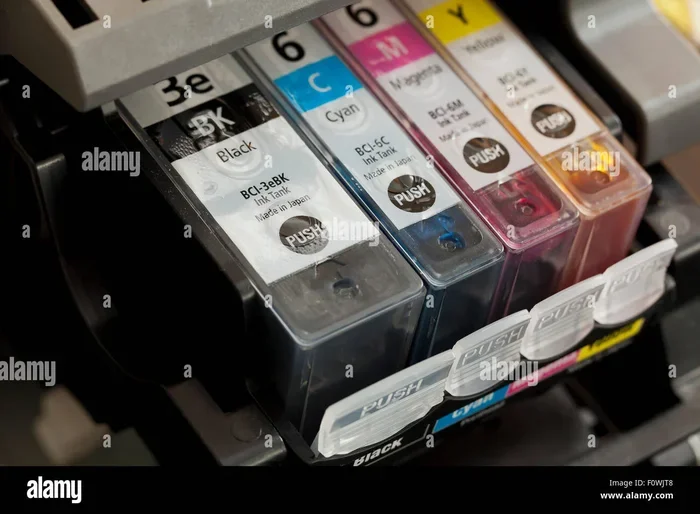
An ink cartridge holds liquid ink in a small reservoir. It also contains a chip that communicates with your printer. This chip tells the printer what type of ink is inside, how much is left, and whether the cartridge is genuine. Modern cartridges are surprisingly sophisticated. They are not just simple containers of colored liquid.
The ink itself is a carefully balanced mixture of dyes or pigments, solvents, and additives. These ingredients control viscosity, drying time, and color accuracy. Changing the formulation even slightly can cause big problems. That is why ink compatibility matters so much.
Can Any Ink Go Into Any Printer?
Here is the truth. You cannot use just any ink in any printer. Each printer brand designs its machines to work with specific ink formulations. HP inks are different from Canon inks, which are different from Epson inks. Even within the same brand, different models may require different cartridges.
Why Ink Is Not Universal
Several factors make printer ink brand-specific. First, the physical shape of the cartridge differs between manufacturers. An HP cartridge will not fit into a Canon printer. Second, the ink chemistry varies. Each brand formulates its ink to work with its specific printhead technology. Third, the chip inside the cartridge must match the printer’s software.
Think of it like fuel for a car. You cannot put diesel into a gasoline engine. The machine simply will not accept it. Or if it does, it will not run properly. Printer ink works the same way.
Cartridge Numbers and Printer Models
Every printer model has a specific cartridge number. For example, the HP DeskJet 2700 uses HP 305 cartridges. The Canon PIXMA TR4520 uses Canon PGI-280 and CLI-281 cartridges. These numbers are your best friend when shopping for ink. Always check your printer manual or the manufacturer’s website to find the correct cartridge number for your printer model.
Using the wrong cartridge number can cause all sorts of issues. The printer might refuse to print. It might display an error message. Or worse, it might accept the cartridge but produce terrible prints.
Types of Printer Ink
When shopping for ink, you will encounter several different options. Understanding these types helps you make smart choices. Not all ink is created equal, and the type you choose affects both print quality and printer health.
OEM Ink
OEM stands for Original Equipment Manufacturer. This means the ink is made by the same company that built your printer. HP makes HP ink. Canon makes Canon ink. Epson makes Epson ink. OEM ink is the safest choice. It guarantees compatibility, delivers the best print quality, and does not void your printer warranty.
The downside is cost. OEM ink cartridges are often expensive. A single cartridge can cost as much as the printer itself. This is why many people look for alternatives.
Compatible Ink
Compatible ink is third-party ink made by companies other than the printer manufacturer. These cartridges are designed to fit specific printer models. They are much cheaper than OEM ink. A compatible cartridge might cost 50 to 70 percent less than the genuine version.
However, compatible ink comes with risks. The ink formulation may not perfectly match the original. This can lead to slightly lower print quality or compatibility issues over time. Some compatible inks work great. Others cause problems. It is a game of chance, so choose your supplier carefully.
Remanufactured Ink
Remanufactured ink cartridges are used OEM cartridges that have been cleaned, refilled, and tested. They are an eco-friendly option. They reduce plastic waste and save you money. The quality of remanufactured ink varies widely. Some remanufactured cartridges perform almost as well as new OEM cartridges. Others produce disappointing results.
Refilled Ink
Refilling means buying a bottle of ink and filling your empty cartridge yourself. This is the cheapest option per page. But it requires patience and a steady hand. Messy refills can damage the cartridge or the printer. Refilled cartridges also tend to have a shorter lifespan than new ones.
What Happens When You Use the Wrong Ink?
Using the wrong ink in your printer can cause a range of problems. Some issues show up immediately. Others develop over time. Either way, the results are rarely good.
Print Quality Problems
The most common sign of wrong ink is poor print quality. You might notice faded colors, streaks, or smudging. Text might look blurry or uneven. Photos might come out with the wrong shades. These problems happen because the ink does not bond properly with the paper or the printhead cannot dispense it correctly.
Clogged Printheads
Ink formulation affects viscosity. If the ink is too thick or too thin for your printer, it can clog the tiny nozzles in the printhead. A clogged printhead leads to missing lines, blank spots, or completely failed prints. Fixing a clogged printhead often requires running cleaning cycles. In severe cases, the printhead may need to be replaced entirely.
Printer Damage
In extreme cases, the wrong ink can cause permanent damage to your printer. Harsh chemicals in low-quality ink can corrode internal components. Ink leaks can stain and damage mechanical parts. The cost of repairs often far exceeds the savings from using cheaper ink.
Warranty Issues
Using unauthorized ink can void your printer warranty. If your printer breaks down and the manufacturer finds you used third-party ink, they may refuse to cover repairs. This is a serious risk. Always check your warranty terms before switching ink brands.
Chip Recognition Failures
Modern cartridges have smart chips. These chips communicate with the printer to confirm the cartridge is genuine and compatible. When you use a cartridge with an incompatible chip, the printer may refuse to recognize it. You might see error messages or warning lights on your display. Some printers will simply stop working until you insert a recognized cartridge.
How to Choose the Right Ink for Your Printer
Choosing the right ink does not have to be confusing. Follow these simple steps to make sure you always get the correct ink for your printer.
Step 1: Check Your Printer Model
Find your printer model number. It is usually printed on the front or back of the device. You can also check the display screen or your computer’s printer settings. Once you know your model number, you can look up the correct cartridge requirements.
Step 2: Find the Correct Cartridge Number
Every printer model uses specific cartridge numbers. Write these down or take a photo of them. When shopping for ink, always match the cartridge number exactly. Even similar cartridge numbers from the same brand may not be interchangeable.
Step 3: Decide Between OEM and Third-Party
Consider your budget and printing needs. If print quality is your top priority, stick with OEM ink. If you print a lot and want to save money, high-quality compatible ink can be a good option. Just make sure you buy from a reputable supplier.
Step 4: Check the Expiration Date
Ink has a shelf life. Expired ink may not flow properly or produce good prints. Always check the expiration date before purchasing. Store your ink cartridges in a cool, dry place away from direct sunlight.
Quick Tips for Ink Shopping
- Always buy from authorized retailers or trusted sellers.
- Keep your old cartridge packaging until you have tested the new ink.
- Do not mix ink brands inside the same printer.
- Run a test print after installing a new cartridge.
- Store unused cartridges upright to prevent leaks.
Common Mistakes People Make With Printer Ink
Even careful users make mistakes with printer ink. Avoid these common errors to keep your printer running smoothly.
Assuming All Black Ink Is the Same
Not all black ink is identical. Some printers use a single black cartridge. Others use a photo black cartridge and a matte black cartridge. Using the wrong black ink type can result in dull or incorrect prints. Always check which type your printer needs.
Ignoring Low-Ink Warnings
When your printer warns you that ink is low, take it seriously. Running a printer on empty can cause air bubbles to enter the printhead. This leads to clogged nozzles and poor print quality. Replace cartridges before they run completely dry.
Leaving Cartridges Out Too Long
If you remove a cartridge from the printer, do not leave it exposed to air. The ink inside can dry out and clog the nozzle. Store removed cartridges in a sealed bag with a damp paper towel to keep them moist.
Buying the Cheapest Option
Ultra-cheap ink is a red flag. Extremely low prices often mean low quality. These cartridges may use inferior ink that damages your printer over time. You get what you pay for in most cases.
Forgetting to Reset the Chip
After refilling or replacing a cartridge, some printers need a chip reset. If you do not reset the chip, the printer may still show low ink levels. This can prevent printing even when the cartridge is full.
Expert Insights on Printer Ink Compatibility
Printer experts agree on a few key points about ink compatibility. First, always use the ink recommended by your printer manufacturer. This is the safest path. Second, if you choose third-party ink, invest in quality brands with good reviews. Not all compatible ink is bad. Some third-party manufacturers produce excellent products that rival OEM performance.
Experts also recommend regular printer maintenance. Run cleaning cycles at least once a month, even if you do not print often. This keeps the printhead clear and prevents clogs. Store your printer in a dust-free environment to protect the internal components.
Another expert tip is to keep a spare cartridge on hand. Running out of ink mid-project is frustrating. Having a backup cartridge saves time and prevents printing delays.
Frequently Asked Questions
Can I use HP ink in a Canon printer?
No. HP ink is formulated specifically for HP printers. Canon printers require Canon ink cartridges. Using HP ink in a Canon printer will not work. The cartridge shape, ink chemistry, and chip technology are all different. Always use ink designed for your specific printer brand and model.
Will using third-party ink void my printer warranty?
It can. Many printer manufacturers state that using unauthorized ink may void your warranty. If your printer breaks down and the manufacturer determines third-party ink caused the problem, they may refuse to cover repairs. Check your warranty terms carefully before switching ink brands.
How long does printer ink last?
Unopened ink cartridges typically last two to three years from the manufacture date. Once opened, they should be used within a few weeks to a few months. Installed cartridges inside a printer can dry out if the printer is not used regularly. Try to print at least once a week to keep the ink flowing smoothly.
Can I refill my ink cartridge myself?
Yes, you can refill most ink cartridges using a refill kit. However, it requires patience and care. Messy refills can damage the cartridge or leak inside the printer. Refilled cartridges also may not last as long as new ones. If you choose to refill, follow instructions carefully and work on a protected surface.
Why does my printer say the ink is incompatible?
This error usually means the cartridge chip does not match the printer’s software. It can also happen if you are using a cartridge from a different printer model. Remove the cartridge and double-check the cartridge number against your printer’s requirements. Try reinserting the cartridge firmly to see if the error clears.
Is compatible ink as good as OEM ink?
It depends on the brand and supplier. Some compatible ink performs nearly identically to OEM ink. Other compatible ink produces lower-quality prints or causes compatibility issues. Read reviews and buy from reputable sellers. High-quality compatible ink can save you significant money without sacrificing much print quality.
Conclusion
The answer to the question “can any ink go into a printer” is a clear no. Ink is not universal. Each printer brand and model requires specific ink formulations designed to work with its unique printhead technology and software. Using the wrong ink risks print quality, printer damage, and warranty voidance.
That said, you do have options beyond expensive OEM ink. Compatible and remanufactured cartridges can save you money while still delivering solid results. The key is to choose wisely and buy from trusted sources. Always match your cartridge number to your printer model. Check expiration dates. And never ignore warning signs like faded prints or error messages.
Taking care of your printer ink is one of the simplest ways to extend the life of your device. A little knowledge goes a long way. Now that you understand how ink compatibility works, you can make informed decisions and keep your printer running at its best. Your prints will look sharper, your printer will last longer, and you will avoid costly mistakes along the way.