Are Usb Ports Universal The Complete Guide For Everyone
Not all USB ports are the same. Understanding the different USB port types and connector shapes saves you time, money, and frustration. This guide covers USB-A, USB-C, USB-B, and everything in between so you always know what works with what.
Have you ever grabbed a cable and plugged it in, only to find it does not fit? You are not alone. The question are USB ports universal comes up every day from people who just want their gadgets to work together. The short answer is no, but the full story is much more helpful.
USB stands for Universal Serial Bus. The name itself promises one-size-fits-all simplicity. But over the years, USB technology has branched out into many shapes, sizes, and speeds. This guide walks you through every type of port you will encounter. You will learn what each one does, where you will find it, and how to pick the right cable for the job.
Key Takeaways
- USB ports are not fully universal: Different shapes and standards exist for different purposes.
- USB-C is the most versatile option: It handles data, power, and video through a single cable.
- USB-A is still everywhere: You will find it on older computers, chargers, and peripherals.
- USB-B and Mini-USB are mostly legacy: You rarely see them on new devices.
- Adapters solve most compatibility problems: A simple adapter can bridge almost any gap.
- USB 2.0 and USB 3.0 matter for speed: The version affects how fast your data transfers.
- Thunderbolt uses the same shape as USB-C: But it is much faster and more powerful.
📑 Table of Contents
- What Does Universal Serial Bus Actually Mean?
- The Main Types of USB Ports
- USB Standards and Speeds Explained
- Is USB Power Delivery Universal?
- Common Compatibility Issues and How to Fix Them
- Quick Tips for Buying the Right USB Cables
- Comparison Table: USB Port Types at a Glance
- Are USB Ports Universal? The Final Answer
What Does Universal Serial Bus Actually Mean?
The term universal was chosen for a reason. Back in the 1990s, computers had a mess of different ports. Printers used one connector. Mice used another. Keyboards used yet another. USB was created to simplify all of that. The idea was one cable to rule them all.
But here is the thing. Universal does not mean identical. It means the standard is shared across devices and brands. So every USB port follows the same basic communication rules. But the physical connectors can look very different. Think of it like electrical outlets. They follow a standard, but you still need the right plug for the right country.
Today, USB is the most common connection type in the world. It powers phones, laptops, cameras, game controllers, and hundreds of other peripheral devices. Understanding how it works gives you a real advantage in everyday tech life.
The Main Types of USB Ports
Not all USB connections look alike. Each type has a specific shape and purpose. Knowing them helps you avoid buying the wrong cable.
USB Type-A
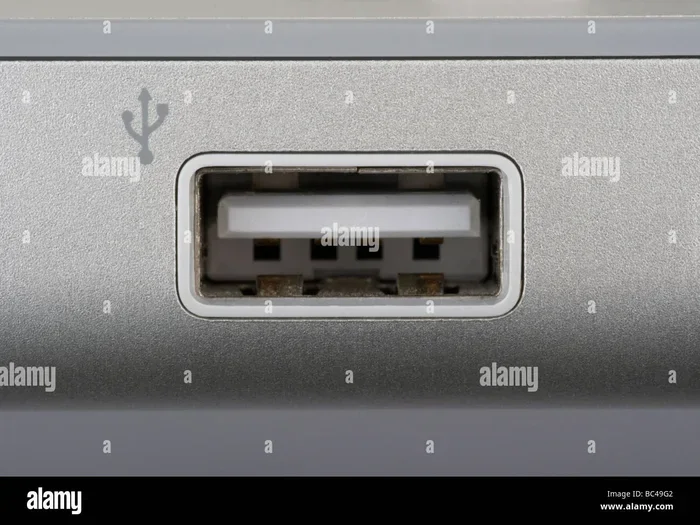
USB-A is the classic rectangular port. You have probably seen it hundreds of times on computers, wall chargers, and TVs. It is flat and wide with a slightly beveled edge. This design ensures you can only plug it in one way.
USB-A is still the most common port on the planet. Most charging cables for phones and tablets use a USB-A end on one side. It is reliable, cheap, and widely available. The downside is that it only carries power and data. It does not handle video signals.
USB-A comes in different versions too. USB 2.0 is the older, slower standard. USB 3.0 and USB 3.1 are much faster. You can tell the difference by color. USB 3.0 ports are usually blue inside. USB 2.0 ports are black or white.
USB Type-C
USB-C is the modern wonder of the USB world. It is small, oval-shaped, and reversible. That means you can flip it and plug it in either way. No more flipping the cable three times to get it right.
This connector does a lot of heavy lifting. A single USB-C cable can carry data, power, and video. Many modern laptops, phones, and tablets use USB-C as their main port. It also supports USB power delivery, which can charge devices much faster than older standards.
But not all USB-C ports are the same. Some only support USB 2.0 speeds. Others support USB 3.1 or even Thunderbolt 3 and 4. This is a key point people often miss. The shape does not tell you the speed. You need to check the specs.
USB Type-B
USB-B is a square-shaped port. You mostly see it on larger devices like printers and scanners. It is not very common on consumer gadgets anymore. You might also find it on some external hard drives.
There is also a smaller version called USB Mini-B. You will find this on older cameras and MP3 players. Both Mini-B and regular USB-B are becoming rare. Most manufacturers have moved on to USB-C for these devices.
USB Micro-B
USB Micro-B was the go-to port for Android phones for many years. It is a small, trapezoid-shaped connector. You probably still have cables with this shape lying around.
The rise of USB-C has made Micro-B mostly obsolete. Newer Android phones use USB-C. But if you have older devices, you will still need Micro-B cables. They are still sold in stores, but finding them is getting harder.
USB Standards and Speeds Explained
The physical shape of a port is only half the story. The USB standard determines how fast data moves and how much power flows. Think of the port as the road and the standard as the speed limit.
USB 2.0
USB 2.0 is the oldest standard still in wide use. It offers a maximum data transfer speed of 480 megabits per second. That sounds fast, but for today’s large files, it feels slow. You will mostly find USB 2.0 on older computers and basic hubs.
USB 2.0 is fine for charging devices or moving small files. But if you need to transfer large videos or backups, you will want a faster standard.
USB 3.0 and USB 3.1
USB 3.0 brought a huge speed boost. It can transfer data at 5 gigabits per second. That is about ten times faster than USB 2.0. USB 3.1 doubled that to 10 gigabits per second.
These speeds matter for things like external SSDs, video editing, and large file transfers. Most modern docking stations and external drives rely on USB 3.0 or higher for smooth performance.
USB4
USB4 is the newest standard. It uses the USB-C connector and can reach speeds of 40 or 80 gigabits per second. It also supports multiple data protocols, including Thunderbolt 3 and DisplayPort. USB4 is still relatively new, but it is quickly becoming the gold standard.
Is USB Power Delivery Universal?
USB power delivery, or USB PD, is a game changer. It allows devices to negotiate how much power they need through the USB connection. A phone might draw 7.5 watts. A laptop might draw 100 watts. Both can use the same USB-C cable.
This is a big step toward true universality. You can charge your phone, tablet, and laptop with the same charger and cable. No more carrying three different power bricks. But there is a catch. Your device and charger both need to support USB PD.
Not all USB-C chargers are created equal. A cheap charger might only push 5 watts. A good one can deliver 65 watts or more. Always check the wattage before buying. A fast charger with USB PD support saves time and protects your battery.
Common Compatibility Issues and How to Fix Them
Even with the best intentions, things do not always plug in. Here are the most common problems and simple fixes.
The Cable Does Not Fit
USB-A and USB-C look nothing alike. You cannot force one into the other. If your device has a USB-C port and your cable has a USB-A end, you need a different cable or an adapter.
It Plugs In But Does Not Work
This happens when the USB standard does not match. For example, a USB 2.0 cable in a USB 3.0 port will still work. But it will only transfer data at USB 2.0 speeds. Always match your cable to the highest standard your device supports.
Your Device Charges Slowly
Slow charging often means the cable or charger lacks proper power delivery. A basic USB 2.0 cable might only carry 2.5 watts. A USB-C cable with USB PD can carry up to 240 watts. If your device charges slowly, try a different cable first.
Quick Tips for Buying the Right USB Cables
Shopping for USB cables can be confusing. These tips help you make smart choices.
- Check the connector type. Make sure both ends match your devices.
- Look for USB 3.0 or higher. You get faster speeds and better performance.
- Choose USB-C with USB PD support. This gives you the fastest charging.
- Buy from reputable brands. Cheap cables can damage your devices.
- Keep a few adapters on hand. They solve most compatibility problems in seconds.
- Check the cable length. Longer cables can mean slower charging in some cases.
Comparison Table: USB Port Types at a Glance
| Port Type | Shape | Common Uses | Reversible? |
|---|---|---|---|
| USB-A | Rectangular | Computers, chargers, TVs | No |
| USB-C | Oval | Laptops, phones, tablets | Yes |
| USB-B | Square | Printers, scanners | No |
| USB Micro-B | Trapezoid | Older phones, cameras | No |
| USB Mini-B | Small rectangle | Older cameras, MP3 players | No |
Are USB Ports Universal? The Final Answer
So, are USB ports universal? The answer is both yes and no. Yes, the USB standard is universal. Every USB device speaks the same basic language. No, the physical ports and cables are not all the same shape. You still need the right connector for the right device.
The good news is that USB-C is bringing us closer to true universality. One cable that works for charging, data, and video on almost any modern device. Until every device has USB-C, you will still need a few adapters and the right cables for older gear.
Understanding your ports and standards makes a huge difference. You stop guessing, save money on the right cables, and avoid frustration. The next time someone asks you are USB ports universal, you will know the full answer.
Take a few minutes to check your devices today. Know which ports you have and which cables you need. A little knowledge goes a long way in keeping your tech life simple and connected.
Frequently Asked Questions
Can I plug a USB-C cable into a USB-A port?
No, you cannot plug them directly into each other. The shapes are completely different. However, you can buy a USB-A to USB-C cable or an adapter. This lets you connect a USB-C device to a USB-A port easily.
Is USB-C the same as Thunderbolt?
Not exactly. Thunderbolt uses the same USB-C shape but is a different technology. Thunderbolt 3 and 4 are much faster than standard USB-C. Some USB-C ports support Thunderbolt, but not all. Check your device specs to be sure.
Do all USB-C cables support fast charging?
No, they do not. Only cables that support USB Power Delivery offer fast charging. A basic USB-C cable might only charge at slow speeds. Look for cables that are rated for USB PD if you want the fastest charge times.
Why do some USB ports have a blue interior?
A blue interior usually means the port is USB 3.0 or higher. This standard offers much faster data transfer than the older USB 2.0. USB 2.0 ports are typically black or white inside.
Can I use an adapter to connect any USB device to any port?
In most cases, yes. Adapters can bridge the gap between different USB types. For example, a USB-C to USB-A adapter lets you use older cables with new devices. Just make sure the adapter supports the speed and power level you need.
Will USB 2.0 cables become obsolete?
USB 2.0 is fading out but still very common. Many chargers, hubs, and budget devices still use it. It will likely stick around for years because it works fine for basic charging and slow data transfers. But for anything demanding, USB 3.0 or higher is the better choice.
=== CONCLUSION ===
The question are USB ports universal has a nuanced answer. USB as a standard is truly universal. Every device that uses USB follows the same communication rules. But the physical ports and cables come in different shapes and speeds. USB-A, USB-C, USB-B, and Micro-B each serve specific roles in the tech ecosystem.
Your best move is to embrace USB-C as your go-to connection. It is reversible, versatile, and future-proof. Keep a few adapters handy for older devices. And always check the USB standard on your cables and ports to get the best performance.
With this knowledge, you can connect anything to anything with confidence. You will never be stuck with the wrong cable again. Share this guide with a friend who is tired of tangled cords and mismatched ports. A little understanding of USB ports goes a long way in making your digital life smoother and simpler.