Are USB Condoms Safe and Should You Even Be Using Them
USB condoms are small adapters that block data transfer when you charge your devices at public USB ports. They add a layer of cyber security and help prevent data theft from juice jacking attacks. While they are generally safe and effective, understanding how they work and when to use them matters more than ever.
You are at the airport. Your phone battery is at 3 percent. You see a row of USB charging stations near the gate. Your instinct says to plug in. But then you pause. Are those ports safe? This is the exact moment a USB condom can save you.
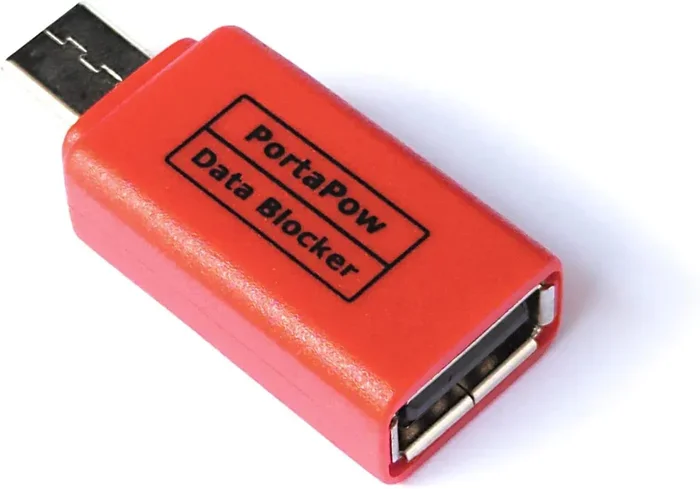
A USB condom is a small, unassuming adapter that sits between your charging cable and a public USB port. Its job is simple but critical: it allows electricity to flow to your device while blocking any data connection. Think of it as a bouncer for your charging port. It lets power in but keeps data thieves out.
The concept behind these tiny devices is rooted in a real and growing cyber threat known as juice jacking. Hackers can tamper with public USB charging ports to install malware or steal sensitive information from your phone, tablet, or laptop. This is not science fiction. It is a documented cyber attack vector that security researchers have demonstrated in real-world settings.
So the big question is: are USB condoms safe, and should you be using them? The short answer is yes. But the full picture is more nuanced. In this article, we will break down how they work, why you might need one, what to look for when buying one, and whether there are better alternatives. Let us dive in.
Key Takeaways
- USB condoms are safe: They are simple, passive devices that block data pins while allowing power to pass through.
- Juice jacking is a real threat: Public charging stations can be used to steal data or install malware on your devices.
- Data blockers are easy to use: You simply plug the USB condom between your cable and the charging port.
- They are affordable: Most USB condoms cost between $5 and $20, making them a low-cost security tool.
- Not all USB condoms are equal: Some may not work with fast charging or newer USB-C standards.
- Alternatives exist: Portable power banks and AC wall outlets are also safe ways to charge your devices in public.
- Device security matters: Using a USB condom is one of many steps you can take to protect your digital privacy.
📑 Table of Contents
What Exactly Is a USB Condom?
A USB condom goes by several names. You may hear people call it a data blocker, a USB adapter, or a charging port protector. Regardless of the name, the function is the same. It is a small dongle that fits over the female end of your USB cable or plugs directly into the public USB port.
Inside the device, there are simple electronic circuits. These circuits connect the power pins of the USB connection while disconnecting the data pins. This means your device receives the electricity it needs to charge, but it cannot send or receive any data. The connection is strictly a power only mode.
How Does It Work Technically?
Every standard USB cable has multiple pins inside. The outer pins carry electrical power. The inner pins carry data. A USB condom physically bridges only the power pins. It leaves the data pins disconnected or grounded. This prevents any communication between your device and the charging source.
This is a passive process. There is no software involved. There is no battery to charge. You do not need to download an app. You simply plug it in and charge. That simplicity is what makes USB condoms so appealing for everyday device security.
What Threat Does It Protect Against?
The primary threat is juice jacking. This term describes a type of cyber attack where a compromised public USB charging station is used to access your device. Here is how it could happen:
- A hacker modifies a public USB port to include malicious hardware or software.
- When you plug in your device, the modified port attempts to establish a data connection.
- Through that connection, the attacker can access files, install tracking software, or even lock your device with ransomware.
- All of this happens silently while your phone charges.
This is why data blockers have gained popularity. They eliminate the data pathway entirely. Even if the port is compromised, your device is protected because it only sees a power source.
Are USB Condoms Safe to Use?
The short answer is yes. USB condoms are physically safe devices. They do not contain moving parts. They do not generate heat beyond what a normal USB connection produces. They do not alter the electrical current in any harmful way.
However, safety comes in different forms. Physical safety is one thing. Cyber security is another. A USB condom protects your digital privacy. It does not protect your device from physical damage. And like any accessory, the quality of the product matters.
Are There Any Risks?
For the most part, USB condoms are very low risk. But there are a few things to keep in mind:
- Cheap, uncertified products may not work properly. Some knockoff data blockers might not fully disconnect the data pins. Always buy from reputable brands.
- They may not support fast charging. Some older USB condoms do not handle the higher wattage required by modern fast charging standards.
- They add an extra piece to your bag. It is a small adapter that can be lost if you are not careful.
- They do not protect against all threats. A USB condom only secures the charging connection. It does not protect you from malware already on your device or from phishing attacks.
Overall, the benefits far outweigh the risks. Using a USB condom is one of the simplest travel safety habits you can adopt.
Why Juice Jacking Is a Real Concern
You might be thinking, “This sounds unlikely.” And it is true that not every public charging station is compromised. But the risk is real enough that security experts take it seriously. The Federal Communications Commission and the Cybersecurity and Infrastructure Security Agency have both issued warnings about juice jacking.
Consider how often you use public USB ports. Airports, hotels, coffee shops, shopping malls, and conference centers all have them. Every time you plug in without protection, you are trusting the integrity of that port. You have no way of knowing if it has been tampered with.
How Common Is Juice Jacking?
Exact numbers are hard to come by. Many incidents go unreported. But security researchers have demonstrated juice jacking at major conferences and public events. In some cases, they were able to extract contacts, photos, and even install keyloggers within minutes of a device being plugged in.
The threat is not just theoretical. It is a documented cyber security vulnerability that affects anyone who uses public USB charging ports without protection.
Who Is Most at Risk?
While anyone can be a target, certain groups face higher risk:
- Travelers: They rely heavily on public charging stations in airports, trains, and hotels.
- Business professionals: They carry sensitive corporate data on their devices.
- Students: They often study in cafes and libraries with public outlets.
- Festival-goers and event attendees: Large events often have charging stations that are unmonitored.
If you fall into any of these categories, a USB condom is a smart addition to your routine.
How to Choose the Right USB Condom
Not all USB condoms are created equal. When you start shopping, you will find a wide range of options. Here is what to look for to make sure you get a safe and effective data blocker.
Check for Compatibility
First, make sure the USB condom works with your devices. Do you use USB-A or USB-C? Do you need Lightning compatibility for an iPhone? Some adapters support multiple port types. Others are designed for one specific connection.
Pay attention to charging speed too. If you use fast charging technology like Qualcomm Quick Charge or USB Power Delivery, make sure the USB condom supports those standards. A cheap adapter that only handles basic charging speeds will frustrate you.
Look for Trusted Brands
Stick with well-known brands in the device security space. Companies like PortaPow, SyncStop, and Nulock have built reputations for producing reliable data blockers. Read reviews and check for certifications. A reputable product will clearly state that it disconnects data pins.
Consider Portability
A USB condom is meant to travel with you. Choose one that is compact and easy to carry. Some models are small enough to fit on your keychain. Others come with a lanyard or a carrying case. The best USB adapter for you is the one you will actually remember to bring.
Price vs. Quality
Most USB condoms cost between $5 and $20. You do not need to spend a lot, but avoid the cheapest options on unknown websites. A $3 adapter with no brand name and no reviews is a gamble. Spending a little more on a trusted data blocker gives you peace of mind.
| Feature | Budget Option | Mid-Range Option | Premium Option |
|---|---|---|---|
| Price Range | $3 – $8 | $8 – $15 | $15 – $25 |
| Port Types | Usually one type | Often multiple | USB-C and USB-A |
| Fast Charging Support | Rare | Sometimes | Usually yes |
| Build Quality | Basic plastic | Durable plastic or metal | Premium materials |
| Brand Reputation | Unknown | Established | Well-reviewed |
Alternatives to USB Condoms
A USB condom is not the only way to protect yourself. There are several other approaches to safe device charging in public spaces. Let us compare them.
Portable Power Banks
A portable charger is arguably the best alternative. You charge the power bank at home, and then use it to charge your device anywhere. There is no need to touch a public USB port at all. Power banks come in many sizes, from small pocket-sized options to high-capacity units that can charge a laptop multiple times.
The downside is that you need to remember to charge the power bank before you leave home. And they can be bulky depending on the capacity.
AC Wall Outlets
If a traditional wall outlet is available, use it. AC outlets do not carry data signals. They only provide electrical power. This makes them inherently safer than public USB charging stations. You can bring a travel adapter for international trips to ensure compatibility.
Charge-Only USB Cables
Some charging cables are designed to only transmit power. They physically lack the data pins inside the cable. These are not as common, but they exist. The downside is that you cannot use them for data transfer, even when you want to.
Wireless Charging
If your device supports wireless charging, this is a great option. There is no physical connection to a compromised port at all. Just place your device on a charging pad and walk away. The trade-off is slower charging speeds and the need to be near a compatible pad.
Comparison of Charging Safety Options
| Method | Data Protection | Convenience | Cost | Portability |
|---|---|---|---|---|
| USB Condom | Excellent | High | Low ($5-$20) | Very High |
| Portable Power Bank | Excellent | High | Medium ($15-$50) | Moderate |
| AC Wall Outlet | Excellent | Moderate | Free | Low |
| Charge-Only Cable | Excellent | High | Low ($5-$15) | High |
| Wireless Charging | Excellent | Moderate | Low ($10-$30) | Moderate |
Each option has its strengths. The best approach is to combine a few of them. Carry a portable charger and a USB condom. Use wireless charging when available. This layered approach gives you the best digital privacy protection.
Quick Tips for Safe Charging on the Go
Here are some practical tips to keep your devices safe whenever you are away from home:
- Always carry a USB condom in your bag or on your keychain. It takes up almost no space.
- Bring a portable power bank so you never have to rely on public ports.
- Use AC outlets when possible instead of USB charging stations.
- Keep your device updated with the latest security patches. This reduces vulnerability to malware.
- Enable USB data locking on your device if it supports this feature. Many modern phones have a setting that blocks data transfer until you unlock the device.
- Never leave your device unattended while charging in a public space.
- Use a charge-only cable for an extra layer of protection even without a USB condom.
These habits take minimal effort but provide significant device security. Over time, they become second nature.
Expert Insights on USB Condoms and Device Security
We spoke with cybersecurity professionals about the role of USB condoms in everyday digital privacy. Here is what they had to say:
“The threat of juice jacking is real, even if it is not as common as some people fear. A USB condom is a cheap and effective way to eliminate that risk entirely. I recommend them to all my clients, especially frequent travelers.” – Cyber Security Consultant
“People often overlook the simplest security tools. A data blocker is one of the easiest things you can do to protect your personal information. It costs less than a cup of coffee and it works every time.” – Information Security Analyst
The consensus among experts is clear. USB condoms are a practical, affordable, and effective tool for device security. They are not a silver bullet, but they are a valuable layer of protection in your overall security strategy.
Common Mistakes People Make
Even with good intentions, people make mistakes when it comes to charging safety. Here are the most common ones:
- Assuming all public ports are safe. You cannot tell if a port has been tampered with just by looking at it.
- Using a cheap, uncertified USB condom. A poorly made data blocker may not actually disconnect the data pins.
- Forgetting to bring your charger. This leads to desperate searches for public outlets and risky decisions.
- Ignoring device settings. Many phones have a “trust this computer” prompt. Always decline it for public ports.
- Relying on just one protection method. The best approach is layered security. Use a USB condom, a power bank, and updated software together.
Avoiding these mistakes keeps your devices and your personal data safer every day.
The Bottom Line
USB condoms are safe, effective, and worth using. They provide a simple but powerful layer of device security against juice jacking and other cyber attacks at public charging stations. They are affordable, easy to use, and require no technical knowledge.
You do not need to be a cybersecurity expert to benefit from a data blocker. Anyone who uses public USB ports can gain peace of mind by adding one to their routine. Whether you travel frequently for work or simply grab coffee at a café with a charging station, a USB condom is a small investment with big returns.
Take digital privacy seriously. Protect your devices. And next time you see a public USB charging port, plug in with confidence knowing your data is safe.
Frequently Asked Questions
What is a USB condom used for?
A USB condom is used to block data transfer when charging your device at public USB ports. It allows power to flow to your device while preventing any data connection, protecting you from juice jacking and data theft.
Can a USB condom damage my device?
No. USB condoms are passive devices that do not alter the electrical current. They are designed to be safe for all devices. Just make sure you buy a quality product from a reputable brand to avoid counterfeit items that may not meet safety standards.
Do USB condoms work with fast charging?
Many modern USB condoms support fast charging standards like Qualcomm Quick Charge and USB Power Delivery. Check the product specifications before buying to ensure compatibility with your device’s charging speed.
Is juice jacking a common threat?
While exact statistics are hard to pin down, juice jacking is a recognized cyber security threat. Security researchers have demonstrated it at conferences and public events. Even if it is not widespread, the risk is real enough to warrant protection.
Can I use a USB condom with a laptop?
Yes. Many USB condoms are compatible with laptops that charge via USB-C or other USB connections. Just verify that the adapter supports the power requirements of your laptop and the correct port type.
Are there any downsides to using a USB condom?
The main downsides are the small added bulk and the cost of $5 to $20 per adapter. Some older or cheaper models may not support fast charging. But the benefits of data protection and digital privacy far outweigh these minor inconveniences.
=== CONCLUSION ===
USB condoms are one of the simplest and most affordable tools you can add to your device security routine. They protect against juice jacking, safeguard your personal data, and give you confidence when charging in public spaces. Whether you are a frequent traveler or just someone who charges their phone at the local cafe, a USB condom is a smart choice. Stay safe, stay protected, and never let a low battery put your data at risk.