Everything You Should Know About Cable Splitter Types
Cable splitter types come in many shapes and sizes, and choosing the right one can make or break your signal quality. Whether you need a coaxial cable splitter, an HDMI splitter, or a broadband splitter, this guide covers it all. You will learn how each type works, what to look for, and how to avoid common setup mistakes. We break down split ratios, signal loss, and frequency range so you can make a confident choice. By the end, you will know exactly which cable splitter fits your needs.
Cable splitter types might not sound exciting, but they play a huge role in how your home entertainment and internet setups work. If you have ever wondered why your TV picture looks fuzzy or why your internet drops randomly, the answer might be a cheap or wrong cable splitter. These small devices take one signal and split it into two or more outputs. They look simple on the outside, but the technology inside varies quite a bit.
In this guide, we will walk through every major cable splitter type you will come across. We explain how each one works, where it fits best, and what to watch out for. Whether you are setting up a home theater, running cable TV to multiple rooms, or building a small office network, this guide has you covered. Let us dive in and make sure you pick the right one every time.
Key Takeaways
- Multiple splitter types exist: coaxial, HDMI, fiber optic, RCA, and Ethernet splitters all serve different purposes.
- Split ratio matters: a 2-way splitter divides signal into two outputs, while 4-way and 8-way splitters reduce strength further.
- Signal loss is real: every split reduces signal strength, so choose splitters with low dB loss for best performance.
- Passive vs active splitters: passive splitters need no power, while active splitters boost signal for longer runs.
- Match your splitter to your device: using the wrong type leads to poor picture quality, dropped connections, or no signal at all.
- Installation tips help: proper grounding, short cables, and quality connectors reduce interference and improve reliability.
📑 Table of Contents
- What Are Cable Splitter Types and Why Do They Matter?
- Common Cable Splitter Types You Will Encounter
- How to Choose the Right Cable Splitter for Your Setup
- Cable Splitter Specifications You Should Understand
- Installation Tips and Common Mistakes
- Cable Splitter Maintenance and Troubleshooting
- Frequently Asked Questions
- Final Thoughts
What Are Cable Splitter Types and Why Do They Matter?
A cable splitter is a device that divides a single signal into multiple paths. Think of it like a fork in a road. The signal travels down one path, reaches the splitter, and then splits into two or more directions. Each output carries a copy of the original signal, but with some loss along the way.
Understanding cable splitter types matters because not all splitters are created equal. A splitter built for coaxial cable TV signals works very differently from one designed for HDMI audio and video. Using the wrong type can cause signal degradation, poor picture quality, or even damage to your equipment. That is why knowing your options is the first step to a clean, reliable setup.
Here are the main reasons why choosing the right splitter matters:
- Signal quality: A good splitter preserves most of the original signal strength.
- Device compatibility: Different devices need different signal types and connectors.
- Frequency range: Some splitters handle only certain frequency bands, while others cover a wide range.
- Number of outputs: Splitters come in 2-way, 3-way, 4-way, and even 8-way configurations.
- Signal amplification: Active splitters boost the signal, while passive ones do not.
How Signal Splitting Works
When a signal enters a splitter, it gets divided among the output ports. A 2-way splitter sends roughly half the signal to each output. A 4-way splitter divides it four ways. This means each output gets a weaker signal than the original. The amount of loss is measured in decibels, or dB. Higher dB loss means weaker output signals. This is why longer cable runs or too many splits can cause problems.
Common Cable Splitter Types You Will Encounter
There are several cable splitter types used in homes and businesses today. Each one handles a specific kind of signal. Let us go through the most common ones and see what they do best.
Coaxial Cable Splitters
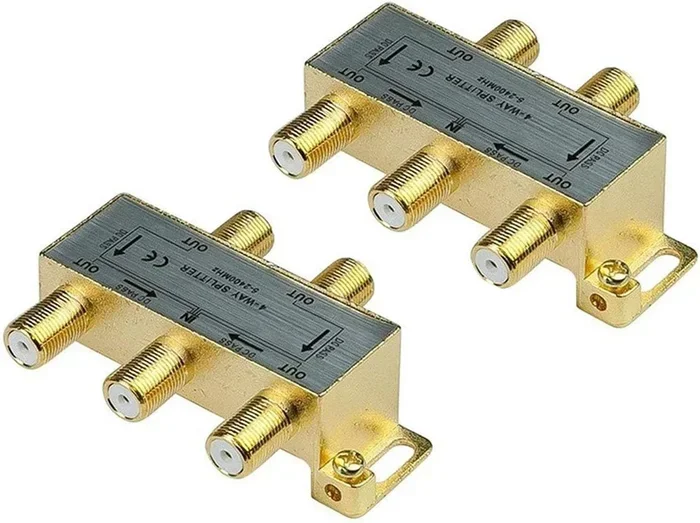
The coaxial cable splitter is the most common type you will find in homes. It is used for cable TV, satellite dishes, and broadband internet connections. These splitters have one input port and two or more output ports. They work with RG6 and RG59 coaxial cables, which are the standard cables for TV and internet connections.
Coaxial splitters come in different grades. A cheap plastic splitter might add 3.5 dB of loss per output. A high-quality metal splitter might only add 1 dB or less. For cable TV installation in multiple rooms, a metal broadband splitter is always the better choice. It handles a wide frequency range, usually from 5 MHz to 2150 MHz, which covers most TV channels and internet frequencies.
Quick Tip: Always check the frequency rating of a coaxial splitter before buying. If your cable provider uses higher frequencies for internet, a low-rated splitter will cause slow speeds or dropped connections.
HDMI Splitters
An HDMI splitter takes one HDMI input and sends the same audio and video signal to multiple TVs or displays. These are popular for home theater setups where you want the same content on two or more screens. They also work well in retail stores, restaurants, and conference rooms.
HDMI splitters come in different versions. Older ones support HDMI 1.4, which handles 1080p resolution. Newer ones support HDMI 2.0 or even HDMI 2.1, which handle 4K and even 8K resolutions. When choosing an HDMI signal distribution device, make sure it matches the resolution your devices use.
Some HDMI splitters also include an audio extractor feature. This lets you send video to a TV while sending audio to a separate sound system. This is handy for setups where the TV and speakers are in different locations.
Fiber Optic Splitters
Fiber optic splitters are used in high-speed internet and telecommunications networks. They split light signals instead of electrical signals. These splitters are tiny, reliable, and offer almost zero signal loss compared to traditional copper splitters. They are commonly found in fiber-to-the-home (FTTH) installations.
Fiber optic splitters come in two main designs: FBT (fused biconical taper) and PLC (planar lightwave circuit). FBT splitters are made by fusing fibers together. PLC splitters use a silicon chip to split light signals. PLC splitters are more precise and work better for larger split counts, like 8-way or 16-way configurations.
These splitters are not something the average homeowner buys for a home setup. They are more common in commercial buildings, data centers, and ISP infrastructure. But it is good to know they exist if you ever deal with fiber internet.
RCA and Composite Splitters
An RCA splitter handles older analog audio and video signals. These are the classic red, white, and yellow cables from the VCR and early DVD era. An RCA splitter lets you connect one source to multiple devices, like splitting a cable box output to two TVs in different rooms.
Composite video splitters carry only video signals, while component splitters carry higher-quality video through three separate cables. These splitter types are less common today but still useful for older equipment or retro gaming setups.
Ethernet and Network Splitters
An Ethernet splitter is a bit different from other splitters. It does not amplify or repeat a signal. Instead, it lets you run one network cable through a wall and split it into two connections at the other end. This is useful when you do not want to pull extra cables.
However, Ethernet splitters have a limitation. They reduce the speed of the network. A 100 Mbps connection will drop to 100 Mbps total shared between two devices. For gigabit networks, a better option is a small network switch instead of a splitter. This is an important distinction to keep in mind.
RF and Power Splitters
An RF splitter handles radio frequency signals. These are used in amateur radio setups, antenna installations, and wireless communication systems. An RF broadband splitter covers a wide range of frequencies, making it versatile for different radio applications.
A power splitter or power divider takes one power source and divides it among multiple devices. These are common in amplifier setups, where one power supply feeds several amplifier channels. They are also used in testing and measurement equipment in labs and workshops.
How to Choose the Right Cable Splitter for Your Setup
Now that you know the main cable splitter types, let us talk about how to pick the right one. The wrong choice can lead to frustration, poor performance, and wasted money. Follow these guidelines to make a smart decision.
Determine Your Signal Source and Destination
Start by identifying what kind of signal you are working with. Is it a cable TV signal? An HDMI video feed? A fiber internet connection? Once you know the source, you can narrow down your options. A coaxial splitter works for cable TV and internet. An HDMl distributor works for audio and video to multiple screens.
Also consider the devices on the receiving end. If you are splitting a signal to two smart TVs, an HDMI splitter is the way to go. If you are distributing cable TV to four rooms, a coaxial splitter with enough output ports is what you need.
Consider the Split Ratio
The split ratio tells you how many outputs a splitter provides. Common ratios include:
- 2-way splitter: One input, two outputs. Best for splitting a cable signal to two TVs.
- 3-way splitter: One input, three outputs. Useful when you need three connections from one source.
- 4-way splitter: One input, four outputs. Common for distributing cable TV to multiple rooms.
- 8-way splitter: One input, eight outputs. Used in larger installations like apartment buildings or offices.
Keep in mind that more outputs mean more signal loss. A 2-way splitter loses about 3.5 dB per output. A 4-way splitter loses about 7 dB per output. An 8-way splitter can lose 11 dB or more. This is why long cable runs with many splits often need a signal amplifier to compensate.
Check the Frequency Range
Every splitter has a frequency range it can handle. For cable TV and internet, look for a splitter rated for at least 5 MHz to 2150 MHz. This covers all standard TV channels and internet frequencies. If you have a newer cable provider that uses higher frequencies, check the splitter specifications carefully.
For HDMI signals, the splitter needs to support the right bandwidth. HDMI 2.0 supports up to 18 Gbps, while HDMI 2.1 supports up to 48 Gbps. A splitter that cannot handle the required bandwidth will not pass a 4K or 8K signal properly.
Passive vs Active Splitters
Passive splitters do not need any external power. They simply divide the signal. These are the most common and affordable option. They work well for short cable runs and setups with nearby devices.
Active splitters include a built-in amplifier or signal booster. They require a power source, usually through a USB cable or wall adapter. Active splitters are ideal for long cable runs or setups where signal loss would be a problem. They are also useful when splitting a signal to many devices.
Quick Tip: If you notice pixelation on your TV or slow internet speeds after installing a splitter, an active splitter with a built-in amplifier might solve the problem.
Cable Splitter Specifications You Should Understand
When shopping for a cable splitter, you will see several technical specifications. These numbers tell you how well the splitter performs. Let us break down the most important ones.
Insertion Loss
Insertion loss measures how much signal strength is lost when the signal passes through the splitter. Lower numbers are better. A good 2-way splitter has an insertion loss of around 3.5 dB. A cheap splitter might have 5 dB or more. Over long cable runs, this difference adds up and can noticeably affect performance.
Return Loss
Return loss measures how much signal is reflected back toward the source instead of passing through to the outputs. High return loss means less signal is reflected, which is better. Look for splitters with a return loss of at least 10 dB for reliable performance.
Impedance Matching
Most home audio and video cables use 75-ohm impedance. Your splitter should match this. A splitter with the wrong impedance will cause signal reflections and quality problems. Always check that your coaxial splitter, HDMI splitter, or other splitter is rated for 75 ohms for standard setups.
Number of Ports
The number of ports determines how many devices you can connect. Count the input and output ports carefully. A splitter with one input and four outputs is a 4-way splitter. Some splitters also include a dedicated through port, which lets you chain additional devices or cables without losing the main signal path.
Installation Tips and Common Mistakes
Even the best cable splitter types will not perform well if installed incorrectly. Here are some practical tips and mistakes to avoid.
Keep Cables Short and Direct
The longer the cable run after a splitter, the weaker the signal becomes. Try to keep cables as short as possible. If you need to run cables over long distances, use a higher-quality cable with better shielding. RG6 coaxial cable is the best choice for most home installations.
Avoid Daisy-Chaining Splitters
One of the biggest mistakes people make is connecting one splitter to another, a process called daisy-chaining. This doubles the signal loss and often leads to a very weak or noisy signal. Instead, use a single splitter with enough output ports for all your devices.
Use Quality Connectors
Cheap connectors and poorly crimped cables cause signal loss and interference. Use quality connectors and make sure they are firmly attached. A loose connection is one of the most common causes of poor signal quality.
Ground Your Setup
For outdoor or rooftop installations, proper grounding protects your equipment from lightning surges and reduces interference. Use a grounding block where the cable enters your home, and connect it to a proper ground rod.
Common Mistakes to Avoid
- Buying the cheapest splitter: Low-cost splitters often have high insertion loss and poor shielding.
- Ignoring frequency ratings: A splitter that does not support your cable provider’s frequency range will cause problems.
- Using the wrong cable type: Mixing RG59 and RG6 cables can cause signal mismatch and quality issues.
- Over-splitting the signal: Too many splits in a row will kill your signal quality.
- Not checking for signal amplification needs: Long runs with multiple outputs often need an amplifier.
Cable Splitter Maintenance and Troubleshooting
Once your cable splitter is installed, a little maintenance goes a long way. Most splitters have no moving parts and can last for years. But problems can still arise.
If you experience signal issues, start by checking all connections. A loose or corroded connector is the most common culprit. Inspect the cables for damage, especially where they bend or connect to the splitter. If you are using an outdoor splitter, check for water damage or rust. Weatherproof covers can help extend the life of an outdoor installation.
For HDMI setups, try reseating the cables or testing with a different HDMI cable. Sometimes the problem is not the splitter but a faulty cable. For coaxial setups, use a signal meter or your cable provider’s diagnostic tools to check signal strength at different points in your setup.
Expert Insight: Most signal problems come down to three things: bad connections, too many splits, or the wrong splitter type. Fix those three areas first before replacing any equipment.
Frequently Asked Questions
What is the difference between a passive and an active cable splitter?
A passive splitter divides the signal without any power or amplification. It simply splits the signal and sends it to each output. An active splitter includes a built-in amplifier that boosts the signal after splitting. Active splitters need a power source and are best for long cable runs or setups with many outputs where signal loss would be a problem.
Can I use a coaxial cable splitter for internet?
Yes, you can use a coaxial splitter for internet as long as it supports the right frequency range. Most modern cable internet providers use frequencies between 5 MHz and 1 GHz or higher. Make sure your splitter is rated for broadband use and has low insertion loss to avoid slowing down your internet speed.
Does a cable splitter reduce internet speed?
A splitter does not directly reduce your internet speed, but it can weaken the signal. A weak signal may cause your modem to drop connection or negotiate a lower speed. To avoid this, use a high-quality splitter with low dB loss, and consider an active splitter with amplification for longer runs.
How many times can I split a cable signal?
You can split a signal multiple times, but each split adds loss. A single 2-way split adds about 3.5 dB of loss. Splitting again adds another 3.5 dB or more. After three or four splits, the signal can become too weak for reliable performance. It is better to use a single splitter with enough ports rather than chaining multiple splitters together.
What is the best cable splitter for a home theater setup?
For a home theater setup, an HDMI splitter is the best choice if you need to send the same audio and video to multiple TVs. Look for an HDMI 2.0 or HDMI 2.1 splitter that supports 4K resolution and high dynamic range (HDR). For audio-only distribution, an optical or RCA splitter may be more appropriate depending on your equipment.
Are expensive cable splitters worth the money?
Yes, in most cases. A higher-quality splitter has lower insertion loss, better shielding, and a wider frequency range. This means better signal quality and fewer problems over time. For critical installations like home theaters or office networks, investing in a well-built splitter saves frustration and extends the life of your setup.
Final Thoughts
Choosing the right cable splitter types does not have to be confusing. Once you understand the basics, it becomes much simpler. Start by identifying your signal type, then pick the splitter that matches. Whether you need a coaxial cable splitter for cable TV, an HDMI splitter for your home theater, or a fiber optic splitter for a network installation, the right choice makes all the difference.
Remember to check the split ratio, frequency range, and whether you need a passive or active design. Avoid common mistakes like daisy-chaining splitters or using cheap connectors. And do not forget that proper installation and maintenance keep your setup running smoothly for years.
With the information in this guide, you are now equipped to choose the perfect cable splitter for any situation. Take your time, compare options, and invest in quality. Your signal — and your devices — will thank you.