Can Wired Speakers Be Made Bluetooth With Easy Mods
Yes, you can make wired speakers Bluetooth with a few simple mods or add-on devices. Whether you want to breathe new life into old speakers or upgrade your current setup, converting wired speakers to wireless Bluetooth is easier than most people think. This guide covers everything from Bluetooth adapters and DIY kits to full speaker modifications that deliver great sound without the cords.
You love your wired speakers. They sound great. But there is this annoying cable running across the room. You keep tripping over it. You wish you could just go wireless. So you start asking yourself, can wired speakers be made Bluetooth? The short answer is yes. The longer answer is even better. You have options. Cheap ones. Expensive ones. DIY ones. And they all work. Let us walk through every single one of them.
Wireless audio has taken over the world. People do not want tangled cords anymore. They want freedom. They want to place their speakers anywhere in the room. They want to stream music from their phones without plugging anything in. The good news is that you do not need to buy a whole new speaker system. You can convert your existing wired speakers to Bluetooth with a few simple tools or devices. This guide will show you exactly how. We will cover every method. We will talk about sound quality. We will discuss battery life. And we will help you pick the best option for your setup.
Key Takeaways
- Bluetooth adapters are the easiest way to make any wired speaker wireless without permanent changes.
- DIY Bluetooth speaker kits let you build a custom wireless setup inside your existing speaker cabinet.
- Audio quality may vary depending on the Bluetooth codec and adapter quality you choose.
- Battery power is a key consideration when converting wired speakers to Bluetooth.
- Signal range and interference can affect your wireless listening experience.
- Older speakers can gain new life through Bluetooth conversion, saving money and reducing waste.
- Multiple methods exist so you can pick the one that fits your budget and skill level.
📑 Table of Contents
- Why Convert Wired Speakers to Bluetooth?
- Understanding Bluetooth Basics for Speaker Mods
- Method 1: Using a Bluetooth Adapter (Easiest Option)
- Method 2: DIY Bluetooth Speaker Kit (For Enthusiasts)
- Method 3: Replacing the Internal Amplifier with a Bluetooth-Enabled One
- Common Mistakes to Avoid When Modifying Speakers
- Comparing Wireless Methods: Which Is Right for You?
- Expert Tips for the Best Wireless Audio Experience
- Frequently Asked Questions
- Conclusion
Why Convert Wired Speakers to Bluetooth?
Before we dive into the how, let us talk about the why. There are many reasons people want to make their wired speakers wireless. Some of these reasons might surprise you.
Freedom of Placement
When your speakers are wired, you are stuck near an outlet and near your audio source. With Bluetooth, you can place your speaker anywhere in the room. The kitchen. The bedroom. The backyard. You name it. You are not limited by cord length anymore.
Saving Money
Buying a new Bluetooth speaker can cost a lot of money. Especially if you want good sound quality. But your current wired speakers might already sound amazing. Converting them to Bluetooth costs a fraction of the price. You get wireless freedom without a big bill.
Reducing Clutter
Let us be honest. Cables are messy. They pile up behind your entertainment center. They create clutter. Going wireless cleans up your space. It looks better. It feels better.
Keeping Old Speakers Alive
Some people have great vintage speakers. But the technology around them has changed. Converting them to Bluetooth lets you keep using speakers you love. It is a great way to reduce waste too.
Understanding Bluetooth Basics for Speaker Mods
Before you start any project, it helps to understand how Bluetooth works with audio. This knowledge will make the whole process much easier. You will make better decisions. And you will avoid common mistakes.
How Bluetooth Audio Works
Bluetooth sends audio data wirelessly between devices. Your phone or computer acts as the transmitter. The Bluetooth receiver in your speaker acts as the receiver. The data travels through the air as radio waves. This happens in real time. You hear the music almost instantly.
The connection uses something called a Bluetooth codec. This is just a fancy word for the method used to compress and send audio. Different codecs offer different levels of quality. Some focus on sound quality. Others focus on low energy use. The most common ones are SBC, AAC, aptX, and LDAC.
Bluetooth Versions Matter
Not all Bluetooth is the same. Older versions like Bluetooth 3.0 or 4.0 work fine for basic audio. But newer versions like Bluetooth 5.0 and 5.3 offer better range. They use less power. And they deliver improved audio quality. When choosing a Bluetooth adapter or module, always check the version.
Range and Signal Strength
Bluetooth has a typical range of about 30 feet. This is in open space. Walls and obstacles can reduce this distance. If you plan to place your speaker far from your phone, keep this in mind. Bluetooth 5.0 and above handle distance better than older versions.
Method 1: Using a Bluetooth Adapter (Easiest Option)
This is the simplest way to add Bluetooth to wired speakers. No soldering. No wiring. No permanent changes. You just plug in a small device and you are done.
What Is a Bluetooth Adapter?
A Bluetooth adapter is a small gadget that receives Bluetooth signals and turns them into audio. You plug it into your speaker using an aux cable, USB port, or audio cable. The adapter picks up the Bluetooth signal from your phone. Then it sends that audio to your speaker. It is like giving your speaker a Bluetooth ear.
Types of Bluetooth Adapters
There are several types of adapters on the market. Here are the most common ones:
- 3.5mm Bluetooth receivers: These plug into the aux port on your speaker or amplifier. They are small and portable. Most are very affordable.
- USB Bluetooth audio dongles: These work with powered speakers that have a USB input. They are great for computer speakers.
- RCA Bluetooth adapters: These connect to speakers with RCA inputs. They are common in older stereo systems.
- Optical Bluetooth transmitters: These work with speakers that have optical audio inputs. They offer a clean digital connection.
Best Bluetooth Adapters for Wired Speakers
Not all adapters are created equal. Here are some popular options that work well:
- TP-Link UB500: A reliable USB Bluetooth 5.0 adapter. Great for PC speakers and powered speakers with USB input.
- 1Mii B06 Bluetooth 5.0 Receiver: A compact 3.5mm receiver with good range and solid audio quality.
- Avantree Leaf aptX Low Latency: A premium option with excellent sound and low delay. Great for watching videos.
- Creative BT-W4: A high-quality Bluetooth receiver with multipoint connection. You can pair two devices at once.
How to Set Up a Bluetooth Adapter
Setting up a Bluetooth adapter is quick and easy. Here is what you need to do:
- Plug the adapter into your speaker or amplifier.
- Turn on the adapter and put it in pairing mode.
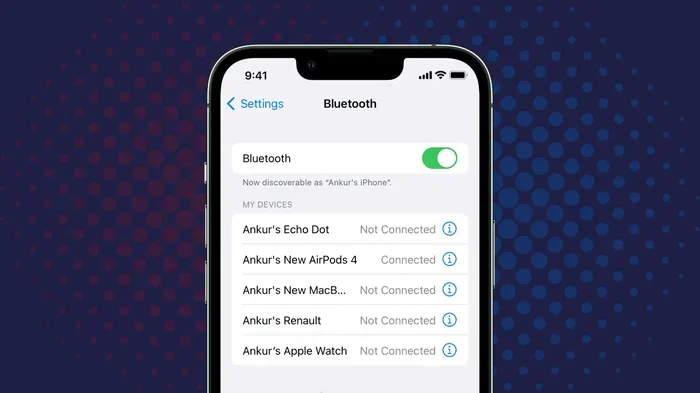
- Go to your phone or computer Bluetooth settings.
- Find the adapter name and tap to connect.
- Play music and enjoy your wireless audio.
That is it. No tools needed. No technical skills required. You can be up and running in under five minutes.
Pros and Cons of Bluetooth Adapters
Every method has its strengths and weaknesses. Here is a quick look at what to expect:
- Pros: Easy setup, no permanent changes, affordable, portable, works with most speakers.
- Cons: Needs batteries or charging, adds a small device to your setup, limited range compared to built-in Bluetooth.
Method 2: DIY Bluetooth Speaker Kit (For Enthusiasts)
If you like hands-on projects, a DIY Bluetooth kit might be your best bet. This method involves opening up your speaker and adding Bluetooth components inside. It sounds intimidating, but it is very doable.
What Is a DIY Bluetooth Speaker Kit?
A DIY Bluetooth kit is a package of electronic parts that you install inside your speaker. The kit usually includes a Bluetooth module, a battery, a charging circuit, and an amplifier board. You connect these parts together inside your speaker cabinet. The result is a fully wireless speaker with built-in Bluetooth.
Popular DIY Bluetooth Kits
Here are some kits that work well for speaker conversions:
- DFPlayer Mini with Bluetooth module: A budget-friendly option for basic audio playback. Great for simple projects.
- Xiaomi Bluetooth amplifier board: Compact and powerful. Delivers good sound quality at an affordable price.
- TPA3116 Bluetooth amplifier board: A popular choice among DIY enthusiasts. Offers solid performance and easy setup.
- Raspberry Pi with Bluetooth audio HAT: For advanced users who want full control over their audio setup.
Tools You Will Need
Before you start, gather these tools:
- Soldering iron and solder
- Wire strippers
- Screwdrivers
- Hot glue gun
- Multimeter
- Drill (if you need to add a charging port)
Step-by-Step DIY Installation
Here is a general overview of the installation process. Every speaker is different, but this gives you a good starting point:
- Remove the speaker cabinet cover. Use a screwdriver to take off the back or side panel.
- Disconnect the existing wiring from the speaker drivers and amplifier. Take a photo before you disconnect anything so you remember how it was wired.
- Mount the Bluetooth amplifier board inside the cabinet. Use screws or hot glue to secure it in place.
- Connect the Bluetooth module to the amplifier board. Follow the wiring diagram that comes with your kit.
- Install the battery pack. Make sure it fits comfortably inside the cabinet without pressing against the speaker drivers.
- Add a charging port if your kit includes a rechargeable battery. Drill a small hole in the cabinet for the charging jack.
- Reconnect the speaker drivers to the amplifier output. Match positive and negative wires carefully.
- Replace the cabinet cover. Power on the system and test the Bluetooth connection.
Tips for a Clean DIY Installation
A few tips can make your project much smoother:
- Plan your layout before soldering. Make sure all components fit inside the cabinet without crowding each other.
- Use short wires where possible. Shorter wires reduce signal loss and keep things neat.
- Secure all connections with heat shrink tubing. This prevents loose wires and short circuits.
- Test each component individually before closing the cabinet. This saves you from having to reopen everything later.
Method 3: Replacing the Internal Amplifier with a Bluetooth-Enabled One
This method is a step up from the adapter approach. It involves replacing the amplifier inside your speaker with one that has built-in Bluetooth. This creates a more permanent and seamless wireless setup.
When to Choose This Method
Consider this method if your speaker has a separate amplifier inside. Passive speakers, for example, need an external amplifier. You can replace that amplifier with a Bluetooth amplifier. Active speakers with built-in amplifiers can also be modified, but it requires more care.
How the Upgrade Works
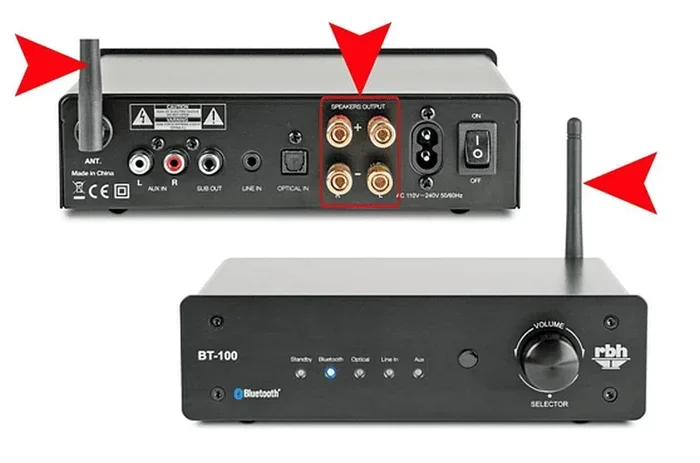
The process involves removing the old amplifier board and installing a new Bluetooth amplifier in its place. You connect the speaker drivers to the new amplifier just as they connected to the old one. The new amplifier handles both amplification and Bluetooth reception. This means no external adapters or boxes are needed.
Many Bluetooth amplifier boards are available online. They range from simple single-channel boards to stereo boards with multiple inputs. Choose one that matches your speaker setup. If you have a pair of speakers, you will need a stereo amplifier board.
Advantages of Internal Amplifier Replacement
- Cleaner look: No external devices or cables hanging around.
- Better sound quality: A dedicated Bluetooth amplifier can outperform a small adapter.
- More features: Many Bluetooth amplifiers include volume controls, multiple inputs, and even built-in equalizers.
- Permanent solution: Once installed, it stays in place and works every time.
Common Mistakes to Avoid When Modifying Speakers
Even though these projects are beginner-friendly, mistakes can happen. Here are some common errors and how to avoid them.
Ignoring Impedance Matching
Every speaker has an impedance rating, usually 4, 8, or 16 ohms. Your amplifier must match this rating. Using the wrong impedance can damage your speaker drivers. Always check the specs before you buy an amplifier or adapter.
Using Low-Quality Bluetooth Modules
Cheap Bluetooth modules can hurt your audio quality. They may introduce static, distortion, or lag. Stick with reputable brands. Read reviews before you buy. A slightly more expensive module often delivers much better sound.
Overlooking Power Requirements
Bluetooth adapters and amplifier boards need power. Some run on batteries. Others need a USB connection or a wall plug. Make sure your power source is stable. Unstable power can cause audio dropouts and buzzing sounds.
Forgetting About Battery Life
If you add a battery to your setup, you need to think about how long it will last. Small Bluetooth adapters can run for 10 to 20 hours on a single charge. Larger DIY setups with amplifiers may need bigger batteries. Plan for your usage patterns.
Skipping the Test Phase
Never close up your speaker cabinet without testing everything first. Test the Bluetooth connection. Test the audio quality. Test the battery if you have one. Fix any issues before you seal the cabinet. Opening it back up is much harder than fixing things while everything is accessible.
Comparing Wireless Methods: Which Is Right for You?
With so many options, it can be hard to pick the right one. Here is a comparison to help you decide.
| Method | Difficulty | Cost | Sound Quality | Permanence |
|---|---|---|---|---|
| Bluetooth Adapter | Very Easy | $10-$50 | Good | Removable |
| DIY Bluetooth Kit | Moderate | $30-$100 | Great | Permanent |
| Internal Amp Replacement | Advanced | $50-$150 | Excellent | Permanent |
The Bluetooth adapter is the best choice for most people. It is fast, easy, and affordable. The DIY kit is great if you enjoy building things and want a custom setup. The internal amp replacement works best for people who want a clean, permanent wireless solution.
Expert Tips for the Best Wireless Audio Experience
Once you have converted your speakers to Bluetooth, you can take steps to improve your experience. These tips come from audio enthusiasts who have been doing speaker mods for years.
Place Your Bluetooth Adapter Away from Interference
Wi-Fi routers, microwaves, and other electronic devices can interfere with Bluetooth signals. Keep your adapter away from these sources. This helps maintain a strong, stable connection.
Update Your Bluetooth Firmware
Many Bluetooth adapters and modules receive firmware updates. These updates can improve connection stability and audio quality. Check the manufacturer’s website for updates after you set up your system.
Use High-Quality Audio Files
Bluetooth has limits on audio quality. But you can still get good sound by using high-quality audio files. Streaming services like Spotify and Apple Music offer high-quality streaming options. Choose the best quality setting available in your app.
Keep Your Devices Close
While Bluetooth 5.0 offers improved range, keeping your phone close to the speaker always helps. The closer they are, the stronger the signal. The better the audio quality.
Charge Your Battery Before Each Use
If your setup includes a battery, make it a habit to charge it regularly. A fully charged battery ensures uninterrupted playback. It also extends the overall lifespan of the battery.
Frequently Asked Questions
Can any wired speaker be converted to Bluetooth?
Most wired speakers can be converted to Bluetooth. Powered speakers with aux or USB inputs are the easiest to convert. Passive speakers need an external amplifier or Bluetooth amplifier board. Even very old speakers can be modified with the right approach.
Does converting speakers to Bluetooth reduce audio quality?
The quality loss depends on the method you use. A good Bluetooth adapter with aptX or LDAC support delivers excellent sound. Cheap adapters may introduce some quality loss. Overall, the difference is small for most listeners and is worth the wireless convenience.
How much does it cost to make wired speakers Bluetooth?
A Bluetooth adapter costs between $10 and $50. DIY Bluetooth kits range from $30 to $100. Internal amplifier replacements can cost $50 to $150. Compare these prices to buying a brand new Bluetooth speaker, and the savings are clear.
Is it hard to install a Bluetooth module inside a speaker?
It is not very hard. Basic soldering skills help. But many kits come with plug-and-play connections. Beginners can complete most installations with just a screwdriver and a soldering iron. Online tutorials make the process even easier.
How far can I place my speaker from my phone after converting to Bluetooth?
Standard Bluetooth works up to about 30 feet in open space. Bluetooth 5.0 extends this range further. Walls and obstacles reduce the distance. For best results, keep your phone within the same room as your speaker.
Can I convert multiple speakers to Bluetooth at once?
Yes, you can. Some Bluetooth adapters support multipoint connections. You can also use a Bluetooth transmitter to send audio to multiple receivers. For a full multi-room setup, consider a multi-channel Bluetooth amplifier board.
Conclusion
The answer to the question can wired speakers be made Bluetooth is a clear and confident yes. You have multiple paths to choose from. You can use a simple Bluetooth adapter for a quick fix. You can build a DIY kit for a custom wireless setup. Or you can replace the internal amplifier for a seamless, permanent upgrade. Each method has its benefits. Each method fits a different budget and skill level.
Converting your wired speakers to Bluetooth is one of the best upgrades you can make. It saves money. It reduces clutter. It gives your old speakers new life. And it gives you the wireless freedom that modern audio demands. So grab a Bluetooth adapter or a DIY kit. Pick a method that works for you. Start your project today. You will be amazed at how easy it is. Your wireless audio experience is just a few simple steps away.