Are There Any Security Cameras That Dont Need Internet
Yes, there are security cameras that don’t need internet to work. These offline cameras use local storage, cellular networks, or analog signals to record footage without a Wi-Fi connection. Whether you need wire-free surveillance for a remote property or want to avoid monthly cloud fees, internet-free cameras offer a reliable and private alternative.
Home security is a top priority for homeowners and renters alike. But here is the thing. Not everyone has a reliable internet connection. And some people simply do not want their cameras connected to the web. So what do you do? You look for security cameras that don’t need internet.
The good news is that these cameras absolutely exist. You have more options than you might think. From old-school analog systems to modern battery-powered trail cams, there is a solution for almost every situation. In this guide, we will walk you through everything you need to know. We will cover how they work, what types are available, and how to pick the right one for your home.
Whether you live in a rural area with spotty Wi-Fi or you just value your privacy, this article has you covered. Let us dive in.
Key Takeaways
- Offline cameras exist: You can fully secure your property without an internet connection using analog CCTV, battery-powered trail cameras, or cellular systems.
- Local storage is key: Most internet-free cameras save footage to SD cards, DVRs, or NVRs instead of the cloud.
- Privacy is stronger: Without internet access, your footage stays on your device and is not vulnerable to hacking or data breaches.
- Multiple types available: Options include wired CCTV, wireless trail cameras, PoE systems, and cellular security cameras.
- No monthly fees: Offline cameras eliminate cloud subscription costs, making them more budget-friendly long-term.
- Easy to set up: Many internet-free cameras are simple to install with no router or network configuration needed.
- Ideal for remote areas: Off-grid properties, farms, and cabins benefit greatly from cameras that don’t require Wi-Fi.
📑 Table of Contents
- What Are Security Cameras That Don’t Need Internet?
- How Do Internet-Free Security Cameras Work?
- Types of Security Cameras That Don’t Require Wi-Fi
- Benefits of Choosing Cameras Without Internet
- Common Mistakes People Make With Offline Security Cameras
- Expert Tips for Setting Up Cameras Without Internet
- Final Thoughts
What Are Security Cameras That Don’t Need Internet?
When we talk about security cameras that don’t need internet, we mean any camera that can record and store footage without connecting to a Wi-Fi network or the cloud. These cameras use alternative methods to capture and save video. Some store data locally on an SD card or a physical recorder. Others use cellular networks or simple analog signals.
The main idea is simple. You get surveillance coverage without depending on an internet service provider. This makes them perfect for remote properties, off-grid cabins, and anyone who wants a more private setup.
How They Differ From Smart Cameras
Smart security cameras, like those from popular brands, usually require a Wi-Fi connection. They send video to the cloud. You view footage through an app on your phone. While this is convenient, it comes with downsides. You need a stable internet connection. You often pay monthly subscription fees. And your data travels through the cloud, which raises privacy concerns.
Internet-free cameras skip all of that. They do not send data to the cloud. They do not need a router. And they do not require a monthly subscription. The tradeoff? You usually cannot monitor your cameras from anywhere in the world in real time. But for local surveillance, they work great.
Why People Choose Offline Cameras
There are many reasons someone would pick Wi-Fi-free security cameras over smart ones. Here are the most common ones.
- No internet required: Perfect for rural areas, farms, and remote cabins where broadband is slow or nonexistent.
- Lower cost: No monthly cloud fees. No subscription plans. Just a one-time purchase.
- Better privacy: Your footage stays on your device. It does not leave your property.
- No hacking risk: Without an internet connection, hackers cannot access your camera feed remotely.
- Simple setup: Many offline cameras plug and play. No network configuration needed.
How Do Internet-Free Security Cameras Work?
Understanding how security cameras that don’t need internet function helps you make a smarter buying decision. The technology is straightforward, even if the marketing jargon can get confusing.
Local Storage Options
Most offline cameras store footage locally. This means the video is saved on a physical device right at your property. The most common local storage options include:
- SD cards: Many wireless trail cameras and bullet cameras use microSD cards. You just pop the card out, plug it into your computer, and review your footage.
- DVRs (Digital Video Recorders): Used with analog CCTV cameras. The DVR connects to your TV or monitor and saves everything to a hard drive.
- NVRs (Network Video Recorders): Used with some wired IP cameras. Even though they have “network” in the name, they do not need internet access. They work on a closed local network.
- USB drives: Some cameras support direct USB recording. You plug a flash drive into the camera, and it saves footage there.
The key takeaway is that your footage stays on-site. You control it. You access it. Nobody else does.
Power Sources and Battery Life
One big advantage of offline cameras is their flexibility with power. Many battery-powered security cameras run on AA or AAA batteries. Some use rechargeable lithium packs. Others can even connect to solar panels for continuous power.
This is huge for remote locations. You do not need to run an electrical wire to your camera. You do not need a power outlet nearby. Just install the camera, add batteries, and you are good to go.
Battery life varies by model. Some cameras last a few weeks on a single charge. Others can run for several months. Look for cameras with low-power modes or motion-activated recording to extend battery life.
Types of Security Cameras That Don’t Require Wi-Fi
Not all offline cameras are the same. There are several distinct types, each with its own strengths. Let us break them down.
Analog CCTV Cameras
Analog CCTV cameras are the granddaddies of surveillance. They have been around for decades. These cameras connect directly to a DVR using coaxial cables. The DVR records the video and can display it on a connected TV or monitor.
Analog systems are reliable. They do not need Wi-Fi. They do not need the internet. And they produce solid-quality footage. The downside is that the cables can be bulky, and the image quality is not as sharp as modern digital cameras. But for basic home security, they get the job done.
Wireless Trail and Hidden Cameras
Trail cameras, often used for wildlife monitoring, are a popular choice for property surveillance. These battery-operated wireless cameras use motion sensors to start recording. They save clips to an SD card. No internet needed.
Hidden cameras are another option. These small, discreet devices can be placed almost anywhere. Many come with built-in SD card slots. They are great for indoor monitoring or checking on pets while you are away.
Cellular Security Cameras
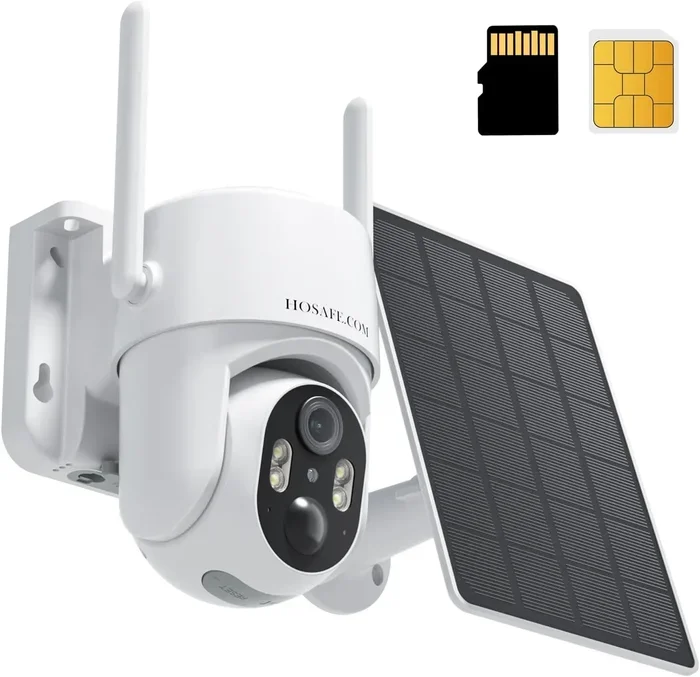
Cellular security cameras are a more advanced option. They use a SIM card, just like a smartphone, to transmit data. The camera connects to a cellular network instead of Wi-Fi.
Now, this might sound like it needs internet. But here is the nuance. The camera uses cellular data to send alerts or short clips to your phone. The full video feed is still stored locally on an SD card or a connected recorder. So you get the best of both worlds. You get remote alerts without needing home Wi-Fi.
PoE and Wired Systems
Power over Ethernet, or PoE, cameras use a single cable for both power and data. They connect to a PoE switch or recorder. The system operates on a closed local network. No internet required.
PoE systems offer excellent image quality. They are easy to install since you only need one cable per camera. And they are very reliable. The only requirement is a PoE switch or NVR at the center of the system.
Comparison Table: Types of Internet-Free Security Cameras
| Type | Storage | Power | Best For | Price Range |
|---|---|---|---|---|
| Analog CCTV | DVR hard drive | Wired (power adapter) | Whole-home wired systems | $100-$500 |
| Wireless Trail Cameras | SD card | Battery or solar | Remote properties, cabins | $50-$200 |
| Cellular Cameras | SD card + cloud backup | Battery or wired | Remote alerts without Wi-Fi | $150-$400 |
| PoE Wired Systems | NVR hard drive | PoE (single cable) | High-quality wired setups | $200-$800 |
| Hidden/Discrete Cameras | SD card | Battery or wired | Indoor monitoring, pet care | $30-$150 |
Benefits of Choosing Cameras Without Internet
There are many reasons to consider security cameras that don’t need internet. Let us look at the biggest benefits.
Privacy is the number one reason. With no internet connection, your video footage never leaves your property. It is not stored on some company’s server. It is not accessible to anyone outside your local network. For people who value their privacy, this is a huge win.
Cost savings are significant too. Most smart cameras require a monthly subscription for cloud storage. Over a year, those fees add up fast. Offline cameras have no recurring costs. You buy the camera, you buy an SD card or hard drive, and you are done. That is it.
Reliability is another advantage. Internet connections go down. Wi-Fi gets spotty. Cloud servers experience outages. But an offline camera keeps recording no matter what. As long as it has power and a storage medium, it works. Period.
Easy setup is a bonus many people overlook. You do not need to configure port forwarding, deal with DDNS settings, or troubleshoot router issues. Just mount the camera, insert an SD card, and turn it on.
Common Mistakes People Make With Offline Security Cameras
Even though offline cameras are straightforward, people still make mistakes. Here are the most common ones to avoid.
Forgetting to check storage regularly. SD cards fill up. DVRs need hard drive space. If you do not check your storage, you risk overwriting important footage. Make it a habit to review and clear your storage every few weeks.
Ignoring battery life. Battery-powered cameras will stop working when the batteries die. Set a reminder to check and replace batteries regularly. Better yet, invest in cameras with low-battery alerts if available.
Placing cameras in poor locations. Offline cameras do not have the same smart features as Wi-Fi cameras. They may not adjust automatically to lighting or motion. So you need to place them carefully. Point them at entry points. Avoid direct sunlight. Keep them out of reach.
Not securing the storage device. If someone steals your SD card or DVR, you lose all your footage. Hide your storage devices. Use tamper-proof mounts. Consider cameras with built-in battery-backed storage.
Expecting smartphone alerts. Most offline cameras do not send push notifications. They record locally, and you must check the footage manually. If real-time alerts are important to you, consider a cellular camera instead.
Expert Tips for Setting Up Cameras Without Internet
Setting up Wi-Fi-free security cameras is simpler than you might think. Here are some expert tips to get the best results.
- Start with a plan. Map out your property. Identify the areas you want to monitor. Decide how many cameras you need. This saves time and money.
- Choose the right storage. For a small setup, a 32GB or 64GB SD card works well. For larger systems, invest in a DVR with a 1TB or larger hard drive.
- Use solar power for remote cameras. If you are placing cameras far from power outlets, solar panels are a game-changer. Many trail cameras support solar add-ons.
- Label your cameras. It sounds simple, but when you have multiple cameras, it is easy to forget which is which. Use tape or labels to mark each camera.
- Test before committing. Set up each camera and record a test clip. Check the image quality, motion detection, and field of view before finalizing the placement.
- Keep firmware updated. Even offline cameras receive firmware updates. Check the manufacturer’s website periodically for improvements and bug fixes.
Following these tips ensures your security cameras that don’t need internet work reliably for years. You get peace of mind without the complexity of smart home systems.
Final Thoughts
Security cameras that don’t need internet are a practical, affordable, and private alternative to smart surveillance systems. Whether you live in a rural area, manage a remote property, or simply value your privacy, there is a camera type that fits your needs. From analog CCTV systems to battery-powered trail cameras, the options are diverse and accessible.
The key is to understand what you need. Do you want local storage? Go with an SD card or DVR setup. Do you need remote alerts without Wi-Fi? Consider a cellular camera. Do you want a simple, no-fuss system? Analog CCTV or a basic trail camera will serve you well.
Take your time. Compare options. Read reviews. And most importantly, choose a system that fits your property and your lifestyle. With the right setup, you can have full home surveillance without ever connecting to the internet.
Your home, your privacy, your rules. That is the beauty of security cameras that don’t need internet.
Frequently Asked Questions
Can I use security cameras without internet for home monitoring?
Absolutely. Many homeowners use offline cameras for local property monitoring. These cameras record to SD cards or DVRs and do not require any internet connection. You simply check the footage by removing the SD card or connecting to the recorder directly.
Do internet-free security cameras work at night?
Yes. Most security cameras that don’t need internet come with night vision capabilities. They use infrared LEDs to capture clear footage in low-light or complete darkness. Check the product specs to confirm the night vision range before purchasing.
Can I view footage from offline cameras on my phone?
It depends on the camera type. Basic offline cameras require you to remove the SD card and view footage on a computer. However, some cellular cameras can send motion-triggered clips to your phone using a SIM card, even without home Wi-Fi.
Are battery-powered cameras without Wi-Fi reliable for long-term use?
Yes, they are quite reliable. Many battery-powered models last several weeks to months on a single charge. Using motion-activated recording and low-power modes significantly extends battery life. For continuous monitoring, consider solar-powered options.
What is the difference between a PoE camera and a Wi-Fi camera?
A PoE camera uses a single Ethernet cable for both power and data. It does not need Wi-Fi or internet. A Wi-Fi camera connects to your wireless router and usually requires cloud storage or a smart app. PoE cameras are more stable and do not depend on wireless signals.
Are offline security cameras harder to set up than smart cameras?
Not at all. In many cases, offline cameras are easier to set up. There is no need to connect to a Wi-Fi network, create cloud accounts, or configure router settings. Most plug-and-play models require just mounting the camera, inserting an SD card, and powering it on.