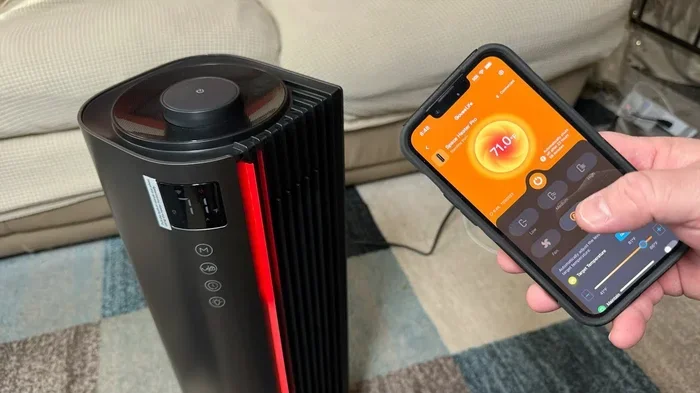
Can I Control My Space Heater With My Phone Anywhere
Yes, you can control your space heater with your phone from virtually anywhere. Smart WiFi heaters and smart plugs let you adjust temperature, set schedules, and monitor energy use right from your mobile device. This guide covers everything you need to know about phone-controlled heating and how to get started today.
Key Takeaways
- Remote Control Is Real: You can turn your space heater on or off from anywhere using your phone and a compatible app.
- Smart Heaters and Smart Plugs Both Work: You don’t need a brand-new heater. A smart plug can make any regular heater phone-controlled.
- Energy Savings Are Significant: Phone control helps you avoid wasting electricity by heating only when needed.
- Setup Is Simple: Most devices connect to your home WiFi in under 15 minutes with a step-by-step app walkthrough.
- Safety Matters: Always follow space heater safety guidelines even when using smart features.
- Voice Control Adds Convenience: Pair your heater with Alexa or Google Assistant for hands-free operation.
- Compatibility Check First: Not all heaters work with all apps. Verify compatibility before buying.
📑 Table of Contents
- Can I Control My Space Heater With My Phone? Yes, Here Is How
- How Phone-Controlled Space Heaters Work
- Benefits of Controlling Your Space Heater From Your Phone
- Types of Smart Space Heaters You Can Control With Your Phone
- Popular Apps and Brands for Phone-Controlled Heating
- Setting Up Phone Control for Your Space Heater
- Safety Tips and Things to Watch Out For
- Voice Control and Integration With Your Smart Home
- Frequently Asked Questions
- Conclusion
Can I Control My Space Heater With My Phone? Yes, Here Is How
Imagine walking into a warm house on a cold winter morning. You did not turn the heater on when you woke up. Your phone did it for you. That is the power of phone-controlled heating.
The short answer is yes. You can absolutely control your space heater with your phone. Whether you are at home, at work, or on vacation, a smart heater or a smart plug lets you manage your heating from anywhere. This technology has made remote control heater devices more popular than ever.
In this guide, we will walk you through everything you need to know. We will cover how it works, which products to buy, how to set things up, and what safety tips to keep in mind. By the end, you will feel confident about making your heater smart and phone-controlled.
The idea of smart home heating might sound futuristic. But it is very real and very affordable today. You do not need to be a tech expert. Most setups take less than 20 minutes. Let us dive in.
How Phone-Controlled Space Heaters Work
Understanding the technology behind phone-controlled heating helps you make better buying decisions. The process is simpler than you might think.
The Technology Behind Smart Heaters
Smart space heaters connect to your home WiFi network. This connection allows them to communicate with a mobile app on your phone. When you tap a button in the app, a signal travels from your phone to your WiFi router. Then it reaches the heater. This all happens in seconds.
Some heaters use Bluetooth instead of WiFi. Bluetooth has a shorter range. It works best when you are within about 30 feet of the heater. WiFi-enabled heaters work from anywhere with an internet connection. For true remote control heater capability, WiFi is the way to go.
Inside the heater, a small chip handles the WiFi or Bluetooth connection. This chip receives your commands and turns the heating element on or off. Some advanced models also adjust temperature levels based on your preferences.
How WiFi and Bluetooth Connect Your Heater to Your Phone
WiFi connectivity is the most common method for smart space heater devices. Here is how it typically works:
- You download the manufacturer’s app on your phone.
- You connect the heater to your home WiFi network.
- Once connected, the heater appears in the app.
- You can now control it from anywhere with internet access.
Bluetooth works differently. It creates a direct connection between your phone and the heater. No WiFi router is needed. But you must be nearby. Bluetooth is fine for quick adjustments in the same room. For mobile app control from far away, WiFi is much better.
Some modern heaters support both WiFi and Bluetooth. This gives you flexibility. You can use Bluetooth for quick local control and WiFi for remote access.
Benefits of Controlling Your Space Heater From Your Phone
Why should you bother controlling your heater with your phone? The benefits go far beyond simple convenience. Let us explore what makes phone app thermostat control so valuable.
Energy Savings and Efficiency
One of the biggest advantages of smart home heating is energy savings. Traditional space heaters run until you manually turn them off. This wastes electricity. With phone control, you can turn the heater off from anywhere.
Say you leave for work and remember you forgot to turn off the heater. No problem. Open the app and switch it off. This simple habit can lower your energy bill significantly over time.
Many WiFi enabled heater models also offer scheduling features. You can set the heater to turn on 30 minutes before you arrive home. It turns off automatically when the room reaches the right temperature. This level of control is impossible with a basic heater.
Comfort and Convenience
Picture this. It is a freezing January evening. You are stuck in traffic. You wish you could turn on the heater before you get home. With a smart plug heater, you can. You tap the app on your phone while driving. By the time you walk through the door, your home is warm and cozy.
This kind of convenience is why so many people are switching to phone-controlled heating. It fits seamlessly into your daily routine. You never have to worry about forgetting to turn off the heater again.
Parents also love this technology. You can check on your child’s room heater from the office. You can adjust the temperature without walking down the stairs. Small comfort, big peace of mind.
Types of Smart Space Heaters You Can Control With Your Phone
Not all phone-controlled heaters are the same. There are two main categories. Each has its own strengths. Let us break them down.
WiFi-Enabled Space Heaters
These heaters have built-in WiFi. You do not need any extra devices. You buy the heater, download the app, and connect. That is it. Popular brands in this category include Dr. Infrared, DeLonghi, and Honeywell. These heaters often come with advanced features like:
- Temperature scheduling
- Energy usage tracking
- Child lock controls
- Voice assistant integration
- Geofencing features
Geofencing is a standout feature. It uses your phone’s location to know when you are near home. The heater turns on automatically when you are close. It turns off when you leave. This is smart home heating at its finest.
Smart Plugs for Regular Heaters
What if you already own a space heater? You do not need to buy a new one. A smart plug can make any regular heater phone-controlled. Smart plugs are small devices that plug into your wall outlet. Then you plug your heater into the smart plug.
The smart plug connects to your WiFi. You control it through an app like Smart Life, Kasa, or Alexa. When you tap “on” in the app, the smart plug sends power to the heater. When you tap “off,” it cuts the power.
Smart plugs are affordable. Most cost between $10 and $25. They are one of the easiest ways to add remote control heater capability to your existing setup.
| Feature | WiFi Heater | Smart Plug + Regular Heater |
|---|---|---|
| Price Range | $60 – $200 | $10 – $25 (plug only) |
| Setup Complexity | Moderate | Very Easy |
| Built-In Scheduling | Yes | Depends on plug app |
| Energy Monitoring | Often included | Some plugs include it |
| Voice Control | Usually supported | Usually supported |
| Works With Existing Heater | No | Yes |
Popular Apps and Brands for Phone-Controlled Heating
The right app makes all the difference when you are setting up mobile app control for your heater. Let us look at some trusted brands and their companion apps.
Top Brands to Consider
When shopping for a smart space heater, consider these well-known brands:
- Dr. Infrared Heater: Known for energy-efficient models with WiFi. Their app offers detailed scheduling and temperature control.
- DeLonghi: Offers premium heaters with smart features. The DeLonghi app is intuitive and reliable.
- Honeywell: A trusted name in heating. Their smart heaters work with the Honeywell Home app.
- Lasko: Affordable options with basic smart features. Good for budget-conscious buyers.
- Amazon Smart Thermostat and Echo-compatible heaters: Great for those already in the Alexa ecosystem.
What to Look for in a Heater App
Not all heater apps are created equal. Before you buy, check that the app offers these features:
- Remote on/off control: The basics. You must be able to turn the heater on and off from your phone.
- Temperature scheduling: Set different temperatures for different times of the day.
- Energy monitoring: See how much electricity your heater uses. This helps you save money.
- Voice control support: Works with Alexa, Google Assistant, or Siri.
- Push notifications: Alerts if the heater is left on or if the temperature drops too low.
- Multi-device control: Manage multiple heaters from one app if you have more than one room.
Expert Insight
According to smart home experts, the best thermostat app experience comes from brands that offer regular software updates. Check the app store for recent updates before purchasing. An app that has not been updated in over a year may have compatibility issues with newer phones.
Setting Up Phone Control for Your Space Heater
Setting up phone-controlled heating is easier than most people think. Here is a clear walkthrough for both WiFi heaters and smart plugs.
Step-by-Step Setup Guide
Follow these steps to get your heater connected to your phone:
- Unbox your heater or smart plug. Make sure all parts are included.
- Plug the heater in. Place it on a flat, stable surface away from curtains and furniture.
- Download the app. Search for the manufacturer’s app in the App Store or Google Play Store.
- Create an account. Most apps require an email and password. Some work with Google or Apple sign-in.
- Add the device. Tap “Add Device” in the app. Follow the on-screen prompts.
- Connect to WiFi. The app will ask you to connect the heater to your home WiFi. Enter your WiFi password.
- Test the connection. Try turning the heater on and off from the app. It should respond within a few seconds.
- Set up your schedule. Create a heating schedule that matches your daily routine.
Total setup time is usually between 10 and 20 minutes. Once done, you can control your heater from your phone anytime, anywhere.
Common Setup Issues and How to Fix Them
Sometimes things do not work perfectly the first time. Here are common issues and quick fixes:
- Heater not showing up in the app: Make sure your phone is connected to the same WiFi network as the heater. Restart both the heater and your router.
- Connection keeps dropping: Move the heater closer to your WiFi router. Thick walls can weaken the signal.
- App crashes when you try to control the heater: Update the app to the latest version. Clear the app cache on your phone.
- Cannot find the WiFi network during setup: Make sure your router is on a 2.4GHz band. Most smart heaters do not support 5GHz WiFi.
Quick Tips
- Keep your heater firmware updated. Manufacturers release updates that improve connectivity and fix bugs.
- Name your WiFi network with a simple name. Avoid special characters that some devices cannot read.
- Use a WiFi extender if your heater is far from the router. This ensures a stable connection.
- Write down your heater’s model number. You will need it for troubleshooting and app setup.
Safety Tips and Things to Watch Out For
Phone-controlled heating is convenient, but safety must always come first. Space heaters cause thousands of house fires every year. Adding smart features does not eliminate the risks. You still need to follow basic space heater safety rules.
Space Heater Safety When Using Smart Features
- Keep the heater away from flammable materials. Curtains, blankets, and furniture should be at least three feet away.
- Never leave the heater running unattended. Even with phone control, do not leave it on when you leave the house or go to sleep.
- Use the app’s timer feature. Set a timer so the heater turns off automatically after a set period.
- Check for overheating alerts. Many smart heaters send notifications if they detect unsafe temperatures.
- Place the heater on a flat surface. Never use it on a table, shelf, or uneven floor.
- Do not use an extension cord. Plug the heater directly into the wall outlet to prevent overheating.
Common Mistakes to Avoid
Even experienced users make mistakes with phone-controlled heating. Here are the ones to watch out for:
- Ignoring app updates: Outdated apps can have security vulnerabilities and bugs. Keep everything updated.
- Using a smart plug with an oversized heater: Check the wattage rating of your smart plug. Most standard plugs handle up to 1500 watts. Higher wattage heaters can overload the plug.
- Forgetting to set a schedule: The whole point of phone control is automation. If you do not set a schedule, you are manually controlling it anyway.
- Placing the router too far away: A weak WiFi signal means delayed responses. Place your router in a central location.
- Sharing app access carelessly: If you share access with family members, make sure they understand how to use the app safely.
Expert Insight
Fire safety experts recommend buying a smart space heater that has built-in tip-over protection and overheat shut-off. These features work even if the WiFi connection drops. Smart features are a bonus, but built-in mechanical safety features are non-negotiable.
Voice Control and Integration With Your Smart Home
Taking your phone-controlled heating to the next level means adding voice control. This is where home automation heating really shines.
If you have an Amazon Echo or Google Home device, you can control your heater with simple voice commands. Say “Alexa, turn on the living room heater” and it happens instantly. No need to even touch your phone.
Most WiFi enabled heater brands support Alexa and Google Assistant. Some also work with Apple HomeKit. Check the product description before buying if voice control matters to you.
You can also create routines. For example, set a routine called “Good Morning” that turns on the heater, starts the coffee maker, and reads the weather forecast. This kind of connected heating device integration makes your home truly smart.
The beauty of portable heater control through voice commands is accessibility. Elderly users or people with mobility challenges can adjust the temperature without reaching for a phone or walking across the room.
Frequently Asked Questions
Can I control any space heater with my phone?
Not every space heater can be controlled with a phone. You need either a WiFi-enabled smart heater or a smart plug to make a regular heater phone-controlled. Check the product specifications before purchasing to confirm mobile app control is supported.
Is it safe to leave my smart heater on when I am not home?
It is generally not recommended to leave any space heater running unattended. However, smart heaters with auto-shutoff and app alerts add a layer of safety. Always follow the manufacturer’s safety guidelines and never leave a heater on overnight or while you are away for extended periods.
How much does a smart space heater cost?
WiFi-enabled smart heaters typically range from $60 to $200. Smart plugs that add phone control to existing heaters cost between $10 and $25. The price depends on the brand, wattage, and features like energy monitoring and voice control support.
Do I need a special WiFi plan for a smart heater?
No special WiFi plan is needed. Your smart heater uses your existing home WiFi network. It does not require a data plan or cellular connection. As long as your phone has internet access, you can control the heater remotely.
Can I control my heater when I am traveling internationally?
Yes, you can control your heater from anywhere in the world as long as both the heater and your phone have internet access. However, you should turn the heater off before leaving home for extended trips. The remote control heater feature is best used for short-term adjustments, not for leaving the heater on while you are away for days.
Which is better: WiFi or Bluetooth for controlling a heater with my phone?
WiFi is better for remote control heater capability because it works from anywhere with internet access. Bluetooth is limited to a short range of about 30 feet. If you want to control your heater while at work or on vacation, WiFi is the clear choice.
Conclusion
Controlling your space heater with your phone is not just a cool tech trick. It is a practical, energy-saving, and convenient way to manage your home comfort. Whether you buy a dedicated smart space heater or add a smart plug to your existing heater, the benefits are clear.
You save money on energy bills. You come home to a warm house. You never worry about leaving the heater on again. And you gain peace of mind through remote monitoring and automated scheduling.
The technology is affordable, easy to set up, and works with the devices you already own. You do not need to be a tech wizard. A few simple steps and you are in control of your heating from anywhere in the world.
So go ahead. Explore your options for phone-controlled heating today. Your warm, comfortable, and energy-efficient home is just a tap away.