Can You Play Audio Through Two Bluetooth Speakers At Once
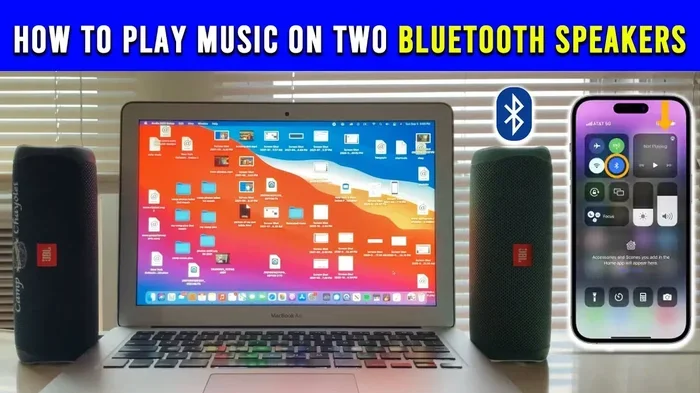
Can You Play Audio Through Two Bluetooth Speakers At Once? Yes, you absolutely can, and it is easier than most people think. Whether you use native stereo pairing, third-party apps, or a Bluetooth splitter, there are multiple ways to connect two speakers for richer sound. This guide covers every method, common problems, and expert tips to help you set up a dual speaker system with confidence.
Have you ever wanted to know if you can play audio through two Bluetooth speakers at once? The answer is a clear yes, and it is much simpler than most people think. Can You Play Audio Through Two Bluetooth Speakers At Once is a question many music lovers ask, and the good news is that multiple methods make it possible today. Whether you want louder sound for a party or richer audio for your home, connecting two speakers opens up new possibilities. This guide covers every method, tip, and solution you need to get started.
Playing audio through two Bluetooth speakers at once has become a go-to way to improve your sound. Many people think it requires expensive gear or technical know-how, but that is far from the truth. Modern Bluetooth technology makes it simple to connect two speakers and enjoy better audio.
Whether you own a pair of matching portable speakers or two different brands, there is almost always a way to link them. The method you pick depends on your speakers, your devices, and the kind of experience you want. Let us walk through each option so you can find the best fit for your setup.
Key Takeaways
- Multiple Methods Exist: You can pair two Bluetooth speakers using native stereo mode, third-party apps, Bluetooth splitters, or speaker-to-speaker connection.
- Compatibility Matters: Not all speakers support dual pairing, so always check your device specs before buying or setting up.
- Sound Quality Improves: Using two speakers gives you louder volume, better bass, and a more immersive listening experience.
- Watch for Latency: Wireless delays can cause audio sync issues, especially with third-party apps or mismatched speakers.
- Placement Is Key: Positioning your speakers correctly makes a big difference in stereo sound and overall audio quality.
- Battery Life Drops: Running two speakers at once drains power faster, so keep both devices charged.
📑 Table of Contents
How Two Bluetooth Speakers Work Together
To understand how to connect two Bluetooth speakers, it helps to know the basics of how Bluetooth audio works. When you stream music from your phone, the audio signal travels wirelessly through Bluetooth technology to your speaker. Each speaker receives that signal and converts it into sound. The challenge comes when you want two speakers to play the same audio in perfect sync.
Bluetooth uses wireless connectivity to send audio data from your source device to the speaker. The range of most Bluetooth connections is about 30 feet, though walls and obstacles can reduce that. When you add a second speaker, both devices need to stay within range of your source device for stable music playback.
Most modern speakers support some form of dual speaker mode. This can work in different ways depending on the brand and model. Some speakers create a true stereo pair, where one speaker handles the left channel and the other handles the right channel. Others simply duplicate the same audio on both speakers for louder volume. Understanding this difference helps you choose the right setup for your needs.
Stereo Pairing vs. Dual Mode
Stereo pairing means each speaker plays a different part of the audio. One speaker handles the left and right channels, creating a wider soundstage. This gives you a much better listening experience, especially for music with instruments and vocals spread across the stereo field.
Dual mode, on the other hand, plays the same full audio on both speakers. This is great for filling a large room with sound or boosting volume at a gathering. It does not create true stereo separation, but it does make the audio louder and more impactful.
Speaker compatibility plays a big role here. Not every portable speaker supports stereo pairing. Some brands only allow dual mode or party mode for connecting multiple speakers. Always check your speaker’s manual or product page to see what options are available.
Methods to Connect Two Bluetooth Speakers at Once
There are several ways to connect two Bluetooth speakers at once. Each method has its own strengths and limitations. Let us look at the most popular options so you can pick the one that works best for you.
Native Stereo Pairing
Many speaker brands offer built-in stereo pairing features. Brands like JBL, Sony, Bose, and Ultimate Ears have dedicated modes that let you connect two matching speakers. This is usually the easiest and most reliable method because it comes straight from the manufacturer.
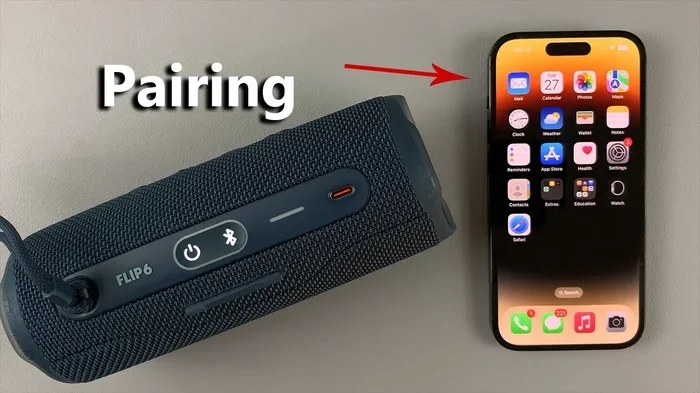
To use native stereo pairing, you typically need to put both speakers into pairing mode at the same time. The exact steps vary by brand, but most involve pressing and holding a Bluetooth or pairing button on each speaker. Once connected, your phone or tablet sees the pair as a single audio output device.
This method gives the best sound quality because the speakers communicate directly with each other. There is less latency, and the left and right channels stay in sync. The downside is that both speakers usually need to be the same model for full compatibility.
Using Third-Party Apps
If your speakers do not have a native pairing mode, third-party apps can help. Apps like AmpMe, SoundSeeder, and Bluetooth Speaker Twin allow you to connect multiple speakers through your phone. These apps use your phone’s audio output to send sound to each speaker over Bluetooth or Wi-Fi.
AmpMe is one of the most popular options for audio sharing across multiple devices. It works with both Bluetooth and Wi-Fi speakers, giving you flexibility. SoundSeeder lets you create a group of speakers and control the music from one device. These apps are free or low-cost and work with a wide range of speaker brands.
The main downside of third-party apps is latency. Because the audio has to travel from your phone to each speaker separately, there can be a slight delay. This might cause the sound to feel slightly out of sync, especially with bass-heavy music. For casual listening, most people do not notice this issue.
Bluetooth Splitter Devices
A Bluetooth splitter is a small hardware device that takes one Bluetooth connection and splits it into two. You connect the splitter to your phone, and then pair both speakers to the splitter. This method works with almost any Bluetooth speaker, regardless of brand or model.
Popular Bluetooth splitter options include the Avantree Oasis and the 1Mii Bluetooth transmitter. These devices often support aptX and other high-quality audio codecs, which means better sound quality than a standard Bluetooth connection. Some splitters also let you connect wired speakers or headphones at the same time.
The trade-off is cost and extra hardware. You need to buy a splitter, and it adds another device to your setup. However, if you frequently want to connect two or more speakers, a splitter is a reliable and versatile solution.
Speaker-to-Speaker Connection
Some speakers allow you to connect one speaker directly to another without using your phone as a middleman. This is sometimes called party mode or speaker chain mode. You pair the first speaker with your phone, and then the second speaker connects to the first one wirelessly.
JBL Flip and Charge series speakers use a feature called PartyBoost for this purpose. Sony speakers use S-Force Pro Front Surround for similar functionality. These methods create a simple wireless link between two speakers, making setup quick and easy.
The benefit of speaker-to-speaker connection is simplicity. You do not need an app or extra hardware. Just turn on both speakers, follow the pairing steps, and you are ready to go. The downside is that the range depends on the Bluetooth connection between the two speakers, which can be shorter than your phone-to-speaker range.
Comparison of Connection Methods
| Method | Best For | Compatibility | Ease of Use | Cost |
|---|---|---|---|---|
| Native Stereo Pairing | Matching speakers from the same brand | Same brand and model usually required | Very Easy | Free (built-in) |
| Third-Party Apps | Mixing different speaker brands | Wide range of Bluetooth and Wi-Fi speakers | Easy | Free or low cost |
| Bluetooth Splitter | Any combination of speakers | Almost all Bluetooth speakers | Moderate | $30-$100 |
| Speaker-to-Speaker Connection | Quick setup without extra devices | Depends on brand-specific features | Very Easy | Free (built-in) |
Benefits of a Dual Bluetooth Speaker Setup
There are many reasons to connect two Bluetooth speakers at once. The benefits go beyond just making things louder. Here are the main advantages you can expect from a dual speaker setup.
Louder Volume: Two speakers produce significantly more sound than one. This is perfect for outdoor gatherings, backyard parties, or large rooms where a single speaker simply cannot fill the space. You can turn up the speaker volume without worrying about distortion.
Better Sound Quality: When speakers are paired in stereo mode, you get a wider soundstage. Instruments and vocals feel more spread out, creating a richer and more immersive listening experience. This is especially noticeable with music that has detailed arrangements or complex audio layers.
Room Filling Sound: A single portable speaker often struggles to cover a large room evenly. Two speakers placed on opposite sides of the room create a more balanced audio output. Every corner of the room gets consistent sound, which makes a big difference for movie watching or group gatherings.
Wireless Freedom: You still get all the benefits of wireless audio streaming without any cables. Your speakers can be placed anywhere within Bluetooth range, giving you flexibility in how you set up your listening space. This portability is one of the biggest advantages of using Bluetooth speakers over traditional wired setups.
Party-Ready Setup: Many speakers now include a party mode that syncs multiple speakers together. This makes it incredibly easy to set up a multi-speaker system for events. You can connect several speakers at once and control everything from one device, creating a seamless audio experience for everyone.
Common Problems When Using Two Bluetooth Speakers
While connecting two Bluetooth speakers is straightforward most of the time, you may run into some issues. Understanding these common problems helps you troubleshoot quickly and get back to enjoying your music.
Audio Latency and Sync Issues
Latency is one of the most common problems with dual Bluetooth speaker setups. It happens when there is a slight delay between the audio reaching each speaker. You might notice one speaker plays a beat a fraction of a second before the other. This is especially noticeable with fast-paced music or videos.
Latency is more common with third-party apps and speaker-to-speaker connections. Native stereo pairing from the same brand usually has the least latency because the speakers are designed to work together. If you notice sync issues, try moving your source device closer to both speakers or switching to a different connection method.
Connection Drops and Interference
Bluetooth signals can be disrupted by walls, other electronic devices, and even Wi-Fi routers. When you connect two speakers, both are relying on a stable Bluetooth connection from your source device. If the signal drops, one or both speakers may stop playing or cut out intermittently.
To reduce interference, keep your source device close to both speakers. Avoid placing speakers near microwaves, baby monitors, or other wireless devices. The Bluetooth range is typically about 30 feet in open space, but obstacles can shorten that significantly.
Battery Drain
Running two speakers at once drains both devices faster than using a single speaker. Each speaker uses power to maintain its Bluetooth connection and produce sound. If you plan on using your dual speaker setup for a long event, make sure both speakers are fully charged beforehand.
Some speakers also use more battery when connected to another speaker for stereo pairing or party mode. Keep an eye on the speaker battery life indicator and have charging cables nearby if your event runs long. A portable power bank can be a lifesaver for extended use.
Compatibility Challenges
Not all speakers play nicely together. Some brands lock their stereo pairing features to their own products only. For example, a JBL speaker may not pair with a Bose speaker using native stereo mode. Always check speaker compatibility before you try to connect two different brands.
Third-party apps help solve this problem because they work across brands. However, the audio quality may not be as good as a native pairing solution. If sound quality is your top priority, try to use matching speakers from the same brand whenever possible.
Tips for the Best Audio Experience
Getting the most out of your dual speaker setup is all about a few simple practices. These tips help you maximize sound quality, avoid common issues, and enjoy your music to the fullest.
Quick Tips for Dual Speaker Setup:
- Place speakers at least 3-5 feet apart for better stereo separation.
- Keep both speakers at the same height for balanced audio output.
- Update your speaker firmware to get the latest features and bug fixes.
- Turn off unnecessary Bluetooth devices nearby to reduce interference.
- Use the equalizer settings on your phone to fine-tune the sound.
- Restart both speakers before pairing to clear any previous connections.
Positioning Matters: Where you place your speakers has a huge impact on sound quality. For stereo mode, place the two speakers on opposite sides of your listening area. Angle them slightly inward toward the seating area. This creates a wider soundstage and makes the audio feel more immersive.
Avoid placing speakers in corners or against walls. Corners amplify bass too much and can make the sound muddy. Elevating speakers on shelves or stands also improves audio clarity by reducing obstructions.
Volume Balancing: When using two speakers, make sure the volume is balanced between them. Most speaker apps let you adjust the volume of each speaker independently. Start by setting both to the same level, then fine-tune based on your room layout and personal preference.
Keep Everything Updated: Bluetooth technology improves with firmware updates. Check your speaker manufacturer’s app regularly for updates. These updates often fix connectivity issues, improve battery life, and add new features like enhanced speaker sync or better wireless connectivity.
Common Mistakes to Avoid
Pairing speakers from different generations: Older and newer speakers from the same brand may not support the same pairing features. Always check that both speakers are compatible before attempting stereo pairing.
Ignoring distance from the source device: If your phone is too far from one speaker, that speaker may lose connection or experience higher latency. Keep your source device roughly centered between both speakers for the best results.
Overlooking battery levels: Nothing kills a good party like a dead speaker. Charge both speakers fully before any event, and bring backup power if needed. Low battery can also cause audio quality to degrade, so keep both speakers well-charged.
Using low-quality Bluetooth codecs: Standard SBC Bluetooth codec is fine for casual listening, but if you want better sound quality, look for speakers that support aptX, AAC, or LDAC codecs. These codecs deliver richer audio with less compression, which matters when you are investing in a dual speaker setup.
Expert Advice for Advanced Users
For those who want to take their dual speaker setup to the next level, there are several advanced techniques worth exploring. These tips come from audio engineers and experienced Bluetooth speaker users who have tested many different setups.
Use a dedicated Bluetooth transmitter: A high-quality Bluetooth transmitter with aptX Low Latency codec can dramatically reduce audio sync issues. Devices like the 1Mii B06 transmitter support multiple codecs and offer a range of up to 100 feet. This is ideal if you want a reliable connection without relying on your phone’s Bluetooth hardware.
Explore Wi-Fi speaker systems: If Bluetooth range or latency is a concern, consider Wi-Fi-based speaker systems. Brands like Sonos and Google Nest use Wi-Fi for audio streaming, which offers a more stable connection and virtually no latency. You can add multiple speakers to a single group and control them from one app.
Experiment with speaker placement: Audio experts recommend the “triangle method” for stereo speaker placement. Position yourself in the center of an imaginary triangle formed by the two speakers. Each speaker should be at roughly equal distance from your listening position. This setup delivers the most accurate stereo imaging and the best overall sound quality.
Consider a multi-room audio system: If you want to play audio through two Bluetooth speakers in different rooms, look into systems that support multi-room grouping. Apps like AmpMe let you group speakers across different rooms and play the same or different music in each space. This is perfect for hosting events where you want consistent music throughout your home.
Remember that every setup is different. What works best for one person may not work for another. Experiment with different methods, speaker positions, and settings until you find the combination that sounds best for your space and your preferences.
Conclusion
Can You Play Audio Through Two Bluetooth Speakers At Once? Absolutely yes. Whether you use native stereo pairing, a third-party app, a Bluetooth splitter, or speaker-to-speaker connection, there is a method that fits almost any setup. The key is understanding your speakers, choosing the right method, and following a few simple best practices.
A dual Bluetooth speaker setup gives you louder volume, better sound quality, and a more immersive listening experience. It is perfect for backyard parties, movie nights, or simply enjoying music throughout your home. With the right approach, you can turn any room into a personal audio space that sounds incredible.
Start by checking your speaker compatibility, pick the connection method that suits your needs, and follow the tips in this guide. You will be enjoying richer, fuller sound in no time. The beauty of Bluetooth technology is that it keeps things simple and wireless, so you can focus on what really matters: great music and good times.
Try out a dual speaker setup today and hear the difference for yourself. Once you experience the improved sound quality and room-filling audio, you will wonder how you ever listened with just one speaker. Happy listening!
Frequently Asked Questions
Can I connect two different brand Bluetooth speakers together?
Yes, you can connect two different brand Bluetooth speakers using third-party apps like AmpMe or a Bluetooth splitter device. However, native stereo pairing usually only works with matching speakers from the same brand. Third-party apps bridge the gap by sending audio to each speaker separately from your phone.
Does using two Bluetooth speakers drain battery faster?
Yes, running two speakers at once drains battery faster than using a single speaker. Each speaker uses power to maintain its Bluetooth connection and produce sound. For long events, fully charge both speakers beforehand and keep charging cables nearby as a backup.
Can I use two Bluetooth speakers with different sizes?
You can pair speakers of different sizes, but the audio balance may not be perfect. Larger speakers tend to produce more bass, while smaller speakers handle mid and high frequencies better. For the best results, try to use speakers with similar audio profiles or adjust the equalizer settings on your source device.
Is there a lag when playing audio through two Bluetooth speakers?
Some latency is possible, especially when using third-party apps or speaker-to-speaker connections. Native stereo pairing from the same brand usually has the least lag. If you notice sync issues, move your source device closer to both speakers or try a different connection method like a Bluetooth splitter.
How far apart should I place two Bluetooth speakers for stereo sound?
For the best stereo effect, place your two speakers about 3 to 5 feet apart and angle them slightly toward your listening position. This creates a wider soundstage and more immersive audio. Avoid placing them too close together or too far apart, as both extremes can reduce stereo separation.
Can I connect more than two Bluetooth speakers at once?
Yes, many apps like AmpMe and SoundSeeder support connecting three or more speakers at once. Some brands also allow chaining multiple speakers through their party mode features. Keep in mind that adding more speakers increases the chance of latency and connection drops, so use a reliable Wi-Fi connection or a Bluetooth splitter for the best results with larger setups.