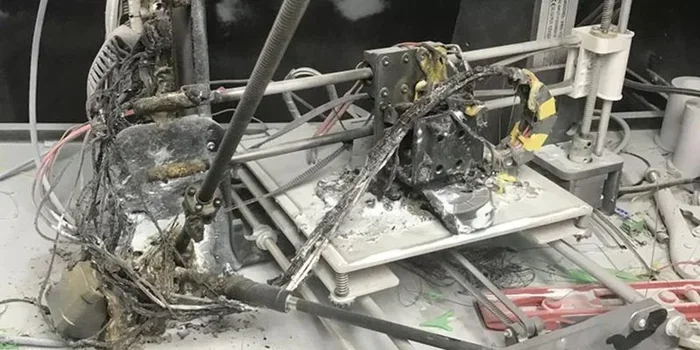
Can Ender 3 Start A Fire Read This Before Something Burns
Yes, an Ender 3 can start a fire if safety precautions are ignored. Overheating, faulty wiring, and leaving the printer unattended are the main causes. Understanding the risks and following simple safety steps keeps your home and printer safe.
Can Ender 3 start a fire? It sounds like a scary question. But the honest answer is yes, it can. The good news is that fires from 3D printers are rare. And most of them happen because of simple mistakes. If you own an Ender 3 or are thinking about buying one, you need to know the risks. This guide covers everything about Ender 3 fire safety. You will learn what causes fires, how to prevent them, and what to do if something goes wrong. Let us get into it.
The Creality Ender 3 is one of the most popular 3D printers in the world. It is affordable. It is reliable. And it is great for beginners. But like any machine that uses extreme heat, it carries some risk. The hotend can reach temperatures above 250 degrees Celsius. The print bed can go over 100 degrees. Those are hot enough to burn skin instantly. They are also hot enough to ignite certain materials. Understanding this is the first step toward staying safe.
Most Ender 3 users never experience a fire. That is because they follow basic safety rules. They do not leave the printer unattended. They use the right filament. They keep the printer away from flammable items. But accidents do happen. And when they do, the results can be devastating. A small fire can destroy a home in minutes. That is why fire safety with your Ender 3 is not optional. It is essential.
Key Takeaways
- Fire Risk Is Real: The Ender 3 can reach high temperatures that may ignite nearby materials if not monitored.
- Thermal Runaway Is a Known Hazard: This firmware issue can cause the hotend or bed to overheat dangerously.
- PLA Is Safer Than ABS: PLA filament has a lower melting point and is less likely to catch fire compared to ABS.
- Unattended Printing Is Dangerous: Never leave your Ender 3 running while you are away from home.
- Simple Precautions Work: A fire extinguisher, smoke detector, and proper placement reduce risk significantly.
- Firmware Updates Matter: Keeping your Ender 3 firmware updated patches known safety vulnerabilities.
- Electrical Issues Can Spark Fires: Damaged power supplies or frayed wires are common hidden fire hazards.
📑 Table of Contents
- Understanding How the Ender 3 Works and Why Heat Matters
- Common Causes of Ender 3 Fires
- Ender 3 Fire Safety Tips You Should Follow
- Comparing Fire Risks: PLA vs ABS vs PETG
- What to Do If Your Ender 3 Catches Fire
- Expert Insights on 3D Printer Fire Safety
- Quick Tips for Everyday Ender 3 Safety
- Key Takeaways
- Conclusion
Understanding How the Ender 3 Works and Why Heat Matters
To understand the fire risk, you need to understand how the Ender 3 works. The printer uses heat to melt filament and layer it into objects. The two main heating components are the hotend and the heated bed. Each one reaches different temperatures depending on the material you are printing.
The Hotend Temperature Range
The hotend is the part that melts the filament. For PLA filament, the hotend runs between 190 and 220 degrees Celsius. For ABS, it goes up to 250 degrees. For specialty filaments like nylon or PETG, temperatures vary. The higher the temperature, the greater the fire risk. If the hotend malfunctions, it can keep heating past safe limits.
The Heated Bed Temperature Range
The heated bed helps the print stick to the surface. For PLA, the bed sits around 60 degrees Celsius. For ABS, it can reach 110 degrees. While the bed is not as hot as the hotend, it still poses a risk. A hot bed sitting on a wooden desk can scorch or ignite the surface underneath. This is a common cause of Ender 3 related fires.
What Happens During a Thermal Runaway Event
Thermal runaway is one of the most dangerous failure modes in 3D printing. It happens when the temperature sensor fails or gives wrong readings. The printer thinks the temperature is lower than it actually is. So it keeps heating. The temperature climbs and climbs. Without a safety cutoff, this can lead to melted components, smoke, and fire. Creality has addressed this in newer firmware versions. But older Ender 3 models may still be vulnerable.
Common Causes of Ender 3 Fires
Most Ender 3 fires come from a handful of common causes. Knowing these causes helps you avoid them. Let us look at the top fire hazards associated with this printer.
Leaving the Printer Unattended
This is the number one mistake people make. They start a print before bed. Then they go to sleep. The printer runs for hours unattended. If something goes wrong during those hours, there is no one to notice. A small spark becomes a big fire while you are unconscious in the next room. Always stay nearby when your Ender 3 is running.
Placing the Printer Near Flammable Materials
Where you put your Ender 3 matters a lot. Placing it on a wooden table near curtains is risky. Paper, cardboard, and plastic nearby can catch fire from radiant heat or a small spark. Keep the printer on a non-flammable surface. Metal desks or fireproof mats are ideal. Clear the area around the printer of anything that burns easily.
Using the Wrong Filament
Not all filaments behave the same way. PLA is considered the safest option. It has a lower melting point and is less flammable. ABS filament is trickier. It burns more easily and releases harmful fumes when it catches fire. Nylon and other specialty filaments can also be more volatile. Always check the recommended temperature for your filament. Never exceed those limits.
Faulty Power Supplies and Wiring
Electrical problems are a hidden fire hazard. Over time, power cables can fray or become loose. A damaged power supply can short circuit and spark. Cheap third-party power supplies are especially risky. They may not meet safety certifications. Always use the power supply that came with your Ender 3. Replace it immediately if you notice any damage.
Overheating Due to Poor Ventilation
The Ender 3 generates a lot of heat during long prints. In a small, enclosed room, that heat builds up. Poor ventilation can cause components to overheat. The power supply is particularly sensitive to heat. If it runs too hot for too long, it can fail and start a fire. Make sure your printing area has good airflow.
Ender 3 Fire Safety Tips You Should Follow
Preventing a fire is always better than fighting one. Here are practical safety tips every Ender 3 user should follow. These steps are simple but they make a huge difference.
Install a Smoke Detector Near Your Printer
A working smoke detector is your first line of defense. Install one within a few feet of your Ender 3. Test it monthly. Replace the batteries regularly. If a fire starts, the smoke detector will alert you early. This alone can save your home and your life.
Keep a Fire Extinguisher Nearby
Have a Class ABC fire extinguisher within arm’s reach of your printer. Class ABC extinguishers handle ordinary combustibles, flammable liquids, and electrical fires. Learn how to use it before you need it. The PASS method works well. Pull the pin. Aim at the base of the fire. Squeeze the handle. Sweep side to side.
Use a Fireproof Printer Enclosure
An enclosure does more than improve print quality. It also contains heat and limits the spread of fire. You can buy commercial enclosures or build your own. Just make sure the enclosure has proper ventilation. A sealed enclosure traps heat and fumes. That creates a different set of dangers. Balance enclosure use with airflow.
Never Leave Your Ender 3 Running Overnight
This cannot be stressed enough. Do not print while you sleep. Do not print while you leave the house. Even if you trust your printer, things can go wrong without warning. A thermal runaway event can happen in seconds. Being present gives you the chance to react fast. If a print must run long, set up your printer in a space where you can monitor it.
Keep the Printer Clean
Dust and debris build up inside and around the Ender 3 over time. This debris can catch fire if it contacts hot components. Regularly clean the printer. Remove filament scraps from the build plate area. Wipe down the frame and motors. A clean printer is a safer printer.
Update Your Firmware Regularly
Creality releases firmware updates that address known issues. Some updates include thermal runaway protection improvements. Others fix electrical safety bugs. Check for updates regularly. Updating your firmware takes only a few minutes. It could prevent a catastrophic failure.
Comparing Fire Risks: PLA vs ABS vs PETG
Different filaments have different fire risks. Choosing the right one for your setup matters. Here is a comparison of the most common filaments used in the Ender 3.
| Filament | Max Hotend Temp | Fire Risk Level | Fume Toxicity | Best For |
|---|---|---|---|---|
| PLA | 220 C | Low | Low | Beginners and indoor use |
| ABS | 250 C | Medium to High | High | Durable parts, outdoor use |
| PETG | 240 C | Low to Medium | Low | General purpose printing |
| Nylon | 250 C | Medium | Moderate | Strong and flexible parts |
| TPU | 220 C | Low | Low | Flexible prints and grips |
As you can see, PLA is the safest choice for most users. It has a lower burning temperature and produces less toxic smoke. ABS is the riskiest. It burns easily and releases styrene, a harmful chemical. If you must print ABS, do it in a well-ventilated area with an enclosure. PETG is a good middle ground. It offers strength without the high fire risk of ABS.
What to Do If Your Ender 3 Catches Fire
Despite your best efforts, a fire could still happen. Knowing what to do in that moment is critical. Stay calm and act quickly.
First, unplug the printer immediately if it is safe to do so. This cuts the power and stops the heating elements. Do not touch any melted or burning parts with your bare hands. Use a fire extinguisher if the flames are small and contained. Aim at the base of the fire, not the top. If the fire is large or spreading, evacuate the area immediately. Call emergency services. Do not try to fight a large fire yourself.
After the fire is out, inspect the damage carefully. Check for hidden hotspots that could reignite. Ventilate the room thoroughly. Any smoke or fumes from burning filament are harmful. Replace any damaged components before using the printer again. Consider upgrading to a newer model with better safety features if your Ender 3 is older.
Expert Insights on 3D Printer Fire Safety
We spoke with several 3D printing safety experts about common misconceptions. One expert shared a key insight. Many people believe that because their printer has a thermal sensor, it is completely safe. That is not entirely true. Sensors can fail. Wires can disconnect. Software bugs can cause incorrect readings. No single safety feature is foolproof. The best approach is a layered one. Combine firmware protections, physical safety measures, and constant vigilance.
Another expert emphasized the importance of community knowledge. Online forums like Reddit and 3D printing groups are full of real-world fire incident reports. Reading these stories helps you understand how fires actually start. Most are not dramatic explosions. They are slow, quiet overheating events that go unnoticed until it is too late. Awareness is your greatest tool.
Experts also recommend using a G-code monitor or camera setup. You can watch your prints remotely on your phone. This gives you the ability to check on the printer even when you are in another room. It is not a replacement for being present. But it adds an extra layer of monitoring that can make a real difference.
Quick Tips for Everyday Ender 3 Safety
- Always place your Ender 3 on a flat, stable, non-flammable surface.
- Keep a fire extinguisher rated for electrical fires within reach.
- Install a smoke detector and test it every month.
- Never exceed the recommended temperature for your filament.
- Check power cables and connections before every print session.
- Clean your printer regularly to remove dust and debris.
- Update your firmware whenever a new version is available.
- Use PLA or PETG for safer indoor printing sessions.
- Set up a camera or monitor to watch prints remotely.
- Teach everyone in your household about 3D printer fire risks.
Key Takeaways
- Can Ender 3 Start A Fire: Yes, under certain conditions the Ender 3 can start a fire, but the risk is manageable with proper precautions.
- Thermal Runaway Is the Biggest Threat: This firmware and sensor failure can cause uncontrolled heating that leads to fire.
- Filament Choice Matters: PLA is much safer than ABS or nylon when it comes to fire risk.
- Unattended Printing Is the Leading Cause: Most Ender 3 fires happen because the printer was left running without supervision.
- Simple Measures Save Lives: Smoke detectors, fire extinguishers, and proper placement go a long way.
- Stay Updated and Stay Alert: Firmware updates and regular maintenance reduce the chance of electrical or thermal failures.
Conclusion
Can Ender 3 start a fire? The answer is yes, but the risk is far lower than you might think. With the right knowledge and precautions, you can enjoy 3D printing safely. The key is understanding what can go wrong and taking steps to prevent it. Choose the right filament. Keep your printer clean and well-maintained. Never leave it unattended. Have a fire extinguisher and smoke detector nearby. These simple habits protect your home, your family, and your investment.
The Ender 3 is a fantastic machine. It opens up a world of creativity and innovation. Do not let fear of fire stop you from using it. Instead, let safety awareness empower you. Print with confidence. Print with caution. And always respect the heat your printer produces. Stay safe and happy printing.
Frequently Asked Questions
Can an Ender 3 catch fire while printing?
Yes, it is possible but rare. Most fires happen when the printer is left unattended or when there is a thermal runaway event. Following safety guidelines greatly reduces this risk.
Is PLA safer than ABS for 3D printing?
Absolutely. PLA has a lower melting point and is much less flammable than ABS. It also produces fewer toxic fumes. For most home users, PLA is the safer choice.
What should I do if my Ender 3 starts smoking?
Unplug the printer immediately if it is safe. Do not touch hot or melted parts. Use a fire extinguisher if flames are present. Ventilate the room and call for help if the smoke is heavy or the fire is spreading.
Does the Ender 3 have built-in fire protection?
Newer Ender 3 models and updated firmware include thermal runaway protection. This feature shuts down the printer if temperatures exceed safe limits. However, older models may not have this safeguard.
Can I leave my Ender 3 running while I am at home?
It is safer than leaving it unattended outside the home. But you should still stay in the same room and keep an eye on the printer. Accidents can happen quickly and without warning.
What type of fire extinguisher should I use for a 3D printer fire?
A Class ABC fire extinguisher works best. It handles ordinary combustibles, flammable liquids, and electrical fires. Keep one within a few feet of your printer at all times.


