Do Projectors Have Their Own Speakers Worth Checking
Do projectors have their own speakers? Many do, but the audio quality varies a lot. Built-in projector speakers work fine for casual viewing, but they often lack power and depth. If you want a true home theater feel, adding external speakers makes a huge difference. Let us walk you through everything you need to know about projector audio.
Do projectors have their own speakers? The short answer is yes, many of them do. But the real question is whether those projector speakers are good enough for your needs. If you have ever set up a projector and wondered why the sound feels flat or tinny, you are not alone. Built-in projector audio has come a long way, but it still has limits. This guide breaks down everything you need to know about built-in speakers, when to upgrade, and how to get the best sound from your setup.
Whether you are watching movies, giving a presentation, or gaming, sound quality plays a huge role in your experience. A stunning picture means nothing if the audio lets you down. Let us dive into the world of projector sound and help you make the right choice for your home theater or office setup.
Key Takeaways
- Many projectors do include built-in speakers: but the quality depends heavily on the model and price range.
- Built-in projector audio is usually weak: most models lack the wattage and speaker size for rich, room-filling sound.
- Portable projectors often have decent speakers: they are designed for casual use and on-the-go entertainment.
- External speakers dramatically improve audio: a sound bar or wireless speaker setup transforms your viewing experience.
- Connectivity options are plentiful: Bluetooth, HDMI ARC, and AUX cables make it easy to pair speakers with any projector.
- Speaker wattage and placement matter: understanding these basics helps you choose the right audio setup.
- Some premium projectors punch above their weight: brands like Epson and BenQ offer surprisingly good built-in audio.
📑 Table of Contents
- What Is Inside Your Projector?
- Do All Projectors Have Speakers?
- How Good Is Projector Audio Really?
- When Should You Add External Speakers?
- Connecting External Speakers to Your Projector
- Best Projectors with Great Built-In Speakers
- Quick Tips and Common Mistakes
- Expert Insights on Projector Audio
- Final Thoughts
What Is Inside Your Projector?
How Built-In Speakers Actually Work
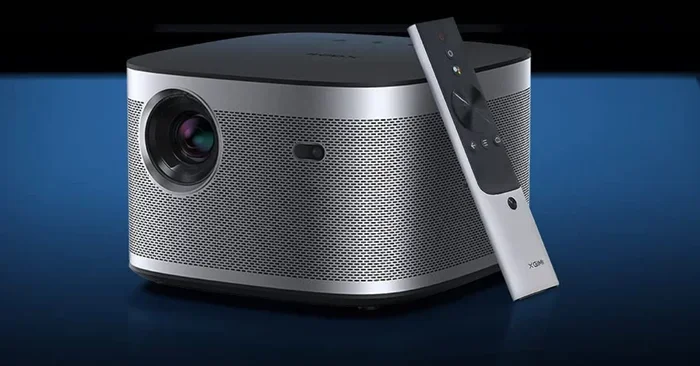
Most projectors come with small speakers built right into the body. These speakers are usually located on the top or the front of the unit. They are designed to be compact so they do not add bulk or weight to the projector. The sound comes out through tiny vents or grills on the surface.
Inside these small speakers, you will find a basic driver and an amplifier. The driver creates the sound, and the amplifier boosts the signal. But because the space is so limited, the audio quality is often thin and lacking in bass. Think of it like a smartphone speaker. It works, but it does not deliver the full range of sound you would get from a proper stereo system.
The speaker wattage in most projectors ranges from 2 watts to 10 watts. That is enough for a quiet room or a small classroom. But if you are in a larger space or watching an action movie with explosions and deep bass, you will quickly notice the limitations. The sound may distort or simply not fill the room properly.
What to Expect from Projector Audio
So what can you realistically expect from built-in audio? Here is a quick breakdown:
- Volume: Most built-in speakers are loud enough for a small to medium room. But they struggle in large or open spaces.
- Bass: Bass is usually very weak or almost nonexistent. Small speakers cannot produce low-frequency sounds effectively.
- Clarity: Mid-range frequencies like voices tend to sound clear enough. High frequencies like music instruments can sound a bit sharp.
- Stereo Effect: Many projectors use mono speakers, which means there is no true stereo separation. Some higher-end models offer stereo or even dual speakers.
- Background Noise: Projector fans can sometimes create a humming sound that mixes with the audio and becomes distracting.
Overall, projector speakers are designed for convenience, not for audiophile-level sound. They get the job done for everyday use but fall short when you want an immersive experience.
Do All Projectors Have Speakers?
Not all projectors come with built-in speakers. The presence of built-in audio depends on the type, brand, and model of the projector. Let us look at the different categories and what you can expect.
Portable Projectors
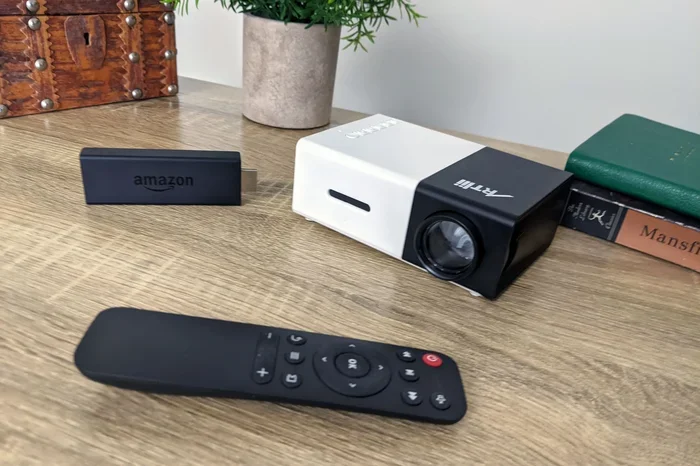
Portable projectors are popular for their convenience and ease of use. Many of them include decent built-in speakers because they are meant for casual, on-the-go viewing. Brands like Anker, Nebula, and XGIMI often equip their portable models with speakers that are surprisingly good for their size.
These projectors usually have 3 to 5 watts of speaker power. That is enough for personal viewing or small gatherings. Some portable models even support Bluetooth connectivity, so you can easily pair them with wireless speakers if you want better sound.
Home Theater Projectors
Home theater projectors focus on image quality. Many of them either skip built-in speakers entirely or include very basic ones. Brands like Epson, BenQ, and Optoma sometimes include small speakers in their mid-range models, but premium home theater projectors often leave audio to external systems.
If you are buying a home theater projector, do not assume it has speakers. Always check the product specifications before you purchase. Look for terms like “built-in speaker” or “audio output” in the description.
Business and Educational Projectors
Business and educational projectors are designed for presentations, not movies. Many of them include basic speakers that are just loud enough for a conference room or classroom. The sound performance is usually functional but not impressive. If you need clear audio for voice-heavy content like webinars or lectures, a basic built-in speaker may be enough.
Budget vs. Premium Models
Budget projectors under $300 often have the weakest speakers. They use small, low-power drivers that sound tinny. Premium projectors above $1,000 sometimes invest in better audio, but even then, they rarely match a dedicated sound system.
Here is a quick comparison:
- Budget projectors: 2-3 watts, mono sound, basic clarity
- Mid-range projectors: 5-10 watts, stereo or dual speakers, decent clarity
- Premium projectors: 10+ watts, enhanced audio tuning, better bass response
How Good Is Projector Audio Really?
The honest answer is that most projector audio is just okay. It works for everyday use, but it is not something you will rave about. Let us look at some of the common limitations and why they exist.
Common Audio Limitations
There are several reasons why projector speakers sound the way they do:
- Size constraints: Projectors are designed to be thin and lightweight. There is very little room for large speakers or bass drivers.
- Heat management: Adding bigger speakers or amplifiers generates more heat, which can affect the projector’s cooling system and lifespan.
- Cost considerations: Manufacturers keep costs down by using basic audio components. Spending more on speakers would raise the price of the projector.
- Design priorities: Most projector brands focus their engineering on image quality. Audio is treated as an afterthought.
Because of these limitations, you should not expect projector speakers to deliver a cinematic audio experience on their own. They are a convenient bonus, not a replacement for a proper sound system.
Quick Tips to Improve Built-In Speaker Sound
Even though built-in speakers have limits, you can get a bit more out of them with these simple tips:
- Place the projector on a flat, stable surface: This reduces vibrations that can muddle the sound.
- Position the projector at ear level: If possible, mount it or place it so the speakers face the audience directly.
- Reduce background noise: Turn off fans, close windows, and minimize ambient sound so the projector audio stands out.
- Use the projector’s audio settings: Many projectors have built-in equalizer or audio enhancement modes. Turn them on to boost clarity.
- Keep the room size in mind: Built-in speakers work best in small to medium rooms. In large rooms, the sound will dissipate quickly.
When Should You Add External Speakers?
At some point, most projector users realize they need better sound. Whether you are building a home theater or setting up a conference room, external speakers can transform your experience. Here is when you should consider making the switch.
You Watch Movies or Play Games
If you use your projector for movies, TV shows, or gaming, built-in speakers will never be enough. Action scenes, dialogue, and soundtracks all need depth and clarity that small projectors cannot deliver. A good sound bar or a pair of wireless speakers makes a massive difference.
For a true multimedia experience, consider a 5.1 surround sound system. It fills the room with rich, immersive audio that matches the visuals on screen. Even a simple sound bar with subwoofer can bring your movies to life.
You Host Movie Nights or Gatherings
If you regularly host movie nights or watch parties, your audience will notice poor audio immediately. Flat, tinny sound takes away from the whole experience. External speakers ensure everyone in the room can hear clearly and enjoy the content.
You Need Clear Dialogue
Some projectors produce audio where dialogue gets lost in background music or sound effects. This is a common frustration. External speakers with better audio output and clarity make voices stand out, so you never miss a line of dialogue.
You Want to Fill a Large Room
If your projector is set up in a large living room, basement, or outdoor area, built-in speakers simply will not cut it. You need more power and more speaker drivers to distribute sound evenly across the space.
You Are a Sound Enthusiast
Even if you are not a hardcore audiophile, you will notice the difference once you hear your projector content through a proper speaker system. Music, podcasts, and gaming all benefit greatly from better audio equipment.
Connecting External Speakers to Your Projector
Hooking up external speakers to your projector is easier than you might think. Most modern projectors offer multiple connectivity options. Here are the most common ways to connect speakers.
Bluetooth and Wireless Options
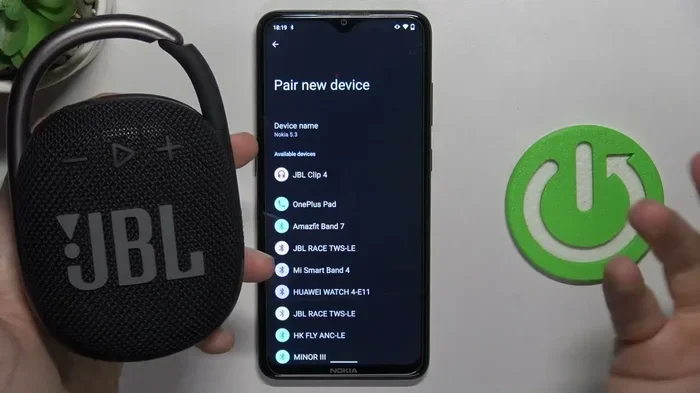
Many projectors now support Bluetooth connectivity, which makes wireless pairing simple. Just turn on your Bluetooth speaker or sound bar, put it in pairing mode, and connect from the projector’s settings menu.
Bluetooth is convenient because there are no cables to manage. The trade-off is a slight delay in audio, which can be noticeable during fast-paced videos or gaming. For most casual viewing, this delay is barely noticeable.
Wired Connections Explained
Wired connections offer more reliable audio with no delay. Here are the most common wired options:
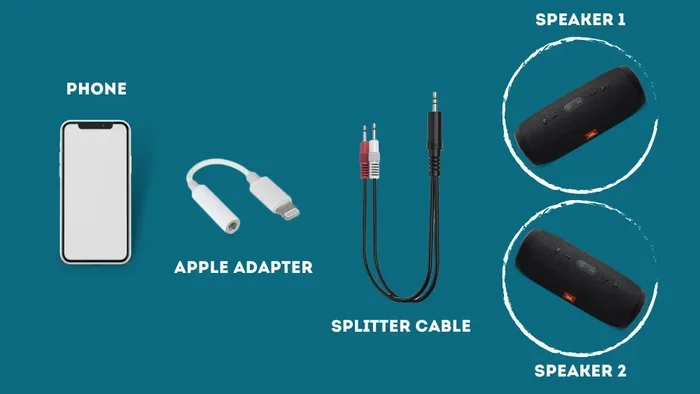
- 3.5mm AUX Cable: The most universal option. Plug one end into the projector’s audio-out port and the other into your speaker or sound bar.
- HDMI ARC: This connection sends both video and audio through one cable. It works best when your projector and sound bar both support HDMI ARC.
- Optical Audio Cable: Offers high-quality digital audio. Connect it from the projector’s optical out to your sound system or sound bar.
- RCA Cables: Older projectors may have RCA audio outputs. These work with older speakers and stereo systems.
For the best audio output quality, an optical or HDMI ARC connection is recommended. These digital connections preserve sound quality much better than analog options.
Best Projectors with Great Built-In Speakers
If you want a projector that sounds good right out of the box, some models stand out. Here are a few projector brands and models known for their surprisingly good built-in audio:
- Epson EpiqVision Mini EF12: This portable projector has built-in Harman Kardon speakers that deliver rich, clear sound. It is one of the best for audio quality in its class.
- BenQ TH585: A popular home theater projector with decent dual speakers that handle everyday viewing well.
- XGIMI Halo+: A portable projector with Harman Kardon-tuned speakers. The audio is warm and full for a projector of this size.
- Nebula Capsule 3: A compact portable projector with surprisingly loud and clear built-in audio. Great for casual use on the go.
- Anker Nebula Mars 3: Offers solid stereo sound with good volume and clarity for a portable model.
These models prove that some projector manufacturers are putting real effort into audio. But even with these options, adding external speakers will still improve the experience for serious viewers.
Quick Tips and Common Mistakes
Quick Tips for Better Projector Sound
- Always check the audio specs before buying a projector if sound matters to you.
- Use the projector’s audio settings to adjust EQ and volume levels.
- Position your projector so the speakers face the audience, not the wall.
- Consider a sound bar as an affordable and easy upgrade.
- For outdoor movie nights, a portable Bluetooth speaker works perfectly.
- Keep your projector’s firmware updated for the latest audio improvements.
Common Mistakes to Avoid
- Assuming all projectors have speakers: Always verify before you buy.
- Ignoring audio quality: A great image with poor sound ruins the experience.
- Using only one speaker: Mono sound from a single built-in speaker feels flat and lifeless.
- Placing the projector too far from the audience: Sound weakens over distance, especially from small built-in speakers.
- Overlooking cable quality: Cheap cables can cause audio interference or signal loss.
Expert Insights on Projector Audio
Audio engineers and projector experts agree on one thing: built-in projector speakers are a convenience feature, not a primary audio solution. Most professionals recommend pairing your projector with at least a basic external speaker setup. Even an affordable sound bar can elevate your experience from mediocre to genuinely enjoyable.
If you are serious about creating a home theater setup, invest in a dedicated audio system. A sound bar with a subwoofer or a full surround sound setup will complement your projector’s stunning visuals and give you a truly immersive experience. The combination of great picture quality and rich audio is what turns a simple movie night into something memorable.
For those who value portability, look for projectors with Bluetooth connectivity and decent built-in speakers. These give you flexibility. You can use the built-in speakers for quick setups and connect to better speakers when you want a more polished experience.
Final Thoughts
So, do projectors have their own speakers? Yes, many do, and they are getting better every year. But the truth is that projector speakers are just the starting point. They work for casual viewing, small rooms, and everyday presentations. When you want to truly enjoy your content, external speakers are the way to go.
Take the time to understand your audio needs. Consider the room size, the type of content you watch, and your budget. Whether you choose a sound bar, wireless speakers, or a full surround system, the right audio setup will make your projector experience completely different. Sound is half the experience, and getting it right makes all the difference.
Start with what your projector offers, and then upgrade when you feel the need. There is no shame in starting simple. The important thing is that you enjoy every moment on your big screen, with sound that matches the picture. That is the real magic of a great home theater setup.
Frequently Asked Questions
Do all projectors have built-in speakers?
No, not all projectors have built-in speakers. Many home theater and premium models skip speakers entirely to keep the unit slim and lightweight. Always check the product specifications before purchasing if audio is important to you.
Can I connect Bluetooth speakers to any projector?
Most modern projectors support Bluetooth connectivity, but not all of them do. Check your projector’s specs for Bluetooth support. If your projector lacks Bluetooth, you can use a Bluetooth audio transmitter plugged into the projector’s audio output.
What is the best type of external speaker for a projector?
A sound bar with a subwoofer is one of the best options for most users. It is easy to set up, takes up little space, and delivers rich sound. For a more immersive experience, a full surround sound system works great with projectors.
Why does my projector sound so quiet?
Most projectors have small, low-wattage speakers that struggle in larger rooms. Fan noise and the distance between the projector and the audience also affect perceived volume. Connecting external speakers solves this problem completely.
Do portable projectors have better speakers than home theater projectors?
Some portable projectors have surprisingly good speakers because they are designed for casual, on-the-go use. Brands like Anker and XGIMI invest in audio for their portable models. However, dedicated home theater projectors with external speakers still deliver better overall sound.
How can I improve my projector’s audio without buying new speakers?
You can adjust the projector’s built-in audio settings, reposition the projector to face the audience directly, and reduce background noise. Using an equalizer app on your streaming device can also help enhance the sound. But for a real improvement, external speakers are the best solution.
=== CONCLUSION ===
Do projectors have their own speakers? Many do, and they are convenient for everyday use. But built-in projector speakers have clear limitations in volume, bass, and overall clarity. For a truly satisfying viewing experience, adding external speakers is a smart move. Whether you choose a sound bar, wireless speakers, or a full surround system, better audio transforms your projector setup. Start with what you have, upgrade when you are ready, and enjoy every moment on the big screen.