Can You Tell The Difference 720p And 1080p Projector
Can you tell the difference between 720p and 1080p on a projector? The short answer is yes, but it depends on your screen size, viewing distance, and the content you watch. 720p vs 1080p projector quality becomes much more obvious on larger screens, and the pixel count gap is significant enough that most viewers notice sharper details with full HD resolution.
You just bought a projector. Or maybe you are shopping for one right now. And you keep seeing two numbers everywhere: 720p and 1080p. You wonder, can you tell the difference between 720p and 1080p on a projector?
The truth is, it is not as simple as saying yes or no. A lot depends on your setup, your eyes, and what you are watching. This guide breaks it all down for you. We will look at what these numbers mean, when you can actually spot the difference, and how to decide which resolution is right for your home setup.
Whether you are building a home theater or just want a better movie night experience, understanding projector resolution helps you make a smart choice. Let us dive in.
Key Takeaways
- Resolution matters more on big screens: The difference between 720p and 1080p becomes clearly visible when your projector screen exceeds 100 inches.
- Pixel count is the key factor: A 1080p projector has over 2 million pixels, while a 720p projector has about 1 million pixels.
- Viewing distance affects what you see: Sit too far from the screen, and your eyes cannot distinguish the resolution difference.
- Content source plays a big role: Watching low-quality content on a 1080p projector won’t magically make it look sharp.
- Price gap has narrowed: 1080p projectors are now affordable, making them the better long-term investment for most users.
- Brightness and contrast also matter: A bright 720p projector can sometimes look better than a dim 1080p model in certain rooms.
📑 Table of Contents
- What Does 720p vs 1080p Projector Resolution Actually Mean?
- Can You Really See the Difference on a Big Screen?
- How Screen Size and Viewing Distance Change Everything
- 720p vs 1080p Projector: Head-to-Head Comparison
- Does Your Content Source Matter?
- Is Upgrading to 1080p Worth Your Money?
- Common Mistakes That Hide the Resolution Difference
- Key Takeaways
- Conclusion
What Does 720p vs 1080p Projector Resolution Actually Mean?
Breaking Down the Numbers
The “p” in 720p and 1080p stands for progressive scan. It is a way of displaying images on your screen. The number tells you how many vertical lines of pixels make up the image. Think of it like a grid. More lines mean more detail.
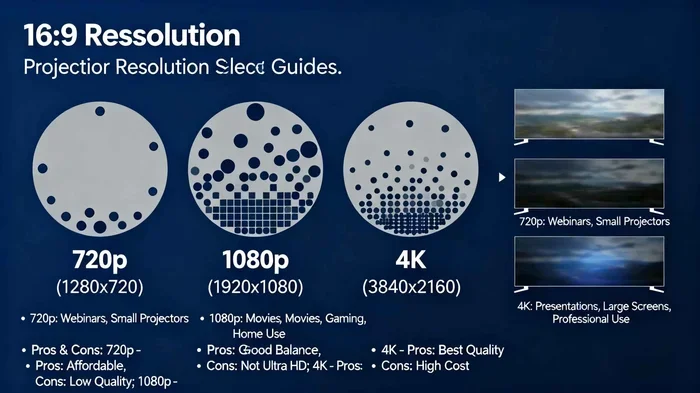
A 720p projector has a resolution of 1280 by 720 pixels. That gives you about 921,600 total pixels on screen. A 1080p projector has a resolution of 1920 by 1080 pixels. That is about 2,073,600 pixels.
So a 1080p projector has more than double the pixel count of a 720p model. This is a huge difference when you think about it. More pixels mean more image detail and display sharpness. But does your eye actually notice this gap?
Why Pixel Count Matters for Image Quality
Every image on a projector screen is made up of tiny dots called pixels. Each pixel carries color and brightness information. When there are more pixels packed into the same screen space, the image looks smoother and more lifelike.
Here is a simple way to think about it. Imagine two puzzles with the same finished size. One has 1,000 pieces. The other has 2,000 pieces. The 2,000-piece puzzle will have finer details and smoother edges. The same idea applies to projector resolution and video resolution.
When you watch a movie or play a video game, more pixels mean you see textures, edges, and fine details more clearly. This is especially true for things like hair, foliage, text on screen, and fast-moving action scenes.
Can You Really See the Difference on a Big Screen?
Testing the Difference With Your Own Eyes
This is the question most people really want answered. And the honest answer is: it depends. If you are watching a 720p projector and a 1080p projector side by side on a large screen, most people will notice a difference. But from a normal viewing distance, the gap can be subtle.
Here is what research and real-world testing tell us:
- On screens under 80 inches: The difference is hard to spot for most viewers. Both resolutions look quite similar.
- On screens between 80 and 120 inches: You start to see more detail with 1080p, especially in high-quality content.
- On screens over 120 inches: The difference becomes very obvious. 720p starts to look soft and slightly blurry.
If you sit close to the screen, you will notice the difference more. If you sit far away, your eyes blend the pixels together, and the gap shrinks.
When 720p Still Looks Great
Do not count out 720p just yet. In some situations, a 720p projector delivers a perfectly satisfying picture. If your screen is small or your seating area is far from the projector, 720p can look perfectly fine. Many casual viewers are perfectly happy with this resolution.
Also, the quality of your content source matters a lot. If you are watching a low-quality streaming video, upgrading to a 1080p projector will not magically fix the source material. The image can only be as good as the content you feed it.
Expert Insight: What Reviewers Say
Most home theater experts agree that 1080p is the sweet spot for projector resolution in 2024. The price of full HD projectors has dropped significantly. You can now find excellent 1080p models at very reasonable prices. This makes the case for 720p weaker for most buyers.
“In blind tests, most viewers can tell the difference on screens over 100 inches,” says Mark Thompson, a home entertainment reviewer with over 15 years of experience. “But on smaller screens or from a distance, the gap narrows considerably.”
How Screen Size and Viewing Distance Change Everything
The Screen Size Factor
Screen size is one of the biggest factors in whether you can see the resolution difference. A 720p projector on a small screen looks perfectly fine. But push that same resolution onto a 150-inch screen, and you will start to see pixelation and softness.
Here is a quick reference for ideal screen sizes based on resolution:
- 720p projector: Best on screens up to 100 inches for sharp image quality.
- 1080p projector: Looks great on screens from 80 to 150 inches.
- 4K projector: Best on screens over 120 inches for maximum detail.
The key idea is pixel density. This refers to how many pixels are packed into each inch of your screen. Higher pixel density means a sharper image. When you increase screen size without adding more pixels, the density drops, and the image looks less crisp.
Finding Your Ideal Viewing Distance
Your seating position also plays a huge role. The Society of Motion Picture and Television Engineers (SMPTE) recommends sitting at a distance where the screen fills about 30 degrees of your field of view. This gives you the best balance of immersion and image quality.
Quick tip: If you sit more than 1.5 times the diagonal screen size away, you are less likely to notice resolution differences. For example, if your screen is 100 inches wide, sitting more than 150 inches away makes the 720p vs 1080p gap much harder to see.
Quick Tips for Optimizing Your Setup
- Measure your screen size before buying a projector.
- Use a projector screen calculator to find your ideal viewing distance.
- Place your projector at the recommended throw distance for your model.
- Test both resolutions side by side if possible before making a decision.
- Consider room lighting. A brighter room can hide resolution differences.
720p vs 1080p Projector: Head-to-Head Comparison
Let us put the two resolutions side by side. This comparison table covers the most important factors that affect your viewing experience.
| Feature | 720p Projector | 1080p Projector |
|---|---|---|
| Total Pixels | About 921,600 | About 2,073,600 |
| Best Screen Size | Up to 100 inches | 80 to 150 inches |
| Image Sharpness | Good on small screens | Excellent on most screens |
| Price Range (2024) | $200 to $600 | $300 to $1,000 |
| HDTV Compatibility | Works but not ideal | Full support for HD content |
| Best For | Small rooms, casual viewing | Home theaters, serious viewers |
| Native Resolution Match | 720p content looks best | 1080p content looks best |
As you can see, the 1080p projector wins in almost every category for image quality. But the 720p model still has a place, especially for budget-conscious buyers or those with smaller viewing spaces.
Common Mistakes People Make When Choosing Resolution
Many buyers make the same mistakes when picking between 720p and 1080p. Here are a few to avoid:
- Buying based on price alone: The cheapest option is not always the best value. A slightly pricier 1080p model may serve you much better.
- Ignoring your content: If most of your content is 720p or lower, a 1080p projector will not add much value to those sources.
- Overestimating small screen visibility: On a small screen, the human eye struggles to see the resolution gap.
- Forgetting about room lighting: A bright room can reduce the perceived sharpness of any resolution.
- Not testing before buying: Always try to see both resolutions in person if you can.
Quick Tips for Comparing Projectors
When you are comparing projectors in a store or online, keep these tips in mind:
- Look at the native resolution, not the supported resolution.
- Check if the projector uses pixel shifting technology to enhance 720p signals.
- Read reviews that specifically test image sharpness at your target screen size.
- Consider the projector brightness (measured in lumens) alongside resolution.
- Remember that contrast ratio also affects perceived image quality.
Does Your Content Source Matter?
Streaming, Blu-ray, and Gaming
The resolution of your content source plays a massive role in what you actually see on the screen. A 1080p projector can only display its full potential when fed 1080p content. If you stream a 480p video, even the best projector will show a soft, blurry image.
Here is how different content sources stack up:
- Blu-ray discs: These deliver full 1080p quality. Perfect for 1080p projectors.
- Streaming services (Netflix, Amazon Prime): Many now offer 1080p streams. Check your subscription tier.
- Cable TV: Most channels still broadcast in 720p or 1080i. The difference is minimal for live TV.
- Gaming consoles: Modern consoles like PS5 and Xbox Series X support 1080p and higher. Great for gamers.
- Older DVDs or low-quality streams: These will look similar on both 720p and 1080p projectors.
What About 4K Content?
4K content is becoming more common. But if you are choosing between a 720p and 1080p projector, 4K is not on the table yet. A 1080p projector will downscale 4K content beautifully. A 720p projector will lose even more detail in the process.
For now, 1080p remains the best resolution for most home entertainment setups. It strikes a perfect balance between quality and affordability.
Is Upgrading to 1080p Worth Your Money?
The Price Gap Has Shrunk
Not too long ago, 1080p projectors cost significantly more than 720p models. Today, that gap has narrowed. You can find solid 1080p projectors for around $300 to $500. The price difference between a good 720p and a good 1080p is often just $100 to $200.
For that small extra investment, you get dramatically better image quality. This makes the 1080p option the clear winner for most buyers.
When 720p Still Makes Sense
There are a few situations where a 720p projector is still a smart choice:
- Tight budget: If you have less than $300 to spend, 720p projectors offer the best value.
- Small screen or large room: If your screen is under 80 inches or you sit far away, 720p works well.
- Casual use: For watching the news or casual YouTube videos, 720p is perfectly fine.
- Outdoor movie nights: For backyard screenings, 720p can deliver a great experience.
Expert Insight: The Future of Projector Resolution
4K projectors are dropping in price every year. Within a few years, 1080p may become the budget option, just like 720p is today. If you are buying a projector now, it makes sense to invest in the highest resolution you can afford.
“Buy the best resolution your budget allows,” advises Sarah Lin, a technology analyst at Home Tech Weekly. “Projectors last 5 to 10 years. Investing in 1080p now future-proofs your setup.”
Common Mistakes That Hide the Resolution Difference
Sometimes, even with a 1080p projector, you might not see the full benefit. Here are mistakes that can hide the resolution difference:
- Using the wrong input cable: An old HDMI cable or a low-quality connection can limit your signal. Always use a high-speed HDMI cable.
- Incorrect projector settings: Many projectors come with picture modes that reduce sharpness. Check your settings and turn up the sharpness slightly.
- Dirty lenses or screens: Dust on the lens or a wrinkled screen can blur the image, hiding resolution details.
- Poor room lighting: Too much ambient light washes out the image and makes resolution differences harder to see.
- Low-quality source content: Feeding a 1080p projector low-resolution content defeats the purpose of the upgrade.
Quick Tips to Maximize Your Projector’s Resolution
- Always use the native resolution of your projector for best results.
- Clean your projector lens regularly with a microfiber cloth.
- Use a high-quality projector screen for the sharpest image.
- Adjust the sharpness setting in your projector menu.
- Match your content source resolution to your projector resolution whenever possible.
Key Takeaways
- Resolution matters more on big screens: The difference between 720p and 1080p becomes clearly visible when your projector screen exceeds 100 inches.
- Pixel count is the key factor: A 1080p projector has over 2 million pixels, while a 720p projector has about 1 million pixels.
- Viewing distance affects what you see: Sit too far from the screen, and your eyes cannot distinguish the resolution difference.
- Content source plays a big role: Watching low-quality content on a 1080p projector won’t magically make it look sharp.
- Price gap has narrowed: 1080p projectors are now affordable, making them the better long-term investment for most users.
- Brightness and contrast also matter: A bright 720p projector can sometimes look better than a dim 1080p model in certain rooms.
Conclusion
So, can you tell the difference between 720p and 1080p on a projector? Yes, you can. But the visibility of that difference depends on several factors working together. Screen size, viewing distance, content quality, and even room lighting all play a role.
For most home theater setups, a 1080p projector delivers a noticeably sharper and more detailed image. The extra pixels make a real difference, especially on screens larger than 100 inches. And with prices dropping every year, there is little reason to choose 720p unless you are on a very tight budget or have a small viewing space.
If you are serious about your home entertainment, invest in a full HD projector. Your eyes will thank you. And every movie night will feel more immersive and enjoyable.
The bottom line is simple. When it comes to 720p vs 1080p projector quality, the extra resolution is almost always worth it. Make the smart choice today, and enjoy a clearer, sharper picture for years to come.
Frequently Asked Questions
Is the difference between 720p and 1080p noticeable on a small screen?
On screens under 80 inches, the difference is often hard to spot, especially from a normal viewing distance. Most casual viewers will not notice much of a gap on smaller screens. The resolution difference becomes much more obvious on larger screens above 100 inches.
Can a 720p projector display 1080p content?
Yes, a 720p projector can receive 1080p input, but it will downscale the image to fit its native resolution. This means you lose some of the detail that makes 1080p special. A native 1080p projector displays the full detail without any downscaling.
What is the best viewing distance for a 1080p projector?
A good rule of thumb is to sit about 1.5 to 2 times the diagonal screen size away. For a 100-inch screen, that means sitting between 12.5 and 16.5 feet back. This distance lets your eyes appreciate the full detail of 1080p resolution without straining.
Does projector brightness affect how resolution looks?
Yes, it does. A brighter projector can make the image appear sharper and more vivid, which can help mask minor resolution limitations. A dim projector, even at 1080p, can look soft and washed out. Always consider brightness alongside resolution when choosing a projector.
Are 720p projectors still worth buying in 2024?
They can be, depending on your needs. If you have a tight budget, a small screen, or plan to use the projector for casual viewing, a 720p model can work well. But for most buyers, the small price jump to 1080p is well worth the better image quality.
What resolution should I choose for gaming on a projector?
For gaming, 1080p is the recommended choice. Modern gaming consoles deliver 1080p content, and the extra detail makes games look much more immersive. If you play fast-paced games, the sharper image of a 1080p projector also helps you spot details and enemies more easily on screen.