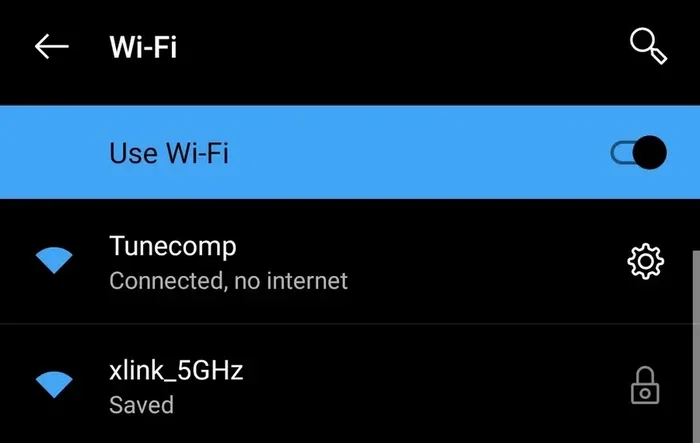
Can You Run Wifi Without Internet And Still Stay Connected
Yes, you can run wifi without internet and still stay connected. Your wireless router creates a local network that lets devices communicate, share files, and stream content even when the web is down. This guide shows you how to set up a network without internet and keep your devices linked.
Have you ever wondered if you can run wifi without internet? It sounds like a contradiction, but here is the truth. Your wireless router does not need an active internet connection to broadcast a signal. It can still create a local network that connects your devices. This means you can stream movies, share files, and even control smart home devices without the web.
The idea of running wifi without internet surprises many people. We all assume that wifi equals the internet. But the two are actually separate things. Your router handles local traffic all on its own. Understanding this opens up a lot of possibilities. You can stay connected in more ways than you think.
In this guide, we will walk you through everything you need to know. We will cover how offline wifi works, how to set it up, and what you can do with it. Whether your internet is down or you simply want a disconnected setup, this article has you covered. Let us dive in.
Key Takeaways
- Wifi works independently of the internet: Your router creates a local network even without an ISP connection.
- You can share files and media: Devices on the same network can transfer data offline.
- Smart home devices still work: Many smart devices function on a local network without needing the web.
- You need the right settings: Configuring your router properly is key to an offline setup.
- Streaming and gaming are possible: Local servers and DLNA let you enjoy content without the internet.
- Security matters: Protect your offline network just like you would an online one.
📑 Table of Contents
What Does It Mean to Run Wifi Without Internet
When we talk about can you run wifi without internet, we are talking about your router creating a wireless network on its own. The router acts as a hub. It lets your phones, laptops, and tablets talk to each other. But none of them can reach the wider web. Think of it like a private bubble of connectivity.
Your internet service provider sends data to your router through a modem. That data travels from the web to your devices. But when that flow stops, your router does not shut down. It keeps broadcasting a wireless signal. Devices can still find it and connect to it. They just cannot leave your local area network.
How Wifi and the Internet Are Different
This is a key distinction many people miss. Wifi is a technology that sends data through the air. It uses radio waves to link devices. The internet is a global network of servers and cables. Your wifi router is the bridge between the two. When the bridge breaks, wifi still exists on one side.
Here is a simple way to think about it. Imagine a train station. The station is your router. The trains are data. When the trains stop coming from outside, the station is still there. Trains can still move between platforms. That is exactly what happens with your network without internet. The station stays active. The local trains keep running.
How Your Wireless Router Works Offline
Your wireless router has two main jobs. First, it connects your devices to each other. Second, it routes traffic between your devices and the internet. When the internet goes away, the first job keeps working perfectly. Your router still assigns local IP addresses. It still manages connected devices on the network.
The router uses something called a DHCP server. This gives each device a local address. Those addresses let devices find each other. They do not need the outside world to do this. The whole process happens inside your home. It is fast, private, and completely offline.
The Role of the Router’s Firmware
Your router runs on firmware. This is built-in software that controls how the device works. The firmware handles both online and offline tasks. When there is no internet connection, the firmware shifts focus. It prioritizes local communication. This is why your devices can still see each other even when the web is down.
Most modern routers are designed to handle this gracefully. They do not crash or stop working. They simply adjust their behavior. This is great news for anyone dealing with an outage. You can keep using your local network without stress.
Setting Up a Local Network Without Internet
Setting up an offline wifi network is simpler than you might think. You do not need an internet plan to create a local network. You just need a working router and some devices. Here is how to get started.
Step One: Power Up Your Router
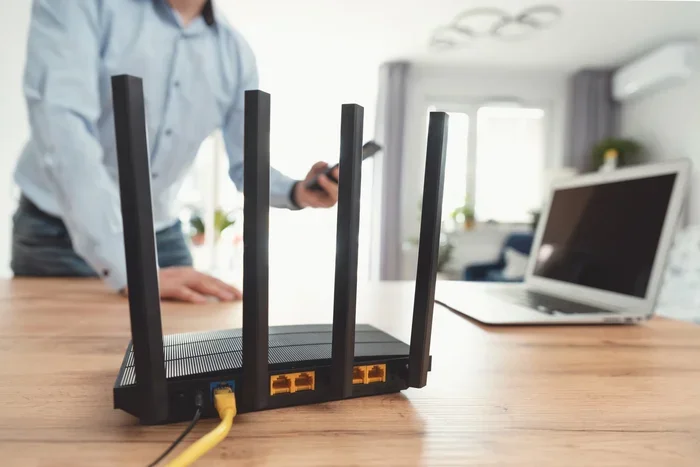
Plug in your router and turn it on. Wait for the lights to stabilize. Most routers have a power light and a wireless signal light. Once those are solid, your router is ready. It is now broadcasting a wireless signal all on its own.
You do not need to connect an ethernet cable from a modem. Without an internet source, the WAN port stays empty. That is perfectly fine. Your router will still create a local network. Your devices will still be able to connect.
Step Two: Connect Your Devices
On each device, go to the wifi settings. Look for your router name in the list. Tap or click on it. Enter the password if required. Once connected, your device is part of the local network.
You can connect phones, tablets, laptops, and smart TVs. Even gaming consoles can join. All of these devices can now talk to each other. They share the same local network. This is the foundation of your offline setup.
Step Three: Configure Router Settings
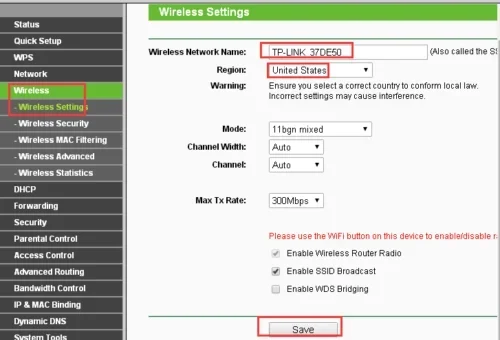
To get the most out of your offline network, you should check a few router settings. Open a browser and type in your router IP address. This is usually 192.168.1.1 or 192.168.0.1. Log in with your admin credentials.
Here are some settings to review:
- Network Name: Make sure your wifi name is easy to find.
- Password: Set a strong password to keep strangers out.
- DHCP Range: Ensure enough addresses for all your devices.
- Wireless Channel: Pick a channel with less interference.
- Guest Network: Set one up if visitors need access.
These steps help you create a clean, organized local area network. Even without the internet, a well-configured router makes a big difference.
What You Can Do With Offline Wifi
This is where things get fun. Many people assume that no internet means no useful wifi. That is far from true. You can do a surprising amount with a network without internet. Here are the best things you can try.
Share Files Between Devices
With your devices on the same network, you can share files easily. Windows has a feature called HomeGroup. Mac computers use AirDrop. Both work over a local network. You can send photos, documents, and videos between devices.
You do not need USB drives or cables. Just connect to the same wifi hotspot and share. It is fast and convenient. This is especially handy when you have large files to move.
Stream Media Locally
Want to watch movies on your TV without the internet? You can. Use apps like Plex or VLC. These apps support local streaming. They pull media from a shared folder on your network. Your phone or laptop becomes a remote control.
You can also use DLNA servers. These let you stream content to smart TVs and streaming sticks. All of this works without a single internet packet. Your bandwidth stays local and fast.
Play Multiplayer Games
Gamers will love this feature. Many games support local multiplayer over wifi. You can set up LAN parties without the internet. Connect your PCs or consoles to the same network. Play together in real time.
Games like Minecraft, Mario Kart, and StarCraft thrive on local networks. The lag is minimal because the data never leaves your home. It is a great way to game with friends during an outage.
Control Smart Home Devices
Here is a big one. Many smart home devices work on local networks. Smart bulbs, plugs, and cameras often have local control modes. They do not always need the cloud to function.
For example, Philips Hue bulbs can be controlled through a local bridge. Ring cameras can record locally to a base station. Your mesh network or standard router keeps these devices connected. You lose some remote features, but core functions still work.
Common Problems and How to Fix Them
Even with offline wifi, you might run into issues. Here are the most common problems and simple fixes.
Devices Cannot Find the Network
If your devices cannot see your wifi, try restarting the router. Unplug it for 30 seconds. Plug it back in and wait for it to boot. Also check that your router is set to broadcast its name. Some routers hide the network by default.
Devices Connect But Cannot Share Files
This usually happens when devices are on different subnets. Check that all devices are on the same network configuration. Make sure file sharing is turned on in your settings. On Windows, go to Network and Sharing Center. On Mac, check System Preferences under Sharing.
Slow Speeds on the Local Network
Slow local speeds can be frustrating. Try changing the wireless channel on your router. Interference from neighbors can cause slowdowns. Also, make sure your router firmware is up to date. A wifi range extender can also help boost the signal in larger homes.
Smart Devices Keep Going Offline
Some smart devices need a stable connection to stay linked. Place your router centrally. Avoid walls and metal objects near the router. If problems persist, consider a wifi access point to extend coverage. This keeps all your smart devices connected.
Expert Tips for a Better Offline Wifi Experience
Want to get the most from your offline network? Here are some tips from networking pros.
Use Ethernet for Key Devices
For devices that need a rock-solid connection, use an ethernet connection. Plug your smart TV or gaming PC directly into the router. Wired connections are faster and more stable than wireless. They also reduce interference on the wireless network.
Set Up a Dedicated Offline VLAN
Advanced users can create a virtual LAN. This separates your offline traffic from any guest traffic. It adds a layer of security and organization. Check your router manual for VLAN setup instructions.
Keep a Local DNS Server
You can set up a local DNS server on your network. This helps devices find each other faster. It also allows you to use custom domain names for local services. Tools like Pi-hole work great for this. They add both speed and privacy to your offline setup.
Secure Your Offline Network
Just because you are offline does not mean you should skip security. Use WPA3 encryption if your router supports it. Change default admin passwords. Disable WPS if it is not needed. A secure local network protects your data even without the internet.
When You Need Internet Again
At some point, you will want to reconnect. When your internet service provider comes back online, the transition is easy. Simply plug the ethernet cable back into your modem. Your router will detect the connection. Your devices will automatically regain access to the web.
You may need to check a few DNS settings after reconnecting. Sometimes offline configurations interfere with online browsing. Resetting your router to factory defaults is a last resort. But most of the time, a simple reboot does the trick.
The beauty of modern routers is their flexibility. They handle both offline and online modes with ease. You can switch back and forth without any hassle. Your connected devices will barely notice the difference.
Conclusion
So, can you run wifi without internet and still stay connected? Absolutely yes. Your wireless router is capable of so much more than just linking you to the web. It creates a powerful local network that keeps your devices talking. You can share files, stream media, game, and control smart home devices all without the internet.
Setting up an offline wifi network is straightforward. A few simple steps and you are up and running. The key is understanding that wifi and the internet are two different things. Once you grasp that, the possibilities open up. You gain more control over your home network.
Whether you are dealing with an outage or just want a private offline setup, this knowledge is valuable. You now know how to configure your router, share content, and keep your smart devices working. The next time someone asks you about running wifi without internet, you will be the expert they turn to.
Take what you have learned here and try it out. Set up your own network without internet today. You will be surprised by how much you can do. Stay connected, stay curious, and enjoy the power of your local network.
Frequently Asked Questions
Can I use my wifi router without an internet service provider?
Yes, you can. Your router will still broadcast a wireless signal and create a local network. Devices can connect to each other and share files. The only thing missing is access to the wider web. Everything else works normally on your offline network.
Will my smart home devices work without internet?
Many smart home devices will still work locally. Devices like smart bulbs and plugs often have local control modes. You may lose remote access and voice assistant features. But basic functions like turning lights on and off usually continue working.
How do I share files between devices on offline wifi?
Make sure all devices are connected to the same network. On Windows, enable file sharing through Network and Sharing Center. On Mac, use AirDrop or enable file sharing in System Preferences. You can also use apps like Sharedrive or local FTP servers for easy transfers.
Is offline wifi slower than online wifi?
Not necessarily. In fact, offline wifi can be faster for local tasks. Data does not have to travel to external servers. Streaming local media or sharing files on your network uses your full local speed. The only limitation is the range and quality of your wireless signal.
Do I need any special equipment for offline wifi?
No special equipment is needed. Any standard wireless router will work. You just need the router powered on and connected to your devices. For better coverage, a wifi range extender or mesh system can help. But the basics require nothing more than your existing router.
Can I set up a wifi network completely isolated from the internet?
Yes, you can. This is sometimes called an air-gapped network. You simply do not connect your router to a modem or internet source. All traffic stays within your local network. This setup is great for privacy, testing, or secure file sharing between devices.