Can I Have 2 Routers With Spectrum At My Home Today
Yes, you absolutely can have 2 routers with Spectrum. Adding a second router helps boost your WiFi signal, covers more rooms, and reduces dead zones in your home. Whether you have a large house or just need better speeds in certain areas, a dual router setup with your Spectrum router is totally doable. This guide walks you through every step, from planning your setup to troubleshooting common issues.
Have you ever walked into a room and found your WiFi signal drops to nothing? Or maybe your internet crawls when you try to stream a movie in the bedroom while someone else is gaming downstairs. It happens to the best of us. And when it does, one question pops up fast: Can I have 2 routers with Spectrum?
The short answer is yes. You can absolutely run two routers with your Spectrum internet service. A lot of homeowners do it every single day. It is one of the easiest and most affordable ways to improve your home network. Whether you live in a small apartment or a big two-story house, adding a secondary router can make a huge difference.
In this guide, I will walk you through everything you need to know. We will cover why you might want a second router, how to set it up, what problems to watch out for, and expert tips to get the most out of your dual router setup. Let us dive right in.
Key Takeaways
- Two routers work fine with Spectrum: You can connect a second router to your Spectrum modem or primary router without any problems.
- Better coverage and speed: A dual router setup eliminates dead zones and improves WiFi signal throughout your home.
- Proper configuration is key: You need to set up the second router correctly to avoid IP address conflicts and DHCP issues.
- Ethernet or wireless backhaul: You can connect the two routers using a cable or wirelessly, depending on your setup.
- Watch for common mistakes: Avoid placing routers too close together and always check your Spectrum internet plan speeds.
- Spectrum support is available: If you get stuck, Spectrum support can help you configure your network.
📑 Table of Contents
- Why You Might Want a Second Router With Spectrum
- How to Set Up Two Routers With Spectrum
- Benefits of Running Two Routers With Spectrum
- Common Problems When Using Two Routers With Spectrum
- Spectrum Router vs. Your Own Router
- Expert Tips for a Smooth Dual Router Setup
- Quick Tips for Better WiFi With Two Routers
- Conclusion
Why You Might Want a Second Router With Spectrum
Most people never think about their home network until something goes wrong. Then suddenly, every video call lags, every download stalls, and everyone in the house is frustrated. That is exactly when a second router becomes a lifesaver.
Your Home Is Too Big for One Router
Here is a simple fact. Most Spectrum routers are designed to cover a moderate-sized home. If your house has multiple floors, thick walls, or long hallways, one router simply cannot reach every corner. The WiFi signal weakens as it travels through walls and furniture. By the time it reaches the far end of your house, it might barely work.
A second router extends the reach of your network. It fills in the gaps and gives you strong wireless range in every room. This is especially helpful if you work from home and need a reliable connection in your office.
Too Many Devices on One Network
Think about how many devices connect to your home network. You have your phone, laptop, smart TV, tablet, gaming console, maybe a smart speaker or two. Add in smart home devices like cameras, doorbells, and thermostats. That is a lot of gadgets all competing for the same bandwidth.
When too many devices share one router, your internet slows down. A second router helps distribute the load. It spreads out the traffic so no single device hogs all the network resources. The result? Smoother streaming, faster downloads, and fewer buffering moments.
You Want Separate Networks for Guests and Family
Some people like to keep their home network and guest network separate. A second router lets you do this easily. You can set up one network for your family with full security settings, and another for guests with limited access. This keeps your personal devices safe while still being welcoming to visitors.
How to Set Up Two Routers With Spectrum
Setting up a dual router setup with Spectrum is simpler than you might think. You do not need to be a tech expert. Just follow these steps and you will be up and running in no time.
Step 1: Check Your Spectrum Equipment
Before you buy anything, take a look at what Spectrum gave you. Most customers receive a combo device that acts as both a modem and a router. This is called a gateway. It handles your internet connection and broadcasts your WiFi signal.
Here is the thing. You can use the Spectrum gateway as your primary router. Then you connect your own second router to it. You have two main ways to do this:
- Wired connection: Use an Ethernet cable to connect the Spectrum gateway to your second router.
- Wireless connection: Set up the second router to connect to the Spectrum gateway over WiFi.
The wired option is almost always faster and more stable. If you can run a cable between the two devices, go for it. It gives you the best internet speed and the fewest connection problems.
Step 2: Choose the Right Placement for Your Second Router
Where you put your second router matters a lot. You do not want to place it right next to your Spectrum gateway. That creates signal overlap and can actually slow things down. Instead, put the second router in a central location between the gateway and the area with weak coverage.
Good places for a second router include:
- The upstairs hallway if you have a two-story home
- A living room that is between the modem and the far bedrooms
- A home office on a different floor from the gateway
- A basement or garage where the signal is usually weakest
Keep the router elevated and away from thick walls and metal objects. These things block WiFi signals and reduce your wireless range.
Step 3: Configure the Second Router
Once your second router is connected, you need to configure it properly. This is where most people get stuck, so pay close attention.
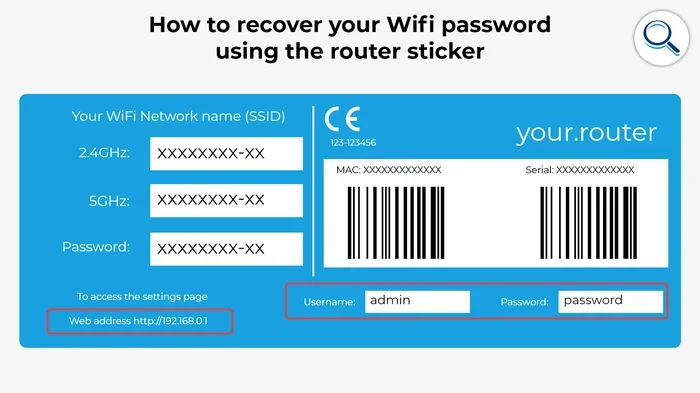
First, log into the second router’s admin panel. You can usually do this by typing the router’s IP address into your web browser. Common addresses are 192.168.1.1 or 192.168.0.1. Check the router’s manual if you are not sure.
Next, turn off the DHCP server on the second router. DHCP assigns IP addresses to devices on your network. If both routers run DHCP, they will conflict with each other. This causes IP address conflicts and connection drops.
Set the second router to operate in bridge mode or access point mode if that option is available. This tells the router to simply extend the network rather than create a separate one.
Finally, give the second router a unique name for its WiFi network. You can call it something like “HomeWiFi_2” so you know which router your device is connected to. Some people prefer to use the same network name and password on both routers for a seamless experience.
Step 4: Test Your Connection
After setup, test your connection in different parts of the house. Walk around with your phone and check the signal strength. Try streaming a video or running a speed test. If everything works smoothly, you are all set.
If you notice issues, go back and check your cable connections. Make sure the second router is not too close to the Spectrum gateway. And double-check that DHCP is turned off on the secondary router.
Benefits of Running Two Routers With Spectrum
Adding a second router to your Spectrum setup comes with some real advantages. Here is why so many homeowners choose to do it.
Faster Speeds in Every Room
One of the biggest benefits of a dual router setup is better speed throughout your home. When your primary router has to cover a large area, it has to work hard. That can slow it down. A second router takes some of the load off the primary router. Devices closer to the second router get faster speeds because they are not competing as much for the same resources.
Fewer Dead Zones
Dead zones are areas in your home where the WiFi signal is too weak to work. They are super annoying, especially if your dead zone is in a room you use every day. A second router eliminates most dead zones by placing a strong signal closer to those hard-to-reach areas.
Better Performance for Gaming and Streaming
If you are a gamer or a heavy streamer, you know how important a stable connection is. Lag spikes and buffering can ruin the experience. A second router helps by giving your gaming console or streaming device a dedicated connection. This means less interference from other devices and a smoother, more reliable experience.
Future-Proof Your Home Network
Technology keeps advancing. More smart home devices, more streaming services, and more people working from home all put pressure on your network. A second router gives you room to grow. You can add more devices without worrying about your network crashing.
Common Problems When Using Two Routers With Spectrum
A dual router setup is not without its challenges. Here are the most common issues and how to fix them.
IP Address Conflicts
This is the number one problem people run into. When both routers assign IP addresses, they can overlap. This causes devices to lose their connection or get confused about which router to use.
The fix is simple. Turn off DHCP on the second router. Or set the second router to a different IP range than the Spectrum gateway. For example, if your Spectrum gateway uses 192.168.1.x, set your second router to 192.168.2.x.
Double NAT Issues
NAT stands for Network Address Translation. It is how your router shares your internet connection with all your devices. When you have two routers, you can get something called double NAT. This happens when both routers are trying to do NAT at the same time.
Double NAT can cause problems with online gaming, video calls, and some apps. To fix it, set your second router to bridge mode or access point mode. This stops it from doing its own NAT and lets the Spectrum gateway handle everything.
Slow Speeds on the Second Router
If your second router is slow, the problem might be how it is connected. A wireless connection between the two routers always loses some speed. The signal has to travel through the air, and walls and furniture weaken it.
The best fix is to use an Ethernet cable to connect the two routers. If you cannot run a cable, consider using a WiFi extender or a mesh network system instead. These alternatives can also boost your network coverage without the complexity of managing two routers.
Router Placement Mistakes
Placing your second router in a bad spot is one of the most common mistakes. Do not hide it behind a TV cabinet or inside a closet. Do not put it on the floor. These things block the signal and reduce your wireless range.
Instead, place the router in an open area on a shelf or table. Keep it away from microwaves, baby monitors, and other electronics that can cause interference.
Spectrum Router vs. Your Own Router
When you think about adding a second router, you might wonder whether to use the Spectrum-provided router or buy your own. Both options have pros and cons.
The Spectrum gateway works well for most basic needs. It is easy to set up and comes with support from Spectrum support. But it may not be the best choice for larger homes or heavy internet users. Many people find that their own router delivers better WiFi signal strength and faster internet speed.
Buying your own router gives you more control. You can choose features like better antennas, stronger processors, and advanced security settings. Popular choices include routers from brands like Netgear, ASUS, TP-Link, and Linksys. These routers often support the latest WiFi standards like WiFi 6, which offers faster speeds and handles more devices at once.
Here is a quick comparison to help you decide:
| Feature | Spectrum Gateway | Your Own Router |
|---|---|---|
| Ease of Setup | Very Easy | Easy to Moderate |
| Speed Performance | Good for Average Use | Better for Heavy Use |
| Coverage Area | Moderate | Can Be Much Larger |
| Advanced Features | Limited | More Options Available |
| Monthly Cost | Often Includes Rental Fee | One-Time Purchase |
| Customer Support | Spectrum Support Included | Depends on Manufacturer |
As you can see, buying your own router gives you more flexibility and often better performance. If you plan to run a dual router setup, having your own router makes it even easier to customize your network.
Expert Tips for a Smooth Dual Router Setup
Setting up two routers is straightforward, but a few expert tips can make the process even smoother. Here is what the pros recommend.
Use the Same WiFi Band for Both Routers
If your Spectrum gateway and your second router both support 2.4 GHz and 5 GHz bands, try to set them to the same band for seamless roaming. This way, your devices can switch between routers without dropping the connection.
Keep Firmware Updated
Router firmware updates fix bugs and improve performance. Check for updates on both routers regularly. Most routers have an option to auto-update in the settings panel.
Use Strong, Unique Passwords
Every router on your network should have a strong password. This keeps your home network safe from intruders. Use a mix of letters, numbers, and symbols. Avoid common passwords like “password123.”
Monitor Your Network Performance
After setup, keep an eye on how your network performs. Use apps or built-in router tools to check signal strength, connected devices, and speed. If something feels off, you can adjust your settings right away.
Consider a Mesh Network Instead
If managing two routers feels like too much work, consider a mesh network system. A mesh system uses multiple nodes placed around your home to create one seamless network. It is easier to set up and manage than a dual router setup. Brands like Google Nest WiFi, Eero, and Netgear Orbi make great mesh systems that work well with Spectrum internet.
Quick Tips for Better WiFi With Two Routers
- Place your second router halfway between the Spectrum gateway and the weakest signal area
- Use an Ethernet cable for the most stable connection between routers
- Name both routers with the same SSID and password for seamless roaming
- Restart both routers once a month to keep things running smoothly
- Check your Spectrum internet plan speeds regularly to make sure you are getting what you pay for
- Keep routers away from thick walls, metal objects, and electronics that cause interference
Conclusion
So, can you have 2 routers with Spectrum? Absolutely. A dual router setup is one of the best things you can do for your home network. It improves your WiFi signal, extends your wireless range, and gives every device in your home the speed and connection it needs.
Whether you set up your second router through a wired Ethernet connection or wirelessly, the key is proper configuration. Turn off DHCP on the second router, avoid double NAT, and place your routers strategically for the best results.
If you ever feel overwhelmed, remember that Spectrum support is just a phone call away. They can walk you through the setup and help you troubleshoot any issues. And if managing two routers feels like too much, a mesh network system is always a great alternative.
The bottom line is simple. You deserve a home network that works as hard as you do. With two routers and your Spectrum internet, you can make that happen. Start planning your setup today and enjoy faster, stronger WiFi in every corner of your home.
Can I Have 2 Routers With Spectrum?
Yes, you can have two routers with Spectrum. You simply connect your second router to the Spectrum gateway, either through an Ethernet cable or wirelessly, and configure it properly to extend your network coverage.
Will Having Two Routers Slow Down My Internet?
No, having two routers will not slow down your internet. In fact, it often improves speed by distributing the load across both routers. Just make sure you configure the second router correctly to avoid conflicts.
Do I Need a Special Router to Work With Spectrum?
No, you do not need a special router. Any standard WiFi router will work with Spectrum. Just make sure it supports the same WiFi standards as your Spectrum gateway for the best performance.
Can I Use My Own Router Instead of the Spectrum Gateway?
Yes, you can replace the Spectrum gateway with your own router. You will need to put the Spectrum modem into bridge mode first, then connect your router to it. This gives you more control over your network settings and features.
What Is Bridge Mode and Why Do I Need It?
Bridge mode turns your Spectrum gateway into a simple modem. It stops the gateway from doing routing and lets your own router handle the network. You need bridge mode when you want to use your own router instead of the Spectrum-provided one.
How Far Apart Should My Two Routers Be?
Place your second router at least 15 to 20 feet away from the Spectrum gateway. This prevents signal overlap and ensures both routers cover different areas of your home effectively.
Frequently Asked Questions
What is Can I Have 2 Routers With Spectrum?
Can I Have 2 Routers With Spectrum is an important topic with many practical applications.