Can Wifi Repeaters Cause Problems in Your Home Network
Yes, wifi repeaters can cause problems in your home network if you set them up wrong. They may slow down your internet, create double NAT issues, or lead to connection drops. But with the right placement and settings, a range extender can kill dead zones without hurting speed.
Have you ever bought a wifi repeater to fix a weak signal? You plug it in, hope for the best, and suddenly your internet feels slower. Many people ask, can wifi repeaters cause problems? The short answer is yes, they can.
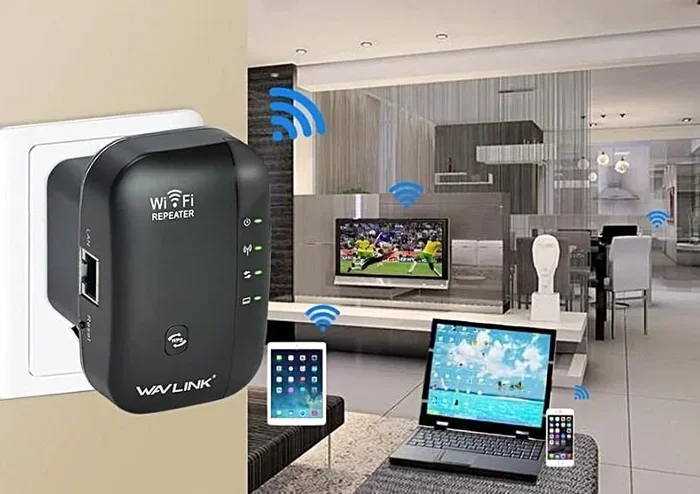
A wifi repeater, also called a range extender or signal booster, grabs your existing wifi and rebroadcasts it. It sounds simple. But that simple act can create new issues like network congestion, double NAT, and connection drops. In this guide, we will look at exactly how wifi repeaters can hurt your home network. We will also share quick fixes so you can get the best of both worlds.
Key Takeaways
- Wifi repeaters can slow your network: They often cut bandwidth in half because they use the same radio to talk to the router and your devices.
- Double NAT can block apps: If your repeater creates a second router, some games and streaming services may not work.
- Placement matters a lot: Put the repeater halfway between your router and the dead zone, not right next to the router or deep in the problem area.
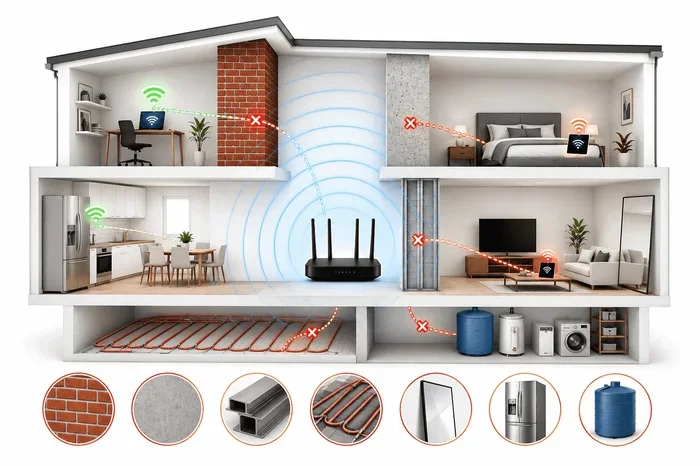
- Wireless interference is a real issue: Microwaves, baby monitors, and even walls can make repeaters worse.
- Mesh systems are often better: They use a single network name and smart routing, so you avoid many repeater headaches.
- You can fix most problems: Changing channels, updating firmware, or using a wired backhaul solves many issues.
📑 Table of Contents
What Is a Wifi Repeater and Why Do People Use It?
A wifi repeater is a small box that sits between your router and a far corner of your home. It listens to the wifi signal from your router and sends it out again. This fills in wifi dead zones where the signal is too weak to work.
How a Repeater Works
Think of a repeater as a messenger. Your router sends a message. The repeater hears it and shouts it out again. The message travels twice. That means it takes more time. It also uses the same radio to send and receive. This is the root of many speed loss issues.
Why They Are So Popular
People love wifi repeaters for a few simple reasons:
- They are cheap. You can buy a basic model for under $30.
- They are easy to set up. Most plug right into a wall outlet.
- They fix dead zones fast. No wiring or new cables needed.
- They work with any router. As long as it has a wifi signal, a repeater can extend it.
But that easy setup can hide real risks. Many users do not know that a range extender can cut your network performance in half. The next section explains why.
Can a Wifi Repeater Slow Down Your Internet?
The answer is often yes. A wifi repeater can slow down your internet in several ways. Let us look at each one.
The Half-Bandwidth Problem
Most cheap wireless repeaters use a single radio. That radio must do two jobs at once. It must talk to your router. Then it must talk to your phone or laptop. Because it cannot do both at full speed, it cuts the bandwidth in half. If your router gives you 100 Mbps, the repeater might only give you 50 Mbps. This is the most common reason for bandwidth loss.
Latency and Ping Spikes
Latency is the time it takes for data to travel from your device to the internet and back. A wifi repeater adds extra hops. Each hop adds a tiny delay. For web browsing, you may not notice. But for online gaming or video calls, those delays add up. You might see ping spikes that cause lag. This is a big problem for network performance in real time.
Real-World Speed Loss
Here is a simple example. Say your router is in the living room. Your bedroom is at the far end. You add a wifi repeater in the hallway. The signal from the router to the repeater is strong. But the repeater to your phone in the bedroom is weaker. The repeater has to work harder. It drops speeds. You may see speed loss of 30% to 50%. That is not a small hit.
So can wifi repeaters cause problems with your speed? Absolutely. But there are ways to reduce the damage.
Common Problems Caused by Wifi Repeaters
Slow speed is not the only issue. Wifi repeaters can cause a range of other headaches. Here are the most common ones.
Double NAT and Device Conflicts
NAT stands for Network Address Translation. It is how your router shares one public IP address with all your devices. A wifi repeater that acts like a router can add a second layer of NAT. This is called double NAT. It can block some apps from working. Online games may fail to connect. Smart home devices might not reach the cloud. Double NAT is a silent killer of home network fun.
Wireless Interference and Channel Overlap
Your wifi repeater uses the same radio frequencies as your router. If your router is on channel 6, the repeater might also use channel 6. This causes channel overlap. The signals crash into each other. You get interference. The result is connection drops and slow speeds. Microwaves, baby monitors, and Bluetooth devices make this worse.
Connection Drops and Instability
Many users report that their wifi repeater causes the network to drop often. The repeater may lose its link to the router for a split second. During that moment, your devices lose connection. They may switch to a slower band. Or they may just hang. This is very frustrating if you are in the middle of a video call or a game.
Compatibility Issues with Older Routers
Not all wifi repeaters play nice with every router. Older routers use older wifi standards like 802.11n. New repeaters use 802.11ac or 802.11ax. When they meet, they may only use the older, slower standard. This limits your network performance. Always check the specs before you buy.
How to Avoid Wifi Repeater Issues
The good news is that you can avoid most of these problems. A few smart choices make a big difference.
Picking the Right Spot
Placement is the single most important thing. Do not put the wifi repeater right next to your router. It needs a strong signal from the router to repeat well. But do not put it deep inside the dead zone either. The sweet spot is halfway between your router and the problem area. A strong signal to the repeater means a strong signal to your devices.
Using a Wired Backhaul If Possible
If your wifi repeater has an Ethernet port, use it. Run a cable from your router to the repeater. This is called wired backhaul. It removes the half-bandwidth problem. The repeater can now use all its radio power for your devices. This is the best way to fix bandwidth loss.
Changing the Channel and Band
Log into your router settings. Look at the wifi channel. If you are on a crowded channel, switch to a less used one. Also, make sure your range extender uses the 5GHz band if your devices support it. The 5GHz band is less crowded and faster. But it has shorter range. The 2.4GHz band goes further but is slower. Use band steering if your router supports it. This helps devices pick the best band automatically.
Keeping Firmware Updated
Just like your phone, a wifi repeater needs software updates. These updates fix bugs and improve network performance. Check the manufacturer’s app or web page once a month. A simple update can solve connection drops and slow speeds.
Renaming the Extended Network
Many repeaters broadcast a new network name, often with “_EXT” added. This is a good thing. It keeps your original network clean. You can also give the extended network a unique name. This helps you avoid SSID confusion. Your phone will not jump between the two signals randomly. This reduces latency and drops.
When to Skip a Repeater and Use a Mesh System Instead
Sometimes a wifi repeater is not the right tool. If your home is large or has many walls, a mesh network works much better.
What Makes Mesh Different
A mesh system uses multiple nodes that talk to each other. They share one network name, or SSID. Your phone moves smoothly from node to node. There is no double NAT. There is no half-bandwidth loss. The system uses smart routing to pick the fastest path. This is why mesh networks are now the top choice for whole-home coverage.
Pros and Cons Comparison
Here is a quick look at both options:
- Wifi Repeater: Cheap, easy to set up, but can cut speed and add latency.
- Mesh System: More expensive, but gives seamless roaming, no double NAT, and better network performance.
If you have more than one dead zone, skip the repeater. Go with a mesh system. Your home network will thank you.
Final Verdict: Are Wifi Repeaters Worth the Risk?
Can wifi repeaters cause problems? Yes, they can. They can slow your internet, create double NAT, and cause connection drops. But they are not all bad. If you use one the right way, they can still help.
Who Should Use a Repeater
A wifi repeater is a good choice if you have a small dead zone. It is also great if you rent and cannot run cables. Just make sure you place it correctly and use a wired backhaul if you can. This will cut most of the speed loss.
Who Should Avoid Them
Avoid a range extender if you have many dead zones. Avoid it if you game online or do video calls all day. Avoid it if your router is already old. In these cases, a mesh network is a much better fix. It gives you strong network performance without the headaches.
The bottom line is simple. Wifi repeaters are not evil. But they are not magic either. Use them with care, and they can help. Use them carelessly, and they will cause real wifi problems. Choose the right tool for your home, and you will enjoy a fast, stable connection everywhere.
Frequently Asked Questions
Do wifi repeaters reduce internet speed?
Yes, most wifi repeaters cut your speed in half. They use the same radio to talk to the router and your devices. This bandwidth loss is the biggest downside. Wired backhaul can fix this problem.
Can a wifi repeater cause double NAT?
Yes, if the repeater acts as a router, it can create a second NAT layer. This double NAT can block some apps and games. You can fix it by setting the repeater in bridge mode.
Why does my wifi keep dropping after adding a repeater?
Connection drops often happen because of wireless interference or a weak link between the router and repeater. Change the channel, move the repeater closer to the router, or use a wired backhaul to stop the drops.
Is a mesh system better than a wifi repeater?
Yes, a mesh network is usually better for whole-home coverage. It uses a single SSID, avoids double NAT, and does not cut your speed in half. It costs more but gives much better network performance.
Can I use two wifi repeaters together?
You can, but it is not a good idea. Each repeater adds more latency and speed loss. The second repeater has to talk to the first, which has to talk to the router. This creates a long chain of delays. A mesh system is a smarter choice.
How do I know if my repeater is causing problems?
Run a speed test near your router. Then run one near the repeater. If the speed near the repeater is much lower, the repeater is the cause. You can also check for connection drops or high latency during calls and games.