Can Wifi Go Through Walls Here Is What You Need To Know
Can wifi go through walls? The short answer is yes, but the signal strength depends on wall material, frequency band, and router placement. Understanding how wireless signals penetrate different surfaces helps you optimize your home network and eliminate Wi-Fi dead zones. This guide covers everything from signal science to practical fixes that improve internet coverage in every room.
Have you ever walked into a room and noticed your phone lost connection? Or maybe your streaming service keeps buffering in the bedroom but works fine in the living room. If so, you have probably wondered, can wifi go through walls?
The answer might surprise you. Wi-Fi signals can travel through walls, but not all walls are created equal. Some materials let the signal pass through easily, while others block it almost completely. Understanding this helps you fix slow internet and weak connections in your home.
In this guide, we will break down exactly how wireless signals move through walls. You will learn which materials block your signal the most, what you can do to improve things, and when it is time to upgrade your equipment. Let us dive in.
Key Takeaways
- Wi-Fi signals can pass through walls: But the signal weakens depending on the wall material and thickness.
- 2.4 GHz travels farther: Lower frequency bands penetrate obstacles better than 5 GHz signals.
- Router placement matters: Central positioning dramatically improves wireless connectivity throughout your home.
- Mesh networks solve coverage problems: They extend signal reach without signal loss from wall penetration.
- Thick and dense materials block signals: Concrete, brick, and metal cause the most signal interference.
- Wi-Fi extenders help but have limits: They boost coverage but can reduce overall bandwidth.
📑 Table of Contents
- How Does Wi-Fi Actually Work?
- What Walls Can Block Wi-Fi Signals?
- How to Improve Wi-Fi Signal Through Walls
- Best Router Placement Strategies
- When to Consider Upgrading Your Equipment
- Common Mistakes That Weaken Your Wi-Fi
- Quick Tips to Boost Wi-Fi Through Walls
- Expert Insights on Wi-Fi Signal Penetration
- Frequently Asked Questions
- Conclusion
How Does Wi-Fi Actually Work?
Before we talk about walls, it helps to understand the basics. Your router sends out radio waves, just like a radio station sends music through the air. These waves carry data between your router and your devices, like phones, laptops, and smart TVs.
The router converts internet data into radio signals. Your devices then pick up those signals and convert them back into usable data. This process happens in milliseconds, which is why you can browse the web instantly.
Frequency Bands and Their Role
Most modern routers use two frequency bands: 2.4 GHz and 5 GHz. Each band behaves differently when it hits a wall.
The 2.4 GHz band has a longer wavelength. This means it can travel farther and penetrate obstacles more easily. Think of it like a big ocean wave that rolls right over a rock.
The 5 GHz band has a shorter wavelength. It carries more data and offers faster speeds, but it struggles more with obstacles. Picture a small wave that breaks when it hits a rock.
So when you ask, can wifi go through walls, the frequency band plays a huge role. 2.4 GHz gets through better, while 5 GHz works best in open spaces.
Signal Strength and Range
Signal strength is measured in decibels, or dBm. A signal of -30 dBm is excellent. A signal of -80 dBm is very weak. As your signal passes through walls, it loses strength. This is called signal attenuation.
Every wall your signal passes through reduces its strength. A single drywall might only reduce it by a few dB. But a thick concrete wall can reduce it by 10 dB or more. That loss adds up fast, especially in multi-room setups.
What Walls Can Block Wi-Fi Signals?
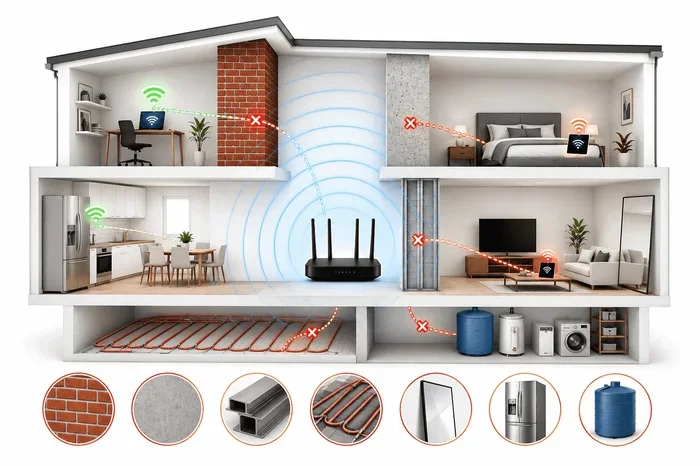
Not all walls are the same. Some let your signal pass through with little trouble. Others almost completely block it. Here is a look at common wall materials and how they affect your wireless signal.
Drywall and Plaster
Drywall is the most common wall material in modern homes. It is thin and lightweight. Wi-Fi signals pass through drywall with very little loss. You might lose about 2 to 4 dB of signal strength per drywall wall.
Plaster walls are a bit thicker but still fairly signal-friendly. If your home has standard drywall or plaster walls, your wireless connectivity should be pretty good from room to room.
Wood and Plywood
Wooden studs and plywood panels are common in many homes. These materials cause moderate signal loss, usually around 3 to 5 dB per wall. Wood is not a major blocker, but multiple wood walls in a row can weaken your signal over distance.
Brick and Concrete
Now we get into the tough stuff. Brick walls are dense and heavy. They can reduce your signal by 6 to 12 dB per wall. Concrete is even worse. A concrete wall can eat up your signal strength and leave you with a weak or dropped connection.
If your home has brick or concrete walls, you have likely noticed dead zones in certain rooms. This is the number one reason people ask, can wifi go through walls, and the answer is: yes, but with serious limitations.
Metal and Mirrors
Metal is the worst enemy of Wi-Fi signals. Metal reflects radio waves instead of letting them pass through. A metal wall or even a large metal appliance near your router can completely block your signal.
Mirrors are sneaky signal killers too. The reflective coating on mirrors bounces Wi-Fi waves away. If you have a large mirror on a wall between your router and your device, you will notice a big drop in network speed.
Water and Glass
Water absorbs Wi-Fi signals. Fish tanks, water pipes inside walls, and even large indoor plants can weaken your signal. Glass is mostly transparent to Wi-Fi, but tinted or thick glass can cause some loss.
How to Improve Wi-Fi Signal Through Walls
The good news is that you do not have to just accept weak signals. There are many practical steps you can take to improve your home network coverage. Here are the most effective strategies.
Optimize Router Placement
Where you put your router matters more than most people realize. The best spot is usually a central location in your home. This gives the signal the shortest path to every room.
Try to place your router in an open area. Avoid hiding it in a closet or behind a TV. Walls and furniture block signals before they even leave the router. The more open space around your router, the better your internet coverage will be.
Elevate your router too. Placing it on a shelf or mounting it on a wall helps the signal spread out evenly. Signals travel outward and downward, so a high position gives you better reach.
Use the Right Frequency Band
If you are struggling with walls, switch to the 2.4 GHz band. It penetrates obstacles much better than 5 GHz. The trade-off is lower top speeds, but for general browsing and streaming, 2.4 GHz is often more reliable.
Many modern routers use band steering, which automatically assigns devices to the best band. Check your router settings to see if this feature is available. If not, you can always connect manually to the 2.4 GHz network for better wall penetration.
Add a Wi-Fi Extender or Repeater
A Wi-Fi extender picks up your existing signal and rebroadcasts it. This is a quick fix for rooms that are far from the router or separated by thick walls.
Place the extender halfway between your router and the dead zone. This ensures it gets a strong enough signal to rebroadcast. Keep in mind that extenders can reduce your bandwidth slightly, so they work best for light browsing and streaming.
Upgrade to a Mesh Network System
If your home is large or has many thick walls, a mesh network is the best solution. Mesh systems use multiple nodes placed around your home. Each node acts as an access point, creating a seamless wireless connectivity experience.
Unlike traditional extenders, mesh systems do not cut your speed in half. They use smart routing to send data through the fastest path. This means you get strong signal and fast speeds in every room.
Popular mesh systems like Google Nest Wifi, Eero, and TP-Link Deco are easy to set up. They work well in homes with brick walls, multiple floors, and tricky layouts.
Update Your Router Firmware
This one is simple but often overlooked. Router manufacturers release firmware updates that improve signal strength and fix bugs. Check your router app or admin panel regularly for updates.
Newer firmware can also improve how your router handles signal interference from neighboring networks. This is especially helpful in apartment buildings or crowded neighborhoods.
Reduce Signal Interference
Other electronics can interfere with your Wi-Fi signal. Microwaves, baby monitors, cordless phones, and Bluetooth devices all operate on similar frequencies. Keep your router away from these devices to reduce interference.
You can also change your Wi-Fi channel. Most routers let you pick a channel manually. Use a Wi-Fi analyzer app to find the least crowded channel in your area. This can make a big difference in signal quality.
Best Router Placement Strategies
Let us talk more about router placement because it is so important. The right placement can solve many of your Wi-Fi dead zone problems without spending a single dollar.
The Central Location Rule
Your router should be in the center of your home if possible. This gives the signal equal distance to every room. If your router is in a corner room, the far side of your home will always have weak signal.
Think of your router like a light bulb. Light spreads out in all directions. If you put the bulb in a corner, half the light goes outside your house. The same idea applies to Wi-Fi.
Avoid Obstacles Around the Router
Keep your router away from large furniture, appliances, and metal objects. A bookshelf full of books, a fridge, or a filing cabinet can all block your wireless signal.
Also avoid placing your router on the floor. Signals spread best when they are elevated. A table or shelf at waist height is ideal.
Test Your Signal Before and After
Use a signal strength app on your phone to test coverage before and after moving your router. Walk around your home and note where the signal drops. Then move the router and test again. This simple step can reveal the best spot for your router.
When to Consider Upgrading Your Equipment
Sometimes, no amount of tweaking will fix a weak signal. If your router is old or underpowered, it might be time for an upgrade. Here are signs that your equipment is holding you back.
Your Router Is More Than Five Years Old
Wi-Fi technology has improved a lot in the last few years. Older routers may not support the latest standards like Wi-Fi 6 or Wi-Fi 6E. Upgrading to a modern router can improve both speed and signal penetration.
You Have Many Connected Devices
Every device you connect to your network uses bandwidth. Smart TVs, phones, tablets, smart speakers, and IoT devices all compete for the same wireless signal. If you have more than 15 to 20 devices, a modern router with better handling can make a big difference.
Your Home Has Problematic Construction
If your home has lots of brick, concrete, or plaster walls, your current router may simply not be powerful enough. In this case, a mesh system or a high-powered router with external antennas can solve the problem.
Common Mistakes That Weaken Your Wi-Fi
Many people accidentally hurt their own Wi-Fi signal without realizing it. Here are the most common mistakes and how to avoid them.
- Hiding the router in a cabinet: Cabinets block signals on all sides. Keep your router out in the open.
- Placing it near the microwave: Microwaves operate on the same 2.4 GHz frequency and cause heavy interference.
- Using an old router: Older routers lack the power and technology to push signals through thick walls effectively.
- Ignoring channel congestion: If too many networks use the same channel, your network speed drops. Switch to a less crowded channel.
- Using too many extenders: Too many extenders create a chain of weak signals. A mesh system is a better long-term solution.
- Not restarting the router: A simple restart can clear cache and refresh your connection. Restart your router once a month for best results.
Avoiding these mistakes alone can improve your wireless connectivity significantly. It costs nothing and takes just a few minutes.
Quick Tips to Boost Wi-Fi Through Walls
Here is a quick list of things you can do right now to improve your signal:
- Move your router to a central, elevated location.
- Switch to the 2.4 GHz band for better wall penetration.
- Remove obstacles around your router.
- Update your router firmware to the latest version.
- Change your Wi-Fi channel to reduce interference.
- Add a mesh node or extender for problem rooms.
- Keep your router away from water sources and metal objects.
- Restart your router regularly to maintain performance.
These small changes can make a surprisingly big difference. You do not need expensive equipment to get better internet coverage. Sometimes, just moving your router to a better spot solves the problem entirely.
Expert Insights on Wi-Fi Signal Penetration
Networking professionals agree that wall material is the single biggest factor in signal penetration. A study by the National Institute of Standards and Technology found that concrete walls reduce Wi-Fi signal by up to 20 dB. That is a 99% loss of signal power.
Experts also recommend using the 2.4 GHz band for devices that are far from the router or separated by multiple walls. The 5 GHz band works best for devices in the same room or nearby rooms with drywall only.
Another expert tip is to use wired access points for rooms that are completely blocked. Running an Ethernet cable to a second access point gives you full-speed wireless connectivity without any signal loss from wall penetration.
Frequently Asked Questions
Can Wi-Fi signals pass through all types of walls?
Wi-Fi signals can pass through most common wall materials like drywall, wood, and plaster. However, thick concrete, brick, and metal walls significantly weaken or block the signal entirely. The signal loss depends on the material type, thickness, and the frequency band your router uses.
Does 2.4 GHz or 5 GHz Wi-Fi penetrate walls better?
2.4 GHz Wi-Fi penetrates walls much better than 5 GHz. The longer wavelength of 2.4 GHz signals allows them to travel through obstacles more easily. 5 GHz offers faster speeds but struggles with wall penetration, making it better for open spaces and short distances.
How can I improve Wi-Fi signal in rooms separated by thick walls?
The best solutions include moving your router to a central location, using a mesh network system, or adding a Wi-Fi extender. You can also switch to the 2.4 GHz band, which handles thick walls better than 5 GHz. For the best results, consider installing a wired access point in the problem room.
Do Wi-Fi extenders really help with wall signal loss?
Yes, Wi-Fi extenders can help by rebroadcasting your signal to areas that are blocked by walls. However, extenders can reduce your overall bandwidth because they receive and retransmit the same signal. For a better experience, mesh systems are recommended over traditional extenders.
What materials block Wi-Fi signals the most?
Metal, concrete, brick, and thick glass are the biggest blockers of Wi-Fi signals. Water and mirrors also absorb or reflect signals significantly. If your home has many of these materials, you will likely need additional equipment like mesh nodes or access points to maintain strong coverage.
How many walls can Wi-Fi realistically pass through?
A standard Wi-Fi router can pass through three to five drywall walls before the signal becomes too weak for reliable use. Through concrete or brick walls, the number drops to one or two. Using a mesh system or extender can extend this range significantly.
Conclusion
So, can wifi go through walls? Yes, they can, but the signal weakens as it passes through different materials. Drywall and wood cause little loss, while concrete, brick, and metal can block your signal almost completely.
The key to a strong home network is understanding how your wireless signal behaves and taking steps to optimize it. Move your router to a central spot, use the right frequency band, reduce interference, and consider upgrading to a mesh system if your home has thick walls.
Small changes can lead to big improvements in your internet coverage and network speed. Start with the tips in this guide, test your results, and adjust as needed. With the right setup, you can enjoy strong, reliable Wi-Fi in every room of your home.