Can My Printer Print White Ink Heres What You Need to Know
Can my printer print white ink? The answer depends on your printer type and model. White ink printing is possible with certain inkjet printers, sublimation printers, and laser printers equipped with white toner. This guide covers everything you need to know about white ink systems, compatible devices, and creative projects you can tackle with opaque ink technology.
Can my printer print white ink? This is one of the most common questions people ask when they want to create designs on dark shirts, mugs, or custom gifts. The short answer is yes, but it depends on the type of printer you own. White ink printing opens up a world of creative possibilities that standard CMYK printing simply cannot match. In this guide, we will walk you through everything you need to know about white ink systems, which printers support them, and how you can start creating stunning prints on dark and transparent materials.
Whether you are a hobbyist looking to make custom gifts or a business owner exploring specialty printing, understanding white ink capabilities is essential. White ink cartridge technology has come a long way in recent years, and more printers now offer built-in white ink support than ever before. Let us dive into the details.
Key Takeaways
- Not all printers can print white: Standard CMYK printers lack white ink, but specialized models support it.
- Multiple printer types work: Inkjet, laser, and sublimation printers all offer white ink options.
- Aftermarket kits exist: You can add white ink capability to some existing printers with conversion kits.
- White ink is essential for dark materials: Printing on dark shirts, mugs, and vinyl requires a white base layer.
- Maintenance matters: White ink can clog and dry out faster than standard inks, requiring regular use.
- Cost varies widely: White ink printers range from affordable hobby models to expensive commercial units.
- Sublimation is a popular choice: Dye sublimation printers are widely used for white ink projects on fabrics and coatings.
📑 Table of Contents
How Does White Ink Printing Work?
Most people do not think about what happens inside a printer when it creates an image. Standard printers use four colors: cyan, magenta, yellow, and black. This is known as CMYK printing. Together, these four inks can produce a wide range of colors. But they cannot produce white. White is the absence of ink on white paper. So when you need white on a dark surface, you need a different approach.
White ink printing works by adding a white ink layer beneath or on top of the color layers. This white base makes colors pop on dark materials. It also allows you to print white text and designs where there would otherwise be no option. The technology behind this is fascinating and has evolved significantly over the past decade.
The Basics of CMYK vs White Ink
In a standard inkjet printer, the printhead sprays tiny droplets of cyan, magenta, yellow, and black ink onto paper. The paper is already white, so you do not need white ink. But what if the surface is black, red, or transparent? That is where white ink comes in. It acts as a foundation layer that other colors sit on top of.
Think of it like painting a wall. You would not paint bright colors directly on a dark surface. You would first apply a coat of white primer. White ink printing works the same way. The white ink layer creates a blank canvas for your colors to appear vibrant and true to life.
How Opaque Ink Creates White Layers
Opaque ink is the key to white ink printing. Unlike transparent dyes that allow light to pass through, opaque inks contain pigments that block light and create a solid white surface. This is what makes white ink so effective on dark materials.
There are two main ways opaque white ink is applied:
- Underprint white: The white ink is printed first, underneath the color layers. This is common in garment printing and heat transfer paper applications.
- Overprint white: The white ink is printed on top of the color layers. This is used for creating highlights or adding white text over colored backgrounds.
Both methods have their uses. Underprint white is great for making colors look bright on dark surfaces. Overprint white is perfect for adding crisp white details to any design.
Quick Tips:
- Always test print on a scrap piece of your target material before running a full batch.
- Make sure your design software includes a white ink layer or channel.
- Check your printer settings to ensure the white ink layer is enabled.
Can My Printer Print White Ink? Understanding Your Options
Now that you understand how white ink works, let us look at which printers can actually do it. The answer is not one-size-fits-all. Different printer technologies offer different levels of white ink support.
Inkjet Printers with White Ink Support
Some inkjet printers come with built-in white ink capability. These printers have additional printheads or cartridges specifically for white ink. They are designed for users who need to print on dark or transparent materials regularly.
Popular models in this category include printers from brands like Epson and Canon that offer white ink systems as part of their lineup. These printers typically use a six-color or eight-color ink setup, adding white and sometimes light cyan and light magenta to the standard CMYK cartridges.
If you are serious about print on dark surfaces projects, an inkjet printer with dedicated white ink support is a great choice. The prints tend to be vibrant and the white layer is usually smooth and even.
Laser Printers and White Toner
Laser printers work differently from inkjet printers. They use toner, which is a fine powder that is melted onto the paper. Some laser printers now offer white toner as an option. This is relatively new technology and is mostly found in commercial and wide format printers.
White toner laser printers are excellent for printing on dark paper, cardstock, and specialty media. They produce sharp, crisp white text and images. However, they tend to be more expensive than their inkjet counterparts.
If you are looking for a laser printer that can handle white printing, look for models specifically marketed as having white toner capability. Not all laser printers support this feature.
Dye Sublimation Printers for White Ink
Sublimation printing is one of the most popular methods for printing on fabrics, mugs, and other coated items. A dye sublimation printer uses heat to transfer dye onto materials. Most sublimation printers use a CMYK ink setup, but they rely on the white color of the blank item or a white coating to show colors properly.
Some advanced inkjet sublimation printers now include a white ink option. This allows you to print white designs directly onto dark fabrics without needing a white-coated blank. The results are durable and vibrant, making these printers ideal for garment printing and custom product businesses.
Sublimation printing with white ink is especially popular for:
- Custom t-shirts and apparel
- Mugs and drinkware
- Phone cases and tablet covers
- Custom pillows and blankets
Comparison Table: Printer Types for White Ink
| Printer Type | White Ink Support | Best For | Price Range |
|---|---|---|---|
| Inkjet with White Ink | Built-in white cartridges | Dark material printing, crafts | $200 – $800 |
| Laser with White Toner | White toner cartridge | Dark paper, commercial prints | $500 – $3000+ |
| Dye Sublimation | White ink in select models | Fabric, coated items, gifts | $300 – $2000 |
| Standard Inkjet (CMYK) | No native white support | Regular documents and photos | $50 – $200 |
| Wide Format Printer | White ink in select models | Signage, banners, large prints | $1000 – $10000+ |
As you can see from the table, not all printers support white ink. Your choice depends on what you want to print, what materials you will use, and your budget. Printer compatibility is a key factor to consider before making a purchase.
Adding White Ink to an Existing Printer
What if you already own a printer and it does not support white ink? Can you add this capability? The answer is maybe. There are aftermarket options available, but they come with limitations.
Aftermarket White Ink Kits
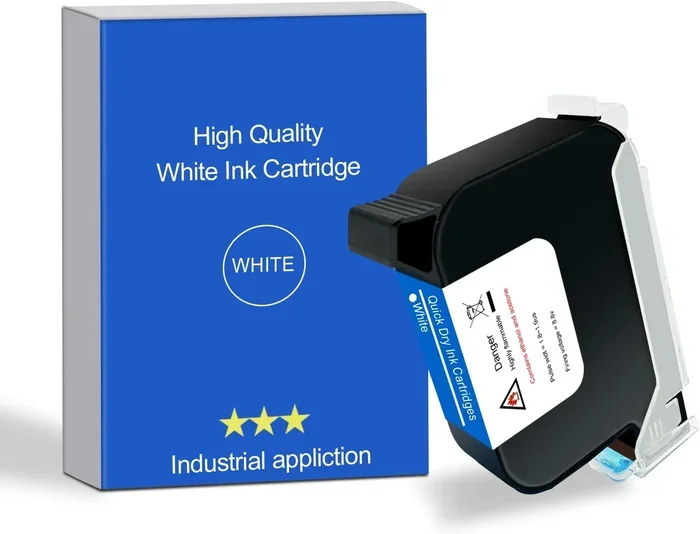
Several companies sell white ink systems that can be added to compatible inkjet printers. These kits usually include a white ink cartridge, a modified printhead or capping station, and sometimes additional software to manage the white ink layer.
These kits work best with printers that have similar ink systems to the ones the kit is designed for. For example, an Epson-compatible white ink kit will work best with Epson printers. The installation process varies by kit, but most require you to replace or modify existing ink channels.
Aftermarket kits can be a cost-effective way to add white ink printing to your setup without buying a new printer. However, they are not always plug-and-play and may require some technical knowledge to install correctly.
Limitations and Risks of Conversion Kits
While aftermarket kits can work, they come with several risks and limitations:
- Voided warranty: Modifying your printer with third-party ink systems may void the manufacturer warranty.
- Clogging issues: White ink tends to be thicker than standard dyes and can clog printheads more easily.
- Inconsistent quality: Aftermarket systems may not produce the same quality as factory-built white ink printers.
- Software challenges: Managing white ink layers often requires additional software or manual color separation.
- Ink waste: Conversion kits may use more ink or require more frequent maintenance than native white ink systems.
Common Mistakes:
- Using the wrong type of white ink for your printer model.
- Skipping regular printhead cleaning, which leads to clogs.
- Not calibrating the white ink layer properly, resulting in misaligned prints.
- Using low-quality white ink that does not adhere well to materials.
- Ignoring the manufacturer recommendations for compatible inks.
If you decide to go the aftermarket route, do your research carefully. Read reviews, watch installation videos, and make sure the kit is compatible with your specific printer model. Printer compatibility is crucial for success with conversion kits.
Best Uses for White Ink Printing
White ink is not just a novelty. It has very practical and creative applications that make it valuable for both personal and professional use. Let us explore the best ways to use white ink printing.
Printing on Dark Materials
The most obvious use for white ink is printing on dark or colored materials. This includes:
- Dark t-shirts and apparel: Print white designs that show up clearly on black, navy, or red shirts.
- Dark paper and cardstock: Create invitations, posters, and cards with white text and designs on dark backgrounds.
- Transparent film and stickers: Print white opaque designs that show up on clear or translucent materials.
- Mugs and drinkware: Add white base layers for vibrant, full-color prints on dark mugs.
Without white ink, these projects would either not be possible or would look faded and dull. The white base layer makes colors appear vivid and ensures your designs stand out.
Custom Crafts and DIY Projects
Hobbyists and crafters love white ink printing for DIY projects. Whether you are making custom phone cases, decorating journals, or creating personalized gifts, white ink gives you flexibility.
Popular DIY projects include:
- Custom printable vinyl for vinyl cutters and craft machines.
- White text on colored heat transfer paper for t-shirt designs.
- Transparent stickers with white backgrounds for branding or labeling.
- Custom wedding invitations on dark or colored paper stock.
- Personalized notebooks and planners with white cover designs.
The versatility of white ink printing makes it a favorite among crafters. You can create professional-looking results at home without needing access to a commercial print shop.
Commercial and Wide Format Printing
For businesses, white ink printing opens up commercial opportunities. Wide format printers with white ink capabilities are used for:
- Vehicle wraps and decals
- Store signage and window graphics
- Exhibition banners and displays
- Floor graphics and wayfinding signs
These applications require white ink to ensure that graphics look professional and vibrant on various surfaces. A wide format printer with white ink can print directly onto vinyl, film, and other materials without the need for a white base coat applied separately.
Expert Insights: Industry professionals note that specialty printing with white ink has grown significantly in the last five years. The demand for custom dark-surface products continues to rise, making white ink capability a valuable feature for both home users and commercial operations. Screen printing shops have also started integrating white ink digital printers to complement their traditional methods, offering customers faster turnaround times and more detailed designs.
Common White Ink Printing Problems
White ink is not without its challenges. Users often encounter specific issues that are unique to white ink printing. Understanding these problems and how to solve them will save you time, money, and frustration.
Clogging and Drying Issues
White ink is thicker than standard dye inks, which makes it more prone to clogging printheads. If you do not use your printer regularly, the white ink can dry out and block the nozzles. This leads to streaks, gaps, or missing white areas in your prints.
To prevent clogging:
- Print at least once a week, even if it is just a test page.
- Run the printer built-in cleaning cycle regularly.
- Store the printer in a climate-controlled environment.
- Use white ink that is specifically formulated for your printer model.
- Shake the white ink cartridge gently before installing it.
If your white ink is already clogged, try running a deep cleaning cycle. If that does not work, you may need to remove the printhead and soak it in a cleaning solution. Some printers also have manual cleaning options that can help clear minor blockages.
Cost and Ink Consumption
White ink tends to be more expensive than standard CMYK inks. This is because white ink formulations use more expensive pigments and require specialized manufacturing processes. Additionally, white ink coverage can be heavy, meaning you may go through cartridges faster than you expect.
Here are some tips to manage costs:
- Use white ink only when necessary. Do not print white layers on light-colored materials.
- Adjust your white ink coverage settings to use the minimum amount needed.
- Buy white ink in bulk when possible to save money per cartridge.
- Consider third-party white ink options, but make sure they are compatible with your printer.
- Plan your prints efficiently to minimize wasted ink and paper.
Key Takeaways: White ink printing requires more maintenance and costs more than standard printing. However, the results on dark and transparent materials are worth the extra effort and expense. Regular use and proper maintenance will keep your white ink system running smoothly.
How to Choose the Right Printer for White Ink
Choosing the right printer for white ink printing involves considering several factors. Not every printer is right for every user, so it is important to evaluate your needs before making a purchase.
Factors to Consider Before Buying
Before you buy a white ink printer, ask yourself these questions:
- What materials will you print on? Dark fabrics, paper, vinyl, and transparent film all have different requirements.
- How often will you print? Frequent users need more durable and reliable white ink systems.
- What is your budget? White ink printers range from affordable to very expensive. Set a realistic budget before shopping.
- Do you need color plus white? Some printers offer white ink alongside full color, while others only print in white.
- What is your skill level? Some white ink printers are user-friendly, while others require technical knowledge to set up and maintain.
Top Printer Recommendations
Based on different needs and budgets, here are some popular options for white ink printing:
For hobbyists and crafters: Look for entry-level inkjet printers with white ink support from brands like Epson or Canon. These are affordable and easy to use. They work well for small projects, custom gifts, and DIY crafts.
For small businesses: Consider a dye sublimation printer with white ink capability. These printers are great for custom apparel, mugs, and promotional items. They offer good quality at a reasonable price point.
For commercial operations: Invest in a wide format printer with built-in white ink. These printers handle large-scale projects, signage, and vehicle wraps with professional results. They are more expensive but offer the best performance and reliability.
No matter which type you choose, make sure the printer supports printer compatibility with the materials you plan to use. Check the manufacturer specifications and read user reviews before buying.
Conclusion
Can my printer print white ink? Yes, but the answer depends on your printer type and what you want to achieve. Standard CMYK printers cannot print white natively, but specialized inkjet printers, laser printers with white toner, and dye sublimation printers can all handle white ink printing. If you already own a printer, aftermarket white ink kits may offer a solution, though they come with some risks and limitations.
White ink printing has transformed the world of custom printing. From dark apparel to transparent stickers, the ability to print white opens up creative possibilities that were once only available through professional print shops. Whether you are a hobbyist creating personalized gifts or a business owner expanding your product line, investing in white ink capability is a smart move.
Remember to maintain your printer regularly, use compatible inks, and always test your prints before committing to a large batch. With the right equipment and a little practice, you can create stunning white ink prints that stand out from the crowd. Start exploring your options today and discover what white ink printing can do for your creative projects.
Frequently Asked Questions
Can any printer print white ink?
No, not every printer can print white ink. Standard CMYK printers do not have white ink capability. You need a specialized inkjet printer with white ink cartridges, a laser printer with white toner, or a dye sublimation printer with white ink support to print white designs.
Is white ink more expensive than regular ink?
Yes, white ink is generally more expensive than standard CMYK inks. The pigments used in white ink formulations are costlier, and the specialized manufacturing process adds to the price. You may also go through white ink cartridges faster due to heavy coverage on dark materials.
Can I print white on colored paper with a normal printer?
No, a standard printer cannot print white on colored paper. Regular printers rely on the white color of the paper as a base. To print white on dark or colored surfaces, you need a printer with dedicated white ink or white toner capability.
How do I maintain a white ink printer?
Regular maintenance is essential for white ink printers. Print at least once a week to prevent the ink from drying out, run the printer cleaning cycle regularly, and store the printer in a stable environment. Always use white ink that is compatible with your specific printer model to avoid clogging and quality issues.
What materials can I print on with white ink?
White ink printers can handle a wide range of materials, including dark fabrics, colored paper, transparent film, printable vinyl, heat transfer paper, mugs, and coated surfaces. The white base layer makes colors vibrant and ensures designs show up clearly on non-white surfaces.
Do I need special software for white ink printing?
Most white ink printers require design software that supports a white ink layer or channel. Popular programs like Adobe Photoshop, Illustrator, and CorelDRAW allow you to create and manage white ink separations. Some printer manufacturers also provide their own dedicated software for white ink management.