Can I Convert HDMI To HDMI ARC And Everything You Need
Yes, you can convert HDMI to HDMI ARC, but it depends on your devices and ports. This guide covers everything you need to know about HDMI ARC adapters, cables, and setup steps. Whether you want to connect a soundbar, improve your TV audio, or build a home theater, understanding HDMI ARC is essential. Learn the right way to convert, common mistakes to avoid, and expert tips for the best audio experience.
Have you ever plugged in an HDMI cable and thought, “Why isn’t my sound working the way I want?” You are not alone. Many people struggle with TV audio setup. They want simple, great sound without a mess of cables. HDMI ARC is the answer for most of them. But can you convert a regular HDMI connection to HDMI ARC? The short answer is yes. The full answer is a bit more involved. This guide walks you through everything. You will learn what HDMI ARC is, how to convert it, what gear you need, and how to avoid common pitfalls.
Converting HDMI to HDMI ARC is easier than most people think. You do not need to be a tech expert. With the right adapter or cable, you can get great audio from your TV to your soundbar or home theater system. This article covers all the details in plain language. No jargon. No fluff. Just practical advice you can use today. Whether you are setting up a new soundbar or fixing an existing one, you will find helpful tips here.
Key Takeaways
- HDMI ARC lets you send audio from your TV to a soundbar or receiver using just one cable.
- You can convert standard HDMI to HDMI ARC with the right adapter or cable.
- Not all HDMI ports support ARC, so check your TV and device specs first.
- eARC is the newer, better version that supports high-quality audio formats like Dolby Atmos.
- Common HDMI ARC issues include no sound, audio lag, and CEC control problems.
- Using the wrong cable or adapter is the most common mistake people make.
- A proper HDMI ARC setup simplifies your home theater and reduces cable clutter.
📑 Table of Contents
- What Is HDMI ARC and Why Does It Matter?
- Can You Convert Standard HDMI to HDMI ARC?
- How to Set Up HDMI ARC the Right Way
- Common HDMI ARC Problems and How to Fix Them
- HDMI ARC vs eARC: What Is the Difference?
- Best Devices for HDMI ARC Setup
- Quick Tips for a Great HDMI ARC Experience
- Common Mistakes People Make with HDMI ARC
- Final Thoughts
What Is HDMI ARC and Why Does It Matter?
HDMI stands for High-Definition Multimedia Interface. It carries both video and audio through a single cable. ARC stands for Audio Return Channel. This is a special feature built into HDMI. It lets your TV send audio back to your soundbar or receiver. Without ARC, you need a separate cable just for audio. With ARC, one cable does it all.
Here is why this matters. Your TV receives audio from many sources. Streaming apps, cable boxes, and gaming consoles all send sound to your TV. Normally, you would need an extra cable from your TV to your sound system. HDMI ARC removes that need. It sends the audio back through the same HDMI cable. This is called audio return. It keeps things simple and tidy.
How HDMI ARC Works in Practice
Imagine this setup. You have a TV, a soundbar, and a streaming device. You plug the streaming device into your TV with one HDMI cable. Then you connect your TV to your soundbar with another HDMI cable. That second cable uses the ARC feature. Your TV sends the audio from the streaming device to your soundbar. All through one connection. No extra wires. No extra adapters.
HDMI ARC also supports CEC control. CEC stands for Consumer Electronics Control. This lets you use your soundbar remote to control the TV volume. You do not need two remotes. One remote handles everything. This is a big convenience factor. It is one of the main reasons people choose HDMI ARC over optical audio cables.
Can You Convert Standard HDMI to HDMI ARC?
The short answer is yes, but with some conditions. A standard HDMI cable carries video and audio. However, it does not support the ARC feature by default. You need specific hardware to enable ARC. This means you cannot just swap a cable and expect it to work. You need the right type of connection.
When Standard HDMI Does Not Support ARC
Most older TVs and devices use standard HDMI ports. These ports do not have ARC capability built in. If your TV has a regular HDMI port labeled just “HDMI,” it may not support ARC. You need to check the port label. Look for a port marked “ARC” or “eARC.” If you do not see that label, your port likely does not support ARC.
Here are some common scenarios where conversion is needed:
- Your TV has only standard HDMI ports. You want to connect a soundbar but no ARC port exists.
- Your soundbar has an HDMI ARC input. But your TV only has regular HDMI outputs.
- You are using an older device. It does not support HDMI ARC natively.
- You have a soundbar with optical input only. You want to use HDMI ARC instead.
In these cases, you need an HDMI ARC adapter or a special cable. These devices bridge the gap between standard HDMI and HDMI ARC. They are widely available and affordable.
Types of HDMI ARC Converters
There are a few types of devices that help you convert standard HDMI to HDMI ARC. Let us look at them.
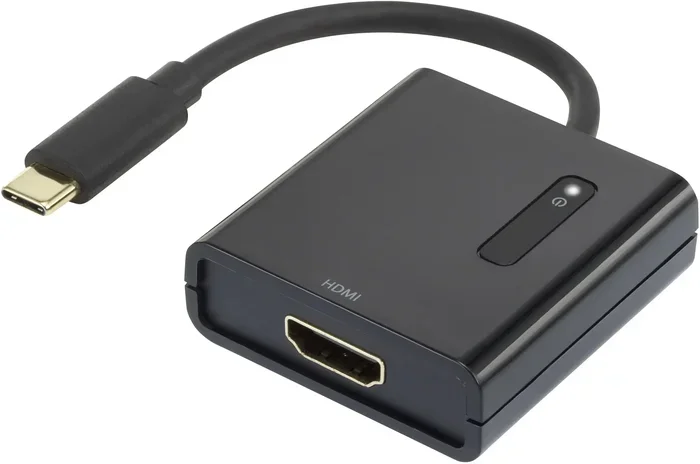
HDMI ARC Adapters. These are small boxes that plug into your TV and soundbar. They convert the signal so ARC works. You plug one adapter into your TV’s HDMI port. Then you connect the other end to your soundbar. The adapter handles the ARC conversion for you.
HDMI ARC Cables. These are special cables with built-in ARC support. They look like regular HDMI cables. But they are designed to work with ARC-enabled devices. You plug them into ARC-labeled ports on both ends. They carry audio both ways, including the return channel.
HDMI Splitters with ARC. Some splitters support HDMI ARC. These let you connect multiple devices to your TV. The audio from all sources can return to your soundbar through the ARC channel. This is useful for complex home theater setups.
How to Set Up HDMI ARC the Right Way
Setting up HDMI ARC is not hard. But you need to follow the right steps. Skipping a step can cause problems. Here is a clear, step-by-step guide.
Step 1: Check Your TV and Soundbar
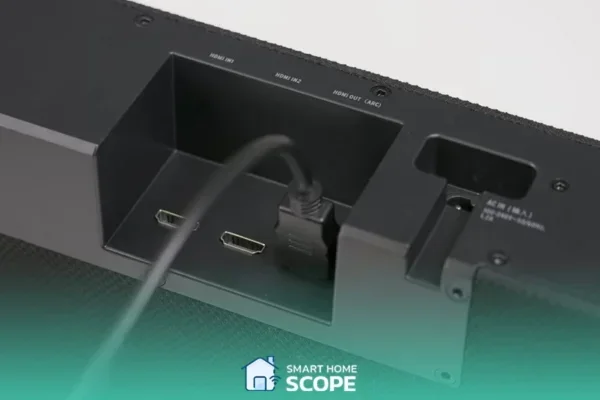
Before you buy anything, check your devices. Look at the back of your TV. Find the HDMI ports. Is any of them labeled “ARC” or “eARC”? If yes, you are in luck. You do not need an adapter. Just use an HDMI ARC cable and plug it into that port.
Next, check your soundbar or receiver. Does it have an HDMI ARC output? Most modern soundbars do. Look for a port labeled “HDMI ARC” or “ARC OUT.” If both your TV and soundbar support ARC, you are ready to go.
Step 2: Get the Right Cable or Adapter
If your TV does not have an ARC port, you need a converter. Buy a quality HDMI ARC adapter from a reputable brand. Cheap adapters can cause audio drops and lag. Spend a little more for reliability. A good adapter costs between 15 and 40 dollars.
If you are using a cable, make sure it is an HDMI ARC cable. It is not the same as a standard HDMI cable. The cable must support the ARC standard. Look for this on the packaging. A high-speed HDMI cable with Ethernet often supports ARC too.
Step 3: Connect Everything
Now it is time to plug things in. Follow these steps:
- Turn off your TV and soundbar. Always power down before connecting.
- Plug the HDMI ARC cable into your TV’s ARC port.
- Plug the other end into your soundbar’s ARC input.
- If you are using an adapter, connect it between the TV and soundbar.
- Turn on both devices.
Step 4: Enable HDMI ARC in Settings
This step is crucial. Many people skip it and wonder why there is no sound. Go into your TV settings. Look for “Sound” or “Audio” settings. Find the HDMI CEC or HDMI ARC option. Turn it on. The exact name varies by brand. Samsung calls it Anynet+. LG calls it SimpLink. Sony calls it BRAVIA Sync. No matter the name, the function is the same. Enable it.
Next, go to your soundbar settings. Make sure HDMI ARC is enabled there too. Some soundbars auto-detect it. Others require manual selection. Check your soundbar manual if you are unsure.
Step 5: Test the Connection
Play something on your TV. A YouTube video or a TV show works well. Listen for audio from your soundbar. If you hear sound, you are all set. If not, do not panic. Move to the troubleshooting section below.
Common HDMI ARC Problems and How to Fix Them
Even with the right setup, problems can happen. HDMI ARC connections can be finicky sometimes. Here are the most common issues and how to solve them.
No Sound Through the Soundbar
This is the number one complaint. You have everything connected but no audio. The first thing to check is the TV sound settings. Make sure the TV audio output is set to HDMI ARC. Many TVs default to built-in speakers. You need to change this setting. Go to Sound Output in your TV menu. Select “HDMI ARC” or “External Speaker.”
If that does not work, try unplugging the HDMI cable. Wait 10 seconds. Plug it back in. This resets the connection. Sometimes the ARC handshake fails. A simple reconnection fixes it.
Audio Lag or Lip Sync Issues
Audio lag is when the sound does not match the video. The words do not line up with the mouth movements. This is annoying but fixable. First, check if your TV has an “Audio Delay” or “Lip Sync” setting. Adjust it until the sound matches the video.
Also, check your soundbar for a similar setting. Some soundbars have a manual delay adjustment. If you are using an HDMI ARC adapter, the adapter might add a small delay. Try a different adapter or cable if the lag is severe.
CEC Control Not Working
CEC lets you control your soundbar with your TV remote. If this stops working, the HDMI ARC connection may be the issue. Go to your TV settings and toggle CEC off and back on. This often resets the control link. You can also try renaming the CEC function on your TV. Different brands use different names for the same feature.
Intermittent Audio Cutouts
If your soundbar audio cuts in and out, the cable might be loose. Check all connections. Make sure the HDMI cable is fully inserted. A loose connection causes dropouts. Also, avoid running HDMI cables near power cords. Electromagnetic interference can disrupt the signal. Keep them separated by at least a few inches.
HDMI ARC vs eARC: What Is the Difference?
You may have seen “eARC” on your TV or soundbox. What does it mean? eARC stands for Enhanced Audio Return Channel. It is the newer version of HDMI ARC. It offers better audio quality and more features.
Why eARC Is Better
eARC supports higher audio bandwidth. This means it can carry lossless audio formats. Formats like Dolby Atmos and DTS:X need more bandwidth. Standard HDMI ARC cannot carry these. eARC can. If you want the best home theater audio, eARC is the way to go.
eARC also has better lip sync correction. It handles audio delays more gracefully. The connection is also more stable. Fewer dropouts and glitches compared to standard HDMI ARC.
Do You Need eARC?
It depends on your setup. If you have a basic soundbar and watch regular TV, standard HDMI ARC is fine. But if you have a 4K TV and a premium soundbar, eARC makes a difference. You get the full audio quality your devices support.
To use eARC, you need an eARC-enabled TV and an eARC-compatible soundbar. The cable must be HDMI High Speed or Ultra High Speed. Standard HDMI cables may not support eARC. Check the cable specs before buying.
Best Devices for HDMI ARC Setup
Not all devices work the same way with HDMI ARC. Here are some popular options and what you need to know.
Soundbars
Most modern soundbars support HDMI ARC. Popular brands like Sonos, Samsung, and Bose all include it. When buying a soundbar, check the specs for “HDMI ARC” or “eARC.” If it only has optical audio input, you will need a different connection method.
TVs
Almost all TVs made after 2015 support HDMI ARC. The port is usually labeled on the back or side of the TV. Look for the ARC marking next to the HDMI port number. If your TV is older, it might not have ARC. In that case, an optical audio cable is your best alternative.
AV Receivers
If you have a full home theater system with an AV receiver, HDMI ARC works great. The receiver acts as the central audio hub. Your TV sends audio to the receiver through the ARC channel. The receiver then processes and sends it to your speakers. This setup gives you the best sound quality.
Streaming Devices
Devices like Apple TV, Roku, and Chromecast work with HDMI ARC. The audio from these devices flows through your TV to your soundbar. You do not need a separate audio connection from the streaming device. This is the beauty of HDMI ARC. It simplifies your entire setup.
Quick Tips for a Great HDMI ARC Experience
Here are some quick tips to make your HDMI ARC setup work flawlessly:
- Always use an HDMI ARC cable or adapter, not a standard HDMI cable.
- Enable HDMI CEC on both your TV and soundbar for full remote control.
- Keep your firmware updated. TV and soundbar updates often fix ARC bugs.
- Use a high-quality cable. Cheap cables cause dropouts and audio issues.
- Label your cables. This helps you identify the ARC cable quickly.
- Power cycle your devices if the connection stops working. Turn everything off, wait 30 seconds, and turn it back on.
- Check your TV audio output setting every time you add a new device.
Common Mistakes People Make with HDMI ARC
Avoid these common mistakes to save yourself frustration.
Mistake 1: Using a standard HDMI cable. A regular HDMI cable does not support ARC. You need a cable specifically rated for ARC or an adapter. This is the most common reason for setup failure.
Mistake 2: Plugging into the wrong HDMI port. Not all HDMI ports on your TV support ARC. You must use the port labeled ARC or eARC. Plugging into a regular HDMI port will not work.
Mistake 3: Forgetting to enable ARC in settings. Even with the right cable and port, ARC will not work if it is not enabled in your TV settings. Always check this first.
Mistake 4: Ignoring firmware updates. TV and soundbar manufacturers release updates that fix HDMI ARC bugs. Keeping your devices updated prevents many common issues.
Mistake 5: Using a long, low-quality cable. Longer cables can degrade the signal. Keep your HDMI ARC cable as short as possible. Under 6 feet is ideal for most setups.
Final Thoughts
Converting HDMI to HDMI ARC is very doable. You just need the right adapter, cable, or port. Once set up, it makes your home theater so much simpler. One cable handles both video and audio. Your remote controls everything. The sound quality is great. You do not need a degree in electronics to make it work.
Start by checking your TV and soundbar for ARC support. Get the right cable or adapter. Follow the setup steps carefully. Enable the settings. Test everything. If you run into issues, the troubleshooting tips above will help you fix most problems.
HDMI ARC is a game-changer for home audio. It removes cable clutter and improves your viewing experience. Whether you are watching movies, playing games, or listening to music, HDMI ARC delivers clean, simple audio. Take the time to set it up right. You will enjoy the difference every single day.
Frequently Asked Questions
Can I use a regular HDMI cable for HDMI ARC?
No, a regular HDMI cable does not support the ARC feature. You need an HDMI ARC cable or an HDMI ARC adapter to enable audio return. Check the packaging to confirm ARC support before buying.
What is the difference between HDMI ARC and optical audio?
HDMI ARC carries both audio and video through one cable and supports CEC remote control. Optical audio only carries sound and requires a separate connection for video. HDMI ARC is more convenient and supports more audio formats.
Do all TVs have HDMI ARC ports?
Most TVs made after 2015 include at least one HDMI ARC port. However, older models may not have this feature. Check the back of your TV for an HDMI port labeled ARC or eARC to confirm.
Can I convert HDMI ARC to optical audio?
Yes, you can use an HDMI ARC to optical audio converter. These adapters take the ARC signal and convert it to an optical output. This is useful if your soundbar only has an optical input and no HDMI ARC port.
Why is my HDMI ARC not working after I set it up?
The most common reasons are using a non-ARC cable, plugging into the wrong HDMI port, or not enabling ARC in your TV settings. Try unplugging the cable, waiting 10 seconds, and plugging it back in to reset the connection.
Is HDMI eARC better than HDMI ARC?
Yes, eARC is the enhanced version of HDMI ARC. It supports higher audio bandwidth, lossless formats like Dolby Atmos, and has better stability. If your TV and soundbar support eARC, it is worth using over standard HDMI ARC.
=== CONCLUSION ===
Converting HDMI to HDMI ARC is something anyone can do with the right information and tools. You learned what HDMI ARC is, how it works, and how to set it up. You also discovered common problems and how to fix them. The key is using the right cable or adapter and enabling the correct settings on your devices.
Take action today. Check your TV for an ARC port. Get an HDMI ARC cable or adapter if needed. Follow the setup steps in this guide. You will enjoy better audio from your TV in no time. A clean, simple, great-sounding home theater is just one cable away.