Do You Need Wifi For A Smart Speaker Here Is The Answer
Do You Need Wifi For A Smart Speaker? The short answer is yes for full features, but you can still use basic functions without wifi. A smart speaker relies on an internet connection for voice commands, streaming, and smart home control. However, many models offer Bluetooth mode and offline features that keep them useful even when the Wi-Fi network goes down.
Do You Need Wifi For A Smart Speaker? If you are thinking about buying one or already own one, this question probably crossed your mind. Smart speakers have become a staple in many homes. They play music, answer questions, control lights, and set timers. But what happens when the internet goes down? Can you still use your smart speaker? The truth might surprise you.
A smart speaker is more than just a regular Bluetooth speaker. It is a smart home device that connects to the cloud to process your voice commands. This connection is what makes it “smart.” Without it, the speaker loses much of its magic. But that does not mean it becomes useless. There are still plenty of ways to enjoy your smart speaker even without a Wi-Fi network.
In this guide, we will cover everything you need to know about wifi and smart speakers. We will look at what works offline, what needs internet, and how to get the most out of your device. Whether you have an Amazon Echo, Google Home, or another brand, this article has you covered.
Key Takeaways
- Full features need wifi: Most smart speaker functions like voice search and streaming require an active internet connection.
- Bluetooth works offline: You can pair your smart speaker with a phone and play music without wifi.
- Some features work without internet: Alarms, timers, and basic commands still function on select models.
- Smart home control depends on wifi: Without internet, you cannot control connected devices through voice commands.
- Setup always needs wifi: You must connect to a Wi-Fi network the first time you set up any smart speaker.
- Offline mode varies by brand: Amazon Echo, Google Home, and Apple HomePod handle offline features differently.
📑 Table of Contents
- What Is A Smart Speaker And How Does It Work
- Do You Always Need Wifi For A Smart Speaker
- What Happens When Your Smart Speaker Loses Internet
- How To Use A Smart Speaker Without Wifi
- Smart Speaker Features That Require Internet Vs Offline
- Tips For Getting The Most Out Of Your Smart Speaker
- Common Mistakes People Make With Smart Speakers
- Expert Insights On Smart Speaker Connectivity
- Final Thoughts On Do You Need Wifi For A Smart Speaker
What Is A Smart Speaker And How Does It Work
The Basics Of Smart Speaker Technology
A smart speaker is a wireless speaker with built-in voice assistants. It uses microphones to listen to your commands. Then it sends those commands to cloud servers for processing. The servers figure out what you want and send back a response. All of this happens in seconds.
The main components of a smart speaker include:
- Microphones: These pick up your voice from across the room.
- Processors: These handle basic tasks locally.
- Wi-Fi module: This connects the speaker to your home network.
- Bluetooth radio: This allows pairing with phones and other devices.
- Voice assistant: This is the AI that understands and responds to you.
Popular voice assistants include Alexa from Amazon, Google Assistant from Google, and Siri from Apple. Each assistant brings its own set of skills and features. But they all share one thing in common. They rely heavily on an internet connection.
How Voice Commands Are Processed
When you say “Hey Google” or “Alexa,” the speaker wakes up. It records your command and sends it over your Wi-Fi connection to remote servers. Those servers use powerful computers to understand your words. They then send back an answer or action. This whole process is called cloud processing.
Because the heavy lifting happens online, a smart speaker without internet is like a brain without a library. It can do simple things from memory. But it cannot look up new information or process complex requests.
Do You Always Need Wifi For A Smart Speaker
The answer depends on what you want to do. For the full smart speaker experience, yes, you need wifi. But for basic audio playback, you can get by without it. Let us break this down.
When Wifi Is Essential
There are certain things a smart speaker simply cannot do without an internet connection. These include:
- Voice searches: Asking questions like “What is the weather today?”
- Streaming music: Playing songs from Spotify, Apple Music, or Amazon Music
- Smart home control: Turning on lights, thermostats, or cameras
- Multi-room audio: Syncing speakers across different rooms
- Software updates: Getting new features and improvements
- Calling and messaging: Making voice or video calls through the speaker
All of these features require data to flow between your speaker and the cloud. Without a Wi-Fi network, none of them work.
When Wifi Is Not Required
On the other hand, there are things you can still do without internet. These include:
- Playing music via Bluetooth: You can pair your phone and stream local files
- Setting alarms and timers: Most speakers keep these functions offline
- Using built-in radio: Some models have FM radio built in
- Playing stored audio: If you have downloaded files on the device
So while you lose the “smart” part, you still have a perfectly good wireless speaker. It becomes a regular Bluetooth speaker when disconnected.
What Happens When Your Smart Speaker Loses Internet
Common Offline Scenarios
Internet outages happen. Routers crash. Wi-Fi signals drop. When this happens, your smart speaker does not just shut off. It adapts. But not all adaptations are equal.
Here is what typically happens when a smart speaker loses its internet connection:
- Voice commands stop working: Alexa, Google, and Siri cannot reach the cloud.
- Music streaming stops: Spotify, Apple Music, and other services go silent.
- Smart home devices become unresponsive: You cannot control lights or locks by voice.
- Alarms and timers continue working: These are stored locally on the device.
- Bluetooth mode remains active: You can still pair your phone and play music.
The good news is that most smart speakers handle disconnections gracefully. They do not break or freeze. They simply switch to whatever limited offline mode they have available.
How Different Brands Handle Offline Mode
Each brand handles offline situations a bit differently. Here is a quick comparison:
| Brand | Offline Music | Offline Commands | Offline Alarms |
|---|---|---|---|
| Amazon Echo | Via Bluetooth only | Very limited | Yes |
| Google Home | Via Bluetooth only | Very limited | Yes |
| Apple HomePod | Via AirPlay only | Very limited | Yes |
| Sonos | Via Bluetooth or line-in | Very limited | Yes |
As you can see, alarms and timers are the most reliable offline features across all brands. Music playback shifts to Bluetooth or wired connections when the Wi-Fi network drops.
How To Use A Smart Speaker Without Wifi
Step-by-Step Guide To Bluetooth Mode
Using your smart speaker without wifi is simple. Here is how to do it:
- Turn on your smart speaker. It does not need to be connected to wifi for Bluetooth mode.
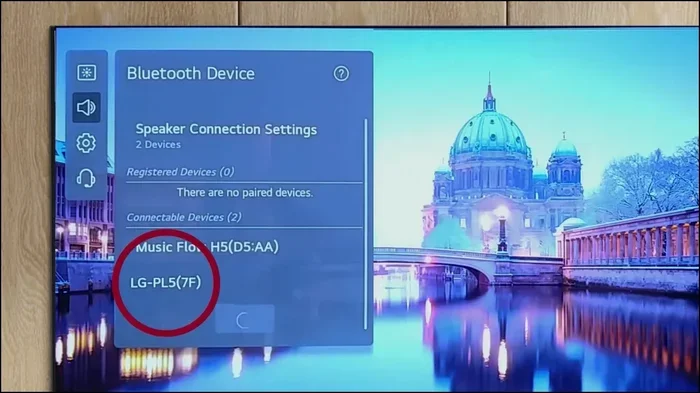
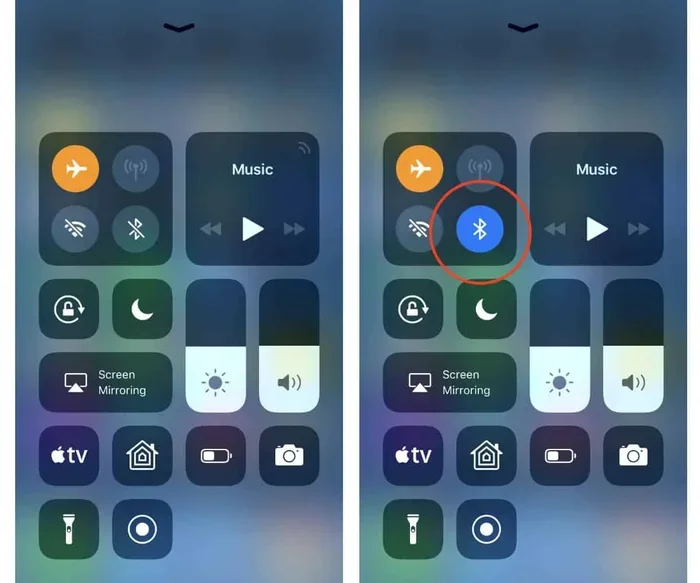
- Open Bluetooth settings on your phone or tablet.
- Search for available devices. Your smart speaker should appear in the list.
- Tap to pair. Once connected, audio from your phone streams to the speaker.
- Play your music. Use any music app on your phone. The audio plays through the speaker.
That is it. You now have a high-quality wireless speaker without needing an internet connection. This works great during power outages that also knock out your router, or when you are in a location with no Wi-Fi access.
Tips For Better Offline Performance
Want to make the most of your smart speaker when it is offline? Try these tips:
- Download music to your phone: Use offline playlists from Spotify or Apple Music so you do not need streaming.
- Keep your phone charged: Bluetooth mode drains phone battery faster than normal.
- Stay within range: Bluetooth works best within 30 feet of the speaker.
- Use line-in audio: Some speakers have a 3.5mm jack for wired connections.
- Set alarms before you lose connection: This ensures your alarms still work offline.
These small steps make a big difference. You will not even notice the lack of internet connection if you plan ahead.
Smart Speaker Features That Require Internet Vs Offline
Features That Need A Wi-Fi Connection
Understanding what requires internet helps set expectations. Here are the features that will not work without a Wi-Fi network:
- Voice-controlled smart home devices: Lights, plugs, locks, and cameras all need cloud communication.
- Real-time information: News, weather, traffic, and sports scores all come from the cloud.
- Music streaming services: Spotify, Pandora, Amazon Music, and Apple Music all require data.
- Voice calling: Drop-in, Skype, and other calling features need internet.
- Skills and routines: Custom Alexa routines or Google automations depend on the cloud.
- New content discovery: Recommendations and new releases are pulled from online databases.
Features That Work Without Internet
Here is the good news. Some features still work even when the Wi-Fi connection is down:
- Alarms and timers: These are stored locally on the device.
- Bluetooth audio streaming: You can play anything from your phone.
- Built-in FM radio: Some models have a radio tuner that works without internet.
- Local reminders: Basic reminders stored on the device may still trigger.
- Volume and playback controls: These work locally without cloud processing.
The more you understand these differences, the better you can plan around internet outages. You will always know what to expect from your smart home device.
Tips For Getting The Most Out Of Your Smart Speaker
Keep Your Wi-Fi Connection Strong
A strong Wi-Fi signal makes all the difference with your smart speaker. Place your router in a central location. Keep the speaker close to the router. If you have a large home, consider a mesh Wi-Fi system to eliminate dead zones.
Interference from microwaves, thick walls, and other electronics can weaken your signal. Positioning matters more than most people realize. A good connection means faster responses and fewer frustrating moments.
Use Offline Features Wisely
Even when your internet connection is stable, it is smart to use offline features. Set your alarms and timers regularly. Download playlists for offline listening. This way, you are always prepared if the Wi-Fi network goes down unexpectedly.
Think of it like keeping a flashlight in your house. You hope you never need it. But you are glad it is there when the power goes out.
Update Your Speaker Regularly
Software updates bring new features and fix bugs. These updates happen over the Wi-Fi network. Make sure your speaker connects to the internet regularly to stay up to date. Most smart speakers update automatically when connected.
You can also check for updates manually through the companion app. For Amazon Echo devices, open the Alexa app. For Google Home, use the Google Home app. For Apple HomePod, use the Home app.
Set Up A Guest Network
If you have many smart home devices, consider setting up a guest Wi-Fi network. This keeps your smart speakers separated from your main network. It can improve performance and security. Many modern routers support multiple networks easily.
A guest network also helps if your main network gets crowded. Too many devices on one network can slow things down. Spreading them out keeps everything running smoothly.
Common Mistakes People Make With Smart Speakers
Placing The Speaker Too Far From The Router
This is one of the most common mistakes. A smart speaker placed in a far corner of the house may struggle to maintain a strong Wi-Fi connection. Weak signals lead to slow responses, dropped commands, and frustration.
Keep your smart speaker in the same room as your router if possible. At minimum, make sure there are only one or two walls between them. A strong signal means a better experience with your smart home device.
Ignoring Offline Capabilities
Many people do not realize their smart speaker can work without wifi. They assume it is useless without internet. In reality, the Bluetooth mode and offline features make it still valuable. Do not overlook these capabilities.
Take a few minutes to explore what your speaker can do offline. You might be surprised at how useful it remains even when disconnected from the wireless network.
Not Securing Your Network
Smart speakers connect to your home Wi-Fi network. If your network is not secure, anyone nearby could potentially access your devices. Always use a strong password. Enable WPA3 encryption if your router supports it. Keep your firmware updated.
Security matters more than most people think. A compromised smart speaker could be used to listen in or access other devices on your network. A little prevention goes a long way.
Expert Insights On Smart Speaker Connectivity
Technology experts agree that wifi connectivity is the backbone of any smart speaker. Without it, you lose the intelligence that sets these devices apart from regular speakers. However, the growing trend is toward better offline support.
Manufacturers are starting to add more local processing capabilities. This means future smart speakers may handle more tasks without an internet connection. For now, though, the internet connection remains essential for the full experience.
If you live in an area with unreliable internet, consider a smart speaker with a strong Bluetooth backup. This ensures you still have audio playback even during outages. Look for models that support both Wi-Fi and Bluetooth for maximum flexibility.
Another expert tip is to invest in a UPS (uninterruptible power supply) for your router. This keeps your Wi-Fi network running during short power outages. Your smart speaker stays connected, and you do not lose any features.
Final Thoughts On Do You Need Wifi For A Smart Speaker
So, do you need wifi for a smart speaker? The answer is clear. For the full range of features, yes, you need a Wi-Fi connection. Voice commands, music streaming, smart home control, and real-time information all depend on the internet.
But that does not mean your smart speaker is useless without wifi. You can still use Bluetooth mode to play music. Alarms and timers continue to work. The speaker becomes a regular wireless speaker when the internet connection drops.
The key is understanding what your speaker can and cannot do offline. Plan ahead. Set your alarms. Download your favorite playlists. Keep your Wi-Fi network strong and secure. With these steps, you will get the best experience from your smart speaker in any situation.
A smart speaker is a great investment for any home. It brings convenience, entertainment, and automation into your daily life. Just remember that the magic happens because of that wifi connection. Take care of it, and your speaker will take care of you.
Whether you have an Amazon Echo, Google Home, or any other brand, the principles remain the same. Wifi unlocks the full potential. Offline mode keeps you going when needed. Both are valuable. Now you know exactly what to expect.
Frequently Asked Questions
Can I set up a smart speaker without wifi?
No, you need wifi to set up a smart speaker for the first time. The initial setup requires an internet connection to download firmware and link your account. After setup, you can use Bluetooth mode without wifi.
Will my smart speaker work during a power outage?
No, smart speakers need electricity to operate. Even if your Wi-Fi network is still running on a backup battery, the speaker itself will not work without power. Consider a UPS for your router and speaker if outages are common in your area.
Can I use Alexa without wifi?
Alexa has very limited functionality without wifi. You can still set alarms and timers. You can also use Bluetooth to play music from your phone. But voice commands, smart home control, and streaming will not work without an internet connection.
How far can a smart speaker be from the router?
Most smart speakers work well within 30 to 50 feet of a router. Thick walls and interference can reduce this range. For best results, keep your speaker in the same room or nearby. A mesh Wi-Fi system can extend coverage throughout your home.
Do smart speakers use a lot of wifi data?
Not really. Voice commands use very little data. Music streaming uses the most data, typically around 100 MB per hour at standard quality. If you have a limited data plan, consider downloading playlists for offline playback through Bluetooth mode.
Can I connect multiple smart speakers without wifi?
No, multi-room audio and speaker grouping require a Wi-Fi network. Without internet, you can only use each speaker individually in Bluetooth mode. For the best experience, make sure your internet connection is stable and your router supports multiple device connections.