Can You Actually Use Bluetooth On Airplane Mode Iphone
Yes, you can use Bluetooth on airplane mode iPhone. Apple allows you to turn on Bluetooth separately while keeping other wireless connections off. This means you can enjoy your favorite wireless headphones, Bluetooth speakers, and other wireless devices during a flight. Let us show you exactly how it works and what you need to know.
Can you use Bluetooth on airplane mode iPhone? This is one of the most common questions travelers ask before boarding a flight. The answer is yes, and it is simpler than most people think. Whether you want to listen to music, watch a movie, or stay connected with wireless earbuds, your iPhone lets you use Bluetooth even when airplane mode is on. In this guide, we will walk you through everything you need to know about Bluetooth in airplane mode on your iPhone.
Airplane mode has confused travelers for years. Many people assume it turns off every single wireless function on their device. But that is not entirely true. Apple designed iOS with a lot of flexibility, and Bluetooth on airplane mode iPhone is one of the best features for travelers. You get to stay connected to your favorite wireless accessories without violating any flight rules.
In this article, we will cover how airplane mode works, how to enable Bluetooth while it is on, which devices are compatible, what the FAA says, and much more. By the end, you will feel confident using your wireless devices on your next flight.
Key Takeaways
- Bluetooth works independently: You can enable Bluetooth even when airplane mode is turned on in iOS settings.
- AirPods and wireless headphones work great: Most Bluetooth audio devices connect seamlessly while in flight mode.
- FAA permits Bluetooth use: The Federal Aviation Administration allows Bluetooth devices during all phases of flight.
- Wi-Fi and cellular data stay off: Only Bluetooth can be toggled on separately while airplane mode remains active.
- Smartwatches and fitness trackers connect too: Many wearable devices use Bluetooth to pair with your iPhone in airplane mode.
- Troubleshooting is simple: Most Bluetooth issues in airplane mode can be fixed with a quick restart or re-pairing.
📑 Table of Contents
- What Is Airplane Mode and What Does It Actually Do?
- Can You Use Bluetooth On Airplane Mode Iphone?
- What Wireless Devices Work With Bluetooth in Airplane Mode?
- FAA Rules and Airline Policies on Bluetooth Use
- Step-by-Step Guide to Using Bluetooth in Airplane Mode
- Common Mistakes People Make With Bluetooth in Airplane Mode
- Expert Tips for the Best Bluetooth Experience on Flights
- The Bottom Line on Bluetooth and Airplane Mode
What Is Airplane Mode and What Does It Actually Do?
Airplane mode is a setting on your iPhone that disables wireless transmissions. When you turn it on, your phone stops sending and receiving cellular signals. This prevents your device from interfering with aircraft communication systems. It is a safety measure that airlines and regulators require.
But airplane mode does not shut down everything on your phone. You can still use apps that do not need a network connection. You can play downloaded music, read ebooks, take photos, and play games. The key limitation is that your phone cannot connect to cellular networks, Wi-Fi, or Bluetooth by default. However, there is a workaround for Bluetooth connections.
How Airplane Mode Works on Your iPhone
When you swipe up from the bottom of your screen or open the Control Center, you see the airplane icon. Tapping it turns on airplane mode immediately. Your iPhone disconnects from all wireless services. The status bar at the top of your screen shows a small airplane icon to confirm it is active.
Apple built iOS to give you control even in airplane mode. You can go to Settings and manually toggle individual wireless features back on. This is how Bluetooth on airplane mode iPhone works. The cellular radio and Wi-Fi stay off, but Bluetooth can be turned on separately.
What Gets Turned Off When You Enable Flight Mode
Here is a quick look at what airplane mode disables on your iPhone:
- Cellular voice and data: You cannot make calls or use mobile data.
- Wi-Fi connections: Your iPhone stops scanning for and connecting to Wi-Fi networks.
- Bluetooth: This is turned off by default, but you can turn it back on manually.
- GPS and location services: Some location features may not work properly.
The good news is that Bluetooth wireless connections are low-power and do not interfere with aircraft systems. That is why regulators allow them even during flights.
Can You Use Bluetooth On Airplane Mode Iphone?
The short answer is absolutely yes. Can you use Bluetooth on airplane mode iPhone? Yes, you can. Apple allows users to turn on Bluetooth independently while airplane mode remains active. This is a built-in feature of iOS and has been available for many years.
Many travelers do not know about this. They assume that airplane mode locks down all wireless functions. But Apple gives you the freedom to pick and choose which wireless features to enable. Bluetooth on airplane mode iPhone is one of the most useful features for in-flight entertainment.
The Short Answer: Yes, You Can
When airplane mode is on, your iPhone blocks cellular and Wi-Fi signals by default. But Bluetooth is treated differently. Apple lets you enable Bluetooth separately because it uses very low power and operates on a different frequency band. This makes it safe for use during flights.
So if you are wondering whether Bluetooth works on airplane mode iPhone, the answer is a clear yes. You can pair your AirPods, wireless headphones, speakers, and other devices without turning off airplane mode.
How to Enable Bluetooth While in Airplane Mode
Here is how simple it is to turn on Bluetooth when airplane mode is active:
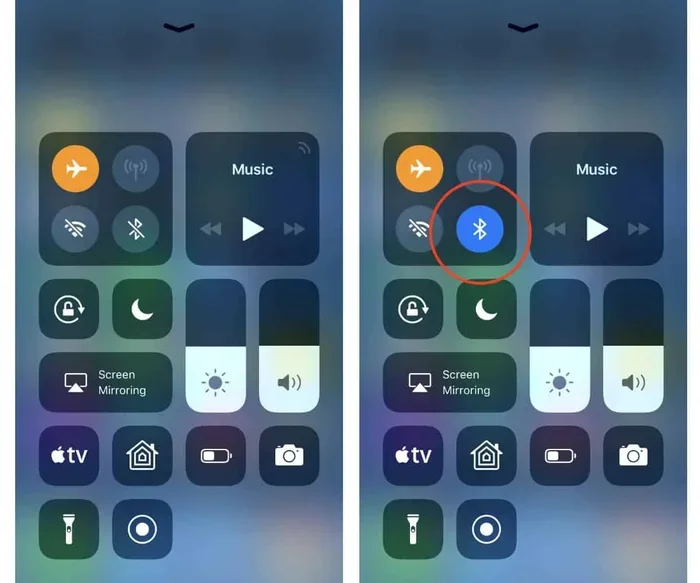
- Swipe down from the top-right corner of your screen to open Control Center.
- Tap the airplane icon to turn on airplane mode. You will see the airplane icon appear in the status bar.
- Now tap the Bluetooth icon to turn it back on. It will light up in blue.
- Go to Settings and confirm that Bluetooth shows as connected to your device.
- Your wireless headphones or other Bluetooth accessories should connect automatically if they are paired already.
That is all it takes. You can now enjoy music, podcasts, or movies through your Bluetooth headphones while your phone remains in airplane mode. The rest of the wireless connections stay off, keeping you compliant with flight regulations.
What Wireless Devices Work With Bluetooth in Airplane Mode?
Not all wireless devices use Bluetooth, but many popular ones do. Let us look at the devices that work best when you use Bluetooth on airplane mode iPhone.
Bluetooth Headphones and AirPods
This is the most common use case. Apple AirPods and other Bluetooth headphones connect seamlessly to your iPhone in airplane mode. Whether you have AirPods Pro, AirPods Max, or third-party headphones, they all work the same way.
You can listen to music stored on your phone or use offline apps like Spotify with downloaded playlists. The audio streams directly from your iPhone to your headphones through a Bluetooth connection. No cellular data or Wi-Fi is needed.
Wireless Keyboards and Controllers
If you like to type on a wireless keyboard during a flight, you can pair it with your iPhone while in airplane mode. The same goes for game controllers. Many Bluetooth gaming controllers work perfectly with iOS devices offline.
This is great for long flights when you want to play games or type notes. Just make sure your keyboard or controller is already paired before you board.
Smartwatches and Fitness Trackers
Many smartwatches use Bluetooth to sync with your iPhone. You can keep your smartwatch connected while in airplane mode. Fitness trackers like the Apple Watch or Fitbit devices often use Bluetooth to track your steps and heart rate locally.
Some smartwatches can also store music offline, so you can leave your phone in your seat and still enjoy music through the watch’s speakers or connected headphones.
Bluetooth Speakers
If you are traveling with a small Bluetooth speaker, you can pair it with your iPhone in airplane mode. This is perfect for sharing music with a travel companion. Just keep the volume reasonable and be mindful of fellow passengers.
FAA Rules and Airline Policies on Bluetooth Use
Understanding the rules around Bluetooth on airplane mode iPhone is important. You want to stay compliant and avoid any issues with flight attendants or aviation authorities.
When Can You Use Bluetooth on Flights?
The Federal Aviation Administration (FAA) in the United States allows the use of Bluetooth devices during all phases of flight. This includes takeoff, cruise, and landing. The FAA updated its guidelines in 2013 to allow portable electronic devices in airplane mode or with Bluetooth enabled.
The key rule is that devices must be in airplane mode or have cellular data turned off. Bluetooth and Wi-Fi can be used as long as the airline permits Wi-Fi. Most airlines today allow Bluetooth use without restrictions during the entire flight.
What Airlines Say About Bluetooth
Most major airlines now support Bluetooth use during flights. Airlines like Delta, United, American Airlines, and Southwest allow passengers to use Bluetooth headphones and devices. Some airlines provide their own in-flight entertainment systems that connect via Bluetooth or auxiliary cables.
It is always a good idea to check your airline’s specific policy before you fly. You can usually find this information on the airline’s website or in your booking confirmation email.
| Feature | Airplane Mode (Default) | Airplane Mode + Bluetooth On |
|---|---|---|
| Cellular Data | Off | Off |
| Wi-Fi | Off | Off (unless manually enabled) |
| Bluetooth | Off | On |
| GPS | Limited | Limited |
| Music Playback | Offline only | Offline via Bluetooth |
| Calls and Texts | Blocked | Blocked |
| FAA Compliant | Yes | Yes |
As you can see from the table above, the main difference is that Bluetooth stays active when you manually enable it in airplane mode. Everything else remains disabled. This setup keeps you safe and connected to your wireless accessories.
Step-by-Step Guide to Using Bluetooth in Airplane Mode
Let us walk through the exact steps to get your Bluetooth devices working while your iPhone is in airplane mode. This guide works for all iPhone models running iOS 15 and later.
For iPhone Users
Follow these simple steps to set up Bluetooth on airplane mode iPhone:
- Turn on airplane mode: Open Control Center and tap the airplane icon. Wait a few seconds for your phone to disconnect from all networks.
- Open Settings: Tap the gear icon on your home screen or in the app library.
- Go to Bluetooth: Tap “Bluetooth” in the Settings menu.
- Toggle Bluetooth on: Flip the switch to turn Bluetooth on. It will turn blue when active.
- Pair your device: If your headphones or accessory is not already paired, put it in pairing mode and select it from the list on your iPhone.
- Start listening: Open your music app, podcast app, or video app and start playing content. The audio will stream through your Bluetooth device.
That is all you need to do. The entire process takes less than a minute. Once your Bluetooth pairing is complete, you can enjoy your content without any interruptions.
Troubleshooting Common Bluetooth Issues
Sometimes Bluetooth connections do not work as expected. Here are a few quick fixes:
- Restart your iPhone: A simple restart often fixes Bluetooth connectivity issues.
- Turn Bluetooth off and back on: Go to Settings, toggle Bluetooth off, wait five seconds, and turn it back on.
- Forget the device and re-pair: Go to Settings > Bluetooth, tap the “i” icon next to your device, and select “Forget This Device.” Then pair it again.
- Check battery levels: Low battery on your Bluetooth device can cause connection problems.
- Move closer to your iPhone: Bluetooth has a range of about 30 feet. Stay within range for the best connection.
Common Mistakes People Make With Bluetooth in Airplane Mode
Even though using Bluetooth on airplane mode iPhone is simple, some people make mistakes. Here are the most common ones to avoid.
Mistake 1: Forgetting to turn Bluetooth back on. Some people turn on airplane mode and forget that they need to manually enable Bluetooth. The result is silence. Make it a habit to check your Bluetooth setting after enabling airplane mode.
Mistake 2: Trying to use Wi-Fi while in airplane mode. Airplane mode turns off Wi-Fi by default. You cannot browse the internet or stream content from the cloud unless you manually re-enable Wi-Fi. If you want to use Wi-Fi on a flight, you need to go to Settings and turn Wi-Fi back on separately, just like Bluetooth.
Mistake 3: Not downloading content beforehand. Bluetooth works offline, but you still need content stored on your device. Make sure to download your playlists, podcasts, and movies before you board the plane.
Mistake 4: Ignoring airline rules. While the FAA allows Bluetooth use, some airlines may have specific rules about when you can use wireless devices. Always listen to the safety briefing and follow crew instructions.
Mistake 5: Leaving Bluetooth on after landing. Some people forget to turn off Bluetooth once they land. While this is not a safety issue, it can drain your battery if your phone keeps searching for connections. It is a good habit to turn off Bluetooth when you no longer need it.
Expert Tips for the Best Bluetooth Experience on Flights
Want to get the most out of your wireless devices during flights? Here are some expert tips that make a big difference.
- Download content before your flight. Use Wi-Fi at the airport or at home to download movies, music, and podcasts. This way, you do not need any internet connection during the flight.
- Charge your devices fully before boarding. Bluetooth uses battery power on both your iPhone and your accessories. Start with a full charge to avoid running out of battery mid-flight.
- Keep your Bluetooth devices in your carry-on. This prevents them from getting lost or damaged during the flight.
- Use noise-canceling Bluetooth headphones. Airplane cabins can be noisy. Noise-canceling headphones help you enjoy your content without raising the volume too high.
- Turn off Bluetooth when not in use. This saves battery life and reduces unnecessary wireless signals, even though Bluetooth is low-power.
- Update your iOS before flying. Apple regularly improves Bluetooth performance and stability. Make sure your iPhone is running the latest version of iOS.
These small steps can greatly improve your experience. You will have fewer connection issues and enjoy your entertainment without interruptions.
The Bottom Line on Bluetooth and Airplane Mode
So, can you use Bluetooth on airplane mode iPhone? Yes, absolutely. Apple makes it easy to enable Bluetooth independently while airplane mode is active. This feature lets you enjoy wireless audio, connect your smartwatch, and use wireless controllers during flights. The FAA supports Bluetooth use during all phases of flight, and most airlines allow it without restrictions.
Just remember to download your content beforehand, keep your devices charged, and follow airline guidelines. With the right setup, you can have a great in-flight entertainment experience using nothing but your iPhone and a pair of Bluetooth headphones.
The next time you board a flight, do not worry about being disconnected. You can still enjoy your favorite music, podcasts, and movies through your wireless devices. Bluetooth on airplane mode iPhone is one of the best features for modern travelers. Use it wisely, stay compliant, and enjoy your journey.
Frequently Asked Questions
Can I use Bluetooth on a plane with airplane mode turned on?
Yes, you can. Apple allows you to turn on Bluetooth separately while airplane mode is active on your iPhone. This lets you connect wireless headphones, speakers, and other devices during your flight without violating any safety regulations.
Why can’t I find the Bluetooth option when airplane mode is on?
If you cannot find Bluetooth in airplane mode, try going to Settings instead of using Control Center. Sometimes the quick toggle in Control Center does not respond properly. Restarting your iPhone or toggling airplane mode off and back on usually fixes this issue.
Is it safe to use Bluetooth on airplanes?
Yes, it is completely safe. The FAA has confirmed that Bluetooth devices do not interfere with aircraft systems. Bluetooth uses low-power radio waves that operate on a different frequency than aircraft communication equipment. You can use Bluetooth throughout the entire flight.
Can I use AirPods in airplane mode on my iPhone?
Absolutely. AirPods connect to your iPhone using Bluetooth, so they work perfectly in airplane mode. Just make sure Bluetooth is turned on after enabling airplane mode, and your AirPods will connect as usual.
Does using Bluetooth in airplane mode drain my iPhone battery?
Bluetooth uses very little battery power. It is a low-energy wireless technology designed to be efficient. You should not notice significant battery drain from using Bluetooth during a typical flight. However, keeping multiple wireless features active for long periods can use some extra power.
What happens if I forget to turn off Bluetooth before landing?
Nothing bad will happen. Bluetooth is safe to use during all phases of flight, including landing. However, some airlines ask passengers to turn off wireless devices during taxiing. It is a good practice to turn off Bluetooth when the crew asks you to power down all electronic devices.