Do You Need an Earc For Dolby Atmos Home Sound Setup
Do you need an eARC for Dolby Atmos? The short answer is yes, if you want the full immersive audio experience. eARC (enhanced Audio Return Channel) is the key that unlocks Dolby Atmos sound from your TV to your soundbar or home theater system. Without it, you lose the rich, overhead audio that makes movies and shows feel real. This guide explains what eARC does, why it matters, and whether your current setup already has it.
You just bought a Dolby Atmos soundbar. You set it up. You press play on a movie. And the audio sounds flat. No height effects. No immersive bubbles floating above your head. What went wrong?
Chances are, your TV is not sending the full Dolby Atmos signal. And the reason? You probably do not have eARC enabled. The enhanced Audio Return Channel is the unsung hero of modern home theater setups. It is the bridge between your TV and your sound system. Without it, Dolby Atmos stays locked up inside your television.
This article will answer the big question: do you need an eARC for Dolby Atmos? We will break it down in plain language. No jargon. No guesswork. Just clear answers you can use right away.
Key Takeaways
- eARC is essential for Dolby Atmos: It carries the full lossless audio signal your TV needs to send to a soundbar or receiver.
- Standard HDMI ARC falls short: It cannot transmit Dolby Atmos or high-resolution audio formats.
- Check your TV and soundbar: Both devices must support eARC for it to work properly.
- eARC offers better bandwidth: This means uncompressed audio and support for newer audio codecs.
- You may already have eARC: Many modern TVs from 2019 onward include it.
- HDMI cable matters: You need a high-speed HDMI cable to get the full benefit of eARC.
- Setting up eARC is simple: Just enable it in your TV audio settings and connect the right cable.
📑 Table of Contents
- What Is eARC and Why Does It Matter?
- Do You Need eARC for Dolby Atmos? The Short Answer
- How to Check If Your TV Has eARC
- What You Need for a Dolby Atmos Setup
- Common Problems With eARC and Dolby Atmos
- Do You Really Need eARC? What If You Skip It?
- Quick Tips for Getting the Best Dolby Atmos Sound
- Expert Insight: What Audio Professionals Say About eARC
- Key Takeaways
- Frequently Asked Questions
- Final Thoughts
What Is eARC and Why Does It Matter?
Let us start with the basics. eARC stands for enhanced Audio Return Channel. It is a feature built into HDMI connections. It allows your TV to send audio back to your soundbar, AV receiver, or home theater system.
But here is the key difference. Standard HDMI ARC, which most TVs have had for years, sends compressed audio. Think of it like a heavily compressed photo. It still looks okay, but you lose all the fine details. eARC, on the other hand, sends uncompressed or lightly compressed audio. It is like that photo in full high resolution.
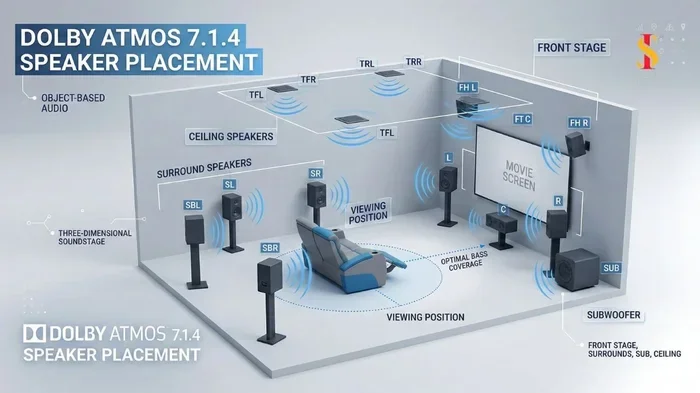
Why does this matter for Dolby Atmos? Dolby Atmos uses object-based audio. That means sound is placed as individual objects in a 3D space. The format needs a lot of bandwidth to carry all those audio objects. Standard HDMI ARC simply does not have enough room. It compresses the signal or blocks it entirely.
How Does Audio Travel from TV to Soundbar?
Here is how the audio path works in a typical setup. Your TV receives a video signal. It may also decode the audio. But instead of playing the sound through its small built-in speakers, it sends the audio back out through HDMI. This is the “return” channel.
With standard ARC, your TV sends a stereo or compressed 5.1 surround signal. With eARC, it can send Dolby Atmos, Dolby TrueHD, DTS-HD Master Audio, and other high-resolution formats. These formats carry the full surround and height channel experience.
Think of it this way. Your TV is a gatekeeper. eARC opens the gate wide open. Standard ARC only cracks it open a little. You get a fraction of the audio quality you paid for.
Do You Need eARC for Dolby Atmos? The Short Answer
Yes. If you want Dolby Atmos to work properly, you need eARC. There is no way around it. Dolby Atmos over HDMI requires the bandwidth that only eARC provides.
Some soundbars claim to support Dolby Atmos over standard ARC. They do this by using a wireless connection or by receiving a downmix. But you lose the true Atmos experience. The overhead sounds get flattened. The spatial audio becomes a less convincing surround effect.
Here is a quick comparison to make this clear.
Dolby Atmos Without eARC
- Your TV sends a compressed audio signal.
- The Dolby Atmos metadata is stripped away.
- Your soundbar plays a regular surround mix.
- You hear height effects as regular speakers, not from above.
- The immersive 3D audio experience is lost.
Dolby Atmos With eARC
- Your TV sends the full uncompressed or lossless signal.
- Dolby Atmos metadata stays intact.
- Your soundbar decodes all the audio objects.
- You hear sounds coming from above and around you.
- The full immersive home theater experience works.
The difference is night and day. If you spent money on a Dolby Atmos setup, you want every last bit of that audio. eARC makes sure you get it.
How to Check If Your TV Has eARC
Not all TVs support eARC. And not all TVs that have HDMI ARC also have eARC. So how do you know if your TV has it?
Check Your TV Manual
The easiest way is to look at your TV’s user manual. Search for the word “eARC” or “enhanced Audio Return Channel.” If it is listed, your TV supports it. Most manufacturers put this on the front page of the spec sheet under audio features.
Check the TV Settings Menu
You can also check directly on your TV. Go to Settings. Find the Sound or Audio section. Look for HDMI Audio Format or eARC settings. If you see an option to enable eARC, your TV has it.
Check the HDMI Ports
Not every HDMI port on your TV supports eARC. Usually, only one or two ports are eARC-enabled. Look for labels on the back of your TV. Some TVs mark the eARC port with a special icon or label. Check your manual to find which port to use.
TV Brands That Commonly Include eARC
Most TVs made after 2019 or 2020 include eARC. Here are some common brands and their support:
- Samsung: Most models from 2020 and newer support eARC.
- LG: Nearly all LG OLED and NanoCell TVs have eARC.
- Sony: Most Sony Bravia TVs from the last few years include eARC.
- TCL: Many TCL Roku TVs support eARC, especially mid-range and higher models.
- Hisense: Select models have eARC. Check the specific model number.
If you are shopping for a new TV, always confirm eARC support before buying. It is one of the most important features for a modern home theater.
What You Need for a Dolby Atmos Setup
Getting Dolby Atmos sound from your TV to your speakers involves a few pieces working together. Let us walk through each one.
1. A TV With eARC Support
This is the starting point. Your TV must have an eARC-enabled HDMI port. Without it, the full Dolby Atmos signal cannot leave the TV.
2. A Soundbar or AV Receiver That Supports Dolby Atmos
Your soundbar or receiver must be able to decode Dolby Atmos. Most modern Dolby Atmos soundbars support this. AV receivers with HDMI eARC inputs also handle it well.
3. A High-Speed HDMI Cable
Not just any HDMI cable will do. You need a Premium High Speed HDMI cable or an Ultra High Speed HDMI cable. These cables have the bandwidth to carry the uncompressed audio data that eARC and Dolby Atmos require.
A cheap or old HDMI cable might work for standard audio. But it will choke on the higher data rate of Dolby Atmos. This can cause audio dropouts, no sound, or a degraded experience.
4. Correct TV Audio Settings
Even with the right gear, you still need to set things up correctly. Go into your TV audio settings and set the HDMI audio output to eARC or Bitstream (Passthrough). This tells your TV to send the raw audio signal to your soundbar instead of decoding it first.
Also make sure the Dolby Atmos setting is turned on in your TV’s audio output options. Some TVs hide this in a separate audio format menu.
Common Problems With eARC and Dolby Atmos
Even when you have the right gear, things can go wrong. Here are the most common issues and how to fix them.
No Dolby Atmos Sound After Connecting
If your Dolby Atmos content plays in regular stereo or 5.1, check your TV audio settings. Make sure eARC is enabled and the output format is set to Bitstream or Passthrough. Also check that your soundbar is set to receive Dolby Atmos.
Audio and Video Are Out of Sync
Lip sync issues happen sometimes with eARC. This is because the audio processing takes slightly longer. Most TVs have a lip sync or audio delay setting. Adjust it until the sound matches the picture.
eARC Keeps Disconnecting
This can happen if the HDMI cable is not fully seated. Try unplugging and replugging the cable firmly. Also, make sure you are using a high-speed cable. A faulty or low-quality cable is the most common cause of eARC dropouts.
Your TV Switches Inputs and eARC Stops Working
Some TVs disable eARC when you switch to a different input source. This is a known issue with certain TV models. The fix is to re-enable eARC in the settings after switching inputs. Some soundbars have an eARC passthrough mode that helps with this.
CEC Settings Interfering
CEC stands for Consumer Electronics Control. It lets devices control each other with one remote. But sometimes CEC settings can interfere with eARC. If you have audio issues, try disabling CEC temporarily to see if it helps. The CEC setting goes by different names on different TVs. Samsung calls it Anynet+. LG calls it SimpLink. Sony calls it BRAVIA Sync.
Do You Really Need eARC? What If You Skip It?
You can skip eARC. Your system will still work. Your soundbar will still play sound. But here is what you miss out on.
First, you lose Dolby Atmos height channels. Those sounds that float above the screen will not come from above. Instead, they get downmixed to your regular speakers. The effect is flat and less convincing.
Second, you lose high-resolution audio formats. Dolby TrueHD, DTS-HD Master Audio, and other lossless formats require the bandwidth of eARC. Without it, your TV or soundbar has to compress the audio. Compression removes detail and richness.
Third, you lose future-proofing. As more content adopts Dolby Atmos and newer audio formats, eARC becomes even more important. A setup without eARC today may feel outdated faster.
On the other hand, if you only watch regular TV shows and listen to stereo music, you might not notice a big difference without eARC. Standard ARC handles basic audio just fine. But if you are watching Netflix, Disney+, or Apple TV+ content with Dolby Atmos, eARC is a must.
Quick Tips for Getting the Best Dolby Atmos Sound
- Always use a high-speed HDMI cable. Look for the Premium High Speed or Ultra High Speed label on the packaging.
- Enable eARC in your TV settings. It is often off by default. Go to Settings, then Sound, then HDMI Audio Format, and select eARC.
- Set your soundbar to the right input mode. Some soundbars have an eARC or ARC mode. Make sure it is selected.
- Update your TV and soundbar firmware. Manufacturers often release updates that improve eARC compatibility and fix bugs.
- Use a dedicated eARC HDMI port. Not all ports on your TV support eARC. Use the one your manual recommends.
- Test with known Dolby Atmos content. Try a Netflix movie or Disney+ show that you know supports Atmos. This helps you confirm the setup is working.
Expert Insight: What Audio Professionals Say About eARC
Audio engineers and home theater designers consistently recommend eARC for any Dolby Atmos setup. The reason is simple. Dolby Atmos was designed to carry rich, multi-layered audio. Standard HDMI ARC was built for a simpler era of audio. It was never meant to handle the data demands of object-based surround sound.
eARC was introduced in 2017 as part of the HDMI 2.1 specification. It was specifically created to solve the bandwidth limitations of standard ARC. Audio professionals agree that eARC is not optional for Dolby Atmos. It is the standard pathway for delivering the full experience to consumers.
Some people try to work around eARC by using optical audio connections. But optical cables cannot carry Dolby Atmos at all. Others use wireless audio transmitters. These can work but add another device to your setup and sometimes introduce audio delay. eARC over HDMI remains the cleanest and most reliable method.
Key Takeaways
- eARC is essential for Dolby Atmos: Without it, your TV cannot send the full Dolby Atmos signal to your soundbar or receiver.
- Standard HDMI ARC is not enough: It compresses audio and strips away Dolby Atmos metadata.
- Both your TV and soundbar need eARC: If either device lacks eARC support, the full Atmos experience will not work.
- Use a high-speed HDMI cable: A cheap or old cable can block the high-bandwidth eARC signal.
- Check your TV settings: eARC is often disabled by default. Turn it on in your audio settings.
- Most modern TVs have eARC: If your TV was made after 2019 or 2020, there is a good chance it supports eARC.
- Setting up eARC is straightforward: It just requires the right cable, the right port, and the right settings.
Frequently Asked Questions
Can I Get Dolby Atmos Without eARC?
You can get a version of Dolby Atmos without eARC, but it will not be the full experience. Some soundbars use upward-firing speakers and receive a downmixed signal through standard ARC or optical connections. This creates a simulated Atmos effect, but it lacks the true object-based audio that makes Dolby Atmos special. For the real thing, eARC is required.
What Is the Difference Between HDMI ARC and HDMI eARC?
HDMI ARC (Audio Return Channel) sends basic audio from your TV to your soundbar. It supports stereo and compressed 5.1 surround. HDMI eARC (enhanced Audio Return Channel) supports uncompressed audio, lossless formats, and Dolby Atmos. eARC also includes better CEC features and can handle higher bandwidth signals. Think of eARC as the upgraded, more powerful version of ARC.
Do I Need a Special HDMI Cable for eARC?
You need a high-speed HDMI cable to support eARC properly. Any Premium High Speed HDMI cable or Ultra High Speed HDMI cable will work. Standard HDMI cables may not have enough bandwidth for the eARC data stream. Using the wrong cable can cause audio dropouts or no sound at all.
Can I Use eARC With a Soundbar That Does Not Have HDMI?
No. eARC is an HDMI feature. If your soundbar only has optical or analog inputs, it cannot use eARC. In that case, you would need to connect your TV to an AV receiver with eARC first, or upgrade to a soundbar with HDMI eARC input. Some soundbars offer optical connections that can carry basic surround sound, but they cannot carry Dolby Atmos.
Why Does My eARC Connection Keep Cutting Out?
The most common reason is a low-quality or damaged HDMI cable. Try replacing it with a certified high-speed HDMI cable. Another cause is CEC settings interfering with the connection. You can try turning CEC off temporarily to see if that fixes the issue. Also, make sure you are plugging the HDMI cable into the correct eARC port on your TV.
Is eARC Worth It for Casual TV Watching?
If you mostly watch regular TV shows and news, eARC might not feel essential. Standard ARC handles basic stereo and surround audio fine for everyday content. But if you watch any movies, streaming shows, or sports with high-quality audio, eARC makes a noticeable difference. It future-proofs your setup and ensures you get the best audio possible from all your content.
Final Thoughts
The answer to the question “Do you need an eARC for Dolby Atmos” is clear. Yes, you do. eARC is the essential link that allows your TV to send the full Dolby Atmos audio signal to your soundbar or home theater system. Without it, you are leaving immersive audio on the table.
Setting up eARC is not hard. Check your TV for eARC support. Use the right HDMI port. Connect with a high-speed cable. Enable the setting in your TV audio menu. That is it. In just a few minutes, you can unlock the full Dolby Atmos experience.
Your home theater setup is only as good as its weakest link. If you have invested in a Dolby Atmos soundbar or receiver, make sure the connection between your TV and your audio system can handle the full signal. eARC does exactly that. It opens the door to rich, immersive, three-dimensional sound that fills your room.
Do not let a simple connection setting hold you back. Check your eARC setup today. You might be surprised at how much better your movies and shows sound once the full Dolby Atmos signal is flowing. Your ears will thank you.