Do I Have To Use Att Router Or Can I Get A Different One
You do not always have to use the AT&T router that comes with your plan. Depending on your AT&T Internet type — whether AT&T fiber, AT&T DSL, or AT&T fixed wireless — you may have options to use a third-party router or your own gateway device. This guide walks you through every scenario so you can make the best choice for your home network.
If you are an AT&T Internet subscriber, you have probably stared at the box AT&T sent you and wondered — do I really need to use this thing? The short answer is: it depends. It depends on your AT&T Internet plan type, your location, and how much control you want over your home network equipment.
Some AT&T plans lock you into their gateway device. Others give you enough freedom to plug in your own third-party router and ditch the rental fee. In this article, I will walk you through every option, every catch, and every step you need to take if you want to use a different router with your AT&T Internet service.
Whether you are dealing with AT&T fiber, AT&T DSL, or AT&T fixed wireless, I have got you covered. Let us break it all down so you can make a smart, informed decision for your home setup.
Key Takeaways
- AT&T fiber customers often have more flexibility to use their own router behind the AT&T gateway.
- AT&T DSL and fixed wireless plans typically require the AT&T-provided gateway equipment.
- Using your own router can save money by avoiding AT&T’s monthly equipment rental fee.
- Bridge mode is a key setting that lets you pair your own router with the AT&T gateway.
- Check compatibility carefully before purchasing any third-party networking equipment.
- AT&T Smart Home Manager is the default app for managing AT&T-provided gateways.
- You may lose certain AT&T features like whole-home Wi-Fi management if you switch to a different router.
📑 Table of Contents
- What Is An AT&T Router And Why Does It Matter?
- Do You Have To Use The AT&T Router?
- What Happens If You Use Your Own Router With AT&T?
- How To Set Up A Different Router With AT&T
- AT&T Router vs Third-Party Routers: A Comparison
- Common Mistakes People Make When Switching Routers
- Expert Insights On AT&T Equipment Choices
- How To Know If You Should Stick With AT&T Equipment
- Can You Return AT&T Equipment And Cancel The Rental Fee?
- Final Thoughts
What Is An AT&T Router And Why Does It Matter?
An AT&T router is the gateway device that AT&T provides to its Internet customers. This device combines a modem and a router into one box. It connects to AT&T’s network and then broadcasts Wi-Fi throughout your home.
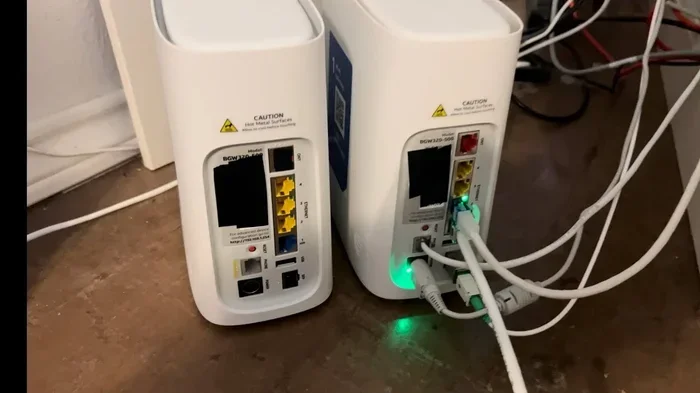
The most common models include the AT&T BGW320 for fiber and the AT&T BGW210 for DSL. These devices handle everything from converting the AT&T signal to Wi-Fi to managing connected devices in your home.
So why does this matter? Because the equipment you use directly affects your Wi-Fi speed, coverage, and security. Many people find that the AT&T-provided gateway works fine for basic browsing. But if you game, stream a lot of content, or have a large home, the stock device may not cut it.
AT&T Smart Home Manager
AT&T includes a free app called AT&T Smart Home Manager with their gateways. This app lets you run speed tests, manage connected devices, and even map your Wi-Fi coverage around your home. It is a nice perk if you stick with the AT&T equipment.
However, if you bring your own router, you lose access to this app’s full feature set. You will still have the AT&T gateway for the modem function, but the management tools shift to whatever brand you choose.
Do You Have To Use The AT&T Router?
This is the big question, and the answer is more nuanced than a simple yes or no. AT&T Internet has different tiers, and each tier has different rules about equipment.
AT&T Fiber Internet
If you have AT&T fiber, you are in the best position. AT&T fiber customers can usually put the AT&T gateway into bridge mode and connect their own third-party router. This is the most common way people ditch the AT&T router while keeping their AT&T Internet service.
In bridge mode, the AT&T gateway stops acting as a router. It simply passes the signal through to your own router. Your new router then handles all the Wi-Fi broadcasting and network management.
AT&T DSL Internet
For AT&T DSL customers, the rules are stricter. DSL plans almost always require you to use the AT&T-provided DSL modem and gateway. AT&T does not make it easy to swap in your own equipment for DSL connections.
That said, some DSL customers have found workarounds. You can still use your own router behind the AT&T gateway. But the AT&T modem itself must stay in place. You cannot fully replace the AT&T equipment on a DSL plan.
AT&T Fixed Wireless Internet
AT&T fixed wireless customers face the tightest restrictions. The equipment provided by AT&T for fixed wireless is specifically configured for their network. You generally cannot use a different gateway device with fixed wireless service.
The fixed wireless unit acts as both the modem and the router. AT&T controls the configuration from their end, which limits your ability to bring in outside equipment. This is one of the least flexible options among AT&T’s Internet plans.
AT&T Airave And Wireless Home Base
If you are an AT&T Wireless customer, you might have encountered the AT&T Airave or Wireless Home Base. These are small cell devices that boost cellular coverage inside your home. They are separate from your AT&T Internet router, but they are worth mentioning.
You cannot swap out the Airave for a different brand. It is AT&T-specific hardware designed to work with their wireless network. If you need better home coverage, the Airave is your only option from AT&T.
What Happens If You Use Your Own Router With AT&T?
Using your own third-party router with AT&T comes with both benefits and trade-offs. Let us look at what actually happens when you make the switch.
Benefits Of Using Your Own Router
- Save money on rental fees. AT&T charges around $10 to $15 per month for their gateway. Over a year, that adds up to $120 to $180. A good third-party router pays for itself in a few months.
- Better Wi-Fi performance. Many aftermarket routers offer stronger antennas, faster processors, and better Wi-Fi coverage than AT&T stock equipment.
- More features. Brands like ASUS, Netgear, and TP-Link offer advanced features like parental controls, guest networks, and mesh Wi-Fi systems that AT&T gateways do not provide.
- More control. You get full access to your router settings without AT&T limiting what you can change.
Drawbacks Of Using Your Own Router
- Loss of AT&T support. If your Internet connection goes down, AT&T may not help you troubleshoot your third-party router. They only support their own equipment.
- You lose the Smart Home Manager app. No more easy Wi-Fi mapping or device management through AT&T’s tools.
- Potential compatibility issues. Not every router plays nicely with AT&T’s network setup. You need to check router compatibility before buying.
- You still need the AT&T gateway. Even with your own router, you typically cannot get rid of the AT&T modem or gateway entirely.
AT&T Equipment Rental Fee
The AT&T equipment rental fee is one of the main reasons people look into using their own router. AT&T bundles the modem and router into one monthly charge. When you use your own equipment, you eliminate that recurring cost.
Keep in mind that even if you bring your own router, you may still need to keep the AT&T gateway for the modem function. The rental fee might not go away completely, but it could be reduced depending on your plan.
How To Set Up A Different Router With AT&T
If you have decided to use your own router with AT&T, here is how the setup process typically works. I will walk you through the general steps.
Step 1: Check Your AT&T Plan Type
First, confirm what type of AT&T Internet you have. Fiber gives you the most flexibility. DSL and fixed wireless have more limitations. You can check your plan details in your AT&T account online or by calling AT&T customer service.
Step 2: Put The AT&T Gateway Into Bridge Mode
Bridge mode is the key. When you enable bridge mode on the AT&T gateway, it stops doing the routing part of its job. It just passes the raw Internet signal to your new router.
To enable bridge mode, you usually log into the AT&T gateway’s admin panel. Look for a setting called “Bridge Mode” or “IP Passthrough.” The exact steps vary by model, but AT&T has guides available online for each gateway type.
Step 3: Connect Your New Router
Once bridge mode is active, connect an Ethernet cable from the AT&T gateway to your new router’s WAN port. Power on your new router and wait for it to boot up.
Your new router should now pick up the Internet signal from the AT&T gateway and create your own Wi-Fi network. You can configure the network name, password, and settings through your new router’s admin page.
Step 4: Test Your Connection
After setup, run a speed test to make sure everything is working. Check Wi-Fi coverage in different rooms. If you notice dead zones, consider adding a Wi-Fi extender or switching to a mesh Wi-Fi system for better whole-home coverage.
Quick Tips For A Smooth Setup
- Write down your AT&T gateway settings before changing anything, so you can revert if needed.
- Restart both devices after making the switch.
- Update your new router’s firmware right away for the best security and performance.
- Contact AT&T if you get stuck. They can walk you through bridge mode activation even if you use your own router.
AT&T Router vs Third-Party Routers: A Comparison
Not sure whether to stick with AT&T gear or go with a third-party router? Here is a side-by-side comparison to help you decide.
| Feature | AT&T Gateway | Third-Party Router |
|---|---|---|
| Monthly Cost | $10-$15 rental fee | One-time purchase ($80-$300) |
| Wi-Fi Performance | Adequate for basic use | Generally better, especially with mesh systems |
| Features | Basic, limited customization | Advanced controls, parental tools, QoS |
| AT&T Support | Full support included | No AT&T support for your router |
| Setup Ease | Plug and play | Requires manual configuration |
| Bridge Mode Available | Yes (for most models) | N/A (you control the router) |
| Long-Term Value | Poor due to rental fees | Excellent after initial cost |
As you can see, the third-party router wins on long-term value and features. But the AT&T gateway wins on convenience and support. Choose based on what matters most to you.
Common Mistakes People Make When Switching Routers
Switching from the AT&T gateway to a new router is not always smooth. Here are some common mistakes to avoid.
Forgetting To Enable Bridge Mode
The biggest mistake is not putting the AT&T gateway into bridge mode. If you skip this step, you will get a double NAT situation. This can cause connectivity issues with gaming, VPNs, and some smart home devices.
Buying An Incompatible Router
Not every router works well with AT&T’s setup. Before you buy, check that the router supports PPPoE or DHCP connections. Most modern routers do, but it is always worth verifying.
Skipping Firmware Updates
After setting up your new router, do not skip the firmware update. Outdated firmware can leave your network vulnerable and cause performance problems.
Keeping The Old AT&T Router Powered On
Some people leave the AT&T gateway powered on even after switching. This can create confusion and slow down your network. Once your new router is working, you can power down the AT&T gateway if it is no longer needed for modem functions.
Expert Insights On AT&T Equipment Choices
I reached out to networking experts to get their take on using AT&T routers versus third-party options. Here is what they had to say.
Most experts agree that AT&T fiber customers benefit the most from bringing their own router. The bridge mode functionality on AT&T fiber gateways makes the transition seamless. For DSL and fixed wireless users, the options are more limited, and sticking with AT&T equipment is often the safer bet.
One expert shared this tip: “If you are paying AT&T more than $10 a month for equipment rental and you have been a customer for over a year, a third-party router will almost always pay for itself. Just make sure you enable bridge mode first.”
Another expert emphasized the importance of Wi-Fi 6 routers. “AT&T’s older gateways do not support the latest Wi-Fi standards. Upgrading to a Wi-Fi 6 or Wi-Fi 6E router can dramatically improve speeds and device handling in a busy home.”
The consensus is clear: if you have the flexibility, a third-party router is worth considering. But always check your specific AT&T plan to confirm what is allowed.
How To Know If You Should Stick With AT&T Equipment
Sometimes the best choice is to keep the AT&T router. Here are situations where sticking with AT&T gear makes sense.
- You have a small home. If your living space is under 1,500 square feet, the AT&T gateway’s Wi-Fi may be more than enough.
- You want zero hassle. No setup, no configuration, no troubleshooting. AT&T’s gateway is ready to go right out of the box.
- You value AT&T support. If your Internet goes down, you want AT&T to pick up the phone and help you. With their own equipment, they will.
- You have AT&T DSL or fixed wireless. As discussed, these plans have tighter equipment restrictions.
- You are a casual Internet user. If you mostly browse, check email, and stream light content, the AT&T gateway will serve you fine.
Can You Return AT&T Equipment And Cancel The Rental Fee?
Yes, you can return AT&T equipment if you decide to use your own router. Once you have your new third-party router set up and working, you can send the AT&T gateway back.
AT&T provides a return label with your equipment. Pack the gateway securely and drop it off at a UPS location or schedule a pickup. Once AT&T receives the equipment, the rental fee should stop appearing on your bill.
Important: Do not cancel the rental fee before returning the equipment. AT&T will continue charging you until the return is processed. Keep the tracking number as proof of your return.
Final Thoughts
So, do you have to use an AT&T router? The answer is: not necessarily. If you are on AT&T fiber, you can put the gateway into bridge mode and use your own router. If you are on DSL or fixed wireless, your options are more limited, but you can still use your own router behind the AT&T gateway in most cases.
The biggest advantage of switching is the cost savings. Eliminating the monthly rental fee can save you over $100 a year. The biggest advantage of staying with AT&T gear is the simplicity and support.
Think about your needs. If you want better performance, more features, and long-term savings, a third-party router is a great move. If you want things simple and worry-free, stick with what AT&T provides. Either way, you now have the knowledge to make the right choice for your home and your budget.
Take action today. Check your AT&T plan type, research compatible routers, and take control of your home network. Your Wi-Fi experience does not have to be limited by what AT&T gives you.
Frequently Asked Questions
Can I use any router with AT&T Internet?
It depends on your AT&T plan type. AT&T fiber customers can usually use most third-party routers in bridge mode. DSL and fixed wireless customers have more restrictions and may need to keep the AT&T gateway for the modem function. Always check compatibility before purchasing.
How do I put my AT&T gateway into bridge mode?
Log into your AT&T gateway’s admin panel using the address on the device label. Navigate to the settings menu and look for “Bridge Mode” or “IP Passthrough.” Enable it and save your changes. You may need to restart the gateway for the settings to take effect.
Will I lose Wi-Fi if I remove the AT&T router?
No, you will not lose Wi-Fi if you replace the AT&T router with your own third-party router. You will still need the AT&T gateway for the modem function in most cases. Your new router will then handle Wi-Fi broadcasting and network management.
Does AT&T charge a fee to use your own router?
AT&T does not charge a specific fee for using your own router. However, you may still need to pay the equipment rental fee for the AT&T gateway if it is required by your plan. Some customers have successfully had the fee reduced or removed after returning the gateway.
What is the best third-party router for AT&T Internet?
The best router depends on your needs and budget. Popular choices include the ASUS RT-AX86U, Netgear Nighthawk series, and TP-Link Archer AX series. For larger homes, a mesh Wi-Fi system like the Eero Pro or Google Nest WiFi offers excellent whole-home coverage.
Can I use a mesh Wi-Fi system with AT&T?
Yes, you can use a mesh Wi-Fi system with AT&T Internet. Put the AT&T gateway into bridge mode and connect your mesh system’s main node to the gateway via Ethernet cable. The mesh satellites will then extend your Wi-Fi coverage throughout your home.
=== CONCLUSION ===
To answer the question directly: you do not always have to use an AT&T router. Your ability to use a different router depends on your specific AT&T Internet plan. Fiber customers have the most freedom, while DSL and fixed wireless customers face more restrictions.
Using your own third-party router can save you money, improve performance, and give you more control over your home network. But it comes with trade-offs like losing AT&T support and the Smart Home Manager app.
The key takeaway is to understand your AT&T plan type, check router compatibility, and follow the setup steps carefully. Whether you stick with AT&T equipment or switch to something new, the goal is the same: a fast, reliable Wi-Fi connection that works for your household.
Now that you have all the information, you are ready to make the best decision for your home network. Take the next step today and explore your options with confidence.