Do Bluetooth Speakers Lag On Your Tv While Watching
Do Bluetooth speakers lag on your TV while watching? The short answer is yes, they can, but the fix is easier than you think. Bluetooth latency, codec mismatches, and outdated TV software are the usual culprits behind audio delay. This guide walks you through every cause, fix, and best speaker pick to get your sound perfectly in sync. You will learn simple tips that work on any budget and any TV setup.
Do Bluetooth speakers lag on your TV while watching? You are not alone. This is one of the most common questions people ask when they try to go wireless with their TV sound setup. You sit down for a movie night, hit play, and then… the sound comes in half a second late. It is annoying. It breaks the whole experience. You start wondering if wireless speakers are even worth it.
The good news is that Bluetooth speaker lag on TV is a well-understood problem. There are clear reasons why it happens. And there are proven ways to fix it. Whether you use a budget portable speaker or a premium wireless setup, this guide covers everything you need to know. We will look at the causes, the best fixes, top speaker picks, and expert tips to get your sound perfectly in sync.
By the end of this article, you will know exactly why your Bluetooth speaker lags on your TV. You will also have a clear action plan to fix it. No guesswork. No tech jargon overload. Just simple, practical advice that works.
Key Takeaways
- Bluetooth lag is real: Wireless audio delay happens because of latency, codec limits, and signal interference.
- aptX Low Latency is a game changer: This codec cuts delay dramatically and is the best fix for most users.
- Firmware and software updates matter: Keeping your TV and speaker updated often solves sync issues fast.
- Distance and obstacles cause problems: Keep your speaker close to the TV and away from walls or other devices.
- Bluetooth transmitters help older TVs: A dedicated transmitter adds low-latency Bluetooth to any TV with a 3.5mm or optical output.
- Wired options still win for zero delay: HDMI ARC or optical cables deliver instant audio sync every time.
- Fixes exist for every budget: From free settings tweaks to paid hardware upgrades, there is a solution for everyone.
📑 Table of Contents
- What Causes Bluetooth Speakers to Lag on TV
- How Bluetooth Latency Affects Your Viewing Experience
- Best Bluetooth Speakers for TV With Minimal Lag
- How to Fix Bluetooth Speaker Lag on TV
- Bluetooth vs Wired Speakers for TV
- Expert Tips to Minimize Bluetooth Speaker Lag on TV
- Common Mistakes That Cause Bluetooth Speaker Lag
- Conclusion
What Causes Bluetooth Speakers to Lag on TV
Understanding the root cause is the first step to fixing any problem. Bluetooth speaker lag on TV is not random. It comes from specific technical reasons. Let us break them down one by one.
Bluetooth Latency: The Core Issue
Bluetooth works by sending audio data wirelessly from your TV to your speaker. This process takes time. That time is called latency. In simple terms, latency is the delay between when a sound is created on screen and when you hear it through your speaker.
Standard Bluetooth codecs like SBC can add 150 to 300 milliseconds of delay. That might sound tiny. But human ears are incredibly sensitive. A delay of just 40 milliseconds can feel off. A delay of 200 milliseconds is very noticeable. You will see lips move and hear the sound a full second later. That is what ruins the experience.
The good news is that newer Bluetooth versions and codecs have made huge improvements. Bluetooth 5.0 and above offer better speed and stability. Codecs like aptX Low Latency can cut delay down to around 40 milliseconds or less. This makes the lag almost unnoticeable for most people.
Codec Mismatch Between TV and Speaker
Not all Bluetooth codecs are the same. Your TV and your speaker need to agree on a codec to send audio. If they do not match, they fall back to the most basic codec. That basic codec is usually SBC. And SBC has the highest latency of all standard codecs.
Here is how codec negotiation works. Your TV tries to send audio using its best codec. Your speaker responds with its best codec. If they share a common codec, they use that one. If not, they default to SBC. This mismatch is one of the biggest reasons for wireless speaker lag on TV.
For example, if your TV supports aptX but your speaker only supports SBC, you will get poor sync. Both devices need to support the same low-latency codec for the best results.
Signal Interference and Distance
Bluetooth uses the 2.4 GHz frequency band. This band is crowded. Your Wi-Fi router, microwaves, baby monitors, and even USB 3.0 cables all use this same band. When there is too much interference, Bluetooth signals get weaker. Weaker signals mean more retransmissions. More retransmissions mean more delay.
Distance also plays a role. The further your speaker is from the TV, the weaker the signal. Walls, furniture, and even your body can block Bluetooth signals. If your speaker is in another room, expect more lag and possible dropouts.
TV Software and Processing Delays
Your TV does a lot of processing before it sends audio out. It processes the video signal, applies picture enhancements, and then sends the audio through Bluetooth. All of this takes time. Some TVs add more processing delay than others.
Older TV models are especially prone to this problem. They often have slower processors and outdated Bluetooth chips. Even some newer TVs have poor Bluetooth implementations. The TV itself can be the bottleneck, not the speaker.
Audio Buffering on the Speaker Side
Bluetooth speakers need to buffer audio data before playing it. Buffering helps prevent gaps and stuttering. But too much buffering adds delay. Some speakers buffer more data than others to ensure smooth playback. This extra buffering creates more wireless audio sync problems.
Cheap portable speakers often have more buffering than premium models. They do this to keep the audio smooth on weak connections. The trade-off is more lag. It is a balancing act between smooth playback and low delay.
How Bluetooth Latency Affects Your Viewing Experience
You might wonder, does a little lag really matter? The answer is a strong yes. Audio sync is critical for an immersive TV experience. Here is how Bluetooth speaker lag affects what you watch.
Lip Sync Problems
The most obvious sign of Bluetooth lag is lip sync issues. You see someone speak on screen. But the sound comes out a moment later. It looks like a badly dubbed movie. This is incredibly distracting. It pulls you out of the story and makes everything feel cheap.
Lip sync problems are especially bad during dialogue-heavy scenes. Think of thriller movies, drama series, or news broadcasts. Every word matters. When the audio does not match the visuals, you lose the impact of every line.
Action Scenes and Gaming
Action movies and sports rely on precise timing. Explosions, gunshots, and fast movements need to match the sound perfectly. When there is audio sync delay, explosions feel weak. You see the flash but hear the boom later. It kills the excitement.
Gaming on TV is even worse. Input lag already affects gameplay. Adding Bluetooth audio delay on top makes it nearly unplayable. You press a button and hear the sound long after the action happens. This is why most gamers avoid wireless speakers for TV gaming.
Music and Streaming Content
Even music videos and streaming shows suffer from Bluetooth delay. You watch a music video and the beat does not match the visuals. It feels off. For casual viewing like news or YouTube clips, the lag might be tolerable. But for anything requiring precise audio timing, it falls short.
The Psychological Impact of Audio Delay
Even if the lag is small, your brain notices it. Humans are wired to expect sound to match what they see. When it does not, it creates a subtle feeling of unease. You might not consciously notice the delay. But you feel that something is off. Over time, this can make watching TV feel tiring and less enjoyable.
Best Bluetooth Speakers for TV With Minimal Lag
Not all Bluetooth speakers are created equal. Some are designed specifically for low latency audio. If you want to avoid wireless speaker lag on TV, choosing the right speaker matters a lot.
Speakers With aptX Low Latency Support
The best way to avoid Bluetooth audio delay is to buy a speaker that supports aptX Low Latency. This codec is designed for real-time audio. It cuts the delay to a level most people cannot detect.
Look for speakers that explicitly mention aptX LL support. Many premium wireless speakers now include this codec. Some great options include models from brands like JBL, Sony, and Bose. Always check the product specs before buying. Do not assume all Bluetooth speakers have low-latency codecs.
Top Picks for TV Use
Here are some speaker types that work well with TVs for minimal lag:
- Bluetooth soundbars with aptX LL: These are designed for TV use. They often have dedicated Bluetooth chips that handle low latency well.
- Premium portable speakers: High-end portable speakers from brands like JBL and Bose often support advanced codecs.
- Dedicated wireless TV speakers: These are purpose-built for TV audio. They often include features specifically for sync optimization.
- Multi-room speakers with TV mode: Some smart speakers have a dedicated TV mode that reduces latency for media playback.
What to Look for When Buying
When shopping for a Bluetooth speaker for TV, keep these things in mind:
- Codec support: Look for aptX, aptX LL, or LDAC support.
- Bluetooth version: Bluetooth 5.0 or newer is ideal.
- TV compatibility: Check if the speaker works well with your specific TV brand.
- Latency specs: Some manufacturers list latency numbers. Lower is always better.
- Reviews: Read user reviews specifically mentioning TV use and audio sync.
How to Fix Bluetooth Speaker Lag on TV
The good news is that you can fix most Bluetooth speaker lag issues. You do not always need to buy new equipment. Many fixes are free and take just a few minutes.
Fix 1: Enable Low Latency Mode
Some TVs and speakers have a low latency or game mode. This mode reduces audio processing to cut delay. Check your TV settings for options like “Bluetooth Low Latency” or “Audio Sync.” Enabling this can make a huge difference.
On your speaker side, look for a pairing mode designed for low latency. Some speakers have a dedicated mode for TV use. Refer to your speaker manual for details.
Fix 2: Update Firmware and Software
Outdated firmware is a common cause of audio sync problems. Both your TV and your Bluetooth speaker receive updates that improve performance. Check for TV software updates in your settings menu. Also check the speaker manufacturer’s app for firmware updates.
Updates often include Bluetooth codec improvements and bug fixes. A simple update can sometimes eliminate lag completely. Always keep your devices up to date.
Fix 3: Reduce Distance and Interference
Move your Bluetooth speaker closer to the TV. The closer they are, the stronger the signal. Stronger signals mean fewer retransmissions and less delay.
Also, reduce interference from other devices. Move your Wi-Fi router away from the TV area. Avoid placing the speaker near microwaves or USB 3.0 cables. A clear line of sight between the TV and speaker helps a lot.
Fix 4: Use a Bluetooth Transmitter
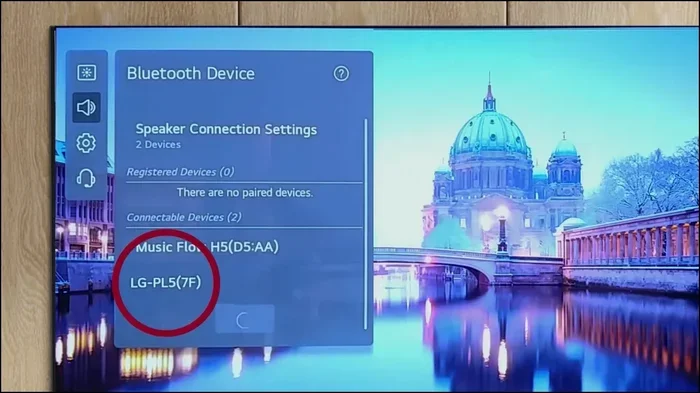
If your TV has poor Bluetooth support, a dedicated Bluetooth transmitter can help. These small devices plug into your TV’s audio output. They handle the Bluetooth connection with better hardware and codecs.
Look for transmitters that support aptX Low Latency. They act as a bridge between your TV and speaker. The transmitter sends audio with much lower delay than most built-in TV Bluetooth chips. This is one of the best upgrades you can make for older TVs.
Fix 5: Adjust Audio Sync Settings on Your TV
Most modern TVs have an audio sync or lip sync setting. This setting lets you manually delay the video to match the audio. If your Bluetooth speaker is lagging, you can delay the video instead.
Go to your TV settings and look for “Audio Sync” or “Lip Sync.” Increase the delay in small increments until the sound matches the picture. This is a simple workaround that works surprisingly well.
Fix 6: Reset and Re-Pair the Connection
Sometimes the Bluetooth connection just gets stuck. Resetting both devices and re-pairing them can clear up sync issues. Turn off Bluetooth on both devices. Wait a few seconds. Turn them back on and pair fresh.
This simple step often resolves unexpected lag. It clears any corrupted pairing data and starts the connection clean.
Fix 7: Use a Wired Connection Instead
If nothing else works, go wired. An HDMI ARC or optical cable connection eliminates Bluetooth lag entirely. The audio sync is perfect every time. You lose the convenience of wireless, but you gain perfect sound quality and zero delay.
Many people use Bluetooth for convenience but switch to wired for critical viewing. This hybrid approach gives you the best of both worlds.
Bluetooth vs Wired Speakers for TV
The debate between Bluetooth and wired speakers for TV is ongoing. Both have pros and cons. Let us compare them directly.
Bluetooth Speakers: Pros and Cons
Bluetooth speakers offer freedom and portability. You can place them anywhere in the room. No cables cluttering your space. They are easy to set up and work with most modern TVs. The biggest downside is Bluetooth audio delay. Even with the best codecs, there is some latency. For casual viewing, this might be fine. For movies and gaming, it can be a real problem.
Wired Speakers: Pros and Cons
Wired speakers deliver perfect audio sync. There is zero latency because the signal travels through the cable instantly. Sound quality is also typically better with a wired connection. The downside is the lack of flexibility. You are limited by cable length. And there are wires to manage.
Which One Should You Choose?
Your choice depends on your priorities. If you want convenience and portability, Bluetooth is the way to go. Just make sure you pick a speaker with low-latency support. If you want perfect audio sync and the best sound quality, wired is superior. Many people use both. Bluetooth for casual music and background sound. Wired for movie nights and gaming sessions.
| Feature | Bluetooth Speakers | Wired Speakers |
|---|---|---|
| Audio Lag | 40-300ms depending on codec | 0ms (instant) |
| Setup Ease | Very easy, wireless pairing | Requires cables and ports |
| Portability | Highly portable | Fixed in place |
| Sound Quality | Good to excellent | Excellent to studio-grade |
| Interference Risk | Moderate to high | None |
| Best For | Casual viewing, music | Movies, gaming, critical viewing |
Expert Tips to Minimize Bluetooth Speaker Lag on TV
Here are some expert-backed tips that make a real difference. These are small changes that add up to a much better experience.
- Keep both devices plugged into power: Bluetooth speakers sometimes reduce performance on battery saver mode. Plugging them in ensures full power and stable connection.
- Use the 2.4GHz band wisely: If your speaker supports dual-band Bluetooth (2.4GHz and 5GHz), use the 5GHz band for less interference.
- Purchase a Bluetooth 5.2 transmitter: The newest Bluetooth versions offer better speed and lower latency. A good transmitter can future-proof your TV setup.
- Avoid connecting multiple Bluetooth devices at once: Each connected device shares bandwidth. More devices mean more potential for lag.
- Place the speaker at ear level: This is more about sound quality than lag, but better audio experience reduces the perception of delay.
- Test different codecs: If your TV and speaker support multiple codecs, try them all. You might find one works better with your specific setup.
- Restart your router and TV regularly: A fresh start clears temporary glitches that can affect Bluetooth performance.
Common Mistakes That Cause Bluetooth Speaker Lag
Many people unknowingly make mistakes that worsen Bluetooth lag. Avoid these common pitfalls.
- Using an old Bluetooth version: Bluetooth 4.0 and older have much higher latency. Upgrade to Bluetooth 5.0 or newer whenever possible.
- Ignoring firmware updates: Manufacturers regularly release updates that improve Bluetooth performance. Skipping updates means missing out on fixes.
- Placing the speaker too far away: More distance means weaker signal and more delay. Keep the speaker within 10 feet of the TV for best results.
- Not checking codec compatibility: Assuming all Bluetooth is the same is a mistake. Always verify codec support before buying.
- Using the speaker for multiple devices simultaneously: Switching between devices can cause sync issues. Pair the speaker with one device at a time for TV use.
- Overlooking TV audio settings: Many people never check their TV audio output settings. Simple changes like turning off “Audio Enhancements” can reduce processing delay.
Conclusion
So, do Bluetooth speakers lag on your TV while watching? Yes, they can. But now you know why and, more importantly, how to fix it. Bluetooth audio delay is not a mystery. It comes from latency, codec mismatches, interference, and TV processing. Each of these causes has a clear solution.
You can fix most lag issues with simple steps. Update your firmware. Reduce distance. Enable low latency mode. Use a Bluetooth transmitter. Or switch to aptX Low Latency codecs. For the best results, choose a speaker designed for TV use with low-latency support.
Remember that wired connections still offer the best sync and sound quality. But Bluetooth technology has come a long way. With the right setup, you can enjoy wireless sound that feels almost instant. The key is knowing what to look for and how to optimize your devices.
Take action today. Try the fixes in this guide. You will be amazed at how much better your TV sound can be. Do not let Bluetooth lag ruin another movie night. Get your wireless speaker TV setup right and enjoy every moment of crystal-clear, perfectly synced audio.
Frequently Asked Questions
Why does my Bluetooth speaker lag so much on my TV?
The most common reason is codec mismatch or high Bluetooth latency. Standard Bluetooth codecs like SBC can add 200 or more milliseconds of delay. Your TV and speaker might not share a low-latency codec, causing the audio to fall behind the video. Distance, interference, and outdated firmware can also make the problem worse.
Can I completely eliminate Bluetooth lag on my TV?
You can greatly reduce Bluetooth lag, but completely eliminating it is hard with standard Bluetooth. Using aptX Low Latency or a dedicated Bluetooth transmitter can get the delay down to 40 milliseconds or less. For zero delay, a wired HDMI ARC or optical connection is the best choice.
What is the best Bluetooth codec for TV use?
aptX Low Latency is the best Bluetooth codec for TV watching. It reduces delay to around 32 to 40 milliseconds, which is nearly unnoticeable. LDAC offers high quality but has more latency. For TV use, low latency matters more than high bitrate. Always check that both your TV and speaker support the same codec.
Does a Bluetooth transmitter help reduce speaker lag on TV?
Yes, a Bluetooth transmitter can significantly reduce lag. Many TVs have weak Bluetooth chips. A dedicated transmitter with aptX Low Latency support sends audio much faster. It acts as a better Bluetooth bridge between your TV and speaker. This is one of the easiest and most effective fixes for wireless speaker lag on TV.
Are wireless speakers worth it for TV despite the lag risk?
They are worth it for most people. The convenience and portability of wireless speakers are hard to beat. With the right speaker and settings, lag is minimal and barely noticeable. For casual viewing, music, and background sound, Bluetooth speakers work great. For serious movie watching or gaming, consider a wired connection or a low-latency Bluetooth setup.
How can I check if my TV supports low-latency Bluetooth?
Check your TV settings for Bluetooth audio options. Look for terms like “Low Latency,” “Game Mode,” or “aptX” in the audio or Bluetooth settings. You can also check your TV model’s manual or website for Bluetooth codec support. If your TV does not support low-latency codecs, a Bluetooth transmitter is your best solution.