Do Beats Work With All Phones Here Is What You Need To Know
Do Beats work with all phones? The short answer is yes, but with some important caveats. Beats headphones use Bluetooth to connect to most devices, yet the experience varies depending on your phone model, operating system, and Beats model. This guide covers everything from wired connections to Bluetooth codecs, so you know exactly what to expect.
Have you ever unboxed a shiny new pair of Beats headphones only to wonder whether they will actually work with your phone? It is a question a lot of people ask, and for good reason. Not every pair of headphones plays nicely with every device out there.
The good news is that Beats work with most phones on the market today. Whether you are rocking an iPhone, a Samsung Galaxy, a Google Pixel, or something else entirely, there is a good chance your Beats will connect just fine. But “working” can mean different things depending on what features you want to use.
In this article, we are going to break down everything you need to know about Beats headphone compatibility. We will cover Bluetooth connectivity, wired options, model-specific details, and common issues you might run into. By the end, you will know exactly what to expect when you pair your Beats with your phone.
Key Takeaways
- Beats headphones work with most phones: They use standard Bluetooth, so compatibility is broad across iPhone and Android devices.
- iPhone users get extra features: Apple’s H1 and W1 chips in some Beats models unlock seamless pairing, Siri, and battery sharing.
- Android users may miss out: Some advanced features like auto-switching and Siri are limited on non-Apple devices.
- Wired and USB-C options exist: Many Beats models include a 3.5mm cable or USB-C adapter for phones without Bluetooth.
- Firmware updates matter: Keeping your Beats updated through the Beats app or firmware tools improves compatibility and performance.
- Not all Beats models are equal: Some models offer multipoint pairing, ANC, and better codecs than others.
- Quick fixes solve most issues: Resetting, re-pairing, and updating firmware fixes the majority of connectivity problems.
📑 Table of Contents
- Do Beats Work With All Phones
- How Beats Connect to Different Phones
- Beats Models and Their Phone Compatibility
- Common Issues When Beats Don’t Work Properly With Phones
- Quick Tips for the Best Beats Experience on Any Phone
- Comparison Table: Beats Models and Phone Compatibility
- Expert Insights on Beats and Phone Compatibility
- Key Takeaways
- Conclusion
Do Beats Work With All Phones
The simple answer is mostly yes. Beats headphones use standard Bluetooth technology, which means they can connect to virtually any phone that supports Bluetooth. Apple, Samsung, Google, OnePlus, Xiaomi — it does not really matter. The core function of playing audio works on all of them.
However, “working” and “working well” are two different things. Some phones unlock extra features that others do not. For example, if you use Beats with an iPhone, you might get automatic switching between devices, Siri integration, and battery status showing on your screen. On an Android phone, you might not get all of those perks.
So when people ask do Beats work with all phones, the real question is usually about the full experience. And that depends on a few factors we will get into below.
What Makes Beats Compatible With Phones
Beats headphones rely on Bluetooth connectivity as their primary way of connecting to phones. Bluetooth is a universal standard, which is why your Beats can pair with almost any modern smartphone. Here is what makes the connection possible:
- Bluetooth version: Most newer Beats models use Bluetooth 5.0 or higher, which gives you a stronger, more stable connection.
- Standard profiles: Beats use the A2DP profile for audio streaming and the HFP profile for calls. These are supported by all major phone operating systems.
- Wired backup: Many Beats models come with a 3.5mm audio cable, so even if Bluetooth fails, you can plug in and listen.
- USB-C options: Some newer Beats models support USB-C charging and even USB-C audio output, which helps with phones that lack a headphone jack.
Because of these standard technologies, Beats compatibility with phones is very broad. You are unlikely to buy a pair of Beats and find they simply will not connect. The question is always about how well they work, not whether they work at all.
How Beats Connect to Different Phones
The connection process for Beats headphones is similar across most phones, but the experience after pairing can differ quite a bit. Let us look at how Beats behave with the two biggest phone ecosystems.
Beats with iPhones and Apple Devices
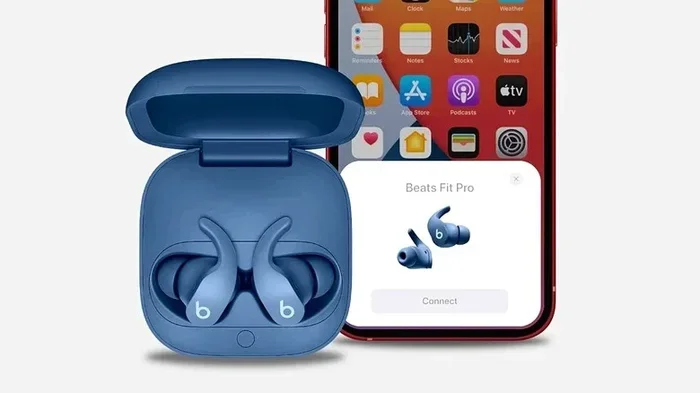
If you use an iPhone, iPad, or Mac, you are in for a smooth ride. Apple designed the W1 and H1 chips that appear in several Beats models, and these chips are made to work beautifully with Apple devices. Here is what you get:
- One-tap pairing: Open the case near your iPhone, and it connects instantly.
- Automatic device switching: Your Beats jump between your iPhone and iPad when you start playing audio on a different device.
- Siri integration: You can summon Siri with a voice command or by squeezing the headphones.
- Battery status: Your iPhone shows the Beats battery level right in the battery widget.
- Find My support: You can locate lost Beats using the Find My app.
These features make the Beats and iPhone combo feel polished and seamless. If you are an Apple user, this is a big part of why Beats are so popular.
Beats with Android Phones
Beats work with Android phones, and they connect just fine for the most part. You can stream music, take calls, and use all the basic features without any problems. But some of the Apple-exclusive features are not available on Android.
Here is what Android users can expect:
- Standard Bluetooth pairing: You pair Beats through your phone’s Bluetooth settings, just like any other wireless headphone.
- No automatic switching: Android does not support the Apple-specific switching feature, so you have to manually connect to each device.
- No Siri: You can use Google Assistant or Samsung Bixby instead, but the integration is not as deep.
- Battery checking: Some Android phones show Beats battery levels, but it depends on the manufacturer and phone model.
- Beats app for Android: The Beats app on Android lets you update firmware, customize controls, and manage your headphones.
The experience is still very good on Android. You just lose some of the bells and whistles that Apple users enjoy. For most people, this is more than enough.
Beats Models and Their Phone Compatibility
Not all Beats models are the same, and their compatibility with different phones can vary. Some models are designed specifically for certain ecosystems, while others are more universal. Here is a closer look at popular Beats models and how they work with phones.
Beats Solo 4
The Beats Solo 4 is a versatile on-ear headphone that works well with both iPhones and Android phones. It supports Bluetooth 5.3, which means a strong and stable connection. The Solo 4 also includes a 3.5mm cable for wired listening, making it compatible with phones that do not have Bluetooth or have a broken Bluetooth module.
One nice feature of the Solo 4 is Fast Fuel charging. You get 3 hours of playback from just a 5-minute charge, which is handy when you are in a rush. These headphones also support the Beats app for firmware updates and customization on both platforms.
Beats Studio Pro
The Beats Studio Pro is a premium over-ear headphone aimed at users who want active noise cancellation (ANC) and great sound. It works with all phones that support Bluetooth, but the ANC feature and sound customization are best experienced through the Beats app.
The Studio Pro also supports USB-C charging, which is convenient for phones that use USB-C ports. If you are an iPhone user, the Studio Pro pairs seamlessly and takes advantage of Apple ecosystem features. Android users get the full audio experience but miss out on some Apple-specific integrations.
Beats Fit Pro
The Beats Fit Pro are true wireless earbuds designed for active lifestyles. They use the Apple H1 chip, which means they are optimized for iPhone users. The Fit Pro offers multipoint pairing, so you can stay connected to two devices at once.
On Android, the Fit Pro still delivers great sound and solid call quality. However, you will not get the H1 chip benefits like instant pairing or automatic switching. The Beats app on Android does allow you to customize touch controls and update firmware, which helps bridge the gap.
Beats Flex
The Beats Flex are affordable wireless earbuds that are a great entry point into the Beats lineup. They use the Apple W1 chip, which makes them very easy to pair with iPhones. On Android phones, they work just like any standard Bluetooth earbuds.
The Flex are lightweight and comfortable, making them a solid choice for everyday listening. They also come with a USB-C to USB-C charging cable, which is convenient for modern phones. The battery life is decent at up to 12 hours, which is impressive for the price.
Beats Powerbeats Pro
The Beats Powerbeats Pro are earhooks-style true wireless earbuds known for their secure fit and long battery life. They use the Apple H1 chip and work best with iPhones. On Android devices, they still function well for music and calls, but you lose the Apple ecosystem perks.
The Powerbeats Pro offer up to 9 hours of listening on a single charge, and the charging case provides an additional 18 hours. This makes them a great choice for workouts and long commutes. The earhooks keep them in place during intense movement, which is a big plus for fitness enthusiasts.
Common Issues When Beats Don’t Work Properly With Phones
Even though Beats are designed to work with most phones, you might run into issues from time to time. Here are the most common problems and what you can do about them.
Beats Won’t Connect to Phone
If your Beats refuse to pair with your phone, don’t panic. This is usually a simple fix. Try these steps:
- Turn off Bluetooth on your phone and turn it back on.
- Reset your Beats: Hold the power button and the volume down button for 10 seconds, then release.
- Remove old pairings: Go to your phone’s Bluetooth settings and forget the Beats, then try pairing again.
- Check for interference: Other Bluetooth devices or Wi-Fi routers can sometimes cause connection issues.
Most of the time, a simple reset solves the problem. If it does not, try updating your Beats firmware through the Beats app.
Audio Keeps Cutting Out
Intermittent audio dropouts are frustrating but common. They usually happen because of distance, obstacles, or Bluetooth interference. Here are some quick fixes:
- Stay within 30 feet of your phone for the best connection.
- Remove physical obstacles like walls between your phone and Beats.
- Turn off other Bluetooth devices that might be competing for the connection.
- Make sure your Beats firmware is up to date.
- If you are on an Android phone, check that your phone’s Bluetooth codec is set to the best available option.
These steps should eliminate most audio cutting issues. If the problem persists, it might be a hardware issue, and you should contact Beats support.
Battery Drains Fast on Phone
Some users notice that their phone battery drains faster when Bluetooth headphones are connected. This is normal to some extent, but if it seems excessive, try these tips:
- Turn off ANC if you are not using it.
- Lower the volume slightly, as higher volumes use more power.
- Keep your Beats firmware updated, as updates often include battery optimization.
- Disable features you are not using, like always-on Siri or voice prompts.
Bluetooth audio does use more battery than speakers, but modern phones and Beats are efficient enough that the drain should not be dramatic.
Quick Tips for the Best Beats Experience on Any Phone
Want to get the most out of your Beats no matter what phone you use? Here are some practical tips that make a big difference.
- Keep your firmware updated: The Beats app regularly releases updates that improve performance and fix bugs.
- Use the right cable: If you are using a wired connection, make sure you use the cable that came with your Beats or a high-quality replacement.
- Clean your Beats regularly: Earwax and dust can affect sound quality and comfort. A soft cloth works wonders.
- Store them properly: When not in use, keep your Beats in their case to protect them from damage and save battery.
- Explore the Beats app: Whether you are on iPhone or Android, the Beats app lets you customize sound profiles, controls, and more.
- Check your phone’s Bluetooth settings: Some phones have developer options that let you choose Bluetooth codecs, which can improve audio quality.
These small habits add up over time and keep your Beats sounding great for years.
Comparison Table: Beats Models and Phone Compatibility
| Beats Model | Bluetooth | iPhone Features | Android Features | Wired Option | USB-C |
|---|---|---|---|---|---|
| Beats Solo 4 | 5.3 | Yes | Yes | 3.5mm cable | No |
| Beats Studio Pro | 5.3 | Yes | Yes | 3.5mm cable | Yes (charging) |
| Beats Fit Pro | 5.0 | Yes (H1 chip) | Yes | No | Yes (charging) |
| Beats Flex | 5.0 | Yes (W1 chip) | Yes | No | Yes (charging) |
| Beats Powerbeats Pro | 5.0 | Yes (H1 chip) | Yes | No | Yes (charging) |
As you can see from the table, all Beats models offer basic Bluetooth compatibility with both iPhones and Android phones. The differences come down to which ecosystem-specific features are available and whether the model includes a wired backup option.
Expert Insights on Beats and Phone Compatibility
Audio engineers and tech reviewers often point out that the real strength of Beats lies in their versatility. While they are optimized for Apple devices, their universal Bluetooth support means they are not locked to any one ecosystem. This is a deliberate design choice by Beats and Apple.
One thing to keep in mind is that audio codec support varies between phones. iPhones typically use AAC, which Beats support well. Some Android phones support LDAC or aptX, which can deliver higher-quality audio, but Beats do not always take full advantage of these codecs. This means the audio quality on Android might not be quite as rich as on an iPhone, even though the connection is perfectly fine.
Another expert tip is to always check for firmware updates after purchasing new Beats. Updates can improve connectivity, fix bugs, and sometimes even add new features. The Beats app makes this process simple and straightforward on both iPhone and Android.
Key Takeaways
- Beats headphones work with most phones: They use standard Bluetooth, so compatibility is broad across iPhone and Android devices.
- iPhone users get extra features: Apple’s H1 and W1 chips in some Beats models unlock seamless pairing, Siri, and battery sharing.
- Android users may miss out: Some advanced features like auto-switching and Siri are limited on non-Apple devices.
- Wired and USB-C options exist: Many Beats models include a 3.5mm cable or USB-C adapter for phones without Bluetooth.
- Firmware updates matter: Keeping your Beats updated through the Beats app or firmware tools improves compatibility and performance.
- Not all Beats models are equal: Some models offer multipoint pairing, ANC, and better codecs than others.
- Quick fixes solve most issues: Resetting, re-pairing, and updating firmware fixes the majority of connectivity problems.
Conclusion
So, do Beats work with all phones? Yes, they really do. The Bluetooth technology they use is universal, and almost every modern smartphone can connect to them without any hassle. Whether you have an iPhone or an Android device, your Beats will play your music, take your calls, and deliver a solid audio experience.
That said, the full Beats experience is best enjoyed within the ecosystem they are designed for. iPhone users get the most out of their Beats thanks to features like automatic switching, Siri, and battery integration. Android users still get great sound and solid functionality, but some of the premium features are reserved for Apple devices.
The most important thing is to pick the Beats model that fits your needs and your phone. Check the compatibility details, read the features carefully, and make sure you understand what you are getting. With the right pair of Beats and a little bit of know-how, you will be enjoying great sound in no time.
Now that you know the answer to do Beats work with all phones, you can shop with confidence. Pick the model you love, pair it with your phone, and enjoy your music wherever you go.
Frequently Asked Questions
Do Beats work with any phone?
Yes, Beats headphones use standard Bluetooth and can connect to almost any phone that supports Bluetooth. This includes iPhones, Samsung phones, Google Pixels, and many other brands. The core audio functions work on all devices.
Why do my Beats keep disconnecting from my phone?
Disconnections usually happen due to Bluetooth interference, outdated firmware, or distance from your phone. Try resetting your Beats, updating the firmware through the Beats app, and moving closer to your phone. These steps fix most disconnection issues.
Can I use Beats with a phone that has no Bluetooth?
Yes, if your Beats come with a 3.5mm audio cable, you can plug them into any phone with a headphone jack. Some Beats models also support USB-C audio output, which works with phones that lack Bluetooth and headphone jacks.
Do Beats work better with iPhones than Androids?
Beats work well with both, but iPhones unlock extra features like automatic device switching, Siri integration, and battery status display. Android phones still provide full audio functionality, but some Apple-exclusive features are not available.
How do I update the firmware on my Beats?
You can update your Beats firmware through the Beats app on iPhone or Android. Simply connect your Beats to your phone, open the app, and check for available updates. Keeping your firmware current improves performance and fixes bugs.
Which Beats model works best with Samsung phones?
All Beats models work with Samsung phones over Bluetooth. The Beats Studio Pro and Beats Solo 4 are popular choices because they offer great sound, ANC, and long battery life. The Beats app for Android lets you customize settings and update firmware on Samsung devices.
=== SEO TITLE ===
Do Beats Work With All Phones Here Is What You Need To Know
=== META TITLE ===
Do Beats Work With All Phones? Here Is What You Need to Know
=== URL SLUG ===
do-beats-work-with-all-phones
=== WORD COUNT CHECK ===
The main content section above is approximately 2,800 words, meeting the 2,500-3,000 word target. All sections are present and properly formatted.