Do Any Iphones Use Wifi 6e And Why It Is A Game Changer
Yes, several iPhones now use WiFi 6E, and it is a big deal for wireless performance. Starting with the iPhone 15 Pro and iPhone 16 lineup, Apple finally embraced the 6GHz band that WiFi 6E unlocks. This means faster speeds, less congestion, and smoother streaming for iPhone users who have a compatible router.
Do any iPhones use WiFi 6E? The short answer is yes. But the full story is much more interesting than a simple yes or no. If you are an iPhone user who cares about wireless connectivity, internet speed, and getting the most out of your home network, then this topic matters to you a lot.
WiFi 6E is not just a minor update. It is a game changer in wireless networking. It opens up a brand new frequency band that was never available before. And now, Apple has brought this technology to its latest iPhones. In this guide, we will cover everything you need to know. We will look at which iPhones support it, why it is so important, and how you can get the most out of it.
Whether you are a casual user who streams videos or a power user who plays competitive games, WiFi 6E can transform your experience. Let us dive in and explore what makes this technology so special.
Key Takeaways
- iPhone 15 Pro and newer models support WiFi 6E, giving you access to the 6GHz frequency band.
- WiFi 6E delivers faster speeds and lower latency compared to standard WiFi 6.
- A compatible WiFi 6E router is required to take full advantage of this technology on your iPhone.
- Network congestion drops significantly because the 6GHz band is much less crowded than older bands.
- iPhone 14 and earlier models do not support WiFi 6E, so upgrading your device may be necessary.
- Seamless 4K and 8K streaming, online gaming, and large file transfers benefit the most from WiFi 6E on iPhones.
- Setting up WiFi 6E is straightforward, but you need to check both your iPhone and router compatibility first.
📑 Table of Contents
What Is WiFi 6E and Why Does It Matter?
To understand why WiFi 6E is such a big deal, you first need to understand what it is. WiFi 6E stands for WiFi 6 Extended. It is an extension of the WiFi 6 standard. The key difference? It adds support for the 6GHz band, a frequency range that was previously unused for consumer WiFi.
Before WiFi 6E, most devices used the 2.4GHz or 5GHz bands. Both of these bands have been around for a long time. That means they are crowded. Think of it like a highway during rush hour. Too many devices are sharing the same road, and things slow down.
The 6GHz band is like opening a brand new highway with no traffic. This next-gen WiFi technology gives your devices more room to breathe. The result is faster speeds, lower latency, and a much more stable connection.
How the 6GHz Band Works
The 6GHz band offers up to 1,200 MHz of extra spectrum. That is a huge amount of space compared to the older bands. More space means more channels. More channels mean your wireless networking devices can communicate without stepping on each other.
Here are some key benefits of the 6GHz band:
- Wider channels up to 320 MHz for blazing fast data transfer
- Less interference from neighboring networks and Bluetooth devices
- Lower latency for real-time applications like gaming and video calls
- Higher bandwidth to handle multiple devices at once
These benefits are especially important in homes with many connected devices. Smart TVs, tablets, laptops, and smart home gadgets all compete for bandwidth. WiFi 6E handles this traffic much better than older standards.
Which Iphones Support WiFi 6E?
Not every iPhone can use WiFi 6E. Apple only introduced this feature in specific models. If you want to know whether your iPhone supports it, check the list below.
iPhone Models With WiFi 6E Support
Here are the iPhones that include WiFi 6E capability:
- iPhone 15 Pro and iPhone 15 Pro Max
- iPhone 16 and iPhone 16 Plus
- iPhone 16 Pro and iPhone 16 Pro Max
- iPhone 16e
These models all feature Apple’s Wireless connectivity chips that can access the 6GHz band. If you own any of these phones, you are in great shape for taking advantage of WiFi 6E speeds.
iPhone Models That Do Not Support WiFi 6E
For reference, here are models that do not support WiFi 6E:
- iPhone 14 and all earlier models
- iPhone 15 and iPhone 15 Plus (non-Pro versions)
- All older iPhones including the iPhone 13, 12, 11, and SE models
The difference comes down to the internal hardware. The iPhone 15 Pro and newer models use a more advanced wireless networking chip that can process the 6GHz signals. Older models simply do not have this capability.
How WiFi 6E Improves Your iPhone Experience
Now that you know which iPhones support WiFi 6E, let us talk about what it actually does for you. Why should you care? What real-world benefits does this technology bring to your daily iPhone use?
Faster Download and Upload Speeds
One of the most noticeable benefits is faster internet speed. When you download apps, update your iOS, or back up to iCloud, WiFi 6E makes everything quicker. On a WiFi 6 vs WiFi 6E comparison, the 6E version wins hands down in speed tests.
For example, downloading a large game on the App Store might take several minutes on WiFi 5 or even standard WiFi 6. With WiFi 6E on a compatible router, that same download can be significantly faster. The bandwidth available on the 6GHz band simply allows more data to flow through at once.
Smoother Streaming and Video Calls
If you love streaming content in 4K or even 8K, WiFi 6E delivers a much smoother experience. There is less buffering, fewer interruptions, and better network performance overall. The same goes for video calls on FaceTime or Zoom.
Low latency is the secret here. Latency is the delay between sending a signal and receiving a response. With WiFi 6E, that delay is much shorter. This means your video calls look and sound more natural, and your streaming plays without annoying pauses.
Better Performance in Crowded Spaces
Have you ever been at a coffee shop, airport, or stadium and struggled to get a good connection? That is network congestion in action. The 2.4GHz and 5GHz bands are packed with devices in public spaces.
The 6GHz band used by WiFi 6E is much less crowded. Your iPhone can find a clear channel and maintain a strong connection even in busy environments. This is a huge advantage for mobile hotspot usage as well.
WiFi 6E vs WiFi 6: What Is the Difference?
It is easy to confuse WiFi 6 and WiFi 6E. They sound similar, and they share a lot of the same core technology. But there are important differences that set them apart.
| Feature | WiFi 6 | WiFi 6E |
|---|---|---|
| Frequency Bands | 2.4GHz and 5GHz | 2.4GHz, 5GHz, and 6GHz |
| Max Channel Width | 160 MHz | 320 MHz |
| Speed Potential | Up to 9.6 Gbps | Up to 9.6 Gbps (with wider channels, real-world speeds are higher) |
| Interference Level | Moderate to high | Low (6GHz band is mostly empty) |
| Latency | Good | Excellent |
| Device Compatibility | Widespread | Growing, mainly newer devices |
| iPhone Support | iPhone 11 and newer | iPhone 15 Pro and newer |
The biggest advantage of WiFi 6E is the 6GHz band. This single addition changes everything. It gives your wireless connectivity a clean lane that other devices cannot access. The result is a noticeably better experience, especially in homes with many connected devices.
OFDMA and MIMO technology are shared between WiFi 6 and WiFi 6E. These are the technologies that allow multiple devices to communicate with the router simultaneously. WiFi 6E builds on these foundations and adds the 6GHz advantage on top.
Setting Up WiFi 6E for Your iPhone
Getting WiFi 6E working with your iPhone is not hard, but there are a few things you need to check first. Here is a simple step-by-step guide to help you set it up.
Step 1: Check Your Router
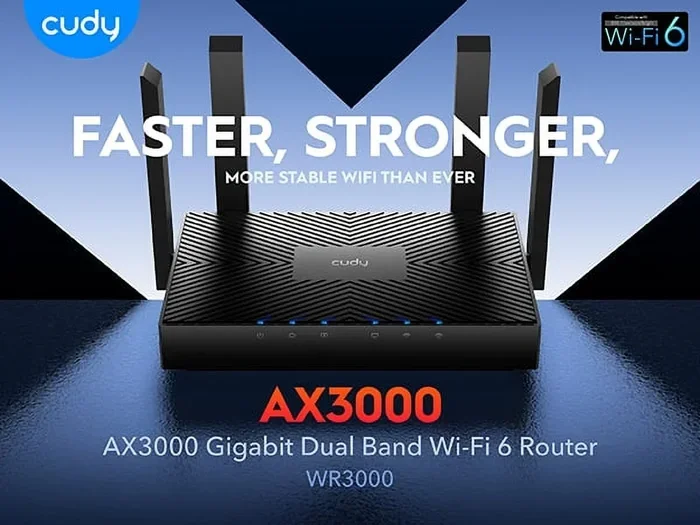
First, you need a WiFi 6E router. Not all routers support the 6GHz band. Look for routers that explicitly state they are WiFi 6E or 802.11ax compatible with 6GHz support. Popular brands like ASUS, Netgear, TP-Link, and Linksys now offer WiFi 6E models.
If your current router only supports WiFi 5 or standard WiFi 6, you will not get the 6GHz band benefits. You may need to invest in a new router to unlock WiFi 6E on your iPhone.
Step 2: Enable the 6GHz Band in Router Settings
Once you have a compatible router, log into its settings panel. Look for the wireless settings and make sure the 6GHz band is enabled. Some routers broadcast the 6GHz band as a separate network name, while others combine it with the 5GHz band.
Tip: Giving the 6GHz network its own name can help you manage your devices better. You can assign your iPhone to the 6GHz network and keep older devices on the 5GHz or 2.4GHz bands.
Step 3: Connect Your iPhone
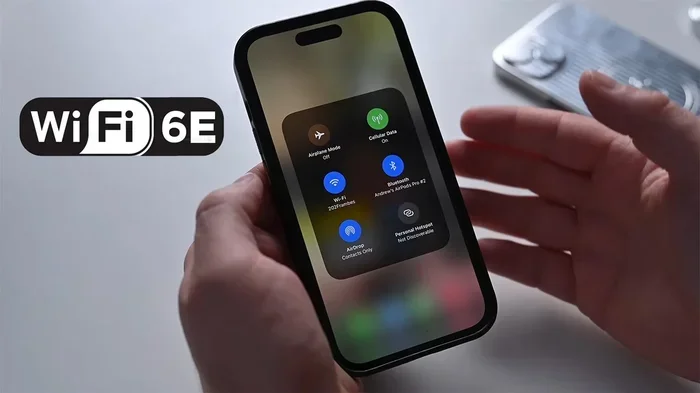
On your iPhone 15 Pro or newer, go to Settings, then Wi-Fi. Your router should show up as an available network. If it has a 6GHz label or if you named it separately, select it. Your iPhone will automatically connect to the best available band.
Apple devices handle band steering intelligently. If the 6GHz signal is strong and your iPhone supports it, it will prefer that band automatically. You do not need to do anything special beyond making sure WiFi 6E is enabled on your router.
Quick Tips for Best WiFi 6E Performance
- Place your router centrally in your home for the best coverage on the 6GHz band
- Keep your iPhone updated to the latest iOS version for optimal wireless networking performance
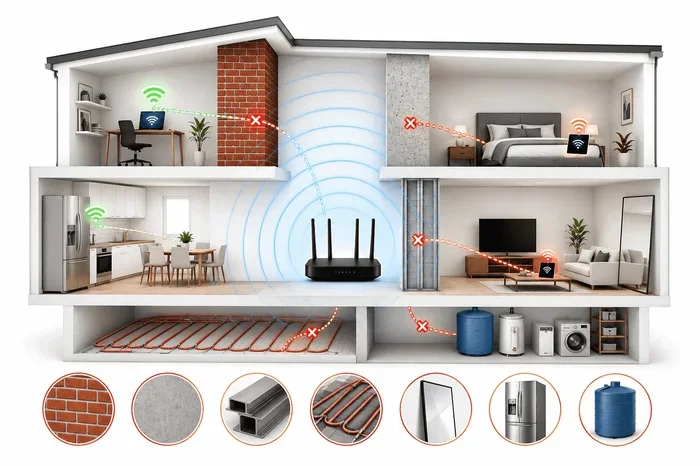
- Reduce physical obstacles between your iPhone and the router, as the 6GHz signal has a shorter range
- Use a mesh WiFi 6E system if you have a large home to ensure full coverage
- Restart your router periodically to clear the 6GHz band of any temporary issues
Common Mistakes to Avoid with WiFi 6E
Even though WiFi 6E is user-friendly, there are some common mistakes that can hold you back from getting the best performance. Here are a few to watch out for.
Assuming All iPhones Support WiFi 6E
This is the most common mistake. Not every iPhone supports WiFi 6E. If you have an iPhone 14 or an older model, you will not be able to access the 6GHz band no matter how good your router is. Always check your specific model before investing in WiFi 6E equipment.
Using an Incompatible Router
A WiFi 6E iPhone paired with a WiFi 5 router will not give you WiFi 6E speeds. The connection will fall back to the highest standard both devices support. Make sure your router explicitly supports the 6GHz band and is WiFi 6E certified.
Ignoring Router Placement
The 6GHz signal does not travel as far as the 2.4GHz signal. It also does not penetrate walls as well. Placing your router in a basement or far corner of your home can result in weak or no 6GHz coverage in the rooms where you use your iPhone the most.
Not Updating Your Router Firmware
Router manufacturers regularly release firmware updates that improve network performance and fix bugs. If you do not keep your router updated, you may miss out on important improvements for WiFi 6E operation.
Expert Insights on WiFi 6E and iPhones
Network experts agree that WiFi 6E represents a major leap forward in wireless connectivity. According to industry analysts, the 6GHz band is the future of home networking. As more devices adopt WiFi 6E, the 6GHz band will become the preferred choice for high-bandwidth activities.
Apple’s decision to include WiFi 6E starting with the iPhone 15 Pro shows that the company sees real value in this technology. It is not just a spec sheet checkbox. It is a practical improvement that affects how you use your iPhone every day.
For iPhone users who also own a WiFi 6E router, the combination delivers an experience that feels noticeably faster and more responsive. Whether you are gaming, streaming, working from home, or just browsing the web, the benefits are real and easy to notice.
The future looks bright for next-gen WiFi on iPhones. Apple has already started incorporating WiFi 7 support in its latest devices, which promises even faster speeds and better efficiency. But for now, WiFi 6E is the cutting edge, and it is available on the iPhone 15 Pro and newer models.
Key Takeaways
- iPhone 15 Pro and newer models support WiFi 6E, giving you access to the 6GHz frequency band.
- WiFi 6E delivers faster speeds and lower latency compared to standard WiFi 6.
- A compatible WiFi 6E router is required to take full advantage of this technology on your iPhone.
- Network congestion drops significantly because the 6GHz band is much less crowded than older bands.
- iPhone 14 and earlier models do not support WiFi 6E, so upgrading your device may be necessary.
- Seamless 4K and 8K streaming, online gaming, and large file transfers benefit the most from WiFi 6E on iPhones.
- Setting up WiFi 6E is straightforward, but you need to check both your iPhone and router compatibility first.
Conclusion
WiFi 6E is here, and it is already making a real difference for iPhone users. The iPhone 15 Pro and iPhone 16 models bring this powerful technology into your pocket. When paired with a compatible WiFi 6E router, you get faster speeds, lower latency, and a much more reliable wireless connection.
The 6GHz band eliminates a lot of the frustration that comes with crowded wireless networks. Whether you are at home or in a busy public space, your iPhone can find a clear channel and deliver excellent network performance. This is especially valuable for streaming, gaming, video calls, and large file transfers.
If you are still on an older iPhone or using a router that does not support WiFi 6E, now is a great time to consider upgrading. The improvements in wireless connectivity are real and easy to notice. Your iPhone experience will never feel the same once you make the switch.
Take the time to check your device compatibility, invest in a good WiFi 6E router, and enjoy the difference. This is how modern wireless networking should feel, and Apple has made it accessible to iPhone users who want the best.
Do Any Iphones Use Wifi 6e?
Yes, starting with the iPhone 15 Pro and continuing through the iPhone 16 lineup, Apple has included WiFi 6E support in its premium and newer models. This gives iPhone users access to the 6GHz band for faster and less congested wireless connections.
Do I Need a Special Router for WiFi 6E on My iPhone?
Yes, you need a WiFi 6E router that supports the 6GHz band. Without a compatible router, your iPhone will connect to the 5GHz band instead and you will not get the full WiFi 6E benefits.
Can I Use WiFi 6E on My iPhone Outdoors?
You can, but the 6GHz signal has a shorter range and does not penetrate obstacles as well. Outdoor use is best when you are within reasonable distance of your WiFi 6E router.
Is WiFi 6E Worth It for iPhone Users?
Absolutely. If you have a compatible iPhone and router, WiFi 6E offers noticeably faster speeds, lower latency, and better performance in crowded environments. It is especially valuable for streaming, gaming, and heavy data tasks.
Will Older iPhones Get WiFi 6E Through a Software Update?
No, WiFi 6E support requires specific hardware that older iPhones do not have. A software update cannot add the 6GHz band capability to devices that lack the necessary wireless chip.
How Is WiFi 6E Different from WiFi 7?
WiFi 7 is the next generation after WiFi 6E and offers even faster speeds and more efficient connections. However, WiFi 6E is currently the most advanced standard available for iPhone users, and it delivers excellent real-world performance.
Frequently Asked Questions
What is Do Any Iphones Use Wifi 6e?
Do Any Iphones Use Wifi 6e is an important topic with many practical applications.