The Real Disadvantages To The PDF Format Nobody Talks About
The disadvantages to the PDF format go far beyond what most users realize. From stubborn file sizes and painful editing to serious accessibility gaps, PDF files create hidden headaches for everyday users and businesses alike. This guide exposes the real drawbacks of relying on the PDF format and shows you when to use better alternatives.
You use PDF files every single day. They show up in your email inbox. They pop up when you download invoices. They fill your work folders and your phone storage. The Portable Document Format has been around since the early 1990s, and it became the go-to choice for sharing documents across devices. But here is the thing nobody tells you.
The disadvantages to the PDF format are real, widespread, and growing. As technology evolves, the limitations of this older file type become harder to ignore. From editing nightmares to accessibility failures, the PDF format holds people back more than it helps. Let us pull back the curtain and look at what is really going wrong.
If you have ever struggled to edit a PDF, wasted time waiting for a huge file to upload, or given up trying to read one on your phone, you already know the frustration. This article breaks down every major disadvantage in plain language. You will learn why these problems happen, what you can do about them, and which alternatives actually work better.
Key Takeaways
- PDF files are hard to edit: Making changes to a PDF often requires expensive software or workarounds.
- File sizes can balloon: Large PDFs slow down sharing, loading, and storage.
- Accessibility is a major weakness: Many PDFs fail screen readers and WCAG standards.
- Mobile viewing is frustrating: PDFs often break on smaller screens and older devices.
- Search and extraction are limited: Finding text inside PDFs is slower and less reliable than with other formats.
- Security features can backfire: Password protection and encryption sometimes cause more problems than they solve.
- Modern alternatives exist: Formats like HTML, DOCX, and cloud-based tools solve many PDF shortcomings.
📑 Table of Contents
Why the PDF Format Became So Popular
Before we dive into the problems, it helps to understand why PDF became the king of document sharing. Adobe created the Portable Document Format back in 1993. The goal was simple: make documents look the same on every device, no matter what operating system or software someone used. And for a long time, it worked beautifully.
PDF files preserved fonts, images, and layouts perfectly. You could send a document from a Windows PC to a Mac, and it would look identical. Print-ready files became the industry standard. Businesses loved PDFs because they felt secure and professional. For years, the format solved real problems.
But technology moved fast. People started working on phones. They needed to collaborate in real time. They wanted files that were easy to search, edit, and share. The PDF format was built for a different era. Its strengths turned into weaknesses as user expectations changed.
The Hidden Drawbacks of PDF Files
Most people do not think about the disadvantages to the PDF format until something goes wrong. And when it does, the problems pile up fast. Let us walk through the biggest issues one by one.
File Size and Storage Problems
One of the most common complaints about PDF files is their size. A simple one-page document can balloon into a massive file when it contains images, embedded fonts, or complex formatting. This creates real headaches for everyday users.
Large PDFs slow down email attachments. They eat up cloud storage space. They take forever to upload and download. On slow internet connections, the frustration multiplies. Even with modern broadband speeds, nobody wants to wait thirty seconds for a document to load.
PDF compression helps, but it often comes at a cost. Compressing a file can reduce image quality or strip out important details. You end up choosing between a smaller file and a readable one. That is not a choice anyone should have to make.
Quick Tip: Before sending a PDF, try reducing its size through your PDF reader’s built-in tools. Or use an online compressor. It takes seconds and can save you a lot of frustration.
Editing and Updating Nightmares
This is the number one complaint about the PDF format. Unlike a Word document or a Google Doc, a PDF is not designed to be edited easily. The format was built for viewing, not for changing. When you need to update text, fix a typo, or rearrange a page, the process becomes painful.
Editing a PDF often requires specialized software. Adobe Acrobat Pro costs money. Free PDF editors exist, but they usually lack features. You might be able to add a text box, but reformatting an entire page? That is a whole different story.
Even simple changes can break the layout. A small text edit might push images out of place. A font substitution might make the document look completely different. The result is often more work than starting from scratch.
Common Mistake: Many people try to edit PDFs using basic word processors. This leads to formatting chaos. Always use a proper PDF editor for any meaningful changes.
Expert Insight: The editing limitations exist because PDF was designed as a final-format file. Think of it like a printed book. You can read it, but you cannot easily change the text inside. The format works best as an endpoint, not a starting point.
Accessibility Issues That Hurt Everyone
PDF accessibility is a serious problem that affects millions of people. Screen readers, which help visually impaired users navigate digital content, often struggle with PDF files. The structure inside a PDF is not always logical or tagged properly.
Images without alt text make PDFs invisible to screen readers. Poor color contrast hurts users with visual impairments. Missing headings and labels make navigation impossible. These are not minor issues. They are real barriers that exclude people from accessing information.
Many organizations do not realize their PDFs fail WCAG accessibility standards. The Web Content Accessibility Guidelines set the bar for digital inclusion. Most PDF files fall short of those standards. This creates legal risks and ethical problems for businesses and institutions.
Quick Tip: If you must share a PDF, use accessibility checkers before sending it. Tools like Adobe Acrobat Pro have built-in accessibility features. Tag your headings, add alt text to images, and set a proper reading order.
Compatibility and Display Problems
Here is a surprise. The PDF format was supposed to solve compatibility issues. But in practice, it creates new ones. Different PDF readers interpret files in slightly different ways. A document that looks perfect in Adobe Reader might display incorrectly in a browser or a mobile app.
Fonts sometimes substitute unexpectedly. Interactive elements like forms and buttons may not work in all readers. Hyperlinks can break. Even something as simple as a page break can shift around depending on the software being used.
Mobile viewing is especially problematic. PDF files were designed for desktop screens. On a phone, they often require constant zooming and panning. The text becomes tiny. The layout falls apart. Users end up frustrated and unable to read the content.
Common Mistake: Assuming a PDF will look the same everywhere. Always test your documents on multiple devices and PDF readers before sharing them widely.
Search and Text Extraction Limitations
Finding information inside a PDF is slower and less reliable than you might expect. The format stores text in a way that is not always searchable. Scanned PDFs, for example, are essentially images. The text inside them cannot be searched unless optical character recognition has been applied.
Even text-based PDFs can have extraction problems. Copying and pasting from a PDF often produces garbled text. Special characters disappear. Paragraph formatting breaks. The process of pulling text out of a PDF is unreliable at best.
For search engine optimization, PDFs present another challenge. Search engines can index PDF content, but they do it less effectively than web pages. The search engine optimization potential of a PDF is limited compared to an HTML page or a blog post.
Quick Tip: If searchability matters, convert your PDF to an HTML page or a web-friendly format. It will reach more people and rank better in search results.
Security Features That Can Backfire
PDF files come with built-in security features like password protection and encryption. These sound great on paper. But in practice, they often create more problems than they solve.
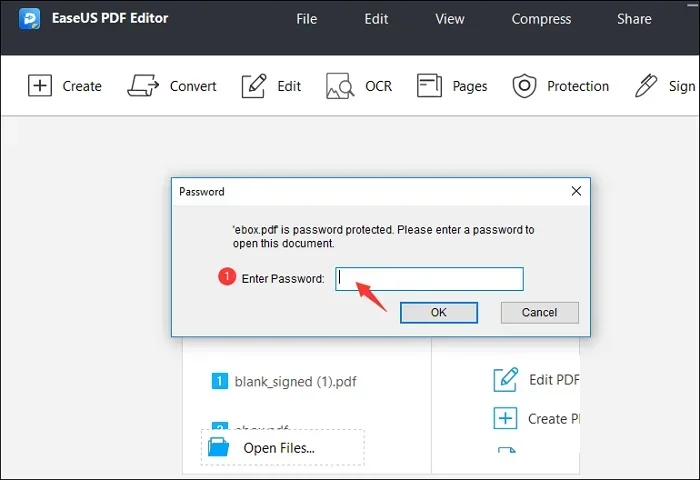
Password-protected PDFs can be impossible to open if you forget the password. There is no easy recovery option. Encrypted files may not work across all PDF readers. Some security settings prevent printing or copying, which blocks legitimate use cases.
False sense of security is another concern. Many people think a password-protected PDF is completely safe. But passwords can be shared or cracked. Encryption standards vary. A PDF is not a secure vault. It is just a file format with optional protection layers.
Expert Insight: If you need to share sensitive documents, consider using secure cloud platforms instead. Services like Google Drive or Dropbox offer better control over who can view, edit, and download your files.
PDF Format vs Modern Alternatives
The disadvantages to the PDF format become even clearer when you compare it to modern alternatives. Different file types serve different purposes. Let us look at how PDF stacks up against the options people actually use today.
| Feature | PDF Format | DOCX | HTML/Web Pages | Google Docs |
|---|---|---|---|---|
| Editing Ease | Difficult | Easy | Easy with tools | Very Easy |
| File Size | Often Large | Small | Very Small | Cloud-Based |
| Cross-Device Viewing | Good | Requires Software | Excellent | Excellent |
| Accessibility | Poor Without Effort | Moderate | Excellent | Good |
| Searchability | Limited | Good | Excellent | Excellent |
| Collaboration | Poor | Moderate | Good | Excellent |
| Layout Consistency | Excellent | Variable | Variable | Variable |
| Mobile Friendliness | Poor | Poor | Excellent | Excellent |
The table above shows why many people are moving away from the PDF format for everyday use. DOCX files are easy to edit and share. HTML pages are lightweight and accessible. Google Docs offer real-time collaboration that PDFs simply cannot match.
That does not mean the PDF format is useless. It still excels at preserving layout for print-ready documents. But for digital sharing, editing, and collaboration, newer tools do a much better job.
When PDF Format Makes Sense
Before you throw out every PDF on your computer, let us be fair. The PDF format is not all bad. There are specific situations where it remains the best choice.
Print-ready documents are the biggest use case. Invoices, contracts, resumes, and brochures all benefit from the layout consistency that PDFs provide. When a document needs to look exactly the same when printed as it does on screen, the PDF format delivers.
Archiving important records is another strong use. PDF/A is a specialized version of the format designed for long-term storage. It preserves fonts and formatting over time, making it ideal for legal and government documents.
Digital signatures and forms also work well with PDFs. Many legal and business processes rely on the PDF format for signing documents electronically. The security features, while imperfect, still provide more protection than most alternatives.
The key is knowing when to use the PDF format and when to choose something else. Using PDFs for everything is a mistake. Using them only where they shine is smart.
Common Mistakes People Make With PDFs
Even experienced users fall into traps with the PDF format. These mistakes make the disadvantages worse and create unnecessary headaches.
- Using PDFs as working documents. The PDF format is not a word processor. Do not use it for documents that need frequent updates. Use Google Docs or Word instead.
- Ignoring accessibility. Sending an untagged PDF to a client or customer excludes people with disabilities. Always check accessibility before sharing.
- Overcompressing files. Aggressive compression destroys image quality and readability. Find a balance between file size and content quality.
- Assuming all PDFs are searchable. Scanned documents are images, not text. Use OCR tools to make them searchable if needed.
- Relying on PDF security alone. Passwords are not enough for sensitive data. Use proper security platforms for confidential documents.
Avoiding these simple mistakes can save you hours of frustration and improve your workflow significantly.
Expert Tips for Working With PDFs
If you must work with the PDF format, these tips will make your life easier. They do not fix the underlying disadvantages to the PDF format, but they help you work around them.
- Use the right tools. Adobe Acrobat Pro, Foxit PDF Editor, and Nitro PDF offer better editing features than free alternatives.
- Keep originals in editable formats. Always save a working copy as a DOCX or Google Doc before converting to PDF.
- Optimize for web. Use linearized PDFs for faster online viewing. These files load page by page instead of waiting for the full download.
- Add bookmarks and links. Long PDFs become navigable when you add bookmarks. This improves the user experience significantly.
- Test on multiple devices. Always check how your PDF looks on a phone, tablet, and desktop before sending it out.
- Use PDF/A for archiving. This specialized version ensures your documents remain readable decades from now.
These small habits add up. They reduce the friction that comes with working in a format that was never designed for modern workflows.
The Future of Document Sharing
The disadvantages to the PDF format are pushing the industry toward better solutions. Cloud-based document platforms are replacing static files. Real-time collaboration tools are changing how teams work together. Web-based formats are becoming the new standard for digital documents.
HTML5 and web-based documents offer everything the PDF format struggles with. They are lightweight, accessible, searchable, and mobile-friendly. They support real-time editing and seamless sharing. The shift toward these formats is already happening.
Does this mean the PDF format will disappear? Probably not anytime soon. It has too much history and infrastructure behind it. But its role is changing. The PDF format is moving from an everyday working tool to a specialized format for specific use cases.
Understanding this shift helps you make smarter choices. Use the right tool for the right job. Do not default to PDF just because it is familiar. Explore alternatives that fit your needs better.
Conclusion
The disadvantages to the PDF format are real and impactful. From editing difficulties and bloated file sizes to accessibility failures and mobile viewing problems, the PDF format holds people back in many ways. It was a brilliant invention for its time, but the digital world has moved on.
That does not mean you should avoid PDFs entirely. They still serve important purposes. Print-ready documents, archived records, and digitally signed forms all benefit from the PDF format. The key is knowing when the format works and when it does not.
The next time you reach for a PDF, ask yourself if it is the right choice. Could a DOCX, an HTML page, or a cloud-based document do the job better? In many cases, the answer is yes. Understanding the limitations of the PDF format empowers you to make better decisions every single day.
Share this article with someone who struggles with PDF files. The more people know about these disadvantages, the better they can work around them. And maybe, just maybe, we will finally start building a better document ecosystem for everyone.
Frequently Asked Questions
What are the biggest disadvantages to the PDF format?
The biggest problems include difficult editing, large file sizes, poor accessibility, limited searchability, and frustrating mobile viewing. These issues make PDFs less practical for everyday digital work compared to modern alternatives.
Can you easily edit a PDF file?
No, editing a PDF is not easy. The format was designed for viewing, not for changes. You typically need expensive software like Adobe Acrobat Pro, and even then, edits can break the layout or formatting.
Why are PDF files so large?
PDFs embed fonts, images, and metadata directly into the file. This preserves layout but increases file size significantly. Complex documents with high-resolution images or custom fonts become especially heavy.
Are PDF files accessible to people with disabilities?
Most PDFs are not accessible out of the box. Screen readers struggle with untagged PDFs, and many files lack proper alt text, headings, and reading order. Accessibility requires extra effort and specialized tools.
Is the PDF format dying?
Not entirely, but its role is shrinking. PDF is moving from an everyday tool to a specialized format for print-ready documents, archiving, and digital signatures. Modern alternatives are replacing it for daily digital work.
What should you use instead of PDF for digital documents?
For digital sharing and collaboration, HTML pages, Google Docs, and DOCX files work better. They are lighter, more accessible, easier to edit, and more mobile-friendly than the PDF format.
=== CONCLUSION ===
The disadvantages to the PDF format are not just minor annoyances. They are real barriers that affect productivity, accessibility, and user experience. From editing headaches to bloated file sizes and mobile viewing problems, the PDF format creates friction in modern workflows.
But awareness is the first step toward improvement. Now that you understand these drawbacks, you can make smarter choices about when to use PDFs and when to choose better alternatives. Keep editable originals, optimize for accessibility, and explore modern tools that make document sharing easier.
The digital world has evolved. Your document workflow should evolve with it. Start applying what you learned today, and you will save time, reduce frustration, and work more effectively every single day.