Can I Make My Old Bose Bluetooth Speaker Work Again
Yes, you can make your old Bose Bluetooth speaker work again in many cases. Whether your Bose Bluetooth speaker won’t connect, has a dead battery, or produces no sound, there are proven fixes that can bring it back to life. This guide walks you through every step, from simple resets to advanced repairs, so you can enjoy your favorite music without buying a new device.
There is nothing worse than grabbing your favorite Bose Bluetooth speaker for a pool party or a road trip and finding it dead. You press the power button. Nothing. You try to pair it. Still nothing. It feels like a total loss.
But before you toss it in a drawer or rush to buy a new one, take a breath. Can I make my old Bose Bluetooth speaker work again? The short answer is yes, in most cases. A surprising number of issues that seem permanent are actually simple to fix. Whether it is a drained battery, a software glitch, or a dirty charging port, the solution might be closer than you think.
This guide covers every practical method to revive an old Bose wireless speaker. You will learn how to reset it, replace the battery, update the firmware, troubleshoot connectivity problems, and even decide when a repair is not worth the effort. Let us bring that speaker back to life.
Key Takeaways
- Soft Reset Often Fixes Connection Issues: A simple reset can solve most Bluetooth pairing problems without any tools.
- Battery Replacement Extends Speaker Life: Swapping out an old battery is one of the most common and effective repairs.
- Firmware Updates Improve Performance: Keeping your speaker’s software current prevents many connectivity and audio issues.
- Cleaning the Charging Port Helps: Dust and debris in the port are a leading cause of charging failures.
- Warranty and Support Options Exist: Bose offers limited warranty coverage and paid repair services for older models.
- DIY Repairs Save Money: Many fixes cost under $20 and can be done at home with basic tools.
- Knowing When to Replace Matters: Some speaker issues are not worth repairing, and upgrading may be the smarter choice.
📑 Table of Contents
- Why Old Bose Bluetooth Speakers Stop Working
- How to Reset Your Old Bose Bluetooth Speaker
- Battery Replacement: The Most Common Fix
- Troubleshooting Bluetooth Connectivity Issues
- Charging Port and Power Issues
- When to Repair vs. When to Replace
- Maintenance Tips to Keep Your Bose Speaker Alive Longer
- Bose Warranty and Support Options
- Conclusion
Why Old Bose Bluetooth Speakers Stop Working
Before diving into fixes, it helps to understand what goes wrong. Bose Bluetooth speakers are built to last, but no electronic device lasts forever. Over time, internal components wear out, software becomes outdated, and daily use takes a toll.
Common Reasons Your Speaker Stops Working
- Dead or Degraded Battery: Lithium-ion batteries lose capacity over hundreds of charge cycles. After two or three years, your speaker may not hold a charge anymore.
- Bluetooth Pairing Failures: Software glitches, outdated firmware, or interference from other devices can break the Bluetooth connection.
- Charging Port Damage: Dust, lint, and moisture can clog the charging port, preventing the speaker from powering up.
- Speaker Driver Issues: The tiny drivers inside the speaker can blow out from playing audio at high volumes for too long.
- Water or Moisture Damage: Even speakers rated as water-resistant can suffer internal corrosion over time.
- Physical Wear and Tear: Drops, impacts, and general aging can damage internal circuitry.
Once you identify the root cause, the fix becomes much clearer. Let us walk through each one.
How to Reset Your Old Bose Bluetooth Speaker
A Bose speaker reset is the first thing you should try. It clears temporary software errors and forces the device to start fresh. Most reset procedures are quick and require no special tools.
How to Perform a Soft Reset
A soft reset restarts the speaker without erasing any settings. Here is how to do it:
- Turn off the speaker completely.
- Unplug it from the charger if it is connected.
- Wait at least 30 seconds.
- Plug it back in and turn it on.
- Try pairing it with your device again.
This simple step fixes more problems than people realize. The 30-second wait allows the internal capacitors to fully discharge, which clears residual electrical errors.
How to Perform a Factory Reset
If a soft reset does not work, a factory reset returns the speaker to its original settings. The method varies by model:
- Bose SoundLink Color: Press and hold the Power button and the Bluetooth button simultaneously for 10 seconds.
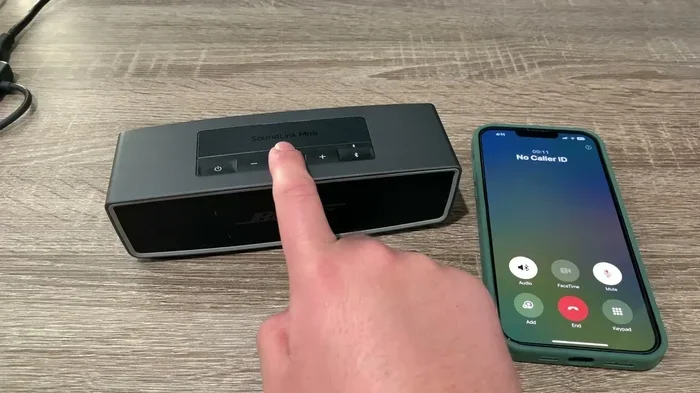
- Bose SoundLink Mini: Press and hold the Bluetooth button for 10 seconds until the speaker turns off.
- Bose SoundLink Revolve: Hold the Power button for 10 seconds until the light ring flashes.
After a factory reset, you will need to pair the speaker with your device again. This is normal and expected. A factory reset clears all saved Bluetooth pairings, which is exactly what you want when troubleshooting connection problems.
Quick Tip: Always try a reset before doing anything else. It takes less than two minutes and solves the problem about half the time.
Battery Replacement: The Most Common Fix
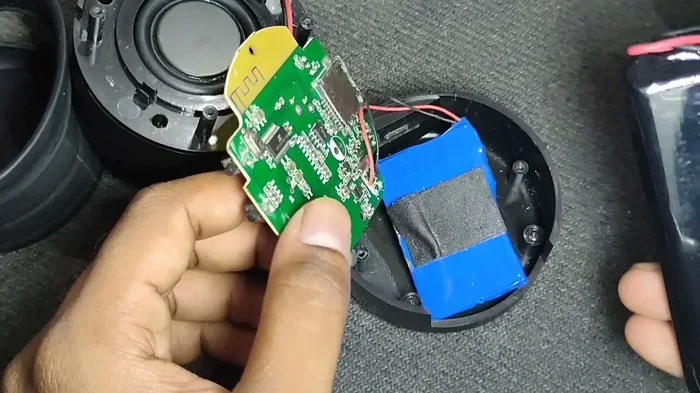
If your Bose Bluetooth speaker will not turn on or dies within minutes, the battery is almost certainly the culprit. Replacing the battery is one of the most effective ways to revive an old Bluetooth speaker and extend its life by several more years.
Signs Your Battery Needs Replacement
- The speaker dies within 30 minutes of charging.
- It will not turn on even after being on the charger for hours.
- The battery indicator lights flash erratically or do not light up at all.
- The speaker only works when plugged into a power source.
How to Replace the Battery
Battery replacement is possible for most Bose speaker models, though the difficulty varies. Here is a general overview:
- Find the Right Battery: Search online for a replacement battery specific to your Bose model. Sites like Amazon, eBay, and specialty electronics stores carry them.
- Gather Tools: You will typically need a small Phillips screwdriver, a plastic prying tool, and sometimes a soldering iron.
- Open the Speaker: Carefully remove the screws and gently pry the housing apart. Use a plastic tool to avoid scratching or cracking the exterior.
- Disconnect the Old Battery: Note the wiring configuration before disconnecting anything. Take a photo if needed.
- Install the New Battery: Connect the new battery in the same configuration as the old one. Solder if necessary.
- Test Before Closing: Charge the speaker briefly and test it before reassembling the housing.
Can I make my old Bose Bluetooth speaker work again with a new battery? Absolutely. A fresh battery can make a speaker that is five years old feel like new. The cost of a replacement battery is usually between $10 and $25, which is a fraction of the price of a new speaker.
Expert Insight: If you are not comfortable with soldering or opening electronics, consider taking the speaker to a local repair shop. Many offer battery replacement services for under $30, and it is a safe option for those who prefer not to DIY.
Troubleshooting Bluetooth Connectivity Issues
Sometimes the speaker turns on and sounds fine, but it will not connect to your phone or tablet. Bose speaker connectivity issues are frustrating but usually solvable with a few targeted steps.
Check Bluetooth Settings on Your Device
Start with the basics. On your phone or tablet:
- Turn Bluetooth off and back on.
- Forget the speaker from your Bluetooth device list and re-pair it.
- Make sure your device is within 3 feet of the speaker during pairing.
- Restart your phone or tablet.
Remove Interference
Other wireless devices can interfere with Bluetooth signals. Wi-Fi routers, microwaves, and even USB 3.0 ports can cause disruptions. Move away from these devices and try pairing again.
Update the Speaker Firmware
Bose releases firmware updates that fix bugs and improve Bluetooth pairing performance. To update:
- Download the Bose Connect app or the Bose Music app from your device’s app store.
- Connect the speaker to Wi-Fi if required.
- The app will check for updates automatically.
- Follow the on-screen prompts to install any available updates.
Updating firmware is one of the most overlooked fixes for wireless speaker troubleshooting. Many users report that their connection problems disappeared after a simple software update.
Charging Port and Power Issues
If your speaker will not charge, the problem is usually the charging port, the cable, or the power adapter. Before assuming the worst, work through these checks.
Clean the Charging Port
Dust and lint love to collect inside charging ports. Over time, this buildup can block the connection entirely. Here is how to clean it safely:
- Use a wooden toothpick to gently scrape out debris from the port.
- Blow compressed air into the port to dislodge loose particles.
- Dip a cotton swab in isopropyl alcohol and gently clean the metal contacts inside the port.
- Let the port dry completely before attempting to charge the speaker.
This simple cleaning step solves charging problems more often than people expect. It costs nothing and takes less than a minute.
Test with Different Cables and Adapters
A damaged USB cable or a weak power adapter can mimic a dead speaker. Try a different cable and a different wall adapter. If the speaker charges with the new setup, you have found your problem.
When the Charging Circuit Is Faulty
If cleaning the port and trying new cables does not help, the charging circuit inside the speaker may be damaged. This requires more advanced repair. At this point, you have two options:
- Professional Repair: A technician can replace the charging module for a reasonable fee.
- Bose Service Center: Bose offers paid repair services for out-of-warranty speakers. Check their website for pricing and turnaround times.
When to Repair vs. When to Replace
Not every old speaker is worth saving. Here is a simple framework to help you decide.
Repair When
- The speaker is less than five years old.
- The damage is limited to the battery or charging port.
- The repair cost is under 40% of the price of a new speaker.
- The speaker still produces excellent sound quality.
- You are emotionally attached to the device or it has sentimental value.
Replace When
- The speaker is more than seven years old.
- Multiple internal components have failed.
- The repair cost exceeds the price of a new model.
- The speaker lacks modern features like waterproofing or longer battery life.
- Bose has released a significantly better model at a similar price point.
| Factor | Repair | Replace |
|---|---|---|
| Speaker Age | Under 5 years | Over 7 years |
| Repair Cost | Under $40 | Over $80 |
| Sound Quality | Still excellent | Deteriorated |
| Features | Meets your needs | Outdated |
| Warranty | Still covered | Expired |
Use this table as a starting point. Every situation is different, but these guidelines help you make a smart, informed decision.
Maintenance Tips to Keep Your Bose Speaker Alive Longer
Prevention is always better than repair. If you have a working Bose speaker or have just revived one, these maintenance habits will keep it in great shape for years.
Charge Smartly
- Do not let the battery drain completely before recharging.
- Unplug the speaker once it reaches full charge.
- Store the speaker at about 50% charge if you will not use it for a long time.
Keep It Clean
- Wipe the exterior with a soft, damp cloth weekly.
- Clean the charging port monthly with compressed air or a toothpick.
- Avoid using harsh chemicals on the speaker surface.
Protect It From the Elements
- Even if your speaker is water-resistant, avoid prolonged submersion.
- Keep it out of extreme heat and direct sunlight.
- Store it in a dry, cool place when not in use.
Quick Tip: The number one thing that kills Bluetooth speakers over time is neglect. A little regular care goes a long way toward extending the speaker lifespan significantly.
Bose Warranty and Support Options
Before spending money on repairs, check whether your old Bose speaker is still covered. Bose offers a limited warranty on all its products, and understanding your options can save you money.
What Does the Bose Warranty Cover?
Bose speakers typically come with a one-year limited warranty. This covers manufacturing defects and hardware failures that occur under normal use. It does not cover damage from drops, water exposure, or normal battery degradation.
How to File a Warranty Claim
- Visit the Bose support website and locate your product model.
- Check the warranty status using your serial number.
- If covered, contact Bose customer support to start the claim process.
- Follow their instructions for shipping the speaker in for repair or replacement.
Out-of-Warranty Repair Options
If your warranty has expired, Bose still offers paid repair services. The cost varies by issue, but battery replacements and charging port repairs tend to be the most affordable options. You can also explore third-party repair services, which are often cheaper than going directly through Bose.
Before committing to any repair, always ask for a quote. This way, you know the cost upfront and can compare it to the price of a new speaker.
Conclusion
Can I make my old Bose Bluetooth speaker work again? The answer is a resounding yes in the majority of cases. Whether the issue is a dead battery, a failed Bluetooth connection, a clogged charging port, or outdated firmware, there are practical fixes available to most people. A simple reset, a battery swap, or a firmware update can bring your speaker back to life without spending much money at all.
The key is to start with the simplest solutions and work your way up. Reset the speaker first. Clean the charging port. Update the firmware. Replace the battery. And only then consider professional repairs or replacement.
Your old Bose Bluetooth speaker has likely served you well. With a little effort and the right knowledge, you can keep enjoying great sound from it for years to come. Do not throw it away just yet. Try these steps and give your speaker a second chance.
Frequently Asked Questions
How do I know if my Bose speaker battery is dead?
If the speaker dies within minutes of charging, will not turn on at all, or only works while plugged in, the battery is likely dead or degraded. A replacement battery usually costs between $10 and $25 and is one of the easiest fixes for Bose Bluetooth speaker problems.
Can I update the firmware on an older Bose speaker model?
Yes, most Bose speakers released in the last five years support firmware updates through the Bose Connect or Bose Music app. Simply connect the speaker to Wi-Fi and open the app to check for available updates. This is one of the best wireless speaker troubleshooting steps you can take.
Is it worth replacing the battery in an old Bose speaker?
In most cases, yes. A new battery costs a fraction of a new speaker and can extend the life of your device by several years. If the speaker still sounds great otherwise, battery replacement is the single best investment you can make.
How long do Bose Bluetooth speakers typically last?
With proper care, a Bose wireless speaker can last anywhere from 4 to 8 years. Battery life tends to decline after 2 to 3 years of regular use, but replacing the battery can easily add another 2 to 3 years of reliable performance.
What should I do if my Bose speaker still will not connect after a reset?
Try unpairing the speaker from all previously connected devices and pairing it fresh. Also, check for interference from other wireless devices and update the firmware. If none of these steps work, the Bluetooth module inside the speaker may be damaged, which would require professional repair.
Are there any risks to opening and repairing a Bose speaker myself?
Opening the speaker will void any remaining warranty, and there is a risk of damaging internal components if you are not careful. However, for out-of-warranty speakers, DIY repairs like battery replacement are generally safe as long as you follow step-by-step instructions and take your time. Always disconnect the speaker from power before opening it.