Difference Between A Regular Hdtv Antenna And Others
Understanding the difference between a regular HDTV antenna and other antenna types helps you make a smart choice for free over-the-air channels. A standard HDTV antenna picks up local broadcast signals without a monthly subscription. Whether you need an indoor or outdoor model depends on your location, signal strength, and viewing goals.
Many people think all antennas work the same way. They assume any antenna will pull in the same channels. But that is far from the truth. The difference between a regular HDTV antenna and other antenna types is bigger than most folks realize. A standard antenna and a specialty antenna each have their own strengths. They each fit different homes, budgets, and viewing needs.
When you cut the cable cord and switch to free over-the-air TV, your antenna choice matters a lot. A regular HDTV antenna gives you access to local news, sports, and network shows. No monthly fee. No contract. Just clear picture quality. But not every antenna delivers the same experience. Some work better indoors. Some need outside installation. Some amplify weak signals. Some do none of that.
This guide breaks it all down. You will learn exactly how a standard antenna compares to amplified, directional, indoor, and outdoor models. We will cover signal range, channel access, ease of setup, and cost. By the end, you will know exactly which antenna fits your situation. Let us dive in.
Key Takeaways
- Regular HDTV antennas work differently from amplified or specialty antennas: Each type serves a unique purpose based on signal needs.
- Indoor antennas offer convenience: They are easy to set up and best for areas with strong nearby broadcast towers.
- Outdoor antennas deliver superior range: They capture weaker signals from farther away and handle more channels.
- Amplified antennas boost signal strength: They help in areas with long cable runs or weak reception.
- Directional antennas focus on one direction: They are ideal when broadcast towers are clustered in one area.
- Multi-directional antennas pull signals from all directions: Great for homes where towers are spread out.
- Price does not always mean better performance: A simple regular HDTV antenna can outperform expensive models in the right conditions.
📑 Table of Contents
What Is a Regular HDTV Antenna?
A regular HDTV antenna is a basic antenna designed to pick up over-the-air broadcast signals. It receives digital TV signals from nearby broadcast towers. These signals carry local channels like ABC, NBC, CBS, and Fox. Many people also pick up PBS, CW, and independent stations. A standard antenna does not need power or an amplifier. It works purely through its design and placement.
These antennas come in two main styles. The first is a flat, indoor model. It looks like a thin black panel. The second is a simple outdoor model. It often looks like a Yagi or bowtie shape. Both types work without extra equipment. They connect directly to your TV or a set-top box through a coaxial cable.
How a Regular HDTV Antenna Works
A regular HDTV antenna captures electromagnetic waves sent by broadcast towers. Those waves carry video and audio data in digital format. The antenna converts those waves into a signal your TV can read. Your TV then decodes that signal into picture and sound.
Here is the simple process:
- The broadcast tower sends out a digital signal.
- The antenna catches that signal through its elements.
- The signal travels down the coaxial cable.
- Your TV decodes the signal into watchable content.
No internet connection is needed. No streaming box is required. Just the antenna, a cable, and your TV. That is what makes a regular HDTV antenna so appealing. It is simple and reliable.
Types of HDTV Antennas Compared
Not all antennas are created equal. The market offers several types beyond the basic model. Each type targets a different need. Let us compare them side by side.
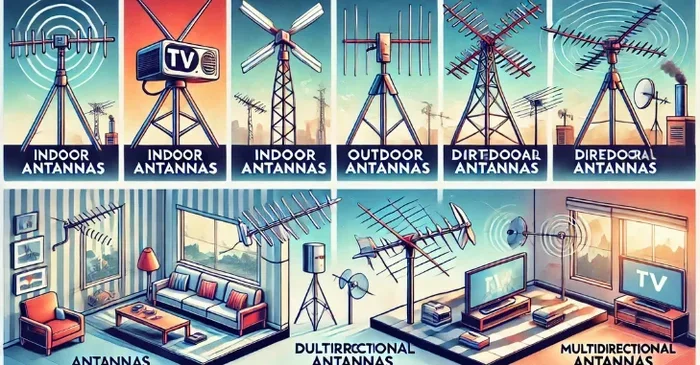
Indoor Antennas
Indoor antennas sit inside your home. They plug directly into your TV or sit on a shelf. Most are flat and lightweight. They blend into your living room or bedroom decor. A regular HDTV indoor antenna works well in cities and suburbs. These areas usually have strong nearby broadcast towers.
Indoor models are easy to set up. You unbox them, place them near a window, and scan for channels. No drilling. No climbing. No tools. That is a huge advantage. But indoor antennas have limits. Walls, furniture, and distance from towers can weaken the signal. If you live far from broadcast towers, an indoor model may not pull in all channels.
Outdoor Antennas
Outdoor antennas mount on your roof or a mast in your yard. They sit above trees, rooflines, and other obstructions. This gives them a clear line of sight to broadcast towers. A regular HDTV outdoor antenna can pull in signals from 60 miles or more. That is far beyond what any indoor model can do.
Outdoor antennas need more effort to install. You will need a mounting bracket, a mast, and coaxial cable. Some setups also require a signal splitter if you have multiple TVs. But the payoff is big. You get access to more channels. You get stronger signals. You get fewer interruptions during bad weather.
Amplified Antennas
An amplified antenna includes a built-in signal booster. This booster strengthens weak signals before they reach your TV. Amplified models are popular in rural areas. They also help when you run a long coaxial cable from an outdoor antenna to your TV inside.
But amplification is not always better. If your signal is already strong, an amplifier can actually distort it. It can overload the tuner in your TV. A regular HDTV antenna without amplification often works just fine in areas with good signal strength. Only add an amplifier when you truly need one.
Directional vs. Multi-Directional Antennas
Directional antennas focus on one specific direction. They look like a flat panel or a long bar shape. They point straight at broadcast towers. This makes them great for pulling in distant channels. A directional antenna ignores signals from other directions. That focus reduces interference and noise.
Multi-directional antennas pick up signals from all sides. They do not need to point at a specific tower. These antennas work well when broadcast towers are spread out across different directions. A regular HDTV multi-directional antenna is a great choice for most suburban homes.
| Antenna Type | Best For | Range | Power Needed | Ease of Setup |
|---|---|---|---|---|
| Regular Indoor | Urban homes, close to towers | 15-30 miles | No | Very Easy |
| Regular Outdoor | Suburban and rural areas | 40-70 miles | No | Moderate |
| Amplified | Weak signal areas | 30-70 miles | Yes (plug-in) | Easy |
| Directional | Towers in one direction | 40-70+ miles | No | Moderate |
| Multi-Directional | Towers spread in all directions | 20-50 miles | No | Easy |
Signal Range and Reception: What Really Matters
Signal range is one of the biggest factors when choosing an antenna. The difference between a regular HDTV antenna and a high-end model often comes down to range and reception quality. But range is not everything. Several factors affect how well your antenna performs.
Distance from Broadcast Towers
The closer you are to a broadcast tower, the stronger your signal will be. In a city, towers may be only 5 to 10 miles away. A simple indoor antenna handles that easily. In rural areas, towers might be 40 or 50 miles away. You will need an outdoor antenna for reliable reception.
You can check your distance to local towers using websites like TVFool or AntennaWeb. These tools give you a clear picture of what to expect. They also tell you which direction to point your antenna.
Terrain and Obstructions
Mountains, hills, and tall buildings block TV signals. Trees and dense foliage also weaken reception. If your home sits in a valley or behind a hill, you may struggle with a basic indoor model. An outdoor antenna mounted high above obstructions solves this problem. Elevation makes a real difference in signal quality.
Weather and Seasonal Changes
Believe it or not, weather affects TV signals. Heavy rain and snow can temporarily weaken reception. High winds can shift an outdoor antenna slightly off alignment. In most cases, these issues are minor. But in areas with weak signals to begin with, weather can cause dropouts. A regular HDTV antenna in a strong signal area rarely has weather problems.
Cost Comparison: Regular vs. Specialty Antennas
Price is a big reason people compare antenna types. A regular HDTV antenna costs much less than most specialty models. Let us break down the typical price ranges.
- Basic indoor antennas: $10 to $30
- Mid-range indoor antennas: $30 to $60
- Outdoor antennas (non-amplified): $40 to $80
- Amplified antennas: $50 to $150
- High-end directional antennas: $100 to $200+
As you can see, a simple regular HDTV antenna costs very little. You do not need to spend a fortune to get local channels. Many people are surprised by how affordable a basic model is. The expensive antennas are only necessary in specific situations. If you live close to towers, a cheap indoor model works perfectly.
Keep in mind that you also save money on cable or streaming subscriptions. Over-the-air TV is completely free after your initial antenna purchase. That savings adds up fast. Within a few months, your antenna pays for itself.
Common Mistakes When Choosing an Antenna
Many buyers make avoidable mistakes when picking an antenna. Here are the most common ones and how to dodge them.
Buying Based on Channel Count Claims
Some manufacturers claim their antenna pulls in 100 or 200 channels. That sounds amazing. But those numbers are often exaggerated. They include channels from hundreds of miles away that your antenna may never actually receive. Focus on channels within your real range instead. A regular HDTV antenna that gets 15 local channels is more useful than one that claims 100 channels you cannot watch.
Ignoring Antenna Placement
Where you place your antenna matters just as much as the antenna itself. Putting an indoor antenna behind a TV or inside a closet kills the signal. Place it near a window or on a high shelf. Point it toward the nearest broadcast tower. A little attention to placement can double your channel count.
Overbuying on Amplification
Not every home needs an amplified antenna. If your signal is already strong, adding an amplifier can cause problems. It can create too much signal, which leads to pixelation and dropouts. Start with a regular HDTV antenna without amplification. Only add a booster if you experience weak reception.
Skipping the Channel Scan
After setting up your antenna, always run a full channel scan on your TV. This tells your TV to find every available channel in your area. Skipping this step means you might miss channels that are actually within reach. Rescan periodically too. New channels or tower changes can affect what you receive.
Expert Tips for Getting the Best Signal
Want to squeeze every last bit of performance from your antenna? Follow these practical tips from experienced TV enthusiasts.
- Place your antenna as high as possible. Elevation reduces obstructions and improves line of sight to towers.
- Keep the antenna away from electronics. TVs, computers, and microwaves can cause interference.
- Use a short coaxial cable. Longer cables lose signal strength. Keep the run as short as possible.
- Try different positions. Even moving an indoor antenna a few inches can change reception dramatically.
- Rescan after storms or heavy winds. Antenna movement can affect which channels you receive.
- Consider a signal meter. A cheap TV signal meter helps you fine-tune antenna placement for the strongest signal possible.
These small adjustments make a big difference. Many people give up too quickly when their antenna does not work perfectly on day one. A little patience and tweaking often solves the problem entirely.
Is a Regular HDTV Antenna Right for You?
A regular HDTV antenna is a great choice for most households. It is affordable, simple, and effective. If you live within 30 miles of broadcast towers, a basic model will likely serve you well. You get free local channels in stunning HD quality. No subscription fees. No contracts. No hidden costs.
This type of antenna works best for people who watch mostly local networks. News fans, sports lovers, and families with young children all benefit. You get access to live local news, emergency alerts, and popular network shows. That content is not always available on streaming services. Local broadcasts are free and reliable.
However, if you live in a very rural area or far from towers, you may need a more specialized antenna. An outdoor model or an amplified antenna might be necessary. The key is to know your situation before you buy. Check your distance to towers. Look at your local terrain. Then choose the antenna that fits.
Conclusion
The difference between a regular HDTV antenna and other antenna types comes down to design, range, and purpose. A standard antenna is simple, affordable, and perfect for most homes. Amplified models help with weak signals. Outdoor models reach farther. Directional antennas focus on specific tower locations. Multi-directional antennas pull from all directions.
You do not need to spend a lot of money to enjoy free over-the-air TV. A basic regular HDTV antenna can deliver dozens of channels in high definition. The trick is choosing the right type for your home and location. Consider your distance from towers, your home layout, and your viewing habits. With the right antenna, you cut the cord without cutting out on the shows you love.
Start with a simple model. Test it in your space. Upgrade only if you need to. That approach saves money and gets you exactly what you need. Free TV has never been more accessible. A regular HDTV antenna is your ticket to it.
Frequently Asked Questions
Can a regular HDTV antenna pick up channels in HD?
Yes, absolutely. A regular HDTV antenna receives digital signals, which include HD channels. As long as the broadcast tower sends an HD signal, your antenna will pick it up. You just need to scan for channels after setup, and your TV will display the HD version of each available channel.
Do I need an amplifier with my regular HDTV antenna?
Most people do not need an amplifier. If you live within 30 miles of broadcast towers and have a clear line of sight, a regular HDTV antenna works perfectly without a booster. Only add an amplifier if you experience weak signals or if you run a long cable from the antenna to your TV.
How many channels can I expect with a regular HDTV antenna?
The number of channels varies by location. In most cities, a basic antenna picks up 20 to 50 local channels. Rural areas may offer fewer channels. The best way to know what you will get is to check online tools like AntennaWeb or to try a basic model first and run a channel scan.
Is a regular HDTV antenna better than a streaming device?
It depends on what you want to watch. An antenna gives you free local channels in HD with no monthly fee. A streaming device gives you access to on-demand content like Netflix and Hulu. Many people use both together. A regular HDTV antenna fills in the gaps that streaming services often miss, especially local news and sports.
Can I use a regular HDTV antenna if I have a smart TV?
Yes. Most smart TVs have a built-in tuner for over-the-air channels. You just connect the antenna to the coaxial input on your TV, run a channel scan, and start watching. No extra boxes or devices are needed. A regular HDTV antenna works with any TV that has a tuner.
What is the main difference between a regular HDTV antenna and an amplified one?
A regular HDTV antenna has no built-in signal booster. It relies on its design and placement to capture signals. An amplified antenna includes an electronic booster that strengthens weak signals. Amplified models cost more and need power, but they help in areas where signals are weak or travel long distances through cables.