Can You Plug A Wireless Router Into A Phone Jack With Ease
Yes, you can plug a wireless router into a phone jack, but you need a DSL modem to make it work. A standard router cannot connect directly to a phone line because it needs a digital signal converted from the analog voice signal. This guide covers everything about plugging a wireless router into a phone jack, from understanding your connection type to setting up your home network the right way.
Key Takeaways
- Phone jacks carry analog signals: A router needs a modem to convert these signals for internet use.
- A DSL modem is essential: Without one, you cannot connect a router to a phone line directly.
- DSL filters improve performance: They separate voice and data signals on the same phone line.
- Not all phone jacks support internet: Check with your internet service provider before attempting a connection.
- Speed depends on your setup: The right cables, filters, and modem make a big difference in wireless connectivity.
- Fiber and cable are different: Phone jack internet is DSL-based and works differently than fiber optic or cable internet.
📑 Table of Contents
- Understanding What Happens When You Plug a Router Into a Phone Jack
- The Role of a DSL Modem in This Setup
- Step-by-Step Guide to Connecting Your Router to a Phone Jack
- Common Problems and How to Fix Them
- Comparing Phone Jack Internet to Other Connection Types
- Is It Worth Plugging a Router Into a Phone Jack?
- Conclusion
Understanding What Happens When You Plug a Router Into a Phone Jack
The short answer is yes, you can plug a wireless router into a phone jack, but there is more to it than just pushing a cable in. Many homeowners wonder if they can use an existing telephone outlet to get wireless internet. The truth is that a phone jack and a router do not work together by themselves. You need the right equipment and a basic understanding of how your broadband connection works.
When you plug a wireless router into a phone jack, you are trying to use an existing telephone line to access the internet. This is called a DSL connection. DSL stands for Digital Subscriber Line. It sends digital data over the same copper wires that carry your voice calls. But your router cannot read that signal on its own. It needs a modem to translate the signal first.
Think of it this way. A phone jack is the road. Your router is the car. But the car needs an adapter to drive on that specific road. That adapter is the modem. Without it, your router just sits there doing nothing. So if you want to set up wireless connectivity using a phone jack, you need to understand the full setup from start to finish.
This guide will walk you through every step. You will learn what equipment you need, how to set things up correctly, and what common mistakes to avoid. By the end, you will feel confident about using your phone line for internet access. Whether you are a complete beginner or someone who has tried and failed before, this guide has you covered.
Why Phone Jacks Work for Internet
Phone jacks are found in almost every home. Most houses built before 2000 have multiple wall outlets for telephone service. When broadband internet became popular, internet service providers found a clever way to use these existing lines. Instead of running new cables through your walls, they used the phone infrastructure to deliver a broadband connection to your home.
This is why DSL internet became so popular in the early 2000s. It was fast, reliable, and used wiring that was already in place. Even today, many rural areas and older neighborhoods rely on DSL broadband because cable or fiber optic options are not available. If you live in one of these areas, knowing how to connect your router to a phone jack is a valuable skill that saves time and money.
The phone line carries what is called an analog signal. This signal was originally designed for voice calls. Your internet service provider uses special equipment to send digital data over this analog line. Your modem receives that data and converts it into something your devices can understand. This entire process happens in seconds, but it requires the right setup.
The Role of a DSL Modem in This Setup
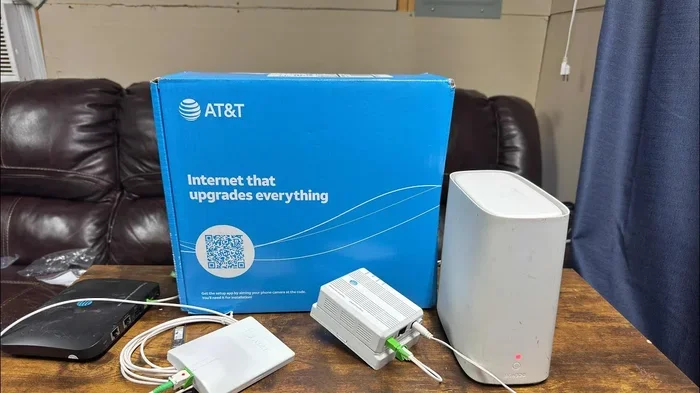
A DSL modem is the bridge between your phone line and your home network. It takes the analog signal from the phone jack and converts it into digital data that your router can understand. Without a DSL modem, plugging a router into a phone jack will not give you internet access. This is the single most important piece of equipment you need.
Most internet service providers supply a DSL modem when you sign up for their service. Some providers give you a modem-router combo unit. This single device handles both the modem and router functions. It saves you money and reduces clutter on your desk or shelf. Check with your provider to see what equipment they offer before you buy anything.
How a DSL Modem Translates Signals
A DSL modem connects to the phone jack using an RJ11 cable. It then communicates with a device called the DSLAM, which sits at your internet service provider’s central office. The DSLAM sends data back and forth between your home and the wider internet. Your modem translates this data into a signal that your devices can use.
The modem then sends this translated signal to your router. If you have a separate router, you connect it to the modem using an Ethernet cable. If you have a modem-router combo, the wireless signal is already built in. Either way, the modem is the essential first link in the chain. Without it, the phone jack is just a hole in the wall.
Do You Need a Separate Modem and Router?
This depends on your setup and your needs. A separate modem and router give you more flexibility. You can upgrade one without replacing the other. A modem-router combo is simpler and takes up less space. Both options work well for most home networks.
If you already have a modem provided by your internet service provider, you may just need to add a wireless router. Connect the modem to the phone jack. Then connect your router to the modem using an Ethernet cable. Your router will broadcast a wireless signal that your phones, laptops, and smart devices can connect to.
Expert Insight: Many people buy a router thinking it will work with a phone jack alone. It will not. Always confirm you have a DSL modem or a modem-router combo before you start. This one mistake causes the most frustration for beginners trying to set up phone jack internet.
Step-by-Step Guide to Connecting Your Router to a Phone Jack
Now that you understand the basics, let us walk through the actual setup process. Following these steps will help you get your wireless network running smoothly using a phone jack. Take your time with each step and do not rush ahead.
Step 1: Check Your Phone Jack
Before you plug anything in, inspect the phone jack. Look for any visible damage or debris. A dirty or damaged jack can cause connection problems. Use a flashlight to look inside the jack. Make sure the metal contacts are clean and not corroded.
Next, test the jack with a basic phone. Plug in a landline phone and listen for a dial tone. If you hear a dial tone, the jack is active and working. If not, you may need to contact your phone service provider to check the wiring in your walls. A dead jack means no internet, so this step is critical.
Step 2: Install a DSL Filter
A DSL filter is a small adapter that separates the voice signal from the data signal on your phone line. Without a filter, your internet connection may experience interference from voice calls. This can slow down your internet speed and cause dropped connections.
Plug the DSL filter into the phone jack first. Then connect your modem to the filter using an RJ11 cable. If you also use a phone on the same line, plug the phone into the filter’s phone port. This keeps your voice and data signals clean and separate. Most DSL filters are inexpensive and easy to find online or at any electronics store.
Step 3: Connect the Modem
Take your DSL modem and connect it to the DSL filter using an RJ11 phone cable. Plug one end into the filter and the other into the modem’s DSL port. This port is usually labeled DSL or LINE. It may be a different color than your other ports, so look carefully.
Once connected, plug the modem into a power outlet. Wait for the lights on the modem to stabilize. This usually takes one to two minutes. The DSL light should turn solid, indicating a successful connection to your internet service provider. If the light blinks continuously, there may be a problem with your line or your account activation.
Step 4: Connect the Router
If your modem and router are separate devices, connect them now. Use an Ethernet cable to link the modem’s output port to the router’s WAN or Internet port. The WAN port is usually a different color from the other ports on the router, often yellow or blue.
Plug the router into a power outlet and wait for it to boot up. The power light should turn on, and the wireless light should start blinking. This means your router is ready to broadcast a wireless signal. You should see the network name appear on your phone or computer within a minute or two.
Step 5: Configure Your Wireless Settings
Now you need to set up your wireless network. Open a web browser on a computer or phone connected to the router. Type the router’s default IP address into the address bar. This is usually 192.168.0.1 or 192.168.1.1. Check your router’s manual for the exact address.
Log in using the default username and password. These are often printed on a sticker on the bottom of the router. Once logged in, you can set your network name and password. Choose a strong password to keep your home network secure. Change the default login credentials as well, since these are easy for hackers to guess.
Quick Tips for a Smooth Setup
- Keep your modem close to the phone jack: Long cables can weaken the signal and reduce your internet speed.
- Restart your devices after connecting: A fresh start helps devices recognize each other and establish a stable connection.
- Use high-quality cables: Cheap cables can cause intermittent connection issues that are hard to diagnose.
- Update your router firmware: This improves security and performance. Check the manufacturer’s website for updates.
- Place your router in a central location: This gives the best wireless coverage throughout your home.
Common Problems and How to Fix Them
Even with a perfect setup, you may run into issues. Here are the most common problems people face when using a phone jack for internet, along with practical solutions you can try at home.
No Internet Connection After Setup
If your router shows no internet, the most common cause is a problem with the modem connection. Check that all cables are firmly seated. Make sure the RJ11 cable is plugged into the correct DSL port on the modem. Also check that the phone jack is active by testing it with a phone.
Another possibility is that your internet service provider has not activated your line yet. Call your provider to confirm that your DSL service is active on that phone number. Sometimes activation takes a few hours after setup. Be patient and do not assume something is broken right away.
Slow Internet Speeds
Slow speeds are a common complaint with phone jack internet. Distance from the provider’s central office affects DSL speed. The farther you are, the slower your connection may be. Other factors include old wiring in your home and interference from other devices.
To improve speed, try using a shorter phone cable between the filter and the modem. Make sure your DSL filter is not damaged or worn out. Also, avoid running your modem near large appliances like microwaves or refrigerators that can cause electrical interference. These simple changes can noticeably improve your internet speed.
Intermittent Connection Drops
If your connection keeps dropping, check your phone line for damage. Frayed wires or loose connections can cause frequent drops. Also, make sure you have a DSL filter installed on every phone outlet on the same line. Missing filters are a common cause of connection instability that many people overlook.
Another fix is to replace old phone cords. Over time, the cables wear out and lose their ability to carry a clean signal. A new RJ11 cable costs very little and can solve many connection problems. Do not overlook the simplest solutions first.
Common Mistakes to Avoid
- Skipping the DSL filter: This causes interference and slows down your connection significantly.
- Using the wrong cable: An Ethernet cable cannot connect directly to a phone jack. Always use an RJ11 cable for the phone line.
- Plugging into the wrong port: Always use the DSL or LINE port on your modem, not the regular phone port.
- Ignoring firmware updates: Outdated firmware can cause security and performance issues over time.
- Placing the router too far from the modem: This weakens the connection between the two devices and reduces performance.
Comparing Phone Jack Internet to Other Connection Types
Phone jack internet is just one way to get a broadband connection. Let us compare it to other common options so you can understand where it stands in the current landscape.
| Feature | DSL (Phone Jack) | Cable Internet | Fiber Optic |
|---|---|---|---|
| Speed Range | 1 to 100 Mbps | 10 to 1000 Mbps | 100 to 10000 Mbps |
| Availability | Widespread in older areas | Common in suburbs | Limited to urban areas |
| Reliability | Good, but distance-sensitive | Very good | Excellent |
| Equipment Needed | DSL modem, router | Cable modem, router | ONT, router |
| Price Range | Low to moderate | Moderate | Moderate to high |
| Uses Existing Wiring | Yes, phone lines | No, coaxial cable | No, new fiber lines |
As you can see, DSL internet through a phone jack offers decent speeds at a low cost. It is a great option for basic browsing, email, and video calls. However, if you need very high speeds or have many devices streaming at once, cable or fiber may be better choices.
The biggest advantage of DSL is that it uses existing phone infrastructure. You do not need new wiring or expensive installation fees. For many households, especially in rural or older neighborhoods, this makes DSL the most practical and affordable option. Your internet service provider can tell you what speeds are available at your address.
Is It Worth Plugging a Router Into a Phone Jack?
The answer depends on your situation. If you live in an area where cable and fiber are not available, DSL through a phone jack is a solid option. It provides reliable broadband connection for everyday use. Many rural households and older neighborhoods depend on this setup every day without any issues.
On the other hand, if you have other options available, you may want to explore them. Cable internet and fiber optic connections offer faster speeds and more consistent performance. They do require different equipment and wiring, but the upgrade can be worth it for heavy users and large families.
If you already have a phone jack in your wall and your internet service provider offers DSL, there is no reason not to use it. With the right modem, filter, and router, you can build a strong home network. The key is to set things up correctly and avoid the common mistakes we discussed above.
Plugging a wireless router into a phone jack is not only possible but also quite practical for many households. As long as you have a DSL modem, a quality filter, and a working phone jack, you can enjoy wireless connectivity throughout your home. Take your time with the setup, follow each step carefully, and you will be online in no time.
Remember that technology evolves quickly. What works today may be updated tomorrow. Keep your equipment current and stay informed about new options from your internet service provider. The more you know about your home network, the better you can optimize it for speed, reliability, and security.
Conclusion
Plugging a wireless router into a phone jack is absolutely possible and can be a great way to get internet in your home. The key is understanding that you need a DSL modem to bridge the gap between the analog phone signal and your digital router. With the right equipment, a DSL filter, and a bit of patience, you can set up a reliable home network using existing phone infrastructure.
Follow the steps we outlined, avoid the common mistakes, and take advantage of the quick tips provided. Your wireless connectivity will be up and running in no time. Whether you live in an older home with plenty of phone jacks or a rural area where other internet options are limited, this setup gives you a practical path to staying connected.
Take what you have learned here and apply it to your own setup. You now know more about plugging a wireless router into a phone jack than most people do. Use that knowledge to build a fast, reliable home network that meets your needs. Your internet experience is in your hands, and with the right approach, you can make the most of every connection available to you.
Frequently Asked Questions
Can I plug my wireless router directly into a phone jack without a modem?
No, you cannot. A router needs a digital signal, but a phone jack carries an analog signal. You must use a DSL modem to convert the signal. The modem connects to the phone jack, and then the router connects to the modem.
Do I need a special router to use a phone jack for internet?
Not necessarily. Any standard wireless router works as long as you pair it with a DSL modem. Some routers are designed specifically for DSL connections, but most modern routers work fine with any compatible modem. Check with your internet service provider for recommended equipment.
How fast is internet through a phone jack?
DSL speeds typically range from 1 to 100 Mbps, depending on your distance from the provider’s central office and the quality of your wiring. It is slower than cable or fiber but still fast enough for browsing, streaming, and video calls for most households.
Can I use the same phone jack for internet and a landline phone?
Yes, you can. Use a DSL filter to split the signals. Plug the filter into the phone jack, then connect your modem to the filter’s DSL port and your phone to the filter’s phone port. This keeps both services running without interference.
What is the difference between ADSL and VDSL?
ADSL stands for Asymmetric Digital Subscriber Line and offers faster download speeds than upload speeds. VDSL stands for Very High Bit Rate Digital Subscriber Line and provides faster speeds in both directions. VDSL works over shorter distances, so it is more common in areas closer to the provider’s central office.
Does a phone jack internet connection need a phone line active?
Yes, DSL internet requires an active phone line. Your internet service provider uses the phone line infrastructure to deliver your broadband connection. However, you do not need to pay for a separate phone service. Many providers offer internet-only DSL plans without requiring a voice phone line.