Can You Charge An Iphone 14 With A Usb C Cable Today
Can You Charge An Iphone 14 With A Usb C Cable? The short answer is yes, but there are a few important details you need to know before you grab any cable and start plugging things in. Apple has made the switch to USB-C on newer models, but the iPhone 14 still uses a Lightning port, which means you need the right adapter to make USB-C charging work. In this guide, we will walk you through everything you need to know about USB-C charging compatibility, the cables you need, and how to get the best charging speeds. Whether you are tired of carrying multiple cables or just want to simplify your setup, this article has you covered with practical tips and expert advice.
So you just got a shiny new iPhone 14 and you are wondering about your charging options. Maybe you have been using USB-C cables for your laptop, your iPad, or your Android phone, and it is getting annoying to carry around different cables for different devices. The question on your mind is simple: can you charge an iPhone 14 with a USB-C cable? The answer is yes, but the full story is a little more nuanced than a simple yes or no.
Apple has been slowly moving toward USB-C across its product lineup. The iPad Pro and iPad Air already use USB-C. The latest MacBook models are fully USB-C. But the iPhone 14 still ships with a Lightning port and a Lightning cable in the box. This creates a bit of a hybrid situation that confuses a lot of people. You can absolutely use USB-C to charge your iPhone 14, but you need the right cable, the right adapter, and a basic understanding of how things work.
In this article, we are going to break it all down for you. We will cover compatibility, the cables you need, how fast USB-C charging really is on the iPhone 14, common mistakes to avoid, and whether making the switch to USB-C is worth it. By the time you finish reading, you will have a clear picture of exactly what you need to do to charge your iPhone 14 with a USB-C cable. No confusion. No guesswork. Just practical, actionable information you can use right away.
Key Takeaways
- Yes, USB-C works with iPhone 14: You can charge your iPhone 14 using a USB-C cable, but you need a USB-C to Lightning cable or adapter to make it work.
- Fast charging is possible: With the right USB-C power adapter, you can fast charge your iPhone 14 up to 50% in about 30 minutes.
- Cable quality matters: Always choose MFi certified cables to ensure safety, speed, and long-term compatibility with your device.
- Lightning vs USB-C: The iPhone 14 still uses Lightning, but USB-C offers faster speeds and more versatility for data transfer and charging.
- Avoid cheap cables: Non-certified or low-quality USB-C cables can damage your battery and slow down your charging speed significantly.
- Future-proof your setup: Investing in USB-C accessories now makes it easier to transition when Apple fully moves to USB-C across its lineup.
📑 Table of Contents
Understanding iPhone 14 and USB-C Compatibility
The Lightning vs USB-C Debate
The Lightning connector has been Apple’s standard charging port since 2012. It has served the iPhone lineup well for over a decade. But the world has moved on. USB-C has become the universal standard for most electronics. Laptops, tablets, headphones, and even gaming consoles now use USB-C. This shift has made Lightning feel outdated to many users.
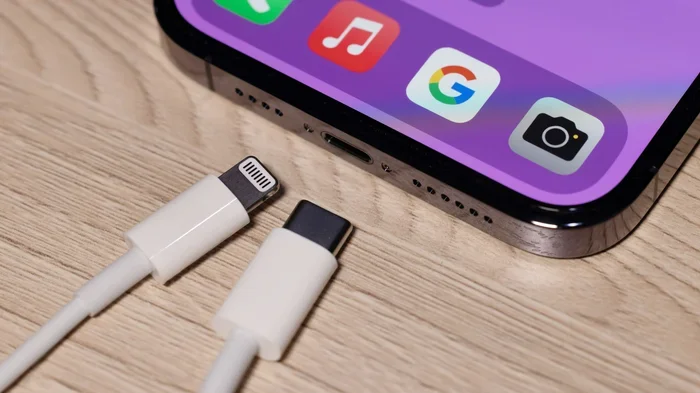
Here is the key thing to understand. The iPhone 14 still uses a Lightning port. It does not have a built-in USB-C port. This means you cannot plug a USB-C cable directly into the iPhone 14. Instead, you need a bridge between the two. That bridge comes in the form of a USB-C to Lightning cable. This cable has a USB-C connector on one end and a Lightning connector on the other. It allows you to connect your iPhone 14 to any USB-C power source, whether that is a wall charger, a laptop, a portable battery pack, or a car charger.
This compatibility situation is important to grasp because it affects everything else we talk about in this guide. You can charge your iPhone 14 with USB-C, but the connection relies on the cable doing the translation between the two different port types.
What Apple Says About iPhone 14 Charging
Apple has been clear about its direction. The company introduced USB-C on the iPad Pro in 2018. It adopted USB-C fully for the MacBook line starting in 2019. The iPhone 15 series, which came out in 2023, made the full switch to USB-C. But for the iPhone 14, Apple stuck with Lightning.
Apple does officially support USB-C charging for the iPhone 14 through the use of USB-C to Lightning cables. The company recommends using cables that are MFi certified, which stands for Made for iPhone. MFi certification ensures that the cable meets Apple’s safety and performance standards. Using an uncertified cable can lead to slower charging speeds, overheating, or even damage to your device over time.
Quick Tips
- Always look for MFi certification when buying a USB-C to Lightning cable.
- Keep your original Lightning cable as a backup, even if you switch to USB-C.
- Check your cable’s wattage rating to match your charging needs.
- Store cables properly to avoid fraying and internal wire damage.
How USB-C Charging Works With the iPhone 14
The USB-C to Lightning Connection
When you plug a USB-C to Lightning cable into your iPhone 14, the USB-C end connects to your power source. The Lightning end connects to your phone. The power flows from the USB-C source through the cable and into your iPhone’s battery. The process is straightforward, but the quality of the cable and the power source both matter a great deal.
USB-C supports something called USB Power Delivery, or PD for short. This is a charging protocol that allows devices to negotiate the right amount of power. When your iPhone 14 connects to a USB-C charger that supports Power Delivery, the phone and the charger communicate to determine the safest and fastest charging rate. This is what enables fast charging on the iPhone 14 when you use a USB-C cable.
Without Power Delivery support, you would just get standard charging speeds. That is why not every USB-C cable and adapter will give you the same results. The combination of a quality USB-C to Lightning cable and a Power Delivery compatible charger is what unlocks the fast charging potential of your iPhone 14.
Power Delivery and Charging Speeds
The iPhone 14 supports fast charging up to 20 watts. When you use a USB-C cable with a 20-watt or higher USB-C power adapter, you can charge your iPhone 14 from 0 to 50 percent in roughly 30 minutes. This is significantly faster than the 5-watt charger that Apple used to include in the box with older iPhone models.
But here is something many people do not realize. The fast charging speed also depends on your cable quality. A cheap, thin USB-C to Lightning cable may not support the full 20-watt Power Delivery. It might limit your charging speed to 10 watts or even less. This is why investing in a good cable from a reputable brand makes a real difference in your daily charging experience.
Expert Insights
According to charging specialists, the USB-C to Lightning cable is the most critical component in the fast charging equation for iPhone 14 users. Many people buy a powerful USB-C power adapter but pair it with a low-quality cable, which bottlenecks the entire charging process. Always invest in a high-quality cable first, then match it with a compatible power adapter for the best results.
The Right Cables and Adapters for USB-C Charging
MFi Certified Cables Matter
Not all USB-C to Lightning cables are created equal. Apple’s MFi certification program ensures that third-party cables meet strict quality and safety standards. When you buy an MFi certified cable, you get peace of mind that it will work reliably with your iPhone 14 and will not cause damage to your battery or charging port.
There are many MFi certified options available from brands like Anker, Belkin, Nomad, and Apple itself. Apple sells its own USB-C to Lightning cable for a premium price, but there are excellent third-party alternatives that cost much less and perform just as well. The key is to look for the MFi badge on the packaging or product listing.
Choosing the Right Power Adapter
The USB-C power adapter you use matters just as much as the cable. To get fast charging on your iPhone 14, you need a USB-C wall charger that supports Power Delivery at 20 watts or higher. Many laptop chargers already meet this requirement. If you have a USB-C charger for your MacBook, you can almost certainly use it to fast charge your iPhone 14 as well.
For a dedicated iPhone charging solution, look for a compact USB-C wall charger rated at 20 watts. These are small, affordable, and perfect for keeping in your bag or on your desk at home. Some multi-port USB-C chargers also work well if you need to charge multiple devices at once.
Lightning vs USB-C Cables: A Comparison
Here is a side-by-side look at how Lightning cables and USB-C to Lightning cables compare for iPhone 14 users:
| Feature | Lightning Cable (Original) | USB-C to Lightning Cable |
|---|---|---|
| Charging Speed | Standard (5W to 12W) | Fast charging up to 20W with PD adapter |
| Data Transfer Speed | Up to 480 Mbps | Up to 480 Mbps (same as Lightning) |
| Port Type | Lightning to USB-A | USB-C to Lightning |
| Future Compatibility | Limited as Apple moves to USB-C | Better long-term compatibility |
| MFi Certification Available | Yes | Yes |
| Price Range | $19 to $38 (Apple brand) | $12 to $35 (varies by brand) |
| Versatility | Only works with Apple devices | Works with USB-C chargers, laptops, and power banks |
As you can see from the table, USB-C to Lightning cables offer clear advantages in charging speed and versatility. They also future-proof your accessory collection as Apple continues its transition away from Lightning entirely.
Fast Charging With USB-C: What to Expect
How Fast Is USB-C Charging on iPhone 14?
Fast charging with USB-C on the iPhone 14 is a game changer for many users. With a 20-watt USB-C power adapter and an MFi certified USB-C to Lightning cable, you can go from zero to 50 percent battery in about 30 minutes. That is roughly twice as fast as charging with the old 5-watt Lightning charger that Apple used to include in the box.
But there are some factors that can affect your real-world charging speed. Your phone case can sometimes trap heat, which causes the iPhone to slow down charging to protect the battery. Charging while using heavy apps can also reduce the charging speed because the phone is using power at the same time it is trying to recharge. And the age of your battery plays a role too. Older batteries tend to charge more slowly than new ones.
In ideal conditions, with a cool phone, a quality cable, and a good power adapter, USB-C fast charging on the iPhone 14 is noticeably faster than standard charging. Most users report being able to get through a full day of use after just 20 to 30 minutes of charging.
Quick Tips for Maximum Charging Speed
- Remove your phone case while fast charging to prevent heat buildup.
- Use a 20-watt or higher USB-C power adapter for the fastest results.
- Avoid using your phone while it charges if you want maximum speed.
- Charge in a cool environment away from direct sunlight or heat sources.
- Use an MFi certified USB-C to Lightning cable to ensure full power delivery.
- Turn on Low Power Mode while charging to reduce power draw and speed up the process.
Common Mistakes When Charging iPhone 14 With USB-C
Using Cheap or Non-Certified Cables
This is probably the most common mistake people make. It is tempting to buy the cheapest USB-C to Lightning cable online, especially when there are options for just a few dollars. But cheap, non-certified cables are a gamble. They may not support the full 20-watt Power Delivery that your iPhone 14 is capable of. Worse, they can be unsafe. Poorly made cables can overheat, fray quickly, or even damage your iPhone’s charging port.
Always stick with MFi certified cables from reputable brands. The small extra cost is worth the peace of mind and the consistent fast charging speeds you will get every time you plug in your phone.
Ignoring Cable Quality and Wattage
Even with a certified cable, not all USB-C power sources are created equal. A standard USB-C port on a computer might only deliver 5 to 10 watts of power. That is fine for overnight charging, but it will not give you the fast charging speeds you are looking for. To get the full benefit of USB-C fast charging, you need a power adapter that supports at least 20 watts of Power Delivery.
Similarly, using a USB-C hub or a low-quality USB-C extension cable can also reduce your charging speed. These accessories add resistance to the connection, which limits the power that reaches your iPhone. For the best results, plug your USB-C cable directly into a quality power adapter or a reliable USB-C port.
Common Mistakes to Avoid
- Buying uncertified cables: Non-MFi cables may damage your battery and charge slowly.
- Using a low-wattage adapter: A 5-watt USB-C adapter will not fast charge your iPhone 14.
- Charging through a hub: USB-C hubs can reduce power delivery and slow charging.
- Ignoring heat buildup: Hot phones charge slower. Remove your case during fast charging.
- Using damaged cables: Frayed or bent cables are a fire hazard and should be replaced immediately.
- Assuming all USB-C cables are the same: Not all USB-C to Lightning cables support the same wattage.
Is USB-C Better Than Lightning for iPhone 14?
Pros and Cons Comparison
Now let us get to the big question. Is switching to USB-C charging worth it for iPhone 14 users? Let us weigh the pros and cons.
Pros of USB-C charging for iPhone 14:
- Faster charging speeds with Power Delivery support
- One cable type works across multiple devices (laptop, tablet, phone)
- Better future compatibility as Apple transitions to USB-C
- More accessory options available in the USB-C ecosystem
- Improved data transfer speeds when connecting to computers
- USB-C power banks are more widely available and versatile
Cons of USB-C charging for iPhone 14:
- Requires a USB-C to Lightning cable, adding an extra accessory
- USB-C to Lightning cables can be more expensive than standard Lightning cables
- The iPhone 14 still has a Lightning port, so the transition is not complete
- Some older USB-C chargers may not support the Power Delivery needed for fast charging
Overall, the pros of using USB-C with the iPhone 14 outweigh the cons for most users. The faster charging speeds alone are a compelling reason to make the switch. And if you already use USB-C devices like a MacBook or an iPad, having one cable type for everything is a huge convenience.
Expert Insights on the USB-C Switch
Technology experts agree that USB-C is the future for iPhone charging. With the iPhone 15 series fully adopting USB-C, Apple has made its commitment clear. Users who invest in USB-C accessories for their iPhone 14 now will be ahead of the curve when they eventually upgrade to a newer iPhone model. The cables, chargers, and power banks you buy today will work seamlessly with tomorrow’s iPhones as well.
Charging specialists also point out that the USB-C ecosystem offers more innovation than the Lightning ecosystem. GaN (Gallium Nitride) chargers, for example, are compact yet powerful. They can deliver 20, 30, or even 65 watts of power in a tiny form factor. These chargers are perfect for iPhone 14 users who want fast charging in a small, portable package. You can find excellent GaN USB-C chargers for under $25, making fast charging more accessible than ever.
Final Verdict
So, can you charge an iPhone 14 with a USB-C cable? Absolutely yes. The iPhone 14 is fully compatible with USB-C charging through a USB-C to Lightning cable. You get faster charging speeds, greater versatility, and better future compatibility when you make the switch.
The key is to use the right combination of a quality MFi certified USB-C to Lightning cable and a USB-C power adapter that supports Power Delivery at 20 watts or higher. With this setup, you can fast charge your iPhone 14 from zero to 50 percent in about 30 minutes. That is a huge improvement over standard charging speeds.
Avoid the common pitfalls we discussed, like using cheap uncertified cables or low-wattage adapters. Invest in quality accessories and take care of your cables, and your iPhone 14 will reward you with reliable, fast charging every single day. The USB-C ecosystem is growing, and getting on board now is a smart move for any iPhone 14 user.
Whether you are looking to simplify your cable collection, speed up your daily charging routine, or future-proof your iPhone accessories, USB-C charging is the way to go. The iPhone 14 may still have a Lightning port, but with the right cable and adapter, USB-C charging brings a noticeable upgrade to your daily experience. Make the switch today and never look back.
Frequently Asked Questions
Can I use any USB-C cable to charge my iPhone 14?
No, you cannot use just any USB-C cable. You need a USB-C to Lightning cable specifically. The iPhone 14 has a Lightning port, so a standard USB-C cable will not plug directly into the phone. Make sure your cable has a Lightning connector on one end and a USB-C connector on the other. Also, look for MFi certification to ensure safety and compatibility.
Does USB-C charging damage the iPhone 14 battery?
No, USB-C charging does not damage the iPhone 14 battery when you use proper equipment. Apple designs the iPhone 14 to handle USB-C Power Delivery safely. The key is to use MFi certified cables and reputable USB-C power adapters. Cheap, uncertified cables can cause overheating or inconsistent power delivery, which over time may affect battery health. Stick with quality accessories and your battery will stay healthy.
How fast can I charge my iPhone 14 with a USB-C cable?
With a 20-watt or higher USB-C power adapter and an MFi certified USB-C to Lightning cable, you can charge your iPhone 14 from 0 to 50 percent in about 30 minutes. This is called fast charging and it is roughly twice as fast as using the old 5-watt Lightning charger. The actual speed may vary slightly depending on your phone case, ambient temperature, and whether you are using the phone while it charges.
Can I use my MacBook charger to charge my iPhone 14 with USB-C?
Yes, you can. Most modern MacBook chargers are USB-C Power Delivery compatible and will work great with the iPhone 14. The iPhone 14 will negotiate the right amount of power with the charger, so even if your MacBook charger is rated at 60 or 96 watts, the iPhone will only draw the power it needs. This makes MacBook chargers a convenient and versatile option for charging your iPhone 14 on the go.
What is the difference between USB-C and Lightning cables for iPhone 14?
The main difference is the connector type. Lightning cables have a Lightning connector on both ends (one plugs into the wall adapter, the other into the iPhone). USB-C to Lightning cables have a USB-C connector on one end and a Lightning connector on the other. USB-C cables connect to modern chargers, laptops, and power banks, giving you more versatility. Lightning cables connect to older USB-A chargers and are becoming less common as the industry moves to USB-C.
Will Apple switch the iPhone 14 to USB-C in a future update?
No, Apple will not add a USB-C port to the iPhone 14 through a software update. The hardware determines the port type, and the iPhone 14 was designed with a Lightning port. However, Apple did switch to USB-C starting with the iPhone 15 series in 2023. If you want full USB-C compatibility, you would need to upgrade to an iPhone 15 or later model. In the meantime, a USB-C to Lightning cable lets you enjoy many of the benefits of USB-C charging with your iPhone 14.