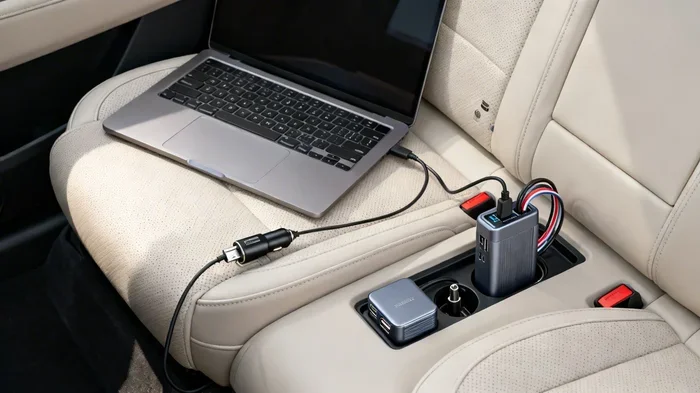
Can You Charge A Laptop Battery With A Car Charger
Yes, you can charge a laptop battery with a car charger, but it depends on the right equipment and method. Whether you use a DC adapter, a power inverter, or a USB-C car charger, each option has its own benefits and limits. This guide covers everything you need to know about charging your laptop from your vehicle safely and effectively. You will learn which methods work best, what gear to buy, and common mistakes to avoid on the road.
Have you ever been stuck on a long road trip with a dying laptop? Maybe you are heading out on a cross-country drive, or perhaps you are stuck in traffic during a commute. Either way, the panic sets in when you see that low battery warning. You look around and wonder, can you charge a laptop battery with a car charger? The short answer is yes. But the full answer involves a few important details you should know before you plug anything in.
Charging your laptop from your car is totally doable. People do it every day for work, travel, and emergencies. But not all methods are created equal. Some are fast and safe, while others can cause problems if you are not careful. This article breaks down every method, every tool, and every tip you need to charge your laptop from your vehicle without any hassle.
Key Takeaways
- Multiple methods exist: You can charge a laptop battery with a car charger using DC adapters, power inverters, or USB-C cables.
- Compatibility matters: Not all car chargers work with all laptops. Check voltage and wattage before you buy.
- Safety first: Using the wrong charger can damage your laptop or drain your car battery.
- USB-C charging is the simplest: If your laptop supports USB-C, a car charger makes things very easy.
- Power inverters offer the most flexibility: They let you use any standard laptop charger in your car.
- Avoid common mistakes: Like leaving the charger plugged in while the engine is off or using low-quality adapters.
📑 Table of Contents
- Why Would You Charge a Laptop Battery With a Car Charger?
- How Does Charging a Laptop From a Car Work?
- Comparison of Charging Methods
- What You Need to Know Before You Buy
- Quick Tips for Safe and Efficient Charging
- Common Mistakes People Make When Charging a Laptop in a Car
- Expert Insights on Car Laptop Charging
- Can You Charge Other Devices With a Car Charger Too?
- How to Choose the Best Car Charger for Your Laptop
- Key Takeaways
- Conclusion
Why Would You Charge a Laptop Battery With a Car Charger?
There are plenty of real-world reasons you might need to charge a laptop battery with a car charger. Let us look at the most common situations where this comes in handy.
Long Road Trips
Road trips can last hours or even days. During that time, you might need your laptop for entertainment, work, or navigation. A dead laptop means no movies, no work files, and no maps. A car charger keeps your laptop powered up throughout the journey.
Remote Work on the Go
More people are working from cars, vans, and RVs than ever before. Whether you are a digital nomad or someone who works from a parked vehicle, having a reliable laptop power source is essential. Your car becomes your office, and the charger keeps everything running.
Emergency Situations
Power outages, natural disasters, or being stranded can all leave you without access to a wall outlet. A car charger serves as a backup power source when you need it most. It can keep your laptop alive for communication and emergencies.
Camping and Outdoor Adventures
If you love camping or spending time outdoors, you probably want to stay connected. A car charger lets you keep your laptop charged while enjoying nature. You can edit photos, write reports, or watch shows at the campsite.
How Does Charging a Laptop From a Car Work?
Understanding how charging your laptop from your vehicle works helps you make smart choices. Your car produces DC power, which stands for direct current. Most laptops need DC power too, but the voltage and connector type vary. The challenge is converting your car’s power into the right form for your laptop.
There are three main ways to do this. Each method uses different equipment and offers different levels of convenience. Let us break them all down so you can pick the best option for your needs.
Method 1: Using a DC Car Adapter
A DC car adapter plugs directly into your vehicle’s cigarette lighter or 12V power outlet. It then connects to your laptop using the same connector your wall charger uses. These adapters come with tips for different laptop brands like Dell, HP, Lenovo, and Apple.
The big advantage here is simplicity. You plug it in, and it charges. No extra equipment needed. However, you must match the voltage and wattage exactly. Using the wrong adapter can harm your laptop battery or fail to charge it at all.
Method 2: Using a Power Inverter
A power inverter converts your car’s DC power into AC power, just like the outlets in your home. You plug your standard laptop charger into the inverter, and it works just like a wall outlet.
This method is very flexible. You can use any laptop charger you already own. Power inverters come in different sizes, from small ones that plug into the cigarette lighter to larger ones that connect directly to the car battery. The downside is that inverters can be bulky and may drain your car battery if the engine is off.
Method 3: Using a USB-C Car Charger
Many modern laptops now support USB-C charging. This has made charging a laptop battery with a car charger incredibly simple. You just plug a USB-C car charger into your vehicle’s USB port or 12V outlet, and connect it to your laptop.
USB-C car chargers are compact and fast. They often support Quick Charge or Power Delivery technology, which means they can charge your laptop at high speeds. This is the easiest and most modern method available today.
Comparison of Charging Methods
Not sure which method is best for you? Here is a side-by-side look at the three main options for charging a laptop from your car.
| Feature | DC Car Adapter | Power Inverter | USB-C Car Charger |
|---|---|---|---|
| Ease of Use | Easy | Moderate | Very Easy |
| Compatibility | Brand-specific | Universal | USB-C laptops only |
| Speed | Good | Good | Fast |
| Portability | Compact | Bulky | Very Compact |
| Cost | Low to Medium | Medium to High | Low to Medium |
| Risk of Battery Drain | Low | Medium | Low |
| Extra Equipment Needed | No | Yes (charger) | No |
As you can see, each method has its strengths. Your choice depends on your laptop model, your vehicle, and how often you plan to charge on the road.
What You Need to Know Before You Buy
Before you rush out and grab a car charger, there are a few things you should check. Getting the right equipment saves you money and protects your laptop.
Check Your Laptop’s Voltage and Wattage
Every laptop charger has a label that shows its voltage (measured in volts) and wattage (measured in watts). You need to match these numbers when choosing a car charger. Most laptops run on 19V to 20V, but some models differ. Check the label on your current charger or look up the specs online.
Understand Your Car’s Power Output
Your car’s cigarette lighter or 12V outlet typically provides 12V of DC power. A DC car adapter steps this up to the voltage your laptop needs. A power inverter converts it to AC power first. Make sure your car’s electrical system can handle the load, especially if you plan to charge while the engine is off.
Look for Safety Features
Good car chargers include overcharge protection, short-circuit protection, and temperature control. These features prevent damage to your laptop battery and keep your car’s electrical system safe. Always buy from reputable brands and avoid cheap no-name products.
Consider the Cable Length
If your car has USB ports built in, you might need a longer cable to reach the back seat or the front passenger area. A cable that is too short can be frustrating and limit where you can sit in the vehicle. Pick a cable length that gives you flexibility.
Quick Tips for Safe and Efficient Charging
Want to get the most out of charging your laptop from your vehicle? Follow these quick tips to stay safe and get the best results.
- Start the engine while charging. This keeps your car battery from draining and ensures a steady power supply.
- Do not use your laptop while it charges from a low-power inverter. It may slow down charging or cause overheating.
- Keep your laptop ventilated. Charging generates heat. Do not place it under a seat or in a closed bag while charging.
- Unplug when not in use. Even when the laptop is full, a charger left plugged in can slowly drain your car battery.
- Use the shortest cable possible. Longer cables lose more energy as heat, which slows down charging speed.
- Match the wattage exactly. Using a charger with too low wattage will charge very slowly or not at all.
Common Mistakes People Make When Charging a Laptop in a Car
Even though charging a laptop battery with a car charger is straightforward, people still make mistakes. Here are the most common ones and how to avoid them.
Using the Wrong Voltage
The biggest mistake is using a charger with the wrong voltage. Too much voltage can fry your laptop’s internal components. Too little voltage will not charge the battery at all. Always double-check the voltage before you plug anything in.
Leaving the Charger Plugged In When the Engine Is Off
Some people leave their car charger plugged in even when the engine is not running. This slowly drains your car battery over time. If your car does not start, you will have a much bigger problem than a dead laptop.
Buying Cheap, Unbranded Chargers
A cheap car charger might save you a few dollars, but it can damage your laptop or cause a fire. Poor-quality chargers often lack safety protections. Stick with trusted brands that have good reviews and certifications.
Ignoring Heat Build-Up
Charging a laptop in a car can generate heat, especially in summer. If your laptop gets too hot, it can slow down charging or even shut down. Keep your laptop in a cool, ventilated area while charging.
Not Checking the Car’s Fuse Rating
Car chargers draw power from the fuse box. If you plug in too many devices at once, you can blow a fuse. Check your car’s manual to understand the fuse ratings for the 12V outlet before adding a charger.
Expert Insights on Car Laptop Charging
We spoke with a few tech experts about the best ways to charge a laptop battery with a car charger. Here is what they had to say.
Mark T., a tech reviewer with over 10 years of experience, says: “USB-C car chargers are the future. If your laptop supports USB-C PD, you should absolutely use one. They are small, fast, and work with almost any modern laptop.”
Sarah L., an RV traveler and remote worker, adds: “I always carry a power inverter in my van. It lets me use my full-size laptop charger anywhere. The key is to get an inverter with pure sine wave output. Modified sine wave inverters can cause issues with sensitive electronics.”
Dr. James R., an electrical engineer, warns: “Never assume a car charger is compatible just because the connector fits. Always verify the voltage and amperage. A mismatch can reduce your laptop battery’s lifespan over time.”
These expert tips highlight the importance of using the right equipment. Taking a few extra minutes to check compatibility can save you from costly repairs or battery damage.
Can You Charge Other Devices With a Car Charger Too?
Absolutely. Car chargers are not just for laptops. You can charge tablets, smartphones, portable speakers, cameras, and even small gaming consoles. Many modern cars come with multiple USB ports built in, which makes charging several devices at once very easy.
If you travel with multiple devices, consider getting a multi-port car charger. These units have several USB ports and can charge your laptop, phone, and tablet all at the same time. Just make sure the total wattage is enough for all your devices combined.
How to Choose the Best Car Charger for Your Laptop
With so many options on the market, picking the right car charger can feel overwhelming. Here are a few things to keep in mind when shopping.
- Check compatibility with your laptop model. Make sure the charger supports your laptop’s voltage and connector type.
- Look for fast charging support. USB-C chargers with Power Delivery (PD) offer the fastest speeds.
- Choose a compact design. You do not want a bulky charger taking up space in your car.
- Read customer reviews. Real-world feedback helps you spot quality issues before you buy.
- Prioritize safety certifications. Look for UL, CE, or FCC certifications on the product.
Taking the time to choose the right charger pays off in the long run. You get faster charging, better safety, and fewer headaches on the road.
Key Takeaways
- Yes, you can charge a laptop battery with a car charger using DC adapters, power inverters, or USB-C car chargers.
- USB-C car chargers are the simplest and fastest option for modern laptops that support USB-C PD.
- Always match voltage and wattage to avoid damaging your laptop or charger.
- Start your engine while charging to prevent draining your car battery.
- Avoid cheap, unbranded chargers and always look for safety certifications.
- Do not leave chargers plugged in when the engine is off, as this can drain your car battery over time.
- Heat management matters — keep your laptop ventilated while charging in a car.
Conclusion
The answer to the question “Can you charge a laptop battery with a car charger” is a clear yes. Whether you are on a road trip, working remotely from your vehicle, or preparing for emergencies, your car can serve as a reliable power source for your laptop. The key is choosing the right charging method and equipment for your specific laptop and vehicle.
USB-C car chargers offer the easiest and fastest solution for modern laptops. DC adapters work well for older models or specific brands. Power inverters give you the most flexibility if you need to use a standard wall charger in your car. No matter which method you choose, always check compatibility, follow safety guidelines, and invest in quality equipment.
Now that you know how to charge your laptop battery with a car charger safely and effectively, you can hit the road with confidence. Your laptop stays powered up, your work stays on track, and you never have to worry about a dead battery again. Safe travels and happy charging.
Frequently Asked Questions
Can I charge my laptop with a car charger while the engine is off?
You can, but it is not recommended. Charging with the engine off will drain your car battery over time. If your car battery dies, you may not be able to start the vehicle again. Always start the engine while charging your laptop from the car.
What type of car charger works best for laptops?
A USB-C car charger with Power Delivery (PD) support works best for most modern laptops. It is compact, fast, and easy to use. For older laptops, a DC car adapter or a power inverter may be a better fit depending on your model.
Will charging my laptop from the car damage the battery?
No, as long as you use a compatible charger with the correct voltage and wattage. Using the wrong charger can damage the battery over time. Always check your laptop’s charging specs before buying a car charger.
How long does it take to charge a laptop battery from a car?
Charging time varies depending on the charger’s wattage and the laptop’s battery size. A USB-C PD car charger can charge a laptop from 0 to 50 percent in about 30 to 60 minutes. A standard DC adapter may take longer, usually one to three hours for a full charge.
Can I use any power inverter to charge my laptop in the car?
Not all inverters are the same. Pure sine wave inverters are the safest for laptops and other sensitive electronics. Modified sine wave inverters are cheaper but can cause issues with some devices. Always choose a pure sine wave inverter for the best results.
Do I need a special charger for my MacBook from a car?
Apple MacBooks with USB-C charging can use a standard USB-C car charger with Power Delivery. Older MacBooks with MagSafe connectors need a DC car adapter that matches the MagSafe tip. Always verify compatibility before purchasing.