Can Any Cartridge Work For Any Printer Explained Here
Not every cartridge works with every printer — cartridge compatibility depends on your printer model, brand, and type. Using the wrong printer cartridge can damage your device, void your warranty, or produce poor print quality. This guide breaks down cartridge compatibility so you can choose the right ink cartridge or toner cartridge with confidence.
You just bought a new printer. You are excited to print your first page. Then you realize you need a cartridge. So you go online and find one that looks right. But wait. Does it actually work? The short answer is no. Not every cartridge works with every printer. Cartridge compatibility depends on several factors that many people overlook. In this article, we will break down everything you need to know about cartridge compatibility. You will learn why printers need specific cartridges, what happens when you use the wrong one, and how to find the right fit every time.
Whether you own an inkjet printer at home or a laser printer in your office, this guide will help you make smart choices. We will cover OEM cartridges, compatible cartridges, and remanufactured options. By the end, you will never second-guess your cartridge purchase again.
Key Takeaways
- Cartridges are not universal: Each printer model requires a specific cartridge type and model number.
- OEM cartridges offer reliability: Original manufacturer cartridges deliver consistent quality and page yield.
- Compatible cartridges save money: Third-party options cost less but vary in quality and reliability.
- Remanufactured cartridges are eco-friendly: Refilled cartridges reduce waste but may affect print performance.
- Check your printer model first: Always verify your cartridge model number before purchasing.
- Wrong cartridges cause problems: Using mismatched cartridges can lead to clogs, streaks, and printer damage.
- Chip technology matters: Modern cartridges use chips that communicate with your printer for proper function.
📑 Table of Contents
- Why Cartridges Are Not Universal
- Types of Printer Cartridges
- What Happens When You Use the Wrong Cartridge
- How to Find the Right Cartridge for Your Printer
- Inkjet vs. Laser Printers and Their Cartridges
- Quick Tips for Saving Money on Cartridges
- Common Mistakes People Make with Printer Cartridges
- Expert Insights on Cartridge Compatibility
- Frequently Asked Questions
- Conclusion
Why Cartridges Are Not Universal
One of the biggest misconceptions in the printing world is that all cartridges are the same. They are not. Printers are built with specific hardware that only works with certain cartridges. Think of it like a lock and key. The printer is the lock. The cartridge is the key. You need the right key to make it work.
Printer manufacturers design their machines to work best with their own cartridges. This means the cartridge model number, shape, size, and even the internal components are tailored to each printer model. A cartridge made for an HP printer will not fit properly in an Epson printer. It is that simple. But there is more to it than just physical fit.
How Printers Recognize Cartridges
Modern printers use smart technology to communicate with cartridges. Inside every cartridge is a tiny chip. This cartridge chip tells the printer important information. It shares the cartridge model, ink levels, and page yield data. When you insert a cartridge, the printer reads the chip and decides whether to accept it.
If the chip does not match, the printer may refuse to work entirely. Some printers will show an error message. Others will simply stop printing. This is why cartridge compatibility is so important. You cannot just swap any cartridge into any printer and expect great results.
The Role of Printer Models and Variants
Even within the same brand, different printer models use different cartridges. For example, the HP DeskJet 2700 uses a different cartridge than the HP DeskJet 4100. Each model has its own cartridge specifications. The manufacturer lists the exact cartridge numbers on the product box. They also list them in the printer manual.
This is why you should always check your printer model before buying a new cartridge. Look at the label on the back of your printer. Or open the printer settings on your computer. The printer model number will be displayed there. Write it down. Then search for the matching cartridge. This simple step saves time, money, and frustration.
Types of Printer Cartridges
Not all cartridges are created equal. There are three main types you will encounter in the market. Each has its own pros and cons. Understanding these types helps you make an informed decision.
OEM Cartridges
OEM stands for Original Equipment Manufacturer. These are cartridges made by the same company that built your printer. For example, HP makes cartridges for HP printers. Canon makes cartridges for Canon printers. OEM cartridges are the most expensive option. But they also deliver the most reliable print quality.
Here is why many people choose OEM cartridges:
- Guaranteed compatibility: They are designed specifically for your printer model.
- Consistent print quality: Colors are vibrant and text is sharp every time.
- Full page yield: OEM cartridges deliver the page count promised on the box.
- Warranty protection: Using OEM cartridges keeps your printer warranty intact.
Compatible Cartridges
Compatible cartridges are third-party cartridges made by companies other than the printer manufacturer. They are designed to fit specific printer models. Compatible cartridges cost significantly less than OEM options. Some cost up to 50 percent less. This makes them very popular among budget-conscious users.
However, quality can vary. A cheap compatible cartridge might produce faded prints. It might also leak ink or stop working after a few pages. The good news is that reputable brands offer high-quality compatible cartridges. Always read reviews before buying. Look for sellers with good return policies.
Remanufactured Cartridges
Remanufactured cartridges are used OEM cartridges that have been cleaned, refilled, and tested. They are an eco-friendly option because they reduce electronic waste. Remanufactured cartridges cost less than new OEM cartridges. They also help the environment by keeping plastic cartridges out of landfills.
The trade-off is that print quality may not match a brand-new cartridge. Some remanufactured cartridges have lower page yield than original ones. If you print a lot and want to save money while being green, remanufactured cartridges are worth considering.
What Happens When You Use the Wrong Cartridge
Using the wrong cartridge can cause several problems. Some are minor. Others are serious enough to damage your printer. Let us look at what can go wrong.
Poor Print Quality
The most common issue is bad print quality. You might see streaks, banding, or faded text. Colors might look washed out or completely wrong. This happens because the wrong cartridge does not deliver ink or toner properly. The printhead relies on the correct cartridge to function at its best.
Printer Errors and Error Codes
Many printers display error codes when an incompatible cartridge is inserted. You might see messages like “Cartridge Not Recognized” or “Incompatible Cartridge Installed.” Some printers will refuse to print until you remove the wrong cartridge. These errors are annoying. But they also protect your printer from potential damage.
Damage to the Printhead or Printer
In rare cases, using the wrong cartridge can cause physical damage. The wrong cartridge might not seat properly in the cartridge slot. This can put pressure on the printhead. Ink from a mismatched cartridge might leak inside the printer. Over time, this can clog internal components. Repairing a damaged printhead can be expensive. In some cases, it costs more than buying a new printer.
Voiding Your Printer Warranty
Here is something many people do not know. Using non-OEM cartridges can sometimes void your printer warranty. This is especially true if the wrong cartridge causes damage. Printer manufacturers argue that third-party cartridges are not covered under their support agreements. To stay safe, always check your warranty terms before switching to a different cartridge type.
How to Find the Right Cartridge for Your Printer
Finding the right cartridge is easier than you think. You just need to follow a few simple steps. Let us walk through the process.
Step 1: Check Your Printer Model Number
Find the model number on your printer. It is usually printed on a sticker on the back or bottom. Write it down. You will need this number to search for the right cartridge.
Step 2: Look Up the Cartridge Number
Go to the printer manufacturer’s website. Enter your model number in the search bar. The website will list all compatible cartridges. Write down the cartridge numbers. You can also check your printer manual for this information.
Step 3: Compare Options
Once you have the cartridge number, you can compare different options. You will see OEM cartridges, compatible cartridges, and remanufactured cartridges side by side. Compare prices, page yields, and reviews. This helps you find the best value for your needs.
Step 4: Buy from a Trusted Seller
Whether you buy OEM or compatible cartridges, always purchase from a trusted seller. Avoid deals that seem too good to be true. Extremely low prices often mean low quality. Stick with reputable retailers and verified sellers.
Inkjet vs. Laser Printers and Their Cartridges
The type of printer you own determines the type of cartridge you need. The two main types are inkjet and laser printers. They use very different cartridge technologies.
Inkjet Printers
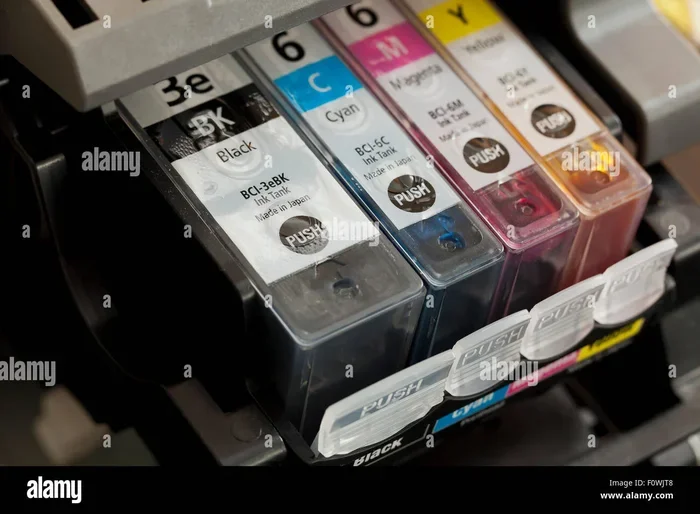
Inkjet printers use liquid ink cartridges. These cartridges contain tiny nozzles that spray ink onto paper. Inkjet printers are popular for home use. They produce high-quality photos and color prints. Ink cartridges come in two types: black and tri-color. Some printers use separate cartridges for each color. This lets you replace only the color you need.
The cost per page for inkjet printing is usually higher than laser printing. But inkjet printers are cheaper to buy upfront. They are a great choice for home offices and casual users.
Laser Printers
Laser printers use toner cartridges instead of ink. Toner is a fine powder that gets melted onto paper. Laser printers are faster and produce sharper text. They are ideal for offices and high-volume printing. Toner cartridges have a higher page yield than ink cartridges. A single toner cartridge can print thousands of pages.
Laser printers cost more upfront. But the lower cost per page makes them cheaper in the long run. If you print lots of documents every day, a laser printer is a smart investment.
| Feature | Inkjet Printers | Laser Printers |
|---|---|---|
| Cartridge Type | Ink Cartridge | Toner Cartridge |
| Best For | Photos, color prints | Documents, high volume |
| Upfront Cost | Lower | Higher |
| Cost Per Page | Higher | Lower |
| Print Speed | Slower | Faster |
| Print Quality | Great for photos | Sharp text |
Quick Tips for Saving Money on Cartridges
Printing can get expensive. But there are smart ways to cut costs without sacrificing quality. Here are some quick tips:
- Buy in bulk: Purchasing cartridges in multi-packs often saves money.
- Use draft mode: Switch to draft mode for everyday documents. It uses less ink.
- Print in black and white: Color ink is more expensive. Use black and white for non-essential prints.
- Try compatible cartridges: High-quality compatible cartridges can save you up to 50 percent.
- Refill when possible: Some cartridges can be refilled with ink kits. This cuts costs significantly.
- Set print quotas: Limit unnecessary printing. Use digital copies whenever possible.
Common Mistakes People Make with Printer Cartridges
Even careful users make mistakes with cartridges. Here are some common errors to avoid.
Buying Based on Price Alone
The cheapest cartridge is not always the best deal. A low-priced cartridge might have a low page yield. You might need to replace it more often. This ends up costing more in the long run. Always check the page yield and cost per page before buying.
Ignoring Expiration Dates
Ink cartridges have expiration dates. Using an expired cartridge can cause clogged nozzles and poor print quality. Always check the expiration date before purchasing. Store your cartridges in a cool, dry place to extend their shelf life.
Not Resetting the Chip
Some cartridges have resettable chips. After refilling, you need to reset the chip for the printer to recognize the cartridge. Failing to do this can result in error messages and wasted ink. Always follow the reset instructions for your specific cartridge type.
Mixing Cartridge Brands
Some people mix OEM and compatible cartridges in the same printer. This can confuse the printer’s software. It may also affect print quality. Stick with one brand or type per printing session for the best results.
Expert Insights on Cartridge Compatibility
We spoke with printing professionals to get their take on cartridge compatibility. Here is what the experts had to say.
Dr. Lisa Chen, Print Technology Specialist: “The biggest mistake consumers make is assuming all cartridges are interchangeable. Printer manufacturers invest heavily in designing proprietary systems. Using the correct cartridge ensures optimal performance and protects your investment.”
Mark Thompson, Office Equipment Manager: “For businesses, compatible cartridges are a game-changer. We save thousands of dollars each year by switching to high-quality third-party options. The key is to buy from trusted suppliers and test a small batch first.”
Sarah Rivera, Home Office User: “I started using remanufactured cartridges two years ago. My print quality has not suffered at all. I save money and feel good about reducing waste. It is a win-win for me.”
Frequently Asked Questions
Can I use a compatible cartridge instead of an OEM cartridge?
Yes, you can use a compatible cartridge in most printers. Compatible cartridges are designed to fit specific printer models and work as a budget-friendly alternative to OEM cartridges. However, quality can vary between brands. Always buy from reputable sellers and check reviews before purchasing. Some printers may display warnings when a compatible cartridge is inserted, but they usually still work fine.
Will using a third-party cartridge void my printer warranty?
Under federal law in the United States, using third-party cartridges cannot automatically void your printer warranty. The Magnuson-Moss Warranty Act protects consumers. However, if a third-party cartridge directly causes damage to your printer, the manufacturer may deny the warranty claim for that specific repair. To stay safe, use high-quality cartridges from trusted brands and keep your original cartridges for reference.
How do I know which cartridge my printer needs?
Check the label on your printer for the model number. Then visit the manufacturer’s website and enter the model number. The website will list all compatible cartridges. You can also open the printer software on your computer and check the cartridge information under settings or preferences. The cartridge model number will be displayed there for easy reference.
Can I refill an ink cartridge myself?
Yes, you can refill most ink cartridges using a refill kit. Refill kits include ink and a syringe for filling the cartridge. However, not all cartridges are refillable. Some have sealed chambers that cannot be opened easily. Refilling can save money, but it may be messy and time-consuming. If you refill often, consider buying a refillable cartridge system for easier use.
Why do compatible cartridges cost so much less than OEM cartridges?
Compatible cartridges cost less because third-party manufacturers do not invest in the research, development, and branding that OEM companies do. They also do not include the same level of customer support or warranty coverage. The lower price reflects these savings. However, quality can vary widely, so it is important to choose reliable compatible cartridge brands with positive customer reviews.
What is the difference between a cartridge and a printhead?
A cartridge holds the ink or toner. The printhead is the component that sprays or applies the ink onto the paper. In some printers, the printhead is built into the cartridge. In other printers, the printhead is a separate part inside the printer. Understanding this difference helps you troubleshoot print quality issues and know which part to replace when problems arise.
Conclusion
The answer to can any cartridge work for any printer is a clear no. Cartridges are designed for specific printer models, brands, and technologies. Using the wrong cartridge leads to poor print quality, error messages, and potential damage. Always check your printer model and cartridge number before making a purchase.
Whether you choose OEM, compatible, or remanufactured cartridges, compatibility is the key factor. Take the time to research your options. Compare prices and quality. And always buy from trusted sellers. With the right cartridge, your printer will deliver excellent results every time. You will save money, reduce frustration, and get the most out of your printing experience.
Remember, a small bit of knowledge goes a long way. Now that you understand cartridge compatibility, you are equipped to make smart choices. Your printer will thank you. Your wallet will thank you. And your prints will look better than ever.