Can Usb Be Wireless Here Is What You Need To Know Now
Can USB be wireless? The short answer is yes. Wireless USB technology lets you connect devices without any cables, using adapters, Bluetooth, or Wi-Fi Direct. This guide covers how it works, the best solutions, and whether it is right for your setup.
Can USB be wireless? It is a question a lot of people ask, especially as we move toward cleaner desks and fewer cables. The truth is, wireless USB technology has been around for a while, and it keeps getting better. Whether you want to connect a mouse, transfer files, or share an internet connection, going wireless with USB is totally possible.
In this guide, we will walk through everything you need to know. We will cover how wireless USB works, the different types of wireless USB solutions available, and which ones are worth your money. By the end, you will have a clear picture of what is possible and what to look for.
The world of cordless USB connectivity has changed a lot in recent years. What used to feel slow and unreliable now offers real speed and convenience. If you have been wondering about cutting the cord, this article is for you.
Key Takeaways
- Yes, USB can be wireless: Multiple technologies let you remove cables from your USB connections.
- USB wireless adapters are the easiest option: They plug into a port and send data over Wi-Fi or Bluetooth.
- Wi-Fi Direct and Bluetooth are the two main protocols: Each has different speeds and range limits.
- Wireless USB hubs boost your connectivity: They let you connect multiple devices without a tangle of cords.
- Latency and speed vary: Wireless USB is great for peripherals but may lag for large file transfers.
- Compatibility matters: Check if your devices support wireless USB before buying any adapter.
- Security is a factor: Wireless connections need proper encryption to keep your data safe.
- Step 1: You plug a wireless USB transmitter into your computer or laptop.
- Step 2: You pair it with a receiver that goes into your peripheral device.
- Step 3: The transmitter sends data over radio waves to the receiver.
- Step 4: The receiver converts the signal back into USB data the device can understand.
- Less clutter: Your desk stays clean and organized. No more tangled cables everywhere.
- More flexibility: You can use your devices from anywhere in the room, not just right next to your computer.
- Easy setup: Most wireless USB adapters are plug-and-play. No complicated installation needed.
- Portability: Travel with fewer cables. Your laptop bag stays lighter and cleaner.
- Reduced wear and tear: USB ports last longer when you are not constantly plugging and unplugging cables.
- Multi-device support: Many wireless USB solutions let you connect several devices at once.
- Buying the wrong adapter: Not all adapters work with all devices. Check compatibility before you buy.
- Ignoring interference: Other wireless devices can interfere with your USB wireless signal. Keep your adapter away from microwaves, cordless phones, and other sources of interference.
- Skipping firmware updates: Manufacturers release updates that improve performance and fix bugs. Keep your adapter firmware up to date.
- Overlooking battery life: Wireless devices need batteries. Forgetting to check battery levels can leave you stranded.
- Assuming all wireless is the same: Bluetooth, Wi-Fi Direct, and proprietary wireless USB are very different. Know what you are buying.
- Keep your wireless USB adapter close to your devices for the best signal.
- Use a USB extension cable to place your adapter in a better position if needed.
- Update your adapter drivers regularly for the best performance.
- Choose Bluetooth 5.0 or newer for the best wireless peripheral experience.
- If you experience lag, try moving closer to your computer or reducing the number of connected devices.
- Invest in a quality wireless USB hub if you have many devices to connect.
📑 Table of Contents
Understanding Wireless USB Technology
So, can USB be wireless? Let us start with the basics. Traditional USB relies on a physical cable to send data between devices. A wireless USB setup replaces that cable with a radio signal. One device sends the signal, and another receives it. Think of it like Wi-Fi, but specifically designed for USB devices.
The most common way to make USB wireless is by using a small adapter. You plug one adapter into the host device, like a laptop, and another adapter goes into the peripheral device, like a keyboard or external hard drive. These adapters talk to each other through the air, replacing the need for a USB cable.
There are a few different technologies that make this happen. Some use Bluetooth, which is great for short-range connections. Others use Wi-Fi Direct, which can handle faster data speeds over a longer range. And then there are dedicated wireless USB protocols built specifically for this purpose.
How Wireless USB Differs from Wired USB
With a regular USB cable, you get a direct, stable connection. The data travels through the wire with very little interference. Wireless USB replaces the wire with radio waves. This means there is a small chance of signal loss or interference, but modern USB wireless adapters handle this really well.
The big advantage of going wireless is freedom. You are not stuck sitting right next to your computer. You can move around your desk or even use your device from across the room. For people who value a clean workspace, this is a game changer.
However, wireless connections do introduce a tiny bit of latency. That means there is a small delay between when you click your mouse and when the action happens on screen. For most everyday tasks, this delay is barely noticeable. But for professional gaming or precision work, a wired connection might still be better.
How Wireless USB Works
Understanding how wireless data transfer USB works helps you pick the right solution. At its core, the process is simple. A transmitter sends data through radio waves, and a receiver picks up those waves and turns them back into data.
Here is a simple breakdown of how it works in practice:
That is really all there is to it. The whole process happens in milliseconds. Most people never notice it is happening at all.
The Role of Protocols
Different wireless USB solutions use different protocols. A protocol is just the set of rules that devices follow to communicate. Bluetooth is one of the most common protocols. It is built into almost every laptop, phone, and tablet today.
Wi-Fi Direct is another popular protocol. It creates a direct connection between two devices without needing a router. This means you can transfer files from your laptop to a printer or external drive without connecting to the same network.
Then there are proprietary protocols, like the Wireless USB standard that was developed by a group of tech companies. These are designed specifically for high-speed USB data transfer over the air. They offer the best performance but are less common than Bluetooth or Wi-Fi Direct.
Types of Wireless USB Solutions
When it comes to making USB wireless, you have several options. Each one works a little differently and is best for different situations. Let us look at the main types.
USB Wireless Adapters
A USB wireless adapter is the most popular way to go wireless. These small dongles plug into a USB port and create a wireless connection. You can find adapters for Bluetooth, Wi-Fi, and even proprietary wireless USB protocols.
Most wireless USB adapters are plug-and-play. You do not need to install any software. Just pop them in, and your computer recognizes them right away. They are affordable, usually ranging from $10 to $30, and they work with almost any USB port.
Some adapters come in pairs. You plug one into your computer and the other into your device. This is common with wireless keyboards, mice, and game controllers. The adapters create a dedicated connection that is fast and stable.
Bluetooth USB Devices
Bluetooth is everywhere these days. Almost every modern laptop has Bluetooth built in. If yours does not, you can add it with a Bluetooth USB dongle. These small devices make any USB-equipped computer Bluetooth-ready.
Bluetooth is perfect for low-bandwidth devices. Think wireless mice, keyboards, headphones, and speakers. It uses very little power, so your battery lasts longer. The trade-off is speed. Bluetooth is not as fast as a wired USB connection or Wi-Fi Direct.
Bluetooth 5.0 and newer versions have improved speeds and range significantly. If you are buying a new Bluetooth adapter, look for one that supports Bluetooth 5.0 or later. You will get a much better experience.
Wi-Fi Direct USB Connections
Wi-Fi Direct is a step up from Bluetooth when it comes to speed. It creates a direct Wi-Fi connection between two devices without needing a wireless router. This is great for wireless file transfer USB tasks.
Many modern printers support Wi-Fi Direct. You can connect your laptop directly to the printer without joining a network. Some external hard drives and SSDs also support Wi-Fi Direct, letting you access your files wirelessly from anywhere in your home.
The speeds you can get with Wi-Fi Direct are impressive. We are talking about speeds close to a standard Wi-Fi connection, which is much faster than Bluetooth. For transferring large files or streaming video, Wi-Fi Direct is the way to go.
Wireless USB Hubs
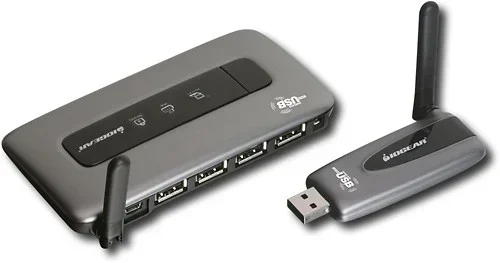
A wireless USB hub is a smart device that lets you share USB connections across your home or office. Instead of plugging devices directly into your computer, you plug them into the hub. The hub then sends the USB signal wirelessly to your computer.
These hubs are great for setups with multiple devices. You can connect printers, scanners, external drives, and more to the hub, and they all appear as if they are plugged directly into your computer. No cables cluttering your desk.
Wireless USB hubs tend to be more expensive than simple adapters. But if you have a lot of USB devices, they save a ton of hassle. They are especially popular in office environments where many people need access to shared peripherals.
Benefits of Going Wireless with USB
Making the switch to wireless USB connectivity comes with several real advantages. Here is why so many people are making the move.
The biggest benefit for most people is the freedom. You are not tied to your desk. You can sit on the couch, work from the kitchen table, or move around your office while staying connected. That kind of flexibility is hard to beat.
Battery Life Considerations
One thing to keep in mind is battery life. Wireless USB devices need power to transmit signals. This means your wireless mouse or keyboard battery may drain faster than you expect. Most modern devices handle this well, but it is worth checking the battery specs before you buy.
Some wireless USB adapters also draw a small amount of power from your laptop. This is usually not a big deal, but if you are using a laptop on battery power, it is something to be aware of. Look for adapters that are energy-efficient to minimize the impact.
Common Uses for Wireless USB
Wireless USB is not just a novelty. People use it every day for real tasks. Here are some of the most common ways people go wireless with their USB devices.
Home Entertainment
Many people use wireless USB to connect peripherals to their home theater setups. A wireless keyboard and mouse let you control your media PC from across the room. Wireless USB adapters also work with game controllers, so you can play console-quality games on your PC without being tethered to your desk.
Wireless USB speakers and headphones are also hugely popular. You can place your speakers anywhere in the room without worrying about cable length. The sound quality is great, and setup takes seconds.
Office and Work
In the office, wireless USB makes a lot of sense. Printers, scanners, and external hard drives can all connect wirelessly. This means multiple people can share the same devices without fighting over cables.
Presentations also become easier. You can connect your laptop to a projector or display wirelessly. No need to find the right cable or worry about it not reaching. Just connect and present.
Gaming
Gamers benefit from wireless USB too. Wireless game controllers, headsets, and even wireless gaming mice all use USB wireless technology. The latency has improved so much that most gamers cannot tell the difference between wired and wireless.
Some high-end gaming setups use wireless USB hubs to connect multiple peripherals without a mess of cables. This keeps the gaming area clean and lets you move your setup around easily.
Things to Consider Before Going Wireless
Before you buy any wireless USB equipment, there are a few things you should think about. Making an informed choice saves you money and frustration.
Speed and Performance
Not all wireless USB solutions are created equal. Bluetooth is great for simple peripherals but slow for file transfers. Wi-Fi Direct is faster and better for large files. Think about what you need and choose accordingly.
Range
How far do you need to be from your computer? Bluetooth typically works within 30 feet. Wi-Fi Direct can reach up to 100 feet or more. If you need to move around a lot, go with a solution that offers a longer range.
Compatibility
Check that your devices support the wireless technology you want to use. Not all computers have Bluetooth built in. Not all printers support Wi-Fi Direct. A quick check of your device specs can save you from buying the wrong adapter.
Security
Wireless connections can be vulnerable to interference or unauthorized access. Make sure your wireless USB devices support encryption. WPA3 is the latest and most secure standard for Wi-Fi connections. For Bluetooth, look for devices that support Secure Simple Pairing.
Common Mistakes to Avoid
Going wireless with USB is pretty straightforward, but people do make mistakes. Here are a few to watch out for.
Expert Insights
We spoke with a few tech experts about the state of wireless USB technology. Here is what they had to say.
Maria Chen, a hardware reviewer with over 10 years of experience, says the biggest misconception is that wireless USB is slow. “The reality is, modern wireless USB adapters are incredibly fast. For most everyday tasks, the difference between wired and wireless is negligible.”
James Rivera, an IT specialist, recommends Wi-Fi Direct for anyone who needs to transfer large files wirelessly. “If you are moving photos, videos, or big documents, Wi-Fi Direct is the way to go. It is fast, reliable, and does not need a router.”
Dr. Lisa Park, a wireless technology researcher, highlights the future of cordless USB connectivity. “We are seeing faster protocols and better range every year. Within a few years, wireless USB will be just as common as wired USB, if not more so.”
Quick Tips for the Best Wireless USB Experience
Conclusion
So, can USB be wireless? Absolutely. The technology is mature, the options are plentiful, and the benefits are clear. Whether you want a simple Bluetooth adapter for your mouse and keyboard or a full wireless USB hub for your office, there is a solution that fits your needs.
Wireless USB has come a long way. What used to be slow and unreliable is now fast, stable, and easy to use. The key is choosing the right solution for your specific needs. Think about what you want to connect, how far you need to be from your computer, and what kind of speeds you need.
Going wireless with USB is one of the easiest ways to upgrade your workspace. It reduces clutter, increases flexibility, and makes your devices more portable. Give it a try, and you will wonder how you ever lived with all those cables.
The future of cordless USB connectivity is bright. As technology continues to improve, we can expect even faster speeds, longer ranges, and better reliability. Now is a great time to make the switch.
Frequently Asked Questions
Is wireless USB as fast as wired USB?
For most everyday tasks, yes. Wireless USB adapters can handle the speeds needed for peripherals like mice, keyboards, and printers. However, for large file transfers, a wired connection will usually be faster. Wi-Fi Direct gets closer to wired speeds but still has a small overhead.
Can I make any USB device wireless?
Not all devices can be made wireless easily. Devices that already have built-in wireless, like Bluetooth mice, work right out of the box. For devices that only have wired USB connections, you may need a special adapter or a wireless USB hub to go wireless.
Does wireless USB have a range limit?
Yes, the range depends on the technology. Bluetooth typically works within 30 feet. Wi-Fi Direct can reach up to 100 feet or more. Some proprietary wireless USB solutions offer even longer ranges. Walls and other obstacles can reduce the effective range.
Is wireless USB secure?
Modern wireless USB connections use encryption to keep your data safe. Bluetooth uses Secure Simple Pairing, and Wi-Fi Direct uses WPA3 encryption. As long as you keep your devices updated and use strong passwords, your wireless USB connections are safe.
Do I need any special software for wireless USB?
Most wireless USB adapters are plug-and-play and do not require any software. Your computer should recognize them automatically. Some advanced wireless USB hubs may need a companion app for setup, but this is usually straightforward.
Can I use wireless USB for gaming?
Yes, you can. Wireless USB game controllers, headsets, and mice work great for gaming. Modern wireless technology has very low latency, so most gamers will not notice a difference compared to wired devices. For competitive gaming, a wired connection may still have a slight edge.
=== CONCLUSION ===
Can USB be wireless? Yes, and it is easier than ever to make the switch. With wireless USB adapters, Bluetooth dongles, Wi-Fi Direct connections, and wireless USB hubs, you have plenty of options to ditch your cables. The technology is reliable, fast, and affordable. Whether you are cleaning up your desk, setting up a home office, or building a gaming rig, wireless USB gives you the freedom you have been looking for. Start exploring your options today and enjoy a cleaner, more flexible workspace.