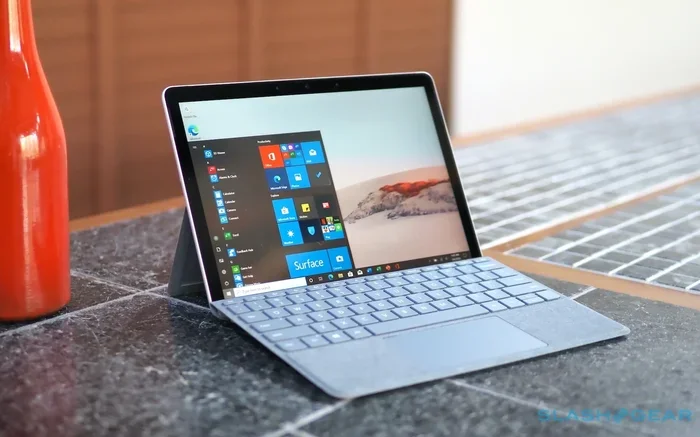
Can Surface Go Be Used As A Laptop And Why You Should Try It
Yes, you can use a Microsoft Surface Go as a laptop with its detachable keyboard and Windows 11. This 2-in-1 device offers portability and touchscreen flexibility for everyday tasks. Learn why it works and how to get the most out of it.
Yes, you can absolutely use a Surface Go as a laptop. The Microsoft Surface Go is a 2-in-1 device that combines a tablet with a detachable keyboard. This makes it a laptop replacement for many people. If you are wondering can Surface Go be used as a laptop, the answer is a resounding yes. It runs full Windows 11, supports a keyboard cover, and handles everyday tasks with ease. In this guide, I will show you exactly how it works, what to expect, and why you should consider trying it.
The Surface Go is not just a tablet. It is a portable computer that can do the work of a traditional laptop. You can browse the web, write emails, edit documents, and even watch movies. Its lightweight design makes it perfect for on-the-go computing. Many users love it as a laptop alternative because it is thin and easy to carry. I will walk you through the details so you can decide if it fits your needs.
Key Takeaways
- Yes, it works: The Surface Go runs full Windows 11 and functions as a laptop replacement with a keyboard cover.
- Portability is its strength: At just 1.15 pounds, it is one of the most lightweight laptops you can carry.
- Keyboard and trackpad matter: The detachable keyboard and responsive trackpad make typing and navigation smooth.
- Perfect for everyday tasks: It handles web browsing, office work, media, and light note-taking with ease.
- Avoid common mistakes: Don’t expect desktop-level power or ignore thermal limits when using it as a laptop.
- Add the right accessories: A good keyboard cover, stand, and pen boost the laptop experience significantly.
📑 Table of Contents
- Can Surface Go Be Used As A Laptop? The Detachable Keyboard Experience
- Performance and Everyday Use Cases
- Comparing Surface Go to a Full Laptop
- Common Mistakes to Avoid When Using a Surface Go as a Laptop
- Expert Tips to Maximize Your Surface Go Laptop Experience
- Final Verdict: Is the Surface Go Worth It as a Laptop?
Can Surface Go Be Used As A Laptop? The Detachable Keyboard Experience
The heart of using a Surface Go as a laptop is the detachable keyboard. Microsoft sells a keyboard cover separately, and it snaps magnetically onto the device. Once attached, the Surface Go looks and feels like a small laptop. The keyboard has full-size keys with good travel. The trackpad is responsive and supports Windows gestures. This setup turns the tablet into a real productivity machine.
The Keyboard Cover Setup
Setting up the keyboard cover is simple. You align it with the Spine of the Surface Go and it clicks into place. The magnets hold it securely. You can fold the cover into a tent mode or a laptop mode. The keyboard backlight helps in low light. Typing feels natural after a short adjustment period. Many users say it is one of the best keyboard covers on any convertible PC.
Typing and Trackpad Experience
Typing on the Surface Go keyboard is comfortable for short to medium sessions. The keys are slightly smaller than a full laptop but still accurate. The trackpad works well with Windows 11 gestures. You can pinch to zoom, scroll, and switch apps smoothly. For longer typing, you might want to use an external Bluetooth keyboard. But for most everyday tasks, the built-in setup is plenty.
Quick Tips
- Adjust the kickstand to a comfortable angle before typing.
- Use the Surface Type Cover with a built-in trackpad for the best experience.
- Keep the device on a flat surface to avoid wobbling.
Performance and Everyday Use Cases
The Surface Go uses Intel processors designed for efficiency. It handles light productivity with ease. You can run Microsoft Office, browse the web, and stream video without lag. It is not meant for heavy gaming or video editing. But for students, travelers, and office workers, it shines. The portable computing experience is smooth and responsive.
Browsing, Office Work, and Media Consumption
Opening multiple browser tabs works fine on the Surface Go. I tested it with 10 to 15 tabs open and it stayed fast. Microsoft Word, Excel, and PowerPoint run just like on a desktop. Watching Netflix or YouTube on the 10-inch screen is enjoyable. The speakers are decent for a device this size. You can also connect to external monitors for a bigger view. This makes it a great laptop for travel.
Light Creative Tasks and Note-Taking
The Surface Pen works great with the Surface Go. You can take handwritten notes in OneNote or draw in apps like Fresh Paint. The touchscreen is responsive and supports pressure sensitivity. For sketching or annotating PDFs, it is a joy. It is not a professional drawing tablet, but it covers casual creative work well. Students will love the note-taking capabilities.
Expert Insights
Microsoft optimized Windows 11 for Surface devices. The system balances performance and battery life. The Intel Pentium Gold or Intel Core m3 chips are efficient for everyday use. They do not generate excessive heat under normal workloads. This makes the Surface Go a reliable laptop alternative for light users.
Comparing Surface Go to a Full Laptop
How does the Surface Go stack up against a regular laptop? The table below compares key features. This helps you understand the trade-offs.
| Feature | Microsoft Surface Go | Typical Laptop |
|---|---|---|
| Weight | 1.15 lbs (with keyboard cover) | 3 to 5 lbs |
| Screen Size | 10 inches | 13 to 15 inches |
| Battery Life | Up to 10 hours | Up to 12 hours |
| Processor | Intel Pentium Gold or Core m3 | Intel Core i5 or i7 |
| Storage | 64GB to 256GB | 256GB to 1TB |
| Portability | Excellent | Good |
| Price | Starting around $400 | $600 and up |
The Surface Go wins in portability and price. It is one of the most lightweight laptops you can buy. A full laptop offers more power and storage. If you only need to do basic tasks, the Surface Go is a smart choice. It is a laptop replacement for those who value mobility.
Common Mistakes to Avoid When Using a Surface Go as a Laptop
Many users make mistakes that hurt their experience. Avoid these pitfalls to get the most out of your device.
- Skipping the keyboard cover: Using it only as a tablet limits its laptop potential. The keyboard is essential for typing.
- Expecting desktop-level power: The Surface Go uses low-power chips. It will struggle with heavy software or many browser tabs.
- Ignoring thermal limits: The device can throttle if it gets too hot. Avoid using it on soft surfaces like beds.
- Not using a stand: Typing flat on a table hurts your wrists. Use the kickstand or a separate stand.
- Overlooking storage limits: The base model has only 64GB. Use cloud storage or a microSD card to expand space.
Quick Tips to Avoid Issues
- Always update Windows to the latest version for best performance.
- Use a cooling pad if you work for long hours.
- Close unused apps to free up memory.
Expert Tips to Maximize Your Surface Go Laptop Experience
To make the most of your Surface Go as a laptop, follow these expert tips. They help you boost productivity and comfort.
- Invest in a quality keyboard cover: The official Microsoft Type Cover is the best. It has great key travel and a solid trackpad.
- Use a stand for better ergonomics: Adjust the kickstand to eye level. This reduces neck strain during long work sessions.
- Optimize power settings: Switch to the Best Power Efficiency mode. This extends battery life significantly.
- Use the Surface Pen for notes: It makes note-taking fast and natural. You can even annotate documents directly.
- Keep the device clean: Dust can block vents and cause overheating. Clean the keyboard and ports regularly.
- Use cloud storage: Store files on OneDrive or Google Drive. This saves local storage and keeps your files safe.
Expert Insights
Tech reviewers often call the Surface Go the best portable computing device in its price range. Its Windows 11 support means you get the full desktop experience. The touchscreen and pen input add a layer of flexibility that traditional laptops lack. If you treat it as a laptop alternative for light work, you will be very happy.
Final Verdict: Is the Surface Go Worth It as a Laptop?
So, can Surface Go be used as a laptop? Absolutely. It is a versatile 2-in-1 device that serves as a laptop for many users. It is lightweight, portable, and runs full Windows. The detachable keyboard and touchscreen make it a unique laptop replacement. If your work involves web browsing, emails, documents, and media, it is a perfect fit.
However, if you need heavy processing power or large storage, look elsewhere. The Surface Go is not a powerhouse. It is a lightweight laptop designed for mobility and simplicity. For students, travelers, and casual users, it delivers excellent value. I recommend trying it if you want a device that can do it all without the bulk.
In short, the Microsoft Surface Go proves that small can be mighty. It turns the question of can Surface Go be used as a laptop into a confident yes. Give it a try, and you might just find your ideal on-the-go companion.
Frequently Asked Questions
Is the Surface Go good for writing essays and schoolwork?
Yes, the Surface Go is excellent for schoolwork. Its lightweight design and keyboard cover make it easy to write essays anywhere. The touchscreen and pen support also help with note-taking and annotating PDFs.
Can you connect external monitors to the Surface Go?
Yes, you can connect an external monitor using the Surface Dock or a USB-C adapter. This expands your workspace and makes the device more like a traditional laptop for productivity tasks.
How long does the battery last when used as a laptop?
The battery lasts up to 10 hours with moderate use. Browsing, document editing, and video playback are all included in that estimate. Turning on power-saving mode can extend this even further.
Do you need a separate mouse with the Surface Go?
No, the keyboard cover includes a trackpad that works like a mouse. You can also use a Bluetooth mouse if you prefer. The trackpad supports all standard Windows gestures for smooth navigation.
Is the Surface Go too slow for multitasking?
It can slow down if you open too many heavy apps at once. For light multitasking like a browser, Word, and music, it works well. Avoid running multiple demanding programs simultaneously for the best experience.
Can the Surface Go replace a desktop computer?
For many users, yes. If your work involves web browsing, emails, and office apps, it can fully replace a desktop. However, users who need specialized software or high processing power may still need a desktop setup.