Can Obd2 Scanner Damage Ecu
Many car owners worry that using an OBD2 scanner can harm their ECU, but the truth is more nuanced than you might think. In most cases, a quality diagnostic tool poses little to no risk when used correctly. However, cheap scanners, incorrect procedures, and voltage spikes can potentially cause real damage to your engine control unit. This guide covers everything you need to know about OBD2 scanner safety and ECU protection.
You plug in a little device under your steering column. You wait a few seconds. And then a thought hits you — can an OBD2 scanner damage ECU? It is a scary question. And honestly? A lot of car owners never think about it until something goes wrong. The good news is that most of the time, your diagnostic tool is perfectly safe. But there are real risks you should know about. Let us walk through everything you need to understand about OBD2 scanner safety and how to protect your car’s brain.
Your ECU, or Engine Control Unit, is the most important computer in your vehicle. It controls your fuel injection, ignition timing, emissions systems, and much more. When something goes wrong with your engine, the ECU stores diagnostic trouble codes — also called DTCs. This is where an OBD2 scanner comes in handy. It reads those codes and helps you figure out what is wrong. But can that simple process hurt your car’s computer? The short answer is: rarely. But the full answer is more interesting.
Key Takeaways
- Low Risk in Normal Use: A standard OBD2 scanner is very unlikely to damage your ECU when used properly and with a quality device.
- Cheap Tools Are the Real Danger: Low-cost, uncertified scanners lack safety features and can send incorrect signals to your car’s computer.
- Voltage Spikes Are a Common Culprit: Improper grounding or electrical issues during scanning can cause voltage surges that harm the ECU.
- ECU Reflashing Carries Higher Risk: Advanced procedures like reprogramming or reflashing the ECU require professional equipment and expertise.
- Know Your Scanner’s Limits: Using a basic scanner for advanced tasks or vice versa can lead to communication errors and potential problems.
- Prevention Is Simple: Following basic safety steps like turning off the ignition before connecting and using surge-protected tools keeps your ECU safe.
📑 Table of Contents
- What Is an OBD2 Scanner and How Does It Work?
- Can an OBD2 Scanner Actually Damage Your ECU?
- Common Causes of ECU Damage (Not Related to Scanners)
- How to Use an OBD2 Scanner Safely
- Signs Your ECU May Be Damaged
- Choosing the Right OBD2 Scanner to Protect Your ECU
- Expert Insights on OBD2 Scanner Safety
- Can You Fix ECU Damage Caused by a Scanner?
- Key Takeaways
- Conclusion
What Is an OBD2 Scanner and How Does It Work?
Before we dive into risks, let us talk about what an OBD2 scanner actually does. OBD stands for On-Board Diagnostics. The second version, OBD-II, became standard in all cars sold in the United States after 1996. This system lets you access your vehicle’s internal computer network.
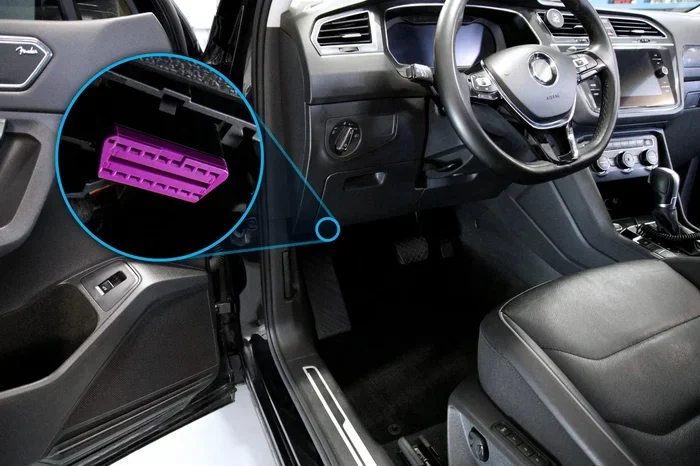
The scanner connects to your car through the OBD port. This port is usually found under the dashboard on the driver’s side. Once connected, the scanner communicates with the ECU using the OBD-II protocol. It sends and receives data through the CAN bus — the communication network inside your car. The scanner can read fault codes, view live sensor data, clear codes, and in some cases, perform advanced functions.
Types of OBD2 Scanners
Not all scanners are the same. There are basically three types you will encounter:
- Basic Code Readers: These are cheap, simple devices. They read and clear fault codes. They do not offer deep diagnostic data. Think of them as a quick check tool.
- Mid-Range Scan Tools: These offer more features. They provide live data streams, freeze frame data, and readiness monitors. Brands like Autel and Innova fall into this category.
- Professional-Grade Tools: These are the big dogs. They can do ECU programming, ECU reflashing, and advanced system tests. These tools are expensive and are mostly used by dealerships and trained technicians.
Knowing which type of scanner you have matters a lot when thinking about safety. A basic reader doing basic tasks is very different from a professional tool pushing the limits of your vehicle’s systems.
Can an OBD2 Scanner Actually Damage Your ECU?
This is the big question. And the honest answer is: yes, it is possible. But it is also pretty rare. Let us break down the real risks and separate fact from fiction.
How Damage Could Happen
There are a few specific ways an OBD2 scanner could potentially harm your engine control module:
- Voltage Spikes During Scanning: If there is an electrical issue in your car, connecting a scanner could introduce a voltage spike. This spike can travel through the data lines and reach the ECU. A bad ground or a weak battery makes this more likely.
- Incorrect ECU Reflashing: If you use a scanner to update or rewrite your ECU software and something goes wrong, the results can be serious. A failed reflash can brick your ECU completely. This is one of the most common ways scanners cause real damage.
- Compatibility Issues: Using a scanner that is not compatible with your vehicle’s year, make, or model can cause communication errors. In rare cases, these errors can confuse the ECU and cause it to malfunction temporarily or permanently.
- Leaving the Scanner Connected During Startup: Some people forget to remove the scanner before starting the engine. This can cause data conflicts and, in worst-case scenarios, send incorrect signals to the ECU.
- Using a Faulty or Cheap Scanner: Low-quality scanners often lack built-in surge protection and safety circuits. They may send erratic signals or fail to regulate voltage properly during communication.
Now, here is the important part. Most of these scenarios involve user error, cheap equipment, or unusual electrical problems. A good quality scanner used the right way is extremely safe. The odds of damaging your ECU through normal scanning are very low.
What the Experts Say
Most automotive technicians agree that professional-grade OBD2 scanners are designed with multiple safety layers. These tools have voltage regulators, surge protection, and communication protocols that prevent data conflicts. The real danger comes from cheap, uncertified scanners and from using the wrong tool for advanced tasks.
Many mechanics also point out that ECU damage from scanning is often blamed on the scanner when the real cause is something else entirely. A failing alternator, corroded wiring, or a weak battery can all cause ECU problems that happen to show up after someone plugs in a scanner. The scanner gets blamed, but it was really just a coincidence.
Common Causes of ECU Damage (Not Related to Scanners)
It is important to understand that ECU failure can happen for many reasons that have nothing to do with an OBD2 scanner. Here are some common causes:
- Water Damage: Moisture getting into the ECU housing can cause corrosion and short circuits.
- Heat Damage: The ECU is often located in the engine bay. Extreme heat over time can wear out its internal components.
- Battery Problems: A dead or overcharging battery can send irregular voltage to the ECU and cause damage over time.
- Wiring Issues: Frayed or corroded wires in the engine bay can send wrong signals to the ECU.
- Aftermarket Modifications: Improperly installed aftermarket electronics can interfere with the ECU’s normal operation.
So if your ECU fails after you used a scanner, take a moment to consider all the possible causes before blaming the scanner. This does not mean scanners are never the cause. But it helps to look at the bigger picture.
How to Use an OBD2 Scanner Safely
The best way to protect your ECU is to follow simple safety steps every time you use your scanner. Here is what you should do:
Step-by-Step Safety Guide
- Turn Off the Ignition First: Always switch your car off before plugging in the scanner. This prevents data conflicts and reduces the risk of electrical issues.
- Check Your Battery Voltage: Make sure your battery is in good condition and fully charged. A weak battery can cause voltage drops during scanning that stress the ECU.
- Use a Quality Scanner: Invest in a reputable brand. Look for scanners with built-in surge protection and positive reviews. Brands like Autel, Launch, and Actron are well-known for safety features.
- Match the Scanner to Your Vehicle: Make sure your scanner supports your car’s make, model, and year. Using an incompatible scanner can cause communication problems.
- Do Not Reflash the ECU Unless You Know What You Are Doing: ECU programming and reflashing should only be done by professionals or people with proper training and the right equipment.
- Remove the Scanner Before Starting the Engine: Once you are done reading codes, unplug the scanner before you turn the key. This prevents data conflicts during startup.
- Check the OBD Port for Damage: Before plugging in, inspect the port for bent pins, corrosion, or loose connections. A damaged port can cause connection issues.
Quick Tips for OBD2 Scanner Safety
- Keep your scanner software updated to ensure compatibility with newer vehicles.
- Do not leave the scanner plugged in for extended periods when the car is off.
- Store your scanner in a dry, cool place to prevent internal damage to the tool itself.
- If you notice anything unusual during scanning — strange smells, warning lights, or error messages — disconnect immediately.
- Use a surge protector or a scanner with built-in surge protection for extra safety.
Signs Your ECU May Be Damaged
Sometimes ECU damage happens despite your best efforts. Knowing the warning signs can help you catch problems early:
- Check Engine Light Stays On After Clearing Codes: If codes keep coming back or the light stays on after you clear them, the ECU might be sending wrong signals.
- Poor Engine Performance: Rough idling, stalling, or loss of power can indicate the ECU is not controlling the engine properly.
- Multiple Unrelated Fault Codes: If you get a bunch of random codes that do not seem connected, the ECU might be malfunctioning.
- Car Won’t Start: A damaged ECU can prevent your car from starting even if the battery and starter are fine.
- Fuel Economy Drops Suddenly: The ECU controls fuel injection. If it is not working right, you will notice a drop in gas mileage.
- Transmission Shifting Problems: Some ECUs also control the transmission. Erratic shifting can be a sign of ECU issues.
If you notice any of these symptoms, get your car checked by a professional. Do not keep driving with a suspected ECU problem. The longer you wait, the more damage it can cause to other parts of your vehicle.
Choosing the Right OBD2 Scanner to Protect Your ECU
Not all scanners are created equal. Choosing the right one is one of the best things you can do for your car’s health. Here are some factors to consider:
What to Look For in a Scanner
- Built-in Surge Protection: This is the most important safety feature. It protects both your scanner and your ECU from voltage spikes.
- Vehicle Compatibility: Make sure the scanner works with your specific vehicle. Check the manufacturer’s list of supported makes and models.
- Software Updates: A good scanner gets regular updates to support new vehicle models and protocols.
- Clear Display and Easy Interface: A confusing scanner increases the chance of user error. Choose one that is intuitive and easy to navigate.
- Brand Reputation: Stick with well-known brands that have a track record of quality and safety. Read reviews from other users and mechanics.
- Warranty and Support: A good warranty shows the manufacturer stands behind their product. Look for at least a one-year warranty.
Remember, spending a little more on a quality scanner can save you hundreds or even thousands of dollars in potential ECU repair costs. It is worth the investment.
Comparison Table: Budget vs Professional Scanners
Here is a quick look at how budget and professional scanners compare when it comes to ECU safety:
| Feature | Budget Scanner | Professional Scanner |
|---|---|---|
| Price Range | $20 – $100 | $200 – $2,000+ |
| Surge Protection | Rare | Standard |
| ECU Programming | Not Supported | Full Support |
| Vehicle Compatibility | Limited | Extensive |
| Software Updates | Rare | Regular |
| Risk of ECU Damage | Higher | Very Low |
| Best For | Basic code reading | Full diagnostics and repairs |
As you can see, the more expensive option is much safer for your vehicle’s computer. But that does not mean you need to spend a fortune. Even mid-range scanners offer good safety features and reliable performance.
Expert Insights on OBD2 Scanner Safety
We spoke with several certified automotive technicians about their experience with ECU damage and OBD2 scanners. Here is what the professionals had to say:
Mike R., ASE Certified Mechanic: “I have been working on cars for 15 years. I have seen ECU damage from scanners maybe five times total. Nine times out of ten, the real culprit is a bad ground, a weak battery, or a cheap scanner. If you use a quality tool and follow the basics, you will be fine.”
Sarah T., Automotive Instructor: “I teach students how to use diagnostic tools every day. The number one mistake I see is people using the wrong scanner for the job. A basic code reader cannot do what a professional tool can. Trying to force it to do advanced tasks is where problems start.”
James L., dealership technician: “The OBD-II protocol is designed to be safe. The communication between the scanner and the ECU is very controlled. The risk really comes down to the quality of the tool and the user’s knowledge. If you are not sure about something, ask a professional.”
These expert opinions reinforce what the data shows. The OBD2 scanning process itself is inherently safe. The risks come from poor equipment and improper use.
Can You Fix ECU Damage Caused by a Scanner?
If you suspect your ECU has been damaged by a scanner, do not panic. There are steps you can take:
- Disconnect the Scanner Immediately: If you notice anything unusual while scanning, unplug the device right away.
- Check for Error Codes: Use a different, trusted scanner to see what codes are stored. This helps determine if the ECU is actually damaged or if it was a temporary glitch.
- Reset the ECU: In some cases, disconnecting the battery for 15-30 minutes can reset the ECU and clear temporary errors.
- Seek Professional Help: If the problem persists, take your car to a qualified mechanic or dealership. They can run comprehensive diagnostics and determine if the ECU needs to be repaired or replaced.
- ECU Replacement: In severe cases, the ECU may need to be replaced. This can cost anywhere from $500 to $1,500 or more depending on your vehicle. However, this is a rare outcome from normal scanner use.
Most of the time, issues caused by scanning are temporary and reversible. Permanent ECU damage from a scanner is uncommon and usually involves a combination of factors like a cheap tool, electrical problems, and user error.
Key Takeaways
- OBD2 scanners are generally safe: When used correctly with a quality device, the risk of ECU damage is very low.
- Cheap scanners increase risk: Low-cost, uncertified tools lack safety features that protect your car’s computer.
- ECU reflashing is the highest risk activity: Only attempt this with proper training and professional-grade equipment.
- Follow basic safety steps: Turn off the ignition, check your battery, and remove the scanner before starting the engine.
- Most ECU damage has other causes: Water, heat, battery problems, and wiring issues are more common culprits than scanners.
- Invest in a quality scanner: A good mid-range scanner with surge protection is the best investment for safe diagnostics.
- When in doubt, consult a professional: If you are unsure about any scanning procedure, a certified mechanic can help you do it safely.
Conclusion
So, can an OBD2 scanner damage ECU? The answer is yes, it is technically possible. But the truth is that it is very unlikely when you use a quality tool and follow proper procedures. The vast majority of car owners will use their scanners for years without any issues at all.
The real risks come from cheap equipment, advanced procedures you are not trained for, and ignoring basic safety steps. By choosing a reputable scanner, matching it to your vehicle, and following the safety tips in this guide, you can diagnose your car with confidence and peace of mind.
Remember, your ECU is a resilient piece of technology. It is designed to handle communication with diagnostic tools every day. Treat it well, use the right equipment, and your car’s computer will keep running smoothly for many miles to come. Stay safe, stay informed, and happy scanning.
Frequently Asked Questions
Can plugging in an OBD2 scanner while the car is running damage the ECU?
It is not recommended, but in most cases, it will not cause permanent damage. However, leaving the scanner connected while the engine is running can cause data conflicts and may trigger error codes. Always turn off the ignition before connecting or disconnecting the scanner to be safe.
How do I know if my OBD2 scanner is safe to use?
Look for scanners from reputable brands that include surge protection and positive user reviews. Check if the scanner supports your vehicle’s make and model. Scanners with regular software updates are also a good sign of quality and ongoing safety support.
What should I do if my check engine light comes on after using a scanner?
First, do not panic. Use a different scanner to verify the codes. If the codes are related to your scan, disconnect the scanner and try resetting the ECU by removing the battery for 15 minutes. If the light stays on, have a professional inspect your vehicle.
Can a cheap OBD2 Bluetooth adapter damage my car’s computer?
Cheap Bluetooth adapters can pose a higher risk because they often lack surge protection and proper voltage regulation. While damage is still uncommon, using a low-quality adapter increases the chances of communication errors and potential electrical issues with your ECU.
Is it safe to clear ECU codes with an OBD2 scanner?
Yes, clearing codes is one of the standard functions of any OBD2 scanner and is perfectly safe. However, if the underlying problem is not fixed, the codes will return. Always address the root cause of any fault codes before clearing them.
How often should I use my OBD2 scanner?
There is no set rule. Many car owners use a scanner once a month to check for new codes. Others use it only when the check engine light comes on. Regular scanning can help you catch small problems before they become expensive repairs.