Can Microwaves Interfere With Bluetooth Connectivity
Many people wonder if their microwave oven is killing their Bluetooth signal. The short answer is yes — microwaves can and do interfere with Bluetooth connectivity because both operate on the same 2.4 GHz frequency band. Understanding this common wireless interference helps you troubleshoot dropped connections, weak signals, and frustrating device lag in your home or office.
Have you ever been listening to music on your wireless headphones and suddenly the audio cuts out the moment you start heating up leftover pizza? It is a frustrating experience that makes you wonder what is going on. The truth is that can microwaves interfere with Bluetooth connectivity in a very real and measurable way. This is not just a coincidence or a broken device. There is actual science behind it.
Millions of households deal with this problem every single day. Whether you are using Bluetooth earbuds, a wireless keyboard, or a smart speaker, the microwave sitting on your kitchen counter could be the culprit behind your connection drops. Let us dive deep into why this happens, which devices are most affected, and what you can do about it.
Key Takeaways
- Shared Frequency Band: Both microwaves and Bluetooth devices use the 2.4 GHz radio frequency, which causes natural interference.
- Signal Disruption Is Real: Microwave radiation can weaken or completely block Bluetooth signals within close range.
- Multiple Devices Are Affected: Wireless headphones, speakers, keyboards, and smart home gadgets are all vulnerable.
- Simple Fixes Work: Moving devices apart and switching frequency bands can greatly reduce interference.
- Modern Devices Help: Newer Bluetooth versions and dual-band routers offer better resistance to wireless interference.
- Other Sources Exist: Wi-Fi networks, baby monitors, and other wireless devices also contribute to signal disruption.
- Distance Matters: The farther your Bluetooth device is from the microwave, the less interference you will experience.
📑 Table of Contents
- How Bluetooth and Microwaves Share the Same Frequency
- What Happens When Microwaves Disrupt Bluetooth
- Common Bluetooth Devices Affected by Microwave Interference
- How to Reduce Microwave Interference With Bluetooth
- The Science Behind Wireless Interference
- When to Worry About Bluetooth and Microwave Interference
- Expert Insights on Bluetooth and Microwave Interference
- Key Takeaways
- Conclusion
How Bluetooth and Microwaves Share the Same Frequency
To understand why interference happens, you need to know a little bit about how wireless devices communicate. Bluetooth technology uses radio waves to send data between devices. These radio waves travel through the air at a specific frequency. Most Bluetooth devices operate on the 2.4 GHz frequency band. This is part of the electromagnetic spectrum that is reserved for industrial, scientific, and medical devices.
Here is the catch. Microwave ovens also use the 2.4 GHz frequency band. They generate electromagnetic radiation at this frequency to heat up your food. When your microwave is running, it blasts out a strong signal on the same frequency that your Bluetooth device uses. This creates a clash in the wireless connection.
The 2.4 GHz Band Explained
The 2.4 GHz band is a popular choice for many wireless devices. It has a good range and can pass through walls and obstacles fairly well. This makes it ideal for home use. However, because so many devices share this band, it gets crowded fast. Think of it like a busy highway. When too many cars try to use the same road, traffic slows down. The same thing happens with wireless signals.
Bluetooth, Wi-Fi, baby monitors, cordless phones, and yes, microwave ovens, all share this crowded highway. When your microwave turns on, it sends out a powerful burst of energy that overwhelms the weaker Bluetooth signals nearby. This is called signal disruption, and it is the main reason your wireless connection drops when the microwave runs.
Why the 2.4 GHz Band Causes Problems
Microwave ovens are not perfectly shielded. A small amount of energy leaks out from the door seal, the vents, and the mesh on the glass window. This leaked energy is usually very small and safe for humans. But it is enough to interfere with nearby Bluetooth devices. The interference is strongest when the Bluetooth device is close to the microwave and the microwave is actively running.
The leaked microwave radiation creates noise on the 2.4 GHz frequency. Bluetooth devices try to communicate through this noise, but the signal gets distorted or lost entirely. This is why you might notice your wireless headphones stuttering or disconnecting right when the microwave kicks in.
What Happens When Microwaves Disrupt Bluetooth
When microwave interference hits your Bluetooth connection, the effects can vary. Some people experience minor glitches, while others deal with complete signal loss. Let us look at exactly what happens and why.
Common Symptoms of Interference
- Audio cutting out: If you are using wireless earbuds or a Bluetooth speaker, the audio may pause, stutter, or drop entirely.
- Delayed responses: Your wireless keyboard or mouse might lag behind your typing or clicking.
- Connection drops: Your Bluetooth device may disconnect and refuse to reconnect until the microwave stops running.
- Reduced range: Devices that normally work from across the room suddenly only work when you are right next to them.
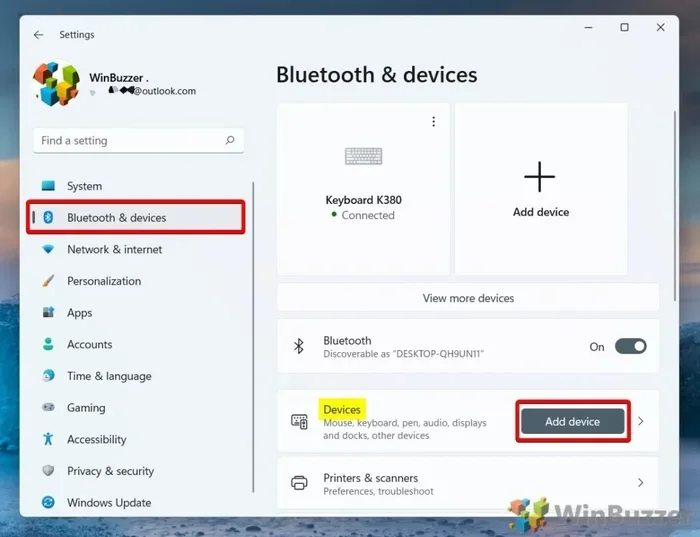
- Pairing failures: New devices may fail to pair or keep dropping the connection during setup.
These symptoms are not signs that your device is broken. They are signs of wireless interference caused by the microwave oven. Once the microwave stops, the Bluetooth signal usually recovers on its own.
How Severe Is the Interference?
The severity depends on several factors. The age and condition of your microwave matter a lot. Older microwaves with worn-out door seals tend to leak more radiation. The distance between the microwave and your Bluetooth device also plays a big role. If your wireless speaker is sitting right next to the microwave, the interference will be much worse than if it is in the next room.
The type of Bluetooth device matters too. Devices with weaker Bluetooth antennas are more susceptible. Cheap wireless earbuds or budget keyboards often have less powerful receivers, making them more vulnerable to signal disruption from microwave radiation.
Common Bluetooth Devices Affected by Microwave Interference
Not all Bluetooth devices are equally affected by microwave interference. Some devices are more sensitive because of how they work or where they are used. Here are the most common devices that experience problems.
Wireless Headphones and Earbuds
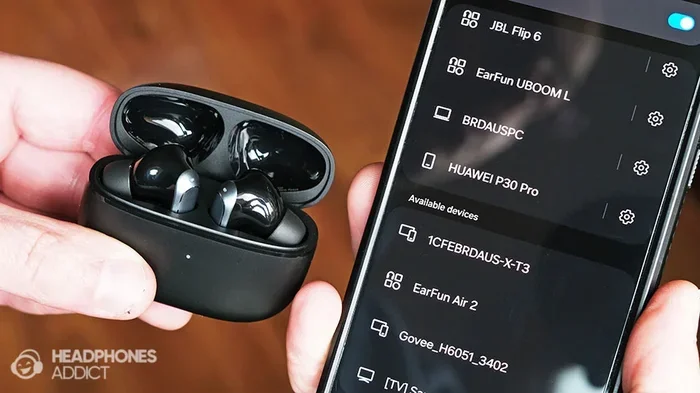
Wireless headphones are probably the most commonly affected devices. When you are cooking and listening to music or a podcast through Bluetooth earbuds, a running microwave can cause the audio to cut out. This is especially annoying if you are in the kitchen and your headphones are sitting on the counter nearby.
Over-ear Bluetooth headphones with larger antennas tend to handle interference better than tiny in-ear earbuds. The bigger antenna can pick up the Bluetooth signal more reliably even when there is noise from the microwave.
Smart Home Devices
Smart home gadgets like wireless speakers, smart plugs, and voice assistants use Bluetooth or Wi-Fi to communicate. If your smart speaker is in the kitchen, a microwave running nearby can cause it to miss commands or respond slowly. Smart home devices that rely on the 2.4 GHz band are particularly vulnerable to this kind of wireless interference.
Wireless Keyboards and Mice
If you work from a kitchen table or a desk near the kitchen, your wireless keyboard and mouse might suffer from microwave interference. You may notice typing delays or cursor jumps when the microwave is running. This can be very frustrating during work or gaming sessions.
Bluetooth Speakers and Audio Systems
Portable Bluetooth speakers used outdoors or in kitchens are also affected. A speaker placed on a kitchen counter within a few feet of the microwave will likely experience signal drops. Larger Bluetooth speakers with better antennas tend to be more resilient.
How to Reduce Microwave Interference With Bluetooth
The good news is that there are several practical steps you can take to minimize microwave interference with your Bluetooth devices. Most of these fixes are simple and do not require any technical expertise.
Increase the Distance
The simplest and most effective fix is to increase the distance between your microwave and your Bluetooth devices. Move your wireless speaker, headphones, or keyboard away from the microwave. Even a few extra feet can make a big difference in signal quality. The further apart they are, the less the microwave radiation affects the Bluetooth connection.
As a general rule, try to keep Bluetooth devices at least 5 to 10 feet away from the microwave when it is running. This reduces the amount of leaked radiation that reaches your wireless devices.
Use 5 GHz Wi-Fi Devices
If your router supports dual-band operation, switch your Wi-Fi devices to the 5 GHz band. This frees up space on the 2.4 GHz band and reduces overall congestion. While this does not fix microwave interference directly, it helps your Bluetooth devices compete less with other wireless signals on the same frequency.
Update Your Bluetooth Devices
Newer Bluetooth versions handle interference much better than older ones. Bluetooth 5.0 and later versions use advanced wireless protocols that are more resilient to signal disruption. If your Bluetooth device is older, consider upgrading to a newer model with better interference resistance.
Check Your Microwave Seal
A worn-out door seal on your microwave can cause more radiation leakage, which means more interference. Inspect the seal around your microwave door regularly. If it looks damaged or loose, consider replacing it or getting a new microwave. A properly sealed microwave leaks less radiation and causes less interference with Bluetooth devices.
Avoid Running Multiple Wireless Devices at Once
When your microwave is running, try to minimize the use of other wireless devices that share the 2.4 GHz band. Turn off Wi-Fi on nearby devices temporarily if you need a stable Bluetooth connection. This reduces the overall wireless traffic and helps your Bluetooth device maintain a stronger signal.
Use Wired Alternatives When Possible
If interference is a persistent problem in your kitchen, consider using wired alternatives for devices that do not need to be wireless. A wired keyboard or a wired headset eliminates the Bluetooth connection entirely and removes the interference problem completely.
Quick Tips to Minimize Interference
- Place your Bluetooth device on the opposite side of the kitchen from the microwave.
- Turn off Bluetooth on devices that are not in use to reduce congestion on the 2.4 GHz band.
- Use Bluetooth devices with the latest firmware updates for better interference handling.
- Consider a Bluetooth repeater or range extender to boost the signal strength.
- Keep your microwave clean and well-maintained to prevent excess radiation leakage.
The Science Behind Wireless Interference
Let us take a quick look at the science of why microwaves and Bluetooth clash. Both devices use electromagnetic waves to transmit information. The key difference is the power level. A microwave oven uses about 1,000 watts of power to heat food. A Bluetooth device uses less than 100 milliwatts to send data. That means the microwave is roughly 10,000 times more powerful than a Bluetooth signal.
When both operate on the same 2.4 GHz frequency, the powerful microwave signal essentially drowns out the weak Bluetooth signal. This is similar to trying to hear someone whisper while a jet engine is running nearby. The Bluetooth device simply cannot pick out its own signal from the noise created by the microwave.
Electromagnetic Spectrum and Frequency Bands
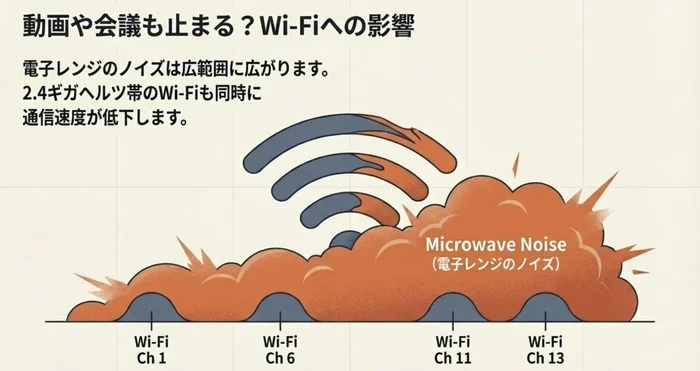
The electromagnetic spectrum is the range of all frequencies of electromagnetic radiation. Radio waves, microwaves, infrared, visible light, and X-rays are all part of this spectrum. Bluetooth and microwave ovens both use a small slice of this spectrum at 2.4 GHz. Wi-Fi also uses this same slice, which is why wireless networks can also experience interference from microwaves.
Other devices that use the 2.4 GHz band include cordless phones, baby monitors, and some security cameras. All of these devices contribute to the overall congestion on the frequency band. When you add a microwave oven into the mix, the interference problem gets worse.
How Bluetooth Tries to Handle Interference
Bluetooth technology has built-in features to handle interference. It uses a technique called frequency hopping. This means the Bluetooth device rapidly switches between different channels within the 2.4 GHz band. By changing channels constantly, Bluetooth tries to avoid crowded frequencies and find clear ones for communication.
However, frequency hopping cannot completely overcome the massive power difference between a microwave and a Bluetooth device. When the microwave is running at full power, the interference is too strong for frequency hopping to fully compensate. This is why you still experience connection drops even with modern Bluetooth devices.
When to Worry About Bluetooth and Microwave Interference
In most cases, microwave interference with Bluetooth is a minor annoyance, not a serious problem. However, there are situations where it becomes a real concern. Knowing when to take action can save you a lot of frustration.
Signs You Should Take Action
- Your Bluetooth device disconnects frequently every time the microwave runs.
- You cannot pair new Bluetooth devices in the kitchen at all.
- The interference affects devices in other rooms, not just the kitchen.
- Your microwave sparks or makes unusual noises while running.
- The interference persists even when the microwave is not running.
If you notice any of these signs, it is worth investigating further. Frequent disconnections and pairing failures suggest that the interference is more severe than normal. A microwave that sparks or makes unusual noises may be leaking excessive radiation and should be inspected or replaced.
When to Replace Your Microwave
If your microwave is old and the door seal is worn, it may be time for a replacement. Newer microwave models are better shielded and leak less radiation. This means less interference with your Bluetooth devices. A new microwave also improves cooking performance and safety.
When shopping for a new microwave, look for models with good door seals and positive reviews regarding radiation leakage. While all microwaves leak some radiation, well-built models keep leakage well below safety limits and cause less interference with wireless devices.
Expert Insights on Bluetooth and Microwave Interference
Wireless technology experts agree that microwave interference with Bluetooth is a well-documented phenomenon. The 2.4 GHz frequency band is inherently shared among many devices, and microwave ovens are one of the most powerful sources of interference on this band. Industry professionals recommend several best practices to minimize the impact.
Experts suggest placing Bluetooth devices at least 3 to 5 feet away from the microwave during use. They also recommend keeping firmware and software updated on all wireless devices. Modern Bluetooth protocols include better interference mitigation, so staying current with updates helps maintain a stable connection.
Another expert tip is to use a Wi-Fi analyzer app on your phone. These apps show you which frequencies are crowded in your home. If the 2.4 GHz band is heavily congested, switching to the 5 GHz band or using a Bluetooth device with a stronger antenna can help significantly.
For smart home users, experts recommend using a mesh network system that handles multiple devices more efficiently. Mesh systems can route traffic through less congested channels, reducing the impact of microwave interference on your connected devices.
Key Takeaways
- Shared Frequency Band: Both microwaves and Bluetooth devices use the 2.4 GHz radio frequency, which causes natural interference.
- Signal Disruption Is Real: Microwave radiation can weaken or completely block Bluetooth signals within close range.
- Multiple Devices Are Affected: Wireless headphones, speakers, keyboards, and smart home gadgets are all vulnerable.
- Simple Fixes Work: Moving devices apart and switching frequency bands can greatly reduce interference.
- Modern Devices Help: Newer Bluetooth versions and dual-band routers offer better resistance to wireless interference.
- Other Sources Exist: Wi-Fi networks, baby monitors, and other wireless devices also contribute to signal disruption.
- Distance Matters: The farther your Bluetooth device is from the microwave, the less interference you will experience.
Conclusion
The answer to whether can microwaves interfere with Bluetooth connectivity is a clear yes. Microwave ovens operate on the same 2.4 GHz frequency as Bluetooth devices, and the powerful radiation they emit can disrupt weak Bluetooth signals. This interference causes audio drops, connection losses, and reduced range for wireless devices in your home.
The good news is that this problem is manageable. Simple steps like increasing distance between devices, updating your Bluetooth technology, and maintaining your microwave can significantly reduce interference. Understanding the science behind wireless interference empowers you to make smarter choices about device placement and usage in your home.
If you have been struggling with frustrating Bluetooth disconnections every time you heat up your food, now you know why. And more importantly, you know what to do about it. Try the tips in this article and enjoy a more stable wireless experience in your kitchen and beyond.
Frequently Asked Questions
Why does my Bluetooth headphone disconnect when the microwave is on?
Your Bluetooth headphone disconnects because the microwave and Bluetooth both use the 2.4 GHz frequency band. The powerful microwave radiation creates noise on that frequency, which overwhelms the weak Bluetooth signal and causes the connection to drop.
Is microwave interference with Bluetooth dangerous?
No, microwave interference with Bluetooth is not dangerous. The leaked radiation from a properly functioning microwave is well within safety limits. The interference only affects wireless signals and does not pose any health risk to humans.
Can a Bluetooth device be too close to a microwave?
Yes, placing a Bluetooth device too close to a microwave increases the chance of interference. Keeping Bluetooth devices at least 5 feet away from the microwave while it is running can help maintain a stable connection.
Do all microwaves interfere with Bluetooth?
Most microwaves cause some level of interference with Bluetooth, but older or damaged microwaves with worn seals tend to leak more radiation and cause worse disruption. Newer, well-maintained microwaves leak less and cause less interference.
Can Wi-Fi also be affected by microwave interference?
Yes, Wi-Fi networks that operate on the 2.4 GHz band can also be affected by microwave interference. The same frequency clash that disrupts Bluetooth can also slow down or interrupt your Wi-Fi connection when the microwave is running.
What is the best way to prevent microwave interference with Bluetooth?
The best way to prevent interference is to increase the distance between your microwave and Bluetooth devices, use the 5 GHz band for Wi-Fi, keep your Bluetooth firmware updated, and maintain your microwave door seal. These steps work together to minimize signal disruption significantly.