Can I Get A Bluetooth Transmitter For My Tv Right Now
Yes, you can absolutely get a Bluetooth transmitter for your TV and enjoy wireless audio from your favorite shows and movies. A Bluetooth transmitter for TV connects to your TV’s audio output and streams sound to your headphones, soundbar, or speakers — no wires needed.
Key Takeaways
- Bluetooth transmitters work with most TVs: As long as your TV has an audio output port, you can add wireless audio easily.
- Multiple types exist: Optical, aux, and USB Bluetooth transmitters all offer different benefits depending on your TV setup.
- Setup is simple: Most devices connect in under five minutes with basic plug-and-play steps.
- Audio delay is a common concern: Look for transmitters with low latency to avoid sync issues during movies.
- Pairing with multiple devices is possible: Some transmitters support connecting two Bluetooth devices at the same time.
- Price ranges vary widely: You can find quality Bluetooth transmitters for TV from under $20 to over $100.
📑 Table of Contents
- Can I Get A Bluetooth Transmitter For My TV Right Now?
- What Is a Bluetooth Transmitter for TV?
- How Does a Bluetooth Transmitter Work with Your TV?
- Types of Bluetooth Transmitters for TV
- How to Choose the Best Bluetooth Transmitter for Your TV
- Setting Up Your Bluetooth Transmitter for TV
- Common Problems and Troubleshooting
- Expert Insights and Quick Tips
- Frequently Asked Questions About Bluetooth Transmitters for TV
- Conclusion
Can I Get A Bluetooth Transmitter For My TV Right Now?
You bet you can. If you have been sitting on the couch trying to get better sound from your TV or wanted to use wireless headphones late at night, a Bluetooth transmitter for TV is the answer. This small device plugs into your TV and sends audio wirelessly to any Bluetooth speaker, headphone, or soundbar you own. It is one of the easiest and most affordable upgrades you can make for your entertainment setup today.
In this guide, we will walk you through everything you need to know. We will cover how these devices work, the different types available, how to pick the right one, and how to set it up in minutes. By the end, you will know exactly which wireless audio transmitter fits your TV and your lifestyle. Let us dive in.
Whether your TV is old or brand new, there is a solution that works for you. The best part is that these devices are widely available online and in electronics stores. You do not need a technician. You do not need complicated tools. You just need a few minutes and this guide.
What Is a Bluetooth Transmitter for TV?
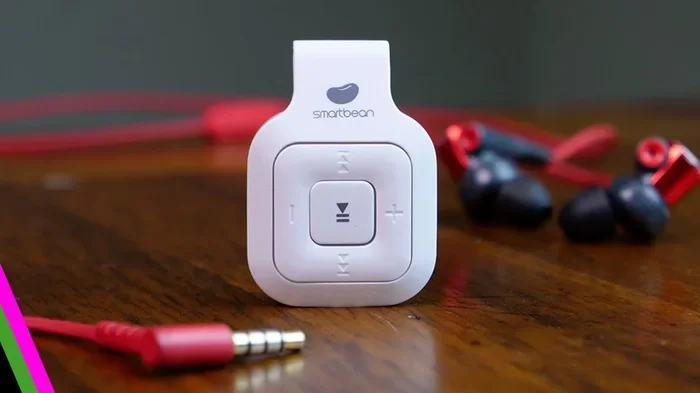
A Bluetooth audio transmitter is a small gadget that takes the audio signal from your TV and sends it wirelessly using Bluetooth technology. Think of it as a bridge between your TV and your wireless audio device. Your TV outputs sound through a port, and the transmitter picks it up and streams it to your headphones or speaker.
Why TVs Need Bluetooth Transmitters
Many modern TVs have built-in Bluetooth. But not all do. Some older models simply do not support it. Even newer TVs that have Bluetooth may not pair well with certain audio devices. A TV audio transmitter fills that gap. It gives any TV Bluetooth capability without replacing the whole unit.
Here are a few reasons people add a Bluetooth transmitter to their TV:
- They want to use wireless headphones for TV without buying a new TV.
- They want to connect a Bluetooth speaker for TV audio in another room.
- They share a TV with someone who prefers different volume levels.
- They want cleaner sound without tangled cables.
How Bluetooth Transmitters Changed TV Watching
Not long ago, watching TV meant dealing with speakerphone-quality sound or running long cables across your living room. Bluetooth technology changed all of that. Now you can place a tiny transmitter behind your TV and forget about it. The audio flows seamlessly to whatever device you choose. It is a small change that makes a huge difference in daily comfort.
How Does a Bluetooth Transmitter Work with Your TV?
The process is simpler than you might think. Your TV sends audio out through a physical port. The transmitter receives that signal and converts it into a Bluetooth wireless signal. Your headphones or speaker then picks it up and plays the sound. The whole thing happens in real time.
The Technology Behind It
Most audio streaming devices for TV use Bluetooth 5.0 or newer. This version offers better range, stronger connections, and lower energy use. Some higher-end models use Bluetooth 5.3, which reduces audio delay even further. The transmitter pairs with your audio device just like any other Bluetooth gadget. You go into your device settings, find the transmitter name, and tap connect.
The key thing to watch for is latency. Latency is the tiny delay between what happens on screen and when you hear the sound. For music, this does not matter much. For movies and action shows, even a small delay can feel off. That is why choosing a transmitter with low-latency audio matters so much.
Connecting via Optical, Aux, or USB
Your TV likely has at least one of these output options. The transmitter you choose depends on which port your TV has available.
- Optical (TOSLINK): This is a digital connection that sends high-quality audio. Many TVs have this port.
- 3.5mm Aux: This is the classic headphone jack. Some TVs still have one, and transmitters that use this connection are easy to find.
- USB: Some TVs allow audio output through USB. Not all transmitters support this, but options are growing.
- HDMI ARC: A few advanced transmitters can pull audio from the HDMI ARC port, though this is less common.
Types of Bluetooth Transmitters for TV
Not every Bluetooth adapter for TV is the same. Different designs serve different needs. Let us break down the main types so you know what to look for.
Optical Bluetooth Transmitters
These connect to your TV through an optical audio out port. They offer digital audio quality that feels clean and detailed. If your TV supports optical output, this is often the best route. Many people who want stream audio to headphones in high quality go with optical transmitters. They are reliable and widely available.
Some optical transmitters even support surround sound formats like Dolby Digital. That is a big plus if you care about movie audio. Prices for optical Bluetooth transmitters range from about $20 to $80 depending on features.
3.5mm Aux Bluetooth Transmitters
These plug into a standard headphone jack. They are the most affordable option and work with nearly any TV that has a jack output. The sound quality is decent for the price. If you just want basic wireless audio without spending much, an aux transmitter gets the job done.
One downside is that the audio quality is not as rich as optical. But for everyday TV watching, it is perfectly fine. These are great entry-level devices for people new to wireless audio transmitters.
USB Bluetooth Transmitters
These are less common but growing in popularity. They plug into a USB port on your TV and handle audio through that connection. Some newer smart TVs support this. The benefit is a clean, cable-free look since the USB port is often hidden behind the TV stand.
Built-in vs. External Bluetooth Adapters
Some newer TVs come with built-in Bluetooth already. In that case, you do not need a transmitter at all. You just pair your headphones or speaker directly. But if your TV lacks Bluetooth, an external adapter is the way to go. External devices also tend to offer better range and more features than built-in options on budget TVs.
| Feature | Optical Transmitter | Aux Transmitter | USB Transmitter |
|---|---|---|---|
| Audio Quality | High | Medium | Medium |
| Price Range | $20-$80 | $10-$40 | $15-$50 |
| Best For | Movie lovers | Budget users | Modern TVs |
| Setup Difficulty | Easy | Very Easy | Easy |
How to Choose the Best Bluetooth Transmitter for Your TV
With so many options on the shelf, picking the right one can feel overwhelming. Here are the key things to focus on when shopping for a Bluetooth transmitter for TV.
Key Features to Look For
Keep these factors in mind as you browse:
- Bluetooth version: Go for 5.0 or newer. It gives you better range and less lag.
- Low latency: Look for transmitters that advertise low-latency or aptX support. This keeps audio in sync with video.
- Range: Most transmitters offer about 30 feet of range. If you want to move around the room freely, this is enough.
- Battery life: Some transmitters run on batteries. A long battery life means less charging hassle.
- Multipoint connection: This lets you connect two devices at once. Great if you share the TV with someone who uses different audio gear.
- Codec support: Look for support for aptX, aptX HD, or LDAC. These deliver richer sound over Bluetooth.
Top Brands Worth Considering
Here are some brands that consistently make solid audio transmitter devices for TV use:
- Avantree: Known for low-latency models designed specifically for TV and gaming.
- TaoTronics: Offers affordable options with good sound quality and easy setup.
- Anker: Makes reliable Bluetooth gear with strong battery life.
- Riwbox: A budget-friendly choice for casual TV watchers.
- Creative: Their BT series is popular for optical connections and clear audio.
You do not always need the most expensive model. Even a mid-range transmitter from a trusted brand will serve you well for years.
Setting Up Your Bluetooth Transmitter for TV
The good news is that setting up a Bluetooth transmitter for TV takes just a few minutes. Here is a general walkthrough that works for most devices.
Step-by-Step Setup Guide
- Plug the transmitter into your TV audio output. Use the right cable for your port — optical, aux, or USB.
- Power on the transmitter. Some plug straight into the TV and power on automatically. Others need their own power source or batteries.
- Put the transmitter into pairing mode. Usually you hold down the Bluetooth button for a few seconds until a light flashes.
- Go to your Bluetooth headphones or speaker and put them in pairing mode too.
- Find the transmitter name in your audio device list and tap to connect.
- Play something on your TV to test the sound. Adjust volume on both the TV and your audio device as needed.
That is it. Most people finish this process in under five minutes. If it does not work the first time, do not worry. We will cover troubleshooting next.
Pairing Tips for Smooth Connection
Here are a few quick tips to make pairing go smoothly:
- Keep the transmitter close to your audio device during the first pairing.
- Make sure your headphones or speaker are fully charged. Low battery can cause connection issues.
- Turn off other nearby Bluetooth devices that might compete for the connection.
- If pairing fails, unplug the transmitter, wait 10 seconds, and try again.
- Check your TV settings to make sure audio output is set to the correct port.
Common Problems and Troubleshooting
Even with a simple setup, a few hiccups can happen. Here are the most common issues people run into with their TV sound system when using a Bluetooth transmitter, along with quick fixes.
Audio Delay and Latency Issues
This is the number one complaint. You see something happen on screen and the sound comes a half-second later. It feels weird, especially during dialogue-heavy shows or action scenes.
Here is how to fix it:
- Check if your transmitter supports a low-latency codec like aptX Low Latency.
- Some transmitters have a delay setting in their app or button combo. Try adjusting it.
- Move closer to the transmitter. Distance can increase delay slightly.
- Make sure your TV software is updated. Sometimes the issue is on the TV side.
If latency still bothers you after trying these steps, consider a transmitter specifically designed for TV and movie use. Avantree and Creative make models that handle this really well.
Connection Drops and Fixes
Sometimes the audio cuts out for a second or two. This usually comes down to interference or distance.
- Keep the transmitter and your audio device in the same room.
- Avoid placing the transmitter near Wi-Fi routers or microwave ovens. These can cause interference.
- Update the firmware on your transmitter if the manufacturer offers an app or update tool.
- Replace batteries if your transmitter runs on them. Weak power can cause unstable connections.
- Re-pair the devices from scratch if drops keep happening.
Most connection issues are easy to solve once you identify the cause. It is usually just a small tweak away from a rock-solid connection.
Expert Insights and Quick Tips
Here are some bonus tips from people who use Bluetooth transmitters with their TVs every day:
- Place the transmitter close to the TV: A short cable between the TV port and the transmitter keeps the connection strong and reduces interference.
- Use a transmitter with a built-in amplifier: This helps if you are connecting to passive speakers that need a power boost.
- Consider a transmitter with a headphone jack out: This lets you plug in wired headphones too, giving you both wireless and wired options.
- Check your TV manual: Some TVs have specific settings for optical or aux audio output. Enabling the right setting makes a big difference.
- Try a Bluetooth 5.2 or 5.3 transmitter: These offer the best balance of range, battery life, and audio quality available today.
These small details separate a good experience from a great one. Take a few extra minutes to optimize your setup and you will notice the difference.
Frequently Asked Questions About Bluetooth Transmitters for TV
People have a lot of great questions about this topic. Let us cover the most common ones.
Can I use a Bluetooth transmitter with any TV?
As long as your TV has an audio output port — optical, aux, or USB — you can use a Bluetooth transmitter. Most TVs made in the last 10 years have at least one of these. If your TV only has HDMI and no audio out, you may need an HDMI audio extractor as a workaround.
Will there be a delay in audio when using a Bluetooth transmitter?
Some delay is possible, but it depends on your transmitter. Models with aptX Low Latency or Bluetooth 5.2+ keep the delay under 40 milliseconds, which is barely noticeable. Cheaper transmitters may have more delay. For casual TV watching, this rarely matters. For fast-paced movies, choose a low-latency model.
Can I connect two sets of headphones to one Bluetooth transmitter?
Some transmitters support multipoint pairing, which lets you connect two devices at once. This is great for couples or families who want to listen at different volumes. Check the product specs before buying if this feature matters to you.
Is a Bluetooth transmitter better than a soundbar for TV audio?
It depends on what you want. A soundbar gives richer, room-filling sound. A Bluetooth transmitter lets you go wireless with headphones or portable speakers. Many people use both. The transmitter is perfect for private listening, while a soundbar is better for shared viewing with enhanced audio.
How far can a Bluetooth transmitter reach from my TV?
Most Bluetooth transmitters offer a range of about 30 to 50 feet. Walls and obstacles reduce this range. If you want to move into another room, stay within 20 to 30 feet for the best connection. Bluetooth 5.0+ generally gives you more reliable range than older versions.
Are Bluetooth transmitters for TV expensive?
Not at all. You can find solid aux transmitters for under $20. Optical transmitters with good features typically cost between $30 and $80. High-end models with advanced codecs and ultra-low latency can go a bit above $100. There is something for every budget.
Conclusion
So can you get a Bluetooth transmitter for your TV right now? Absolutely. These devices are affordable, easy to set up, and work with almost any TV that has a basic audio output. Whether you want to watch in silence with wireless headphones, share audio with a Bluetooth speaker, or simply upgrade your TV sound system without major expense, a Bluetooth adapter for TV is a smart move.
The key is to match the transmitter to your TV ports and your listening preferences. Optical transmitters offer the best sound quality. Aux transmitters are the easiest and cheapest. And USB options work well with newer smart TVs. No matter which you choose, you will be amazed at how much better your TV watching feels with clean, wireless audio.
Take a few minutes today to check your TV ports and pick up a transmitter that fits your needs. It is one of the simplest entertainment upgrades you can make, and you will enjoy it every single evening.