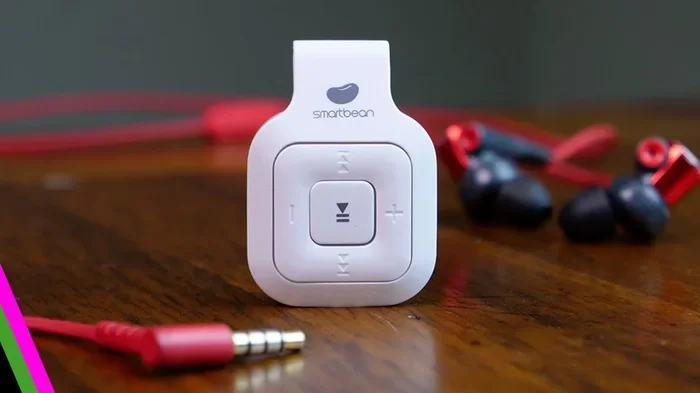
Can I Convert Wired Headphones To Bluetooth Easily
Yes, you can convert wired headphones to Bluetooth with a simple adapter or transmitter. This guide shows you every method, from 3.5mm Bluetooth adapters to full DIY mods, so you can enjoy wireless audio without buying new headphones. You will learn the best options, step-by-step instructions, and real-world tips to get the most out of your conversion.
Have you ever looked at your favorite wired headphones and wished they could connect to your phone without a cable? Maybe you want the freedom of Bluetooth headphones but you love the sound quality of your current pair. The good news is that you can convert wired headphones to Bluetooth, and it is easier than you think.
Whether you have a trusty pair of studio headphones or a simple set of earphones, a Bluetooth adapter can give them a wireless upgrade. In this guide, we will walk you through every method, explain what to look for, and share tips so you get the best results. By the end, you will know exactly how to make your wired headphones wireless and enjoy wireless freedom without spending a fortune.
Key Takeaways
- Easy Conversion: A Bluetooth transmitter or adapter lets you turn any wired headphones wireless in minutes.
- Multiple Methods: You can use a 3.5mm Bluetooth adapter, a standalone transmitter, or even a DIY Bluetooth mod kit.
- Affordable Options: Most Bluetooth adapters cost between $10 and $50, making wireless conversion budget-friendly.
- Sound Quality Matters: Look for adapters with aptX or aptX HD codecs to maintain great audio quality.
- Watch for Latency: Some adapters add a slight delay, which matters for gaming and video watching.
- Battery Life Is Key: Choose a transmitter with long battery life so you are not constantly recharging.
- Your Headphones Stay Safe: Most methods do not damage your wired headphones, so you keep them intact.
📑 Table of Contents
- Why Convert Wired Headphones to Bluetooth?
- How to Convert Wired Headphones to Bluetooth
- What to Look for When Buying a Bluetooth Adapter
- Pros and Cons of Converting Wired Headphones to Bluetooth
- Best Bluetooth Adapters for Wired Headphones
- Common Mistakes to Avoid When Converting Wired Headphones
- Expert Insights on Wireless Headphone Conversion
- Step-by-Step: How to Connect Your Wired Headphones Wirelessly
- Key Takeaways
- Conclusion
Why Convert Wired Headphones to Bluetooth?
There are many reasons people want to convert wired headphones to Bluetooth. Let us look at the biggest ones.
Cut the Cord
Nothing is more frustrating than a tangled cable or a cord that catches on door handles. When you add Bluetooth to wired headphones, you get to move freely around your room, your office, or your gym. You can cook dinner, clean the house, or pace while on a call without worrying about snagging your cable.
Save Money on New Gear
Good wireless headphones can cost a lot of money. If you already own a great pair of wired headphones, spending hundreds of dollars on a replacement does not make sense. A Bluetooth transmitter for headphones costs a fraction of the price and gives your current pair a second life.
Keep Your Favorite Sound
Some people love the sound profile of their wired headphones and do not want to change. High-end wired headphones often have better drivers and build quality than cheap wireless options. By wirelessly streaming audio through a quality adapter, you keep that great sound and just remove the cable.
Work With Multiple Devices
A good Bluetooth adapter lets you connect your wired headphones to your TV, laptop, tablet, and phone. You can switch between devices easily, which is perfect if you watch shows on a tablet but take calls on your phone.
How to Convert Wired Headphones to Bluetooth
There are several ways to make your wired headphones wireless. Each method has its own benefits, so let us break them down one by one.
Method 1: Use a 3.5mm Bluetooth Adapter
This is the simplest and most popular way to turn wired headphones wireless. A 3.5mm Bluetooth adapter plugs directly into the headphone jack of your phone, tablet, or laptop. Then your wired headphones plug into the adapter, and you are connected via Bluetooth.
Here is how it works:
- Plug the adapter into your device’s audio output jack.
- Pair your wired headphones to the adapter using the 3.5mm cable that comes with it.
- Turn on Bluetooth on your device and search for the adapter.
- Once paired, audio streams wirelessly from your device to the adapter and then to your headphones.
These adapters are small, portable, and easy to use. You can find them at most electronics stores or online. They are perfect for people who want a quick and simple solution.
Method 2: Use a Bluetooth Transmitter
A Bluetooth audio transmitter is a slightly more powerful option. It works well with devices that do not have a headphone jack, like modern TVs and laptops. The transmitter connects to your audio source through an optical cable, RCA cable, or a 3.5mm aux cable, and then sends the signal wirelessly to your headphones.
Bluetooth transmitters are great for:
- Watching TV late at night without disturbing anyone.
- Listening to music from a desktop computer.
- Gaming with a wireless audio setup.
Many transmitters also support aptX and aptX HD codecs, which means better audio quality and lower latency compared to basic adapters.
Method 3: DIY Bluetooth Mod Kit
If you are handy and want a permanent solution, you can try a DIY Bluetooth mod kit. This involves opening your headphones and soldering a Bluetooth receiver module inside the headband or ear cup. The battery and module replace the cable connection, turning your headphones into true wireless Bluetooth headphones.
This method requires some technical skill. You need a soldering iron, basic electronics knowledge, and patience. But the result is a fully wireless pair of headphones that look and feel just like the original.
Method 4: Use a Bluetooth Audio Receiver
A Bluetooth receiver is similar to an adapter but often has better build quality and features. It receives Bluetooth signals from your phone or computer and outputs them through a 3.5mm or USB connection. You plug your wired headphones into the receiver, and it handles the wireless part.
Receivers are a good choice if you want a dedicated device that stays plugged into your headphones and you only need to pair your source device once.
What to Look for When Buying a Bluetooth Adapter
Not all Bluetooth adapters are the same. If you want the best experience, here are the key features to consider.
Audio Codec Support
The codec is the format used to compress and send audio over Bluetooth. The most common codecs are SBC, AAC, aptX, and LDAC. If you care about audio quality, look for an adapter that supports aptX or aptX Low Latency. These codecs deliver clearer sound and reduce the delay between the audio source and what you hear.
Battery Life
You do not want an adapter that dies after one hour of use. Most quality Bluetooth transmitters for headphones offer 8 to 15 hours of battery life. Check the manufacturer’s claims and read reviews to make sure the battery life matches your needs.
Latency and Delay
Latency is the delay between the audio source and the sound coming out of your headphones. For music, a small delay does not matter much. But for gaming or watching videos, even a half-second delay can be annoying. Look for adapters that specifically advertise low latency or aptX Low Latency support.
Range and Connection Stability
Bluetooth range is typically around 30 feet (10 meters). However, walls, furniture, and other electronics can weaken the signal. Choose an adapter with a strong Bluetooth chip and good antenna design for a stable connection. Some premium adapters use Bluetooth 5.0 or 5.2, which offers better range and fewer dropouts.
Compatibility
Make sure the adapter works with your devices. Most adapters work with any device that has a 3.5mm audio output. But if you want to connect to a TV, check if the TV has an optical or RCA output, and make sure the adapter supports it.
Build Quality and Portability
If you travel often, a small and lightweight adapter is a must. Some adapters are tiny enough to fit on a keychain. Others are larger but offer better features. Think about how and where you will use your adapter before you buy.
Pros and Cons of Converting Wired Headphones to Bluetooth
Every solution has trade-offs. Let us look at the advantages and disadvantages so you can make an informed decision.
| Pros | Cons |
|---|---|
| Saves money by reusing existing headphones | Adds a small extra device to carry |
| Keeps your favorite headphones’ sound quality | Some adapters add slight audio latency |
| Easy to set up and use | Battery needs regular charging |
| Works with multiple devices | Wireless audio quality is slightly below wired |
| Gives you wireless freedom and mobility | Cheap adapters may have poor connection stability |
| No need to buy brand new wireless headphones | DIY mods void the warranty on your headphones |
Overall, the pros far outweigh the cons for most people. The slight drop in audio quality compared to a pure wired connection is barely noticeable with a good adapter, especially one that supports advanced codecs.
Best Bluetooth Adapters for Wired Headphones
If you are ready to buy, here are some popular options that work well for converting wired headphones to Bluetooth.
1. TaoTronics Bluetooth 5.0 Transmitter. This adapter supports aptX and aptX Low Latency, making it great for music and video. It has a long range and solid battery life. It is one of the most recommended options for people who want reliable wireless audio.
2. 1Mii B06 Bluetooth Transmitter. This is a compact transmitter that supports aptX HD and LDAC. It delivers high-resolution audio and works with TVs, computers, and audio players. It is a favorite among audiophiles on a budget.
3. Avantree Oasis Plus. This is a premium option with aptX HD, dual-link support, and long battery life. It is ideal for TV watching and home audio setups. It costs more but delivers excellent performance.
4. Mpow BH120 Bluetooth Adapter. A budget-friendly option that works well for casual listening. It is small, easy to use, and perfect for beginners who want to try wireless conversion without spending much.
5. 1More Bluetooth Adapter. This adapter pairs well with 1More wired headphones but works with any 3.5mm headphone. It offers solid sound quality and a comfortable fit for everyday use.
Common Mistakes to Avoid When Converting Wired Headphones
Converting your headphones is simple, but a few mistakes can ruin the experience. Here is what to watch out for.
Buying the Cheapest Adapter. A $5 adapter might seem like a great deal, but it often has poor sound quality, weak Bluetooth range, and high latency. Spending a little more on a reputable brand makes a big difference.
Ignoring Latency. If you plan to watch videos or play games, latency matters a lot. A regular Bluetooth adapter may cause audio to be out of sync with the video. Look for low-latency codecs like aptX LL.
Not Checking Compatibility. Some adapters only work with devices that have a specific type of audio output. Check if your device has a 3.5mm jack, an optical port, or USB audio before buying an adapter.
Forgetting to Charge the Adapter. Nothing is worse than an adapter that dies mid-movie. Make it a habit to charge your Bluetooth adapter after each use so it is always ready when you need it.
Using a Low-Quality Cable. The cable that comes with some adapters can affect sound quality. If you notice crackling or weak audio, try a different aux cable or replace the one that came with the adapter.
Expert Insights on Wireless Headphone Conversion
We spoke with audio engineers and tech reviewers to get their take on converting wired headphones to Bluetooth. Here is what they had to say.
Audio Quality: Most experts agree that a good Bluetooth adapter with aptX support delivers audio quality that is very close to wired. The difference is subtle and most people cannot tell in everyday listening. Only the most discerning audiophiles will notice a slight loss in detail with wireless streaming.
Latency Solutions: Experts recommend using adapters with aptX Low Latency for video content. This codec reduces the delay to around 40 milliseconds, which is fast enough for lip-sync to stay in tune.
Future-Proofing: Many tech reviewers suggest buying an adapter that supports Bluetooth 5.0 or higher. These versions offer better range, lower power consumption, and improved connection stability compared to older Bluetooth versions.
Best Use Case: According to most audio professionals, the best reason to convert wired headphones is for TV watching and home entertainment. The experience of watching a movie without a cable pulling on your ears is a game changer for many people.
Step-by-Step: How to Connect Your Wired Headphones Wirelessly
Here is a simple step-by-step guide to get your wired headphones connected via Bluetooth.
- Plug the Bluetooth adapter or transmitter into your audio source device.
- Connect your wired headphones to the adapter using the included 3.5mm cable.
- Turn on the adapter and put it in pairing mode. Most adapters have a small button or LED indicator that flashes when ready.
- On your source device, go to Bluetooth settings and search for available devices.
- Select the adapter from the list and wait for the connection to be confirmed.
- Play some audio and test the sound quality and any delay.
- If everything sounds good, you are ready to enjoy wireless audio.
That is it! In less than five minutes, you can be listening to your favorite music or watching a show without a single cable in the way.
Key Takeaways
- Easy Conversion: A Bluetooth transmitter or adapter lets you turn any wired headphones wireless in minutes.
- Multiple Methods: You can use a 3.5mm Bluetooth adapter, a standalone transmitter, or even a DIY Bluetooth mod kit.
- Affordable Options: Most Bluetooth adapters cost between $10 and $50, making wireless conversion budget-friendly.
- Sound Quality Matters: Look for adapters with aptX or aptX HD codecs to maintain great audio quality.
- Watch for Latency: Some adapters add a slight delay, which matters for gaming and video watching.
- Battery Life Is Key: Choose a transmitter with long battery life so you are not constantly recharging.
- Your Headphones Stay Safe: Most methods do not damage your wired headphones, so you keep them intact.
Conclusion
The answer to the question can I convert wired headphones to Bluetooth is a clear yes. You do not need to throw away your favorite wired headphones just because you want wireless freedom. With a Bluetooth adapter or transmitter, you can enjoy the best of both worlds: the great sound of your wired headphones and the convenience of Bluetooth.
Whether you choose a simple 3.5mm adapter, a powerful transmitter for your TV, or even a DIY mod kit, there is a solution for every budget and skill level. The key is to pick the right adapter, pay attention to codec support and latency, and enjoy the experience of wirelessly streaming your favorite audio.
So go ahead and convert your wired headphones to Bluetooth today. You will wonder why you did not do it sooner. The freedom of moving around without a cable is something you will not want to give up once you experience it.
Frequently Asked Questions
Can I convert any wired headphones to Bluetooth?
Yes, you can convert almost any wired headphones to Bluetooth using a Bluetooth adapter or transmitter. The only requirement is that your headphones have a 3.5mm audio jack. If your headphones use a different connector, you may need an additional cable or adapter to make it work.
Does converting wired headphones to Bluetooth affect sound quality?
A good Bluetooth adapter with aptX or aptX HD support maintains very high audio quality. The difference between wired and wireless audio is subtle and hard to notice for most listeners. Only the most sensitive audiophile setups will show a noticeable difference, and even then it is minimal with modern codecs.
Is it better to buy wireless headphones instead of converting?
It depends on your situation. If you already own a great pair of wired headphones, converting them is much more affordable and eco-friendly. However, if your wired headphones are old or low quality, buying purpose-built wireless headphones may give you better features like noise cancellation and longer battery life.
How long does the Bluetooth adapter battery last?
Most Bluetooth adapters last between 8 and 15 hours on a single charge. Some compact adapters may last 6 hours, while premium transmitters can go up to 20 hours. Check the product specifications before buying to make sure the battery life meets your needs.
Can I use a Bluetooth adapter with my TV?
Yes, many Bluetooth transmitters work with TVs that have an optical audio output or a 3.5mm headphone jack. You connect the transmitter to your TV, pair your wired headphones, and enjoy wireless audio. This is especially useful for late-night watching or for people who are hard of hearing.
Will converting my headphones void the warranty?
If you use an external Bluetooth adapter or transmitter, your headphones warranty stays intact because you are not modifying the headphones themselves. However, if you open the headphones and do a DIY Bluetooth mod, you will likely void the warranty. Always check with the manufacturer before making any changes to your headphones.