Can I Extract Audio From HDMI ARC Without Losing Quality
Can I Extract Audio From Hdmi Arc is an essential topic that provides valuable insights.
Key Takeaways
- Understanding Can I Extract Audio From Hdmi Arc: Provides essential knowledge
📑 Table of Contents
- What Is HDMI ARC and How Does It Work?
- Can You Extract Audio From HDMI ARC Without Losing Quality?
- HDMI ARC vs eARC: Which Should You Use for Audio Extraction?
- How to Extract Audio From HDMI ARC: Step-by-Step Methods
- Common Problems and How to Fix Them
- Expert Tips for the Best HDMI ARC Audio Quality
- Quick Tips for HDMI ARC Audio Extraction
- Common Mistakes to Avoid
- Key Takeaways
- Conclusion
What Is HDMI ARC and How Does It Work?
HDMI ARC stands for Audio Return Channel. It is a feature built into HDMI cables that allows audio to travel in both directions. Normally, HDMI carries video from a source device to your TV. With ARC, the TV can also send audio back to a connected soundbar or receiver. This is incredibly useful for modern home setups.
Here is how it works in simple terms. You plug your TV and soundbar into the same HDMI cable. The TV receives video from a cable box, streaming stick, or gaming console. When the TV plays audio, it sends that sound back through the HDMI cable to the soundbar or receiver. You hear the audio through your external speakers instead of the TV’s tiny built-in speakers.
HDMI ARC was introduced with the HDMI 1.4 standard. It has been a standard feature on most TVs and audio devices since around 2013. Nearly every modern TV and soundbar supports it. The newer version, called eARC, offers even better audio quality and supports advanced formats like Dolby Atmos.
Why HDMI ARC Matters for Your Setup
Most TVs have small, low-quality speakers. They sound tinny and lack bass. HDMI ARC solves this problem by letting you use better speakers without extra wires. It also simplifies your entertainment center. Instead of managing three or four cables, you can often use just one HDMI cable for both video and audio.
Another big benefit is device compatibility. HDMI ARC works with soundbars, AV receivers, home theater systems, and even some sound bases. As long as your devices support ARC, they can communicate and share audio seamlessly.
Can You Extract Audio From HDMI ARC Without Losing Quality?
This is the question at the heart of this guide. The answer depends on a few factors. Let us break them down so you understand exactly what to expect.
When your TV and soundbar both support HDMI ARC, audio travels through the cable in digital form. Digital signals do not degrade the way analog signals do. This means the audio stays as clean and detailed as the source sends it. You get the same quality as if you connected the device directly to the soundbar.
However, there are some caveats. The quality of the HDMI cable matters. A cheap or damaged cable can cause audio dropouts or reduce the signal. Your TV’s audio settings also play a big role. If your TV is set to compress or downsample the audio, you will lose quality even with a perfect HDMI ARC connection.
The Role of HDMI Cable Quality
Not all HDMI cables are created equal. A standard HDMI cable works fine for basic 1080p video and stereo audio. But if you want to pass through high-resolution audio formats, you need a cable that supports those formats. Look for cables labeled “High Speed HDMI” or “Premium High Speed HDMI.” These cables handle the bandwidth needed for lossless audio and surround sound formats.
For the best results with HDMI ARC, use an HDMI cable that supports Ethernet and ARC. Most cables sold today meet this standard. If your cable is more than five years old, consider upgrading it. A new cable costs very little and can make a noticeable difference in audio quality.
TV Audio Settings That Affect Quality
Your TV has hidden audio settings that control how sound is sent through HDMI ARC. If these settings are not correct, you will hear a drop in quality. Here are the key settings to check.
- Audio Output Format: Set this to “Bitstream” or “Passthrough.” This tells the TV to send the raw audio signal to your soundbar without altering it.
- Digital Audio Output: Make sure this is set to “PCM” or “Bitstream” depending on your soundbar’s capabilities.
- Surround Sound Format: Enable Dolby Digital or Dolby TrueHD if your soundbar supports it. This preserves the full surround sound experience.
- Volume Level Control: Turn this on if you want to control your soundbar volume with the TV remote.
Getting these settings right is the single most important step in maintaining audio quality through HDMI ARC. Take a few minutes to go through them. It makes a real difference.
HDMI ARC vs eARC: Which Should You Use for Audio Extraction?
If you are shopping for a new TV or soundbar, you will see both HDMI ARC and eARC mentioned. Understanding the difference helps you choose the right equipment for lossless audio extraction.
HDMI ARC supports standard audio formats like Dolby Digital and DTS. It can pass stereo and 5.1 surround sound. For most casual listeners, this is more than enough. You will get clear, good-sounding audio from your TV to your soundbar.
eARC, which stands for Enhanced Audio Return Channel, was introduced with HDMI 2.1. It supports much higher bandwidth. This means it can handle uncompressed audio formats like Dolby Atmos, Dolby TrueHD, and DTS-HD Master Audio. If you want the best possible sound quality from your HDMI ARC connection, eARC is the way to go.
Key Differences at a Glance
| Feature | HDMI ARC | HDMI eARC |
|---|---|---|
| Max Audio Bandwidth | 1 Mbps | 37 Mbps |
| Dolby Atmos Support | No | Yes |
| Uncompressed Audio | No | Yes |
| Lip Sync Correction | Basic | Advanced |
| Cable Required | Standard HDMI | High Speed HDMI or HDMI 2.1 |
| Introduced | HDMI 1.4 | HDMI 2.1 |
As you can see, eARC offers a big upgrade. If your TV and soundbar both support eARC, use it whenever possible. You will get richer, more detailed audio with no quality loss.
How to Extract Audio From HDMI ARC: Step-by-Step Methods
There are several ways to extract audio from HDMI ARC. The right method depends on your equipment and what you want to achieve. Let us walk through each option.
Method 1: Direct Connection to a Soundbar
This is the simplest and most common approach. You connect your TV and soundbar with an HDMI cable. Plug one end into the HDMI ARC port on your TV and the other into the HDMI ARC port on your soundbar. Then enable HDMI ARC in your TV settings. Your TV will now send all audio to the soundbar automatically.
For the best quality, make sure your TV audio output is set to bitstream or passthrough. This ensures the soundbar receives the full audio format. Most soundbars decode Dolby Digital and DTS without any issue over HDMI ARC.
Method 2: Using an HDMI Audio Extractor
An HDMI audio extractor splits the HDMI signal into two outputs: video and audio. You connect your source device (like a cable box or gaming console) to the extractor. The extractor sends video to your TV and audio to your external speakers or sound system. This is useful when you want more control over the audio path.
Look for an extractor that supports HDMI ARC pass-through. This way, you can still use your TV’s built-in features while extracting high-quality audio. Good extractors support formats like Dolby Digital 5.1 and even Dolby Atmos on newer models.
Method 3: Connecting Through an AV Receiver
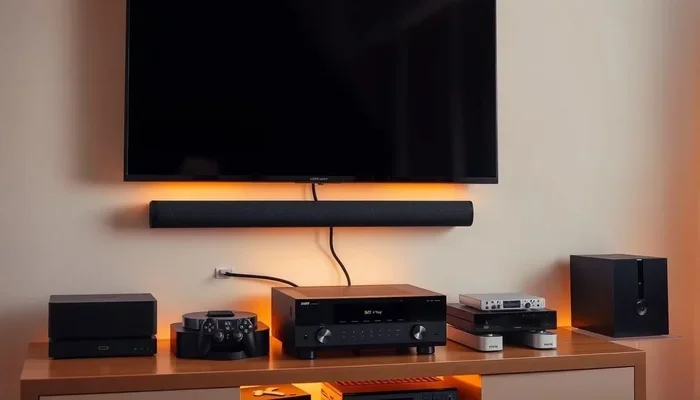
If you have a full home theater setup, an AV receiver is a great option. Connect your TV to the receiver using an HDMI cable with ARC support. The receiver handles both video switching and audio decoding. You get the best sound quality because the receiver processes the audio signal directly.
This method also lets you connect multiple source devices. Your cable box, gaming console, and streaming device can all plug into the receiver. The receiver then sends video to the TV and audio to your speakers. It is a clean, powerful setup that preserves full audio quality.
Method 4: Using an Optical Audio Cable Alongside HDMI ARC
Some setups use both HDMI ARC and an optical audio cable. This works when your TV has limited HDMI ports or when you want to connect multiple audio devices. The HDMI ARC connection handles the main audio path, while the optical cable provides a secondary output.
Keep in mind that optical cables are limited to Dolby Digital 5.1. They cannot carry Dolby Atmos or uncompressed audio formats. For most setups, HDMI ARC alone is sufficient. But if you need an additional output, combining both methods works well.
Common Problems and How to Fix Them
Even with the best setup, you may run into issues with HDMI ARC audio extraction. Here are the most common problems and their solutions.
No Sound Through HDMI ARC
If you have no audio, the first thing to check is the HDMI cable. Make sure it is firmly plugged into both the TV and the soundbar. Try unplugging and plugging it back in. Sometimes a loose connection is all it takes.
Next, check your TV audio settings. Make sure HDMI ARC is turned on in the sound or audio settings menu. Some TVs call it “HDMI Control” or “CEC.” Enable this feature and see if the audio starts flowing.
Audio Delay or Lip Sync Issues
Audio delay is a common frustration with HDMI ARC. You see the lips move, but the sound comes a split second later. This usually happens because your TV processes the audio before sending it through HDMI ARC.
To fix this, look for a “Lip Sync” or “Audio Delay” setting in your TV menu. Adjust it until the sound matches the video. Many soundbars also have a built-in delay adjustment. Try adjusting both to find the sweet spot.
Audio Cuts Out Intermittently
If the audio cuts in and out, your HDMI cable might be the culprit. A damaged or low-quality cable can cause intermittent signal loss. Replace it with a certified High Speed HDMI cable and see if the problem goes away.
Another cause is a conflict between devices. Try turning off CEC (Consumer Electronics Control) on your TV and soundbar, then turning it back on. This resets the HDMI ARC handshake and often fixes the issue.
Expert Tips for the Best HDMI ARC Audio Quality
Getting the most out of your HDMI ARC setup is easier than you think. Follow these tips to ensure you always get the best possible audio quality.
- Use a certified HDMI cable: Look for the “Premium High Speed” label. This guarantees the cable can handle the bandwidth for high-quality audio.
- Keep your firmware updated: Both your TV and soundbar receive firmware updates that improve HDMI ARC performance. Check for updates regularly.
- Use the correct HDMI port: Not all HDMI ports on your TV support ARC. Look for the port labeled “ARC” or “eARC.”
- Disable unnecessary audio processing: Some TVs add EQ or surround processing that can muddle the audio. Set your TV audio to “Passthrough” or “Auto” for the cleanest signal.
- Test with different audio formats: Try switching between Dolby Digital, PCM, and bitstream to see which sounds best on your specific setup.
These small adjustments can make a big difference. Take the time to fine-tune your setup. Your ears will thank you.
Quick Tips for HDMI ARC Audio Extraction
- Always use the HDMI ARC port on your TV, not a regular HDMI port.
- If your TV has both ARC and eARC ports, use the eARC port for the best quality.
- Restart both your TV and soundbar if audio stops working unexpectedly.
- Set your TV audio output to “Bitstream” or “Passthrough” for lossless audio.
- Keep your HDMI cables short (under 6 feet) for the strongest signal.
Common Mistakes to Avoid
- Using a non-ARC HDMI cable: This will prevent audio from flowing back to your soundbar. Always check that your cable supports ARC.
- Ignoring TV audio settings: If your TV is set to output PCM instead of bitstream, you will lose surround sound quality.
- Plugging into the wrong HDMI port: Only the port labeled ARC or eARC supports audio return. Using the wrong port means no audio.
- Overlooking firmware updates: Outdated firmware can cause compatibility issues and audio dropouts.
- Using cheap HDMI cables: A $2 cable from a gas station may not handle the bandwidth needed for quality audio extraction.
Key Takeaways
- Yes, you can extract audio from HDMI ARC without losing quality: Digital signals stay clean as long as you use the right cable and settings.
- Use a High Speed or Premium HDMI cable: This ensures the cable can handle the full audio bandwidth without degradation.
- Set your TV audio to Bitstream or Passthrough: This preserves the original audio format and delivers the best sound.
- eARC is better than ARC for high-quality audio: eARC supports Dolby Atmos and uncompressed audio formats.
- Check your TV audio settings carefully: The wrong settings can compress or downsample your audio, reducing quality.
- Common issues have simple fixes: Cable swaps, firmware updates, and setting adjustments solve most HDMI ARC problems.
- HDMI audio extractors are a great backup option: They give you more control over how audio is routed in your setup.
Conclusion
Extracting audio from HDMI ARC without losing quality is completely doable. You just need the right cable, the correct settings, and a basic understanding of how HDMI ARC works. Whether you connect directly to a soundbar, use an audio extractor, or route audio through an AV receiver, the quality stays high as long as you follow the steps in this guide.
Take a moment to check your HDMI cable and TV audio settings today. These two simple things make the biggest difference. Once you get them right, you will enjoy rich, clear, immersive audio every time you watch a movie or play a game. HDMI ARC is one of the best features in modern home entertainment. Use it well, and you will never look back.
The bottom line is simple. HDMI ARC gives you a clean, convenient way to get great sound from your TV. You do not need expensive equipment or complicated setups. Just follow the tips in this article, and you will extract audio from HDMI ARC with no quality loss. It really is that easy.
Frequently Asked Questions
Does HDMI ARC reduce audio quality?
No, HDMI ARC does not reduce audio quality when set up correctly. The audio signal stays digital as it travels through the cable, preserving its original quality. The key is to use a High Speed HDMI cable and set your TV audio output to bitstream or passthrough. With these settings, you get the same audio quality as a direct connection.
What is the difference between HDMI ARC and optical audio for extracting sound?
HDMI ARC can carry more audio formats than optical audio. Optical cables are limited to Dolby Digital 5.1 and cannot carry Dolby Atmos or uncompressed audio. HDMI ARC supports surround sound, and eARC supports the newest high-resolution formats. For most people, HDMI ARC is the better choice for audio extraction.
Can I use an HDMI splitter to extract audio from HDMI ARC?
Yes, but not all HDMI splitters support ARC pass-through. You need a splitter that specifically handles HDMI ARC. A standard splitter may block the audio return channel. Look for a splitter labeled “ARC compatible” to make sure it works with your setup.
Why is my HDMI ARC audio not working?
The most common reasons are a loose HDMI cable, wrong TV audio settings, or using a non-ARC HDMI port. Check that the cable is firmly connected and that your TV has ARC enabled in the settings. Also make sure you are plugged into the port labeled ARC or eARC on your TV.
Do I need eARC to get lossless audio from my TV?
Yes, if you want to extract lossless audio formats like Dolby TrueHD or Dolby Atmos, you need eARC. Standard HDMI ARC only supports compressed formats like Dolby Digital. If your TV and soundbar both have eARC, use it for the best possible audio quality.
Can I connect multiple audio devices through HDMI ARC?
HDMI ARC connects your TV to one audio device at a time. If you want to connect multiple speakers or sound systems, use an AV receiver or an HDMI audio extractor with multiple outputs. These devices let you split the audio signal to several speakers while keeping the quality intact.
=== CONCLUSION ===
Extracting audio from HDMI ARC without losing quality is something anyone can do with the right knowledge. The process is straightforward once you understand how HDMI ARC works and what settings matter most. Use a quality cable, set your TV to bitstream or passthrough, and consider eARC if your devices support it. You will enjoy full, rich audio from your TV to any external speaker or sound system. Take action today and upgrade your audio setup with these simple steps.