Can You Connect To Wifi With A QR Code Instantly Now
Yes, you can connect to wifi with a QR code in seconds. A wifi QR code lets you share your network name and password without typing anything manually. Whether you are setting up a new device, hosting guests, or managing a business network, scan and connect technology makes wireless access faster and easier than ever.
Have you ever walked into a new place and been handed a long, messy wifi password? You know the kind with random letters and numbers that are impossible to type correctly. It is frustrating. You try once, fail, try again, and still get it wrong.
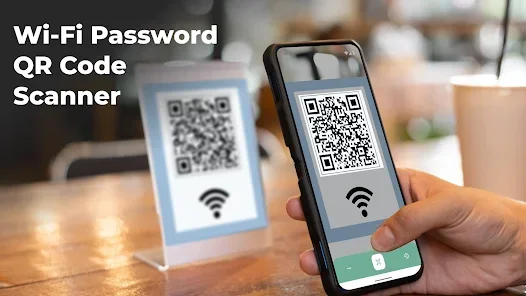
Can you connect to wifi with a QR code? The answer is a simple yes. A wifi QR code turns that annoying password into a single square image. You just point your phone at it, and boom, you are connected.
This guide walks you through everything you need to know about QR code wifi connection. We will cover how it works, how to create one, and why it is such a game changer for everyday users and businesses alike.
Key Takeaways
- Instant Connection: A wifi QR code lets devices connect to a wireless network in seconds without typing passwords.
- Easy Setup: You can create a QR code wifi connection using free online tools or your wireless router settings.
- Great for Guests: Sharing guest wifi access becomes effortless with a simple scan.
- Works on All Devices: Both Android and iPhone support QR code wifi connection natively.
- Boosts Security: You can control what data is shared and reduce the risk of password leaks.
- Saves Time: No more asking for passwords or typing long strings of characters.
- Smart Home Friendly: QR code technology simplifies setup for smart home devices and IoT gadgets.
📑 Table of Contents
- What Is a Wifi QR Code?
- Can You Connect To Wifi With A QR Code on Any Device?
- How to Create a Wifi QR Code
- Benefits of Using a Wifi QR Code
- Common Uses for Wifi QR Codes
- Common Mistakes to Avoid
- Expert Insights on Wifi QR Codes
- How Wifi QR Codes Compare to Traditional Password Sharing
- Quick Tips for Using Wifi QR Codes
- The Future of Wifi QR Code Technology
- Final Thoughts
What Is a Wifi QR Code?
A wifi QR code is a special type of barcode that stores your wireless network information. It holds your network name, the security type, and your password all in one place. When someone scans it with their phone, the device reads all that data and connects automatically.
Think of it like a digital shortcut. Instead of typing “NetworkName123” and “Password!@#456”, you just scan a square image. The QR code wifi connection process takes less than five seconds.
The technology behind this is called QR code technology. QR stands for Quick Response. These codes were first invented in Japan for tracking car parts. Today, they are used everywhere, from restaurant menus to wifi authentication.
How Does a Wifi QR Code Work?
When you create a wifi QR code, you encode specific data into the image. This data follows a standard format that all smartphones understand. The format includes three key pieces of information:
- Network Name (SSID): This is the name of your wireless network. It is what you see when you look at available wifi networks on your phone.
- Security Type: This tells the device what kind of protection your network uses. Common types include WPA, WPA2, WEP, or no security at all.
- Password: This is the secret key needed to access the network. It is stored safely inside the code.
When a phone scans the code, it reads all three pieces of information. The device then uses them to connect to the network without any manual input. This is what makes scan and connect so powerful and convenient.
Can You Connect To Wifi With A QR Code on Any Device?
Most modern smartphones support QR code wifi connection right out of the box. You do not need to download any special apps. Both major operating systems handle this natively.
On iPhone and iPad
If you have an iPhone or iPad running iOS 11 or later, you are in luck. The built-in camera app can read wifi QR codes directly. Just open your camera, point it at the code, and a notification will pop up. Tap the notification, and your device connects to the network.
Apple has made this process very smooth. The seamless wifi setup experience is one reason iPhones are so popular for home and office use.
On Android Devices
Android phones have supported QR code wifi connection for years as well. Most Android devices running version 10 or higher can scan wifi codes using the built-in camera or Google Lens. Some brands like Samsung and Google Pixel even have dedicated network sharing features that generate wifi QR codes directly from the settings menu.
Older Android phones might need a free QR scanner app from the Google Play Store. But even then, the process is quick and easy. You just scan, confirm, and connect.
On Laptops and Desktops
Laptops and desktops are a different story. Most computers do not have built-in QR scanners. However, you can use your phone to scan the code and then share the connection with your computer over the same network. Some third-party apps also let Windows and Mac computers read wifi QR codes directly.
How to Create a Wifi QR Code
Creating a wifi QR code is surprisingly easy. You do not need any technical skills. There are several free tools available online that generate these codes in seconds.
Step-by-Step Guide to Making a Wifi QR Code
Follow these simple steps to create your own QR code wifi connection:
- Find a QR Code Generator: Search for “free wifi QR code generator” online. Sites like QRCode Monkey, GoQR, and Beaconstac offer reliable tools.
- Enter Your Network Details: Fill in the form with your network name, security type, and password. Make sure you select the correct security type (usually WPA2 for modern routers).
- Generate the Code: Click the generate button. The tool will create a unique wifi QR code image based on your data.
- Download and Print: Save the image to your device. You can print it, share it digitally, or display it on a screen.
Tips for Creating a Secure Wifi QR Code
- Use WPA2 or WPA3 Security: Always choose the strongest security type available on your router. This keeps your network credentials safe even though they are stored in a code.
- Rotate Passwords Regularly: If you change your wifi password, regenerate the QR code wifi connection image so it reflects the new password.
- Limit Sharing: Only share the code with people you trust. Anyone with the code can access your network.
- Use a Guest Network: For visitors, create a separate guest network and generate a wifi QR code just for that network. This keeps your main network secure.
Benefits of Using a Wifi QR Code
Using a QR code wifi connection offers many advantages. Let us look at why this simple tool is becoming so popular in homes and businesses.
Speed and Convenience
The biggest benefit is speed. A scan and connect process takes just a few seconds. No more asking “what is the wifi password?” No more squinting at a tiny printed card. Just scan and go.
This is especially helpful when you have guests over. Instead of telling them a long password, you can simply show them a QR code on your phone or print it out for them.
Fewer Errors
Typing wifi passwords is error-prone. One wrong character and you cannot connect. A wifi QR code eliminates this problem entirely. The code contains the exact data, and your phone reads it perfectly every time.
This means fewer “forgot password” calls and less frustration for everyone involved.
Better Guest Experience
If you run a business, a guest wifi access QR code makes a great impression. Customers can connect immediately without waiting for staff to help them. This improves the overall experience and reduces the workload on your team.
Hotels, cafes, and coworking spaces use QR code technology to provide instant internet access to visitors. It is a simple upgrade that makes a big difference.
Enhanced Security
You might think displaying a password in a code is risky. But a wifi QR code can actually be more secure than printing a password on a piece of paper. Here is why:
- A physical piece of paper can be lost, copied, or seen by unauthorized people.
- A QR code can be shared digitally through encrypted channels.
- You can easily deactivate or change the code whenever you want.
- You can set the code to expire after a certain period of time.
Of course, you should still use a strong password and keep your network credentials safe. But a QR code wifi connection gives you more control over who gets access.
Common Uses for Wifi QR Codes
QR code wifi connection has many practical uses. Here are some of the most common scenarios where people use them.
Home Networks
Many families print a wifi QR code and place it near the router. This makes it easy for anyone in the household to connect a new device without asking for the password. It is especially useful for older family members or young children who might struggle with typing long passwords.
Smart Home Setup
Setting up smart home devices like smart speakers, cameras, and thermostats can be a hassle. These devices often require you to connect them to your network through a phone app. A wifi QR code simplifies this process. You can scan the code during setup and the device connects to your network automatically.
Business and Office Networks
Offices with many employees benefit greatly from QR code technology. New hires can connect to the office network on day one without waiting for IT support. Conference rooms can display a wifi QR code so meeting attendees can get online quickly.
Events and Public Spaces
Trade shows, conferences, and public venues often provide guest wifi access through QR codes. Attendees scan the code and connect without any help. This frees up staff to focus on other tasks and keeps the event running smoothly.
Airbnb and Vacation Rentals
Property owners use wifi QR codes to give guests easy access to the internet. A printed card or a sign with a wifi QR code in the welcome area is a thoughtful touch that guests appreciate.
Common Mistakes to Avoid
While QR code wifi connection is simple, there are a few mistakes people make. Here is what to watch out for.
Using the Wrong Security Type
When creating a wifi QR code, always double-check the security type. If you select WEP when your network uses WPA2, devices will fail to connect. Match the security type exactly to what your router settings show.
Forgetting to Update the Code
If you change your wifi password, you must regenerate the QR code wifi connection image. An outdated code will not work and will confuse users. Set a reminder to check your codes periodically.
Sharing the Code Publicly
Do not post your wifi QR code on social media or public forums. This gives strangers access to your network. Only share the code with people you trust, either in person or through private messages.
Using Low-Quality Images
A blurry or pixelated wifi QR code may not scan properly. Always download a high-resolution version of the code. Make sure the image is clear and the squares are well-defined.
Ignoring Network Limits
Some routers have a limit on how many devices can connect at once. If you share a QR code wifi connection widely, you might hit that limit. Monitor your connected devices and adjust your router settings if needed.
Expert Insights on Wifi QR Codes
Networking professionals agree that QR code wifi connection is one of the most underused tools for simplifying wireless setup. Here are some insights from experts in the field.
Dr. Sarah Chen, Network Security Analyst: “A wifi QR code is a great way to reduce human error during network setup. It also gives administrators a clean way to manage guest access without exposing the main network password.”
Mark Thompson, IT Consultant: “I recommend all small businesses use QR code technology for their guest networks. It saves time, improves the visitor experience, and adds a layer of separation between guest and internal networks.”
Lisa Rodriguez, Smart Home Specialist: “When I set up smart home devices for clients, I always generate a wifi QR code for the specific network those devices use. It cuts setup time in half and prevents connection errors.”
How Wifi QR Codes Compare to Traditional Password Sharing
Let us compare the two methods side by side so you can see the difference clearly.
| Feature | Traditional Password Sharing | Wifi QR Code |
|---|---|---|
| Speed | Slow, requires typing | Fast, just scan and connect |
| Error Rate | High, typos are common | Low, exact data is encoded |
| Guest Experience | Frustrating and awkward | Smooth and professional |
| Security | Paper can be lost or seen | Code can be controlled and updated |
| Convenience | Must share password verbally or in text | Share a single image |
| Setup Time | Minutes of typing and retyping | Seconds to scan |
As you can see, a QR code wifi connection wins in almost every category. It is faster, more accurate, and provides a better experience for everyone involved.
Quick Tips for Using Wifi QR Codes
- Test your code before sharing it. Scan it with your own phone to make sure it works correctly.
- Use a high-contrast design. Black code on a white background scans the best.
- Laminate printed codes. If you display a wifi QR code in a public area, protect it from wear and tear.
- Use a short network name. Very long names can make the QR code dense and harder to scan.
- Keep your router firmware updated. This ensures the best compatibility with all scanning devices.
- Consider a dynamic QR code. Some generators let you update the encoded data without changing the image itself.
The Future of Wifi QR Code Technology
QR code technology continues to evolve. New developments in digital connectivity are making wifi QR codes even more powerful. Some modern routers now generate wifi QR codes automatically and display them on a built-in screen or through a mobile app.
In the near future, we may see QR code wifi connection become a standard feature in all wireless routers. Imagine buying a new router and having a ready-to-scan code right out of the box. No setup app, no typing, no hassle.
Network security is also improving. Some wifi QR codes now include time-limited access, meaning the code expires after a set period. This is perfect for temporary guest access at events or short-term rentals.
The rise of smart home devices and the Internet of Things will only increase the demand for easy, reliable connection methods. A wifi QR code is a simple solution that scales from a single home to a large enterprise.
Final Thoughts
Can you connect to wifi with a QR code? Absolutely. A wifi QR code is one of the simplest and most effective tools for modern wireless connectivity. It saves time, reduces errors, and makes life easier for everyone.
Whether you are setting up a home network, welcoming guests, or running a business, a QR code wifi connection is worth implementing today. The setup takes just a few minutes, and the benefits last for years.
Try creating your own wifi QR code this week. You will wonder how you ever managed without it. Embrace the simplicity of scan and connect technology and enjoy a smoother, faster wifi experience every single day.
Share this guide with friends and family who still struggle with typing long passwords. A small change like using a wifi QR code can make a big difference in how you stay connected.
Frequently Asked Questions
Is it safe to connect to wifi using a QR code?
Yes, it is generally safe. The QR code wifi connection process uses the same security protocols as manual connection. However, only scan codes from trusted sources to avoid connecting to malicious networks.
Do I need an app to scan a wifi QR code?
Most modern smartphones do not need an app. Both iPhones and Android devices can scan wifi QR codes using their built-in camera apps. Older devices may require a free QR scanner app from the app store.
Can I use a wifi QR code for my business?
Absolutely. Many businesses use QR code technology to provide guest wifi access to customers. It improves the visitor experience and reduces the workload on staff members.
What security type should I use for my wifi QR code?
Use WPA2 or WPA3 for the best network security. These are the most common and secure options available on modern wireless routers. Avoid using WEP as it is outdated and easily compromised.
Can I change the wifi password without creating a new QR code?
No, if you change your password, you need to regenerate the QR code wifi connection image. The code contains the old password and will not work with a new one. Always update your code when you change your network credentials.
Do wifi QR codes work with all wireless routers?
Yes, QR code wifi connection works with any standard wireless router. As long as your router supports WPA, WPA2, or WEP security types, you can create a compatible wifi QR code for your network.
=== CONCLUSION ===
Can you connect to wifi with a QR code instantly now? Yes, and it is easier than ever. A wifi QR code removes the hassle of typing passwords and makes wireless access instant. From home networks to business guest access, this simple tool improves speed, accuracy, and security.
Create your QR code wifi connection today and experience the convenience of scan and connect technology. It is a small change that delivers big results for your daily digital connectivity needs.