Can Hdmi Be Converted To Rca Here Is How You Do It
Yes, you can convert HDMI to RCA using a dedicated converter box or adapter. This process lets you connect modern devices like laptops, gaming consoles, and streaming boxes to older TVs that only have composite AV inputs. We will walk you through every method, tool, and tip you need to get it done right.
You just pulled out an older TV or a vintage monitor from the garage. It still works perfectly. But there is one problem. Your new streaming stick, gaming console, or laptop only has an HDMI port. Meanwhile, that old screen only has RCA inputs. You are left staring at two different connection types and wondering what to do next.
The good news is that you can bridge this gap. Can HDMI be converted to RCA? Absolutely. The process is straightforward once you know what tools you need. In this guide, we will break down every method, every device, and every tip you need to make it work. Whether you are a tech beginner or someone who just wants a quick answer, this article has you covered.
We will look at converter boxes, adapter cables, signal quality concerns, and common mistakes to avoid. By the end, you will feel confident hooking up your modern devices to older displays. No technical degree required. Just simple, practical steps that get the job done.
Key Takeaways
- HDMI to RCA conversion is possible: You need an active HDMI-to-composite converter to change digital signals into analog output.
- Multiple methods work: You can use standalone converter boxes, HDMI-to-AV adapters, or even capture card devices depending on your setup.
- Signal quality matters: Not all converters are equal. Cheap adapters may downgrade your resolution or lose audio channels.
- Setup is simple: Most conversions require plugging in a few cables and adjusting display settings on your source device.
- Common uses include retro gaming, older monitors, and legacy AV equipment: These are the most popular reasons people need this conversion.
- Potential issues exist: Black screens, no audio, or poor picture quality are common problems with easy fixes.
- Always check your cables and ports: Knowing what you have before buying saves time and money.
📑 Table of Contents
- Understanding HDMI and RCA Connections
- Can HDMI Be Converted To RCA: The Short Answer
- Methods to Convert HDMI to RCA
- What You Need to Know About Signal Quality
- Step-by-Step Setup Guide
- Common Problems and How to Fix Them
- When Should You Use HDMI to RCA Conversion?
- Choosing the Right HDMI to RCA Converter
- Expert Tips for the Best Results
- Key Takeaways
- Conclusion
Understanding HDMI and RCA Connections
What Is HDMI?
HDMI stands for High-Definition Multimedia Interface. It is the standard connection for most modern electronics. Your Blu-ray player, PlayStation, Xbox, laptop, and smart TV probably all use HDMI. It carries both high-definition video and multi-channel audio through a single cable. This makes it incredibly convenient. You plug one cable in, and everything works.
HDMI digital signals are very different from older analog formats. They transmit uncompressed data, which means better picture and sound quality. But this also means they cannot plug directly into older equipment. That is where conversion comes in.
What Is RCA?
RCA connectors have been around since the 1940s. You probably recognize them as the red, white, and yellow cables. The yellow cable carries composite video. The red and white cables carry audio. Red is for the right channel, and white is for the left. These cables were the standard for decades. Many older televisions, VCRs, and stereo systems still rely on them.
RCA connections are analog. They carry lower-resolution signals compared to HDMI. The maximum resolution for composite RCA is 480i or 576i, depending on your region. This is a huge step down from modern HDMI signals that can carry 4K and even 8K resolution. When you convert HDMI to RCA, you are essentially downscaling the signal to work with older equipment.
Can HDMI Be Converted To RCA: The Short Answer
Let us get the big question out of the way first. Can HDMI be converted to RCA? Yes, it can. But it requires an active conversion device. You cannot just plug an HDMI cable into an RCA port and expect it to work. The signals are fundamentally different. HDMI is digital. RCA is analog. You need a converter that translates one into the other.
This process is called active signal conversion. The converter box takes the digital HDMI signal, processes it, and outputs an analog composite signal. It also downconverts the resolution to match what older displays can handle. Some converters also separate the audio into its own channels for the red and white RCA cables.
The good thing is that this technology is mature and widely available. You can find HDMI-to-RCA converters at most electronics stores, online marketplaces, and even some department stores. They range in price from about fifteen dollars to over fifty dollars depending on the quality and features.
Methods to Convert HDMI to RCA
Method 1: HDMI to RCA Converter Box
This is the most popular and reliable method. A dedicated converter box handles the entire conversion process for you. You plug your HDMI source into the box, and the box outputs RCA composite video and stereo audio. It is plug-and-play in most cases.
Here is how it typically works:
- Connect your HDMI device to the converter box using an HDMI cable.
- Plug the red, white, and yellow RCA cables into the converter box outputs.
- Connect the other ends of the RCA cables to your TV or display.
- Power the converter box using the included USB cable or power adapter.
- Switch your TV to the correct AV input channel.
- Adjust the display settings on your source device if needed.
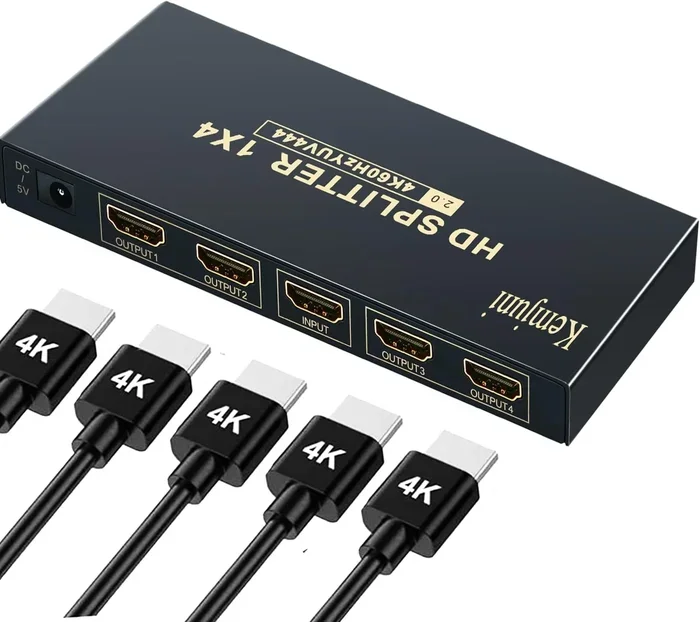
Many converter boxes also include a USB power pass-through. This means you can charge your device while using the converter. Some models even include an HDMI pass-through port, so you can send the signal to both an RCA display and a modern HDMI display at the same time.
Popular brands in this space include GenVideo, ViewHD, and Cable Matters. When shopping, look for converters that support at least 720p or 1080p input. Cheaper models may only support 480p, which can look blurry on larger screens.
Method 2: HDMI to AV Adapter Cable
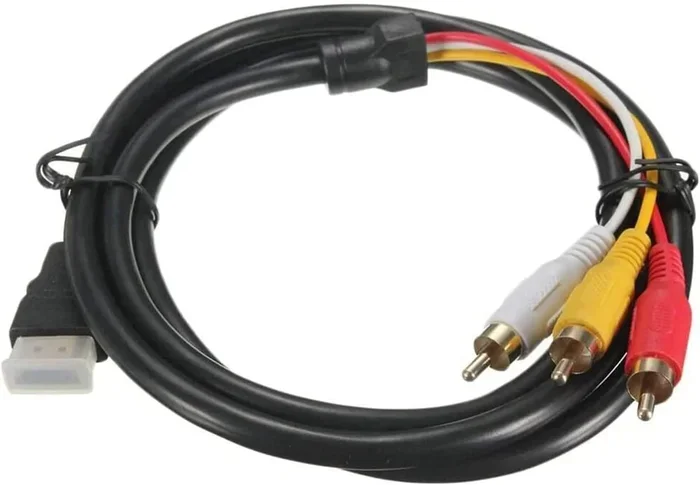
Some companies sell all-in-one adapter cables. One end has an HDMI connector, and the other end splits into RCA composite outputs. These are simpler than a full converter box, but they have limitations.
Most adapter cables do not have built-in signal processing chips. Instead, they rely on the source device to output a compatible signal. This means they work best when your source device already supports analog output or has a setting to enable it. Not all HDMI devices offer this option.
These cables tend to be very affordable, often under twenty dollars. They work for basic setups where you do not need high resolution or advanced features. But for reliable performance, a standalone converter box is usually the better choice.
Method 3: Using an HDMI Capture Card
Another option is to use an HDMI capture card. These are primarily designed for streaming and recording, but they can also be used for signal conversion. You connect the HDMI source to the capture card, then use software on a computer to view and output the signal.
This method is more complicated than the other two. It requires a computer and some software setup. However, it gives you the most control over the output signal. You can adjust resolution, aspect ratio, and audio settings before sending the signal to an RCA display.
This method is best suited for people who already own a capture card and want a flexible solution. For most users, a simple converter box will do the job much more easily.
What You Need to Know About Signal Quality
Resolution Downscaling
When you convert HDMI to RCA, the resolution gets downscaled. RCA composite cables can only handle standard definition signals. This means your 1080p or 4K content will be compressed into 480i or 576i. The picture will not look as sharp as it does on a modern screen.
Do not expect HDMI-quality visuals on an RCA connection. The whole point of conversion is compatibility, not quality. That said, a good converter will produce a clean, watchable standard-definition picture. A cheap or faulty converter might produce a blurry, noisy, or flickering image.
Some converter boxes include a resolution setting. You can choose between 480p, 720p, or 1080p input. The converter then downscales to composite output. Choosing the right input resolution can make a noticeable difference in picture clarity.
Audio Considerations
HDMI carries both video and audio in one cable. RCA separates them. The yellow cable is video only. The red and white cables carry stereo audio. When you use a converter, make sure it outputs both video and audio through the RCA connectors.
Some older converter models only output video through RCA and require a separate audio connection. Always check the product specifications before buying. You want a converter that handles both video and audio through the composite RCA outputs.
If your TV has only RCA inputs and no HDMI, you will also need to make sure the TV has built-in speakers or you connect external speakers to the RCA audio outputs.
Color and Sync Issues
Composite RCA connections can sometimes have color or sync problems. You might see a black-and-white picture, a rolling screen, or incorrect colors. These issues usually stem from incorrect cable connections or a converter that is not properly powered.
Make sure all cables are firmly plugged in. Check that the yellow video cable is in the correct port. Ensure the converter box is receiving adequate power. If you still see issues, try a different HDMI cable or a different RCA cable set.
Step-by-Step Setup Guide
Step 1: Gather Your Equipment
Before you start, make sure you have everything you need. Here is a quick checklist:
- An HDMI source device (laptop, console, streaming stick, etc.)
- An HDMI cable
- An HDMI-to-RCA converter box or adapter
- Red, white, and yellow RCA cables
- A TV or display with RCA composite inputs
- A power source for the converter box (USB or wall adapter)
Step 2: Connect the HDMI Source
Plug one end of the HDMI cable into your source device. Plug the other end into the HDMI input on the converter box. Make sure the connection is secure and snug.
Step 3: Connect the RCA Cables
Take the red, white, and yellow RCA cables. Plug the yellow cable into the yellow video output on the converter. Plug the red cable into the red audio output and the white cable into the white audio output. Then connect the other ends to the matching inputs on your TV.
Color matching is important here. Yellow goes to yellow. Red goes to red. White goes to white. It is easy to mix them up, so take a moment to double-check each connection.
Step 4: Power On the Converter
Connect the power supply to the converter box. Some converter boxes use a USB cable that you can plug into a wall adapter or even into a USB port on your TV. Others come with a dedicated power brick. Make sure the power light on the converter turns on.
Step 5: Switch Your TV Input
Use your TV remote to switch to the correct input source. For composite RCA connections, this is usually labeled as AV, Video, Line In, or CVBS. On older TVs, you may need to tune to channel 3 or 4 using the TV tuner.
Step 6: Adjust Display Settings
On your HDMI source device, go to the display or resolution settings. If possible, set the output resolution to 480p or 720p. This matches the capabilities of composite RCA and will produce the best possible picture on your older TV.
Common Problems and How to Fix Them
Even with the right equipment, you might run into some issues. Here are the most common problems and their solutions.
No picture at all. Check that all cables are connected properly. Make sure the converter is powered on. Try a different HDMI cable or different RCA cables. Verify that your TV is on the correct input source.
Black and white picture. This usually means the yellow video cable is loose or damaged. It can also happen if you plugged the video cable into an audio-only port. Make sure the yellow cable goes into the video input on your TV.
No audio. Check that the red and white audio cables are properly connected. Some converter boxes have a separate audio output. Make sure you are using the correct ports on both the converter and the TV.
Flickering or rolling screen. This is often a power issue. The converter may not be getting enough power. Try a different power source or a powered USB hub. It can also be caused by an incompatible resolution setting on the source device.
Poor picture quality. Lower-quality converter boxes may introduce noise or blur. Investing in a better converter with a higher-quality processing chip can make a big difference. Also, make sure your RCA cables are not damaged or too long.
When Should You Use HDMI to RCA Conversion?
There are many situations where this conversion is useful. Here are some of the most common scenarios.
Retro gaming. Many classic game consoles use HDMI output now, even if the original hardware used composite cables. If you want to play on an old CRT television for that authentic retro feel, you need an HDMI-to-RCA converter.
Older monitors and displays. Some people have vintage monitors or projectors that only accept RCA inputs. Converting HDMI allows you to use modern media players or computers with these displays.
Secondary or backup TVs. In bedrooms, kitchens, or garages, older TVs are still very common. An HDMI-to-RCA converter lets you connect a streaming stick or cable box to these screens.
Car or RV entertainment systems. Many older vehicles and RVs have entertainment systems with RCA inputs. Converting a modern device to RCA makes it possible to watch movies or shows on the road.
Presentations and events. Some projectors and screens used for events still rely on composite inputs. A converter can bridge the gap between a modern laptop and these legacy displays.
Choosing the Right HDMI to RCA Converter
Not all converters are created equal. Here are some things to look for when shopping for one.
- Supported resolution: Look for converters that accept at least 1080p input. This gives you flexibility with your source device settings.
- Audio support: Make sure the converter outputs stereo audio through the RCA cables. Some budget models skip audio entirely.
- Build quality: Plastic housings are fine, but avoid converters with flimsy connectors. A solid build lasts longer and provides more reliable connections.
- Power source: Converters that can be powered via USB are more convenient. You do not need a wall outlet nearby.
- HDMI pass-through: Some converters include a passthrough HDMI output. This lets you connect the same source to both an RCA display and a modern TV simultaneously.
- Brand reputation: Stick with well-known brands or read reviews before buying. A converter from a reputable brand is more likely to deliver consistent results.
Price is not always an indicator of quality. Some affordable converters perform just as well as expensive ones. Read user reviews and look for feedback on picture quality, audio sync, and durability before making a purchase.
Expert Tips for the Best Results
Here are some insider tips that can help you get the most out of your HDMI-to-RCA setup.
Keep your HDMI cable as short as possible. Longer cables can introduce signal degradation, especially after conversion. A six-foot cable is usually more than enough for most setups.
Use high-quality RCA cables. The red, white, and yellow cables that come free with electronics are often thin and poorly shielded. Upgrading to thicker, well-shielded cables can reduce interference and improve picture and sound quality.
Always power your converter box with the recommended power supply. Using a weak or incompatible power source can cause flickering, signal loss, or audio dropouts.
If you are using a laptop, check the display settings before connecting. Some laptops have an HDMI output that defaults to a resolution your converter cannot handle. Setting the output to 720p or 480p before connecting can prevent issues.
Keep your converter box in a well-ventilated area. Some models generate heat during use. Blocking the vents can cause overheating and performance problems.
Key Takeaways
- HDMI to RCA conversion is possible: You need an active converter to translate digital HDMI signals into analog RCA output.
- Converter boxes are the most reliable method: They handle video and audio conversion with consistent results.
- Signal quality will not match HDMI: RCA is limited to standard definition. Expect a noticeable difference in resolution and clarity.
- Setup is straightforward: Connect HDMI in, RCA out, power on, and switch your TV input. It takes less than five minutes.
- Common issues have simple fixes: Most problems with no picture, no audio, or poor quality come from loose cables or wrong settings.
- Choose your converter wisely: Look for resolution support, audio output, build quality, and positive reviews before buying.
Conclusion
Can HDMI be converted to RCA? Yes, it absolutely can. With the right converter box or adapter, you can connect virtually any modern HDMI device to an older RCA display. The process is simple, affordable, and works in just minutes. Whether you are setting up a retro gaming station, connecting a streaming stick to a bedroom TV, or using a projector at an event, HDMI-to-RCA conversion opens up a world of possibilities.
Remember that you are working with older technology. The picture will not look as crisp as it does on a modern HDMI screen, and that is okay. The goal is compatibility and functionality. A good converter will deliver a clean, watchable signal that makes your older equipment feel useful again.
Take the time to choose the right converter for your needs. Check your cables, follow the setup steps carefully, and troubleshoot any issues that come up. With the right approach, you will be watching your favorite content on that old TV in no time. Do not let an outdated connection type stop you from enjoying your favorite devices.
Frequently Asked Questions
Do I need a special converter to connect HDMI to RCA?
Yes, you need an active HDMI-to-RCA converter. You cannot connect HDMI directly to RCA because the signals are different. HDMI is digital and RCA is analog. The converter box processes the digital signal and outputs it as an analog composite signal that your older TV can read.
Will the picture quality be as good as HDMI?
No, the picture quality will not match HDMI. RCA composite cables only support standard definition, typically up to 480i or 576i. Your HDMI content will be downscaled to fit this resolution. A good converter will produce a clean standard-definition picture, but do not expect high-definition clarity on an RCA connection.
Can I convert HDMI to RCA without a converter box?
Not reliably. Some all-in-one adapter cables exist, but they have significant limitations. Most do not process the signal actively, which means they may not work with all devices. A dedicated converter box is the most dependable and versatile option for consistent results.
Why is there no sound when I use HDMI to RCA conversion?
No sound usually means the audio cables are not connected properly. Make sure the red and white RCA cables are plugged into the correct audio output ports on the converter and the matching audio input ports on your TV. Also check that your source device is not set to output audio through HDMI only.
Can I use an HDMI to RCA converter with a gaming console?
Yes, most HDMI-to-RCA converters work great with gaming consoles. This is one of the most popular use cases. Retro gaming enthusiasts use converters to play modern HDMI-enabled consoles on old CRT televisions for an authentic retro experience. Just make sure your converter supports the resolution your console outputs.
How much does an HDMI to RCA converter cost?
Most HDMI-to-RCA converter boxes cost between fifteen and fifty dollars. Basic models with standard definition output are on the lower end. Converters with higher resolution support, HDMI pass-through, and better build quality cost more. Reading reviews before buying helps you find the best value for your money.