Are Usb Mics Bad For Recording Vocals What You Need To Know
USB microphones have changed the way people record vocals at home. Many beginners wonder if USB mics are bad for recording vocals, and the honest answer is that they are not inherently bad at all. A USB mic can deliver solid vocal recordings if you pick the right model and use it correctly. However, they do have limitations compared to professional XLR setups. This guide covers everything you need to know about USB mics for vocal recording.
You have probably seen USB microphones everywhere lately. They sit on desks, line the shelves of online stores, and pop up in YouTube tutorials. But here is the big question: are USB mics bad for recording vocals? The short answer is no. The longer answer is more interesting, and it is exactly what we are going to explore today.
Whether you are a beginner singer, a podcaster, or someone who just wants to record vocals at home, this article is for you. We will break down how USB microphones work, where they shine, and where they fall short. By the end, you will have a clear picture of whether a USB mic fits your vocal recording needs.
USB microphones have become incredibly popular over the past decade. They offer a simple, affordable way to capture vocals without needing extra equipment. But not all USB mics are created equal. Some deliver surprisingly professional results, while others leave a lot to be desired. Let us dive into the details and find out what you really need to know.
Key Takeaways
- USB mics are not bad for vocals: They offer a convenient plug-and-play option for home recording and podcasting.
- They lack the flexibility of XLR mics: USB mics have limited upgrade paths and built-in preamps.
- Audio quality has improved dramatically: Modern USB condenser microphones rival entry-level XLR setups.
- They are ideal for beginners: No extra gear or audio interface is needed to start recording.
- Common mistakes hurt performance: Room acoustics, positioning, and gain staging matter just as much as the mic itself.
- USB mics work great for podcasts and voiceovers: Professional creators use them daily for high-quality output.
- Know your needs before buying: Choose based on your recording goals, budget, and future plans.
📑 Table of Contents
- What Are USB Mics and How Do They Work
- Are USB Mics Actually Bad for Recording Vocals
- USB Mics vs XLR Mics for Vocal Recording
- When a USB Mic Is the Right Choice for Vocals
- Common Mistakes People Make with USB Mics
- How to Get the Best Results from a USB Mic for Vocals
- Expert Insights on USB Mic Vocal Recording
- Key Takeaways
- Conclusion
What Are USB Mics and How Do They Work
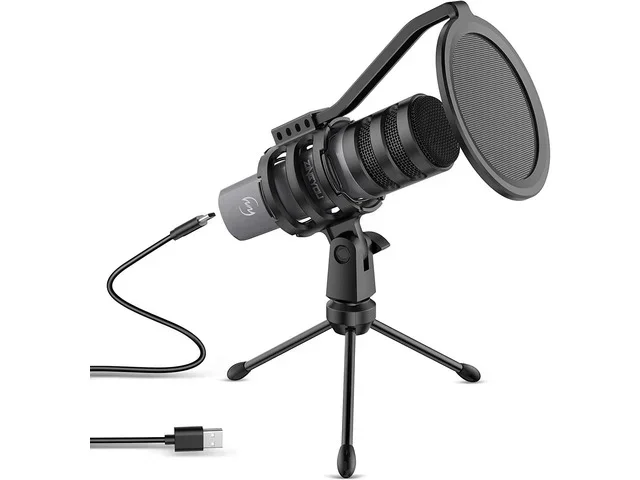
A USB microphone is a microphone that connects directly to your computer through a USB cable. Unlike traditional microphones that need an external device to boost their signal, USB mics have a built-in preamp and analog-to-digital converter. This means you plug them in and they are ready to go. No extra gear required.
The internal components of a USB mic handle the entire signal chain. Sound hits the diaphragm, which creates an electrical signal. That signal gets amplified by the built-in preamp. Then the analog-to-digital converter turns it into digital audio that your computer can read. All of this happens inside the mic body itself.
Types of USB Microphones
Not all USB mics work the same way. There are a few different types you should know about before making a purchase.
- USB condenser microphones: These are the most popular choice for vocal recording. They are sensitive and capture detail well. They work best in quiet environments.
- USB dynamic microphones: These are less sensitive but handle loud sounds beautifully. They are great for noisy rooms or live streaming setups.
- USB shotgun microphones: These pick up sound from a narrow direction. They are useful for specific recording situations but less common for vocals.
Most people looking to record vocals will gravitate toward a USB condenser microphone. The sensitivity and detail capture make them a natural fit for singing and speaking. If you want to learn more about the best options available, check out our guide on the best USB microphones for vocals.
Are USB Mics Actually Bad for Recording Vocals
This is the question everyone wants answered. The truth is that USB microphones are not bad for recording vocals. In fact, many home studio owners and content creators use them every single day to produce professional-quality vocal tracks. The idea that USB mics are inferior comes from outdated assumptions about digital audio technology.
Years ago, USB audio technology was limited. The converters inside early USB mics were basic. The preamps were noisy. But technology has moved on dramatically. Today’s best USB microphones feature high-quality audio resolution, low self-noise levels, and excellent microphone sensitivity. Some models even offer adjustable gain controls and headphone monitoring directly on the mic body.
Where USB Mics Excel for Vocals
USB microphones bring several real advantages to vocal recording. Here are the main reasons they are worth considering:
- Plug and play simplicity: You connect the mic to your computer and start recording immediately. No additional equipment is needed.
- Affordable entry point: You can get a quality USB mic for under $100, making home recording accessible to everyone.
- Compact and portable: Most USB mics are lightweight and easy to transport. You can record vocals anywhere with a laptop.
- Built-in features: Many USB mics include gain control, mute buttons, and headphone jacks right on the device.
- Low setup time: There is no complicated wiring or configuration. This makes them perfect for beginners who want to start recording fast.
For someone just starting out, these benefits are huge. You skip the learning curve of setting up an audio interface and focus on what really matters: your voice. Many successful podcasters, voiceover artists, and independent musicians started their careers with a simple USB mic.
Where USB Mics Fall Short
It is important to be honest about the limitations too. USB microphones do have some drawbacks compared to traditional setups. Understanding these will help you make an informed decision.
- Limited upgrade path: With a USB mic, the preamp and converter are built in. You cannot swap them out or upgrade them separately. If the preamp is mediocre, you are stuck with it.
- Signal processing inside the mic: The analog-to-digital conversion happens inside the mic body. This means you have less control over the conversion quality.
- Single connection dependency: If the USB cable or the mic itself fails, your entire recording setup goes down. There is no backup path.
- Less flexibility for professional studios: In a professional setting, engineers prefer XLR microphones for their superior sound quality and flexibility.
- Potential for electrical noise: Cheap USB mics sometimes pick up interference from the computer or other USB devices.
These limitations do not make USB mics bad. They simply mean that USB mics are better suited for certain situations than others. If you are a beginner or a hobbyist, these drawbacks may never matter to you. But if you plan to scale up to a full professional studio, you will eventually want to move to an XLR setup.
USB Mics vs XLR Mics for Vocal Recording
The debate between USB and XLR microphones is one of the most common discussions in the audio world. Both types have their place. Both can produce excellent vocal recordings. But they serve different needs and budgets.
An XLR microphone connects to an audio interface or mixing console using a three-pin cable. The interface provides the preamp and conversion. This modular approach gives you more control over every part of the signal chain. You can upgrade your preamp, your converter, or your microphone independently.
A USB microphone integrates all of that into one device. It is simpler, cheaper, and faster to set up. But it locks you into a fixed signal path.
Head-to-Head Comparison
| Feature | USB Microphone | XLR Microphone |
|---|---|---|
| Setup Complexity | Very simple, plug and play | Requires audio interface and cables |
| Cost | Lower upfront cost | Higher total cost with interface |
| Sound Quality | Good to excellent in modern models | Superior, especially at higher price points |
| Upgrade Flexibility | Limited, built-in components | Fully modular, upgrade individual parts |
| Portability | Highly portable | Requires additional gear to carry |
| Best For | Beginners, podcasters, home studios | Professional studios, serious vocalists |
| Latency Control | Direct monitoring built in | Requires interface with low-latency monitoring |
For recording vocals at home, a USB mic is a perfectly valid choice. Many professional voiceover artists use USB mics for demo recordings. The key is choosing a quality model with good microphone specs like a high sample rate and bit depth.
When a USB Mic Is the Right Choice for Vocals
Not everyone needs a professional studio setup. There are many situations where a USB microphone is the ideal choice for vocal recording. Let us look at when a USB mic makes the most sense.
For Home Studio Beginners
If you are just starting your recording journey, a USB mic removes almost all barriers. You do not need to learn about preamps, phantom power, or signal routing. You plug the mic into your computer, open your recording software, and start singing. This simplicity lets you focus on developing your vocal skills and your recording technique instead of troubleshooting gear.
A good USB condenser microphone at the $50 to $150 range can produce surprisingly clean vocal recordings. Brands like Audio-Technica, Blue, and Rode offer excellent entry-level options that deliver real value.
For Podcasters and Content Creators
Podcasting is one of the biggest use cases for USB microphones. When you are recording spoken vocals, the technical demands are lower than for music recording. A USB mic handles podcast vocals beautifully. The built-in converter and preamp are more than adequate for voiceover work, interviews, and commentary.
Many top-rated podcasts use USB mics exclusively. The convenience factor is enormous. You can record from a laptop at a coffee shop, in a hotel room, or at a co-working space. This portability is a huge advantage for creators who are always on the move.
For Travel and Mobile Recording
If you record vocals on the go, a USB mic is hard to beat. The entire setup fits in a backpack. You need nothing more than your laptop and the microphone. This makes USB mics perfect for field recording, travel vlogs, and remote collaborations.
For Budget-Conscious Creators
Not everyone can afford a full studio setup. A quality USB mic gives you professional-grade vocal recording at a fraction of the cost. When you factor in the savings from not buying an audio interface, cables, and a separate preamp, the value proposition is strong.
Common Mistakes People Make with USB Mics
Even though USB mics are simple to use, people still make mistakes that hurt their vocal recordings. Avoiding these common pitfalls will dramatically improve your results.
Ignoring Room Acoustics
The microphone is only one part of the equation. If your room has hard walls, bare floors, and lots of reflections, even the best USB mic will sound bad. Room acoustics matter just as much as the microphone itself. Consider adding soft furnishings, acoustic panels, or even a blanket behind you to reduce echo and reverb.
Placing the Mic Too Far Away
USB condenser microphones are sensitive. They pick up detail from a close distance. If you sit too far from the mic, your vocals will sound thin and roomy. Aim to keep your mouth about 6 to 8 inches from the microphone. This distance gives you a warm, full sound with minimal room noise.
Skipping the Pop Filter
Plosive sounds from letters like P and B can cause ugly bursts of air into the microphone. A simple pop filter solves this problem. It costs just a few dollars and makes a noticeable difference in vocal clarity. Many USB mics come with a basic pop filter in the box, but you can upgrade to a better one easily.
Not Monitoring Your Audio
One of the best features of modern USB mics is direct monitoring through headphones. Use it! Listen to yourself as you record. This helps you catch problems in real time, like plosives, sibilance, or background noise. If you record without monitoring, you might not notice issues until it is too late.
Using Cheap Cables and Ports
Even though USB mics are simple, the quality of the USB connection matters. Use a short, high-quality USB cable. Avoid plugging your mic into a cheap USB hub. Connect directly to your computer’s USB port for the cleanest signal path and the least amount of electrical noise.
How to Get the Best Results from a USB Mic for Vocals
If you have decided to use a USB microphone for vocal recording, here are some practical tips to get the most out of it.
- Choose a quiet recording environment. Turn off fans, close windows, and silence phones. Background noise is the enemy of clean vocal recordings.
- Position the mic correctly. Point the mic toward your mouth at a slight angle. This reduces direct plosive hits and gives a more natural tone.
- Use your software to control gain. Most USB mics allow you to adjust input levels in your recording software. Set the gain so your loudest passages peak around -6 dB. This leaves headroom and prevents clipping.
- Record in a lossless format. Use WAV or AIFF files at 24-bit depth and a sample rate of 44.1 kHz or 48 kHz. This preserves the full quality of your vocal recording.
- Apply a light touch of EQ after recording. A gentle high-pass filter around 80 Hz can remove low-end rumble. A subtle boost in the presence range (2 kHz to 5 kHz) can add clarity to vocals.
- Practice good mic technique. Sing or speak consistently at the same distance from the mic. Avoid sudden movements that change the mic-to-mouth distance.
Following these steps will help you get professional-sounding vocal recordings from a USB microphone. The gear matters less than the technique. A well-used USB mic will always outperform a poorly used expensive microphone.
Quick Tips for Better USB Mic Vocals
- Record with the gain as low as you can manage while still capturing a strong signal.
- Use a shock mount to isolate the mic from desk vibrations.
- Keep your computer away from the mic to reduce fan noise and electrical interference.
- Warm up your voice before recording to get the best vocal tone.
- Record multiple takes and comp the best parts together in editing.
Expert Insights on USB Mic Vocal Recording
Many audio engineers agree that USB microphones have reached a point where they are genuinely useful for professional work. The built-in converters in modern USB mics rival the quality of external audio interfaces from just a few years ago. This does not mean XLR setups are obsolete. But it does mean the gap has narrowed significantly.
Some experts recommend a hybrid approach. Use a USB mic for recording vocals at home or on the go. When you are in the studio or ready to take your work to the next level, switch to an XLR setup through a quality audio interface. This gives you the best of both worlds. You get convenience when you need it and quality when it counts.
The microphone preamp inside a USB mic has come a long way. Modern designs use low-noise components that produce clean gain even at high levels. This means the signal chain from your voice to your digital audio file is surprisingly transparent. For vocal recording purposes, this is more than adequate in most cases.
Bit depth and sample rate are two specs that matter for vocal recording. Look for a USB mic that supports at least 24-bit depth and 48 kHz sample rate. These numbers ensure your recordings capture the full dynamic range of the human voice. Lower specs can result in a flattened, less detailed sound that lacks warmth and presence.
One thing to keep in mind is latency. This is the delay between when you sing and when you hear yourself through headphones. USB mics with direct monitoring built in eliminate most latency issues. If your mic does not have this feature, you may need to adjust your buffer settings in your recording software. Low latency is essential for comfortable vocal recording, especially when you are singing along to a backing track.
Key Takeaways
- USB mics are not bad for vocals: They offer a convenient plug-and-play option for home recording and podcasting.
- They lack the flexibility of XLR mics: USB mics have limited upgrade paths and built-in preamps.
- Audio quality has improved dramatically: Modern USB condenser microphones rival entry-level XLR setups.
- They are ideal for beginners: No extra gear or audio interface is needed to start recording.
- Common mistakes hurt performance: Room acoustics, positioning, and gain staging matter just as much as the mic itself.
- USB mics work great for podcasts and voiceovers: Professional creators use them daily for high-quality output.
- Know your needs before buying: Choose based on your recording goals, budget, and future plans.
Conclusion
So, are USB mics bad for recording vocals? The answer is a clear no. USB microphones are a legitimate tool for vocal recording. They offer simplicity, affordability, and surprisingly good sound quality. Whether you are a beginner singer, a podcaster, or a content creator, a USB mic can help you capture great vocals without a complicated setup.
Of course, they are not perfect. They have limitations in flexibility and upgrade potential. But for most home recording situations, those limitations barely matter. The convenience and ease of use make USB mics a smart starting point for anyone who wants to record vocals at home.
If you are on the fence about buying a USB mic, here is my advice: go for it. Start with a well-reviewed model in your budget. Focus on your recording technique and your environment. You will be surprised at how good your vocals can sound with a decent USB microphone. The best microphone is the one that gets you recording. And a USB mic does exactly that.
Take what you have learned from this guide, apply the tips, and start experimenting. Your vocal recordings will improve faster than you think. Happy recording!
Frequently Asked Questions
Can USB mics produce professional-quality vocal recordings?
Yes, many modern USB microphones can produce professional-quality vocal recordings. The key is choosing a model with good specs like 24-bit depth and a high sample rate. When paired with proper recording technique and a quiet room, USB mics deliver results that are hard to distinguish from more expensive setups.
Do I need an audio interface if I use a USB mic?
No, you do not need an audio interface with a USB microphone. The mic handles all the conversion and preamplification internally. This is what makes USB mics so convenient. However, if you ever want to upgrade to an XLR microphone, you will need an audio interface at that point.
Are USB condenser mics or USB dynamic mics better for vocals?
USB condenser microphones are generally better for vocal recording because they are more sensitive and capture more detail. However, USB dynamic mics work well in noisy environments or for louder vocal styles. Choose based on your recording environment and vocal style.
What should I look for when buying a USB mic for vocals?
Look for a microphone that supports at least 24-bit depth and 48 kHz sample rate. Check for adjustable gain control and direct monitoring. Read reviews for real-world vocal performance. Consider a model with a cardioid pickup pattern, which rejects background noise and focuses on your voice.
Can I use a USB mic for live performances?
You can, but it is not ideal. USB microphones are designed for direct computer connection and may not work with live sound systems without additional adapters. For live performances, an XLR microphone through a proper mixing board is the better choice.
Why does my USB mic sound different from a professional studio mic?
The difference usually comes down to the built-in preamp quality, the analog-to-digital converter, and the microphone capsule itself. Professional studio microphones use higher-grade components and offer more control over the signal chain. However, for most home recording situations, the difference is subtle and easily managed with good technique.