Can You Put Eero In Garage And Still Keep WiFi Strong
Yes, you can put an Eero in your garage and maintain strong WiFi, but placement matters more than you might think. The Eero mesh system is designed to extend your home network, and with the right setup, your garage becomes a connected zone. This guide walks you through everything from signal challenges to the best Eero placement strategies for garage environments.
Have you ever walked into your garage and felt completely cut off from the internet? You are not alone. Many homeowners deal with WiFi dead zones in their garages, and it is a real frustration. Whether you stream music while working on projects, use smart home devices, or need reliable internet for a home office setup, weak WiFi in the garage is a problem worth solving.
The Eero mesh WiFi system promises to cover every corner of your home with strong, reliable wireless network signals. But can you put Eero in garage spaces and actually keep the WiFi signal strong? The short answer is yes. The longer answer depends on a few key factors that this guide will walk you through.
In this article, we will explore everything about placing an Eero router in your garage. We will cover signal challenges, the best placement strategies, and practical tips to boost your home network performance. By the end, you will know exactly how to set up your mesh WiFi system so your garage stays connected.
Key Takeaways
- Eero works in garages: You can place an Eero device in a garage and keep your wireless network running strong with proper setup.
- Signal challenges exist: Thick walls, metal doors, and distance from the main router can weaken your WiFi signal significantly.
- Placement is everything: Where you position the Eero inside the garage determines how well the mesh network performs.
- Eero Beacon helps: Using an Eero Beacon as a secondary node can bridge the gap between your home and garage network.
- Avoid common mistakes: Hiding the device behind metal tools or placing it near interference sources kills your signal strength.
- Wired backhaul is best: Connecting your Eero via Ethernet gives the garage the strongest possible WiFi connection.
- Test before you commit: Always run a speed test in the garage after setup to confirm your home network is performing well.
📑 Table of Contents
- Why Garages Are Tough Spots for WiFi
- Can You Put Eero In Garage? The Short Answer
- Best Placement Strategies for Eero in the Garage
- Common Mistakes People Make When Placing Eero in the Garage
- How to Test and Improve Your Garage WiFi After Setup
- Eero Models Compared for Garage Use
- Expert Tips for Maximum Garage WiFi Performance
- Key Takeaways
- Conclusion
Why Garages Are Tough Spots for WiFi
Garages are unique spaces when it comes to WiFi coverage. Unlike the rest of your home, garages present specific challenges that can weaken your wireless router signal. Understanding these challenges is the first step to solving them.
Thick Walls and Construction Materials
Most garages are built with concrete, brick, or insulated metal panels. These materials block WiFi signals more than the drywall and wood used in the rest of your house. When your Eero mesh network tries to push a signal through thick garage walls, the strength drops fast.
Concrete is one of the worst materials for WiFi signal strength. Even a single concrete wall can reduce your signal by 50% or more. If your garage shares a wall with your home, that wall acts like a barrier between your wireless network and the garage space.
Metal Garage Doors and Interference
Metal is the enemy of WiFi signals. Most garage doors are made of metal, and when they are closed, they block radio waves from passing through. This creates a shield that prevents your Eero device from communicating with devices inside the garage.
Even when the garage door is open, nearby metal objects like tools, cars, and shelving units can cause WiFi interference. These objects reflect and absorb wireless signals, reducing the overall network performance in the space.
Distance from the Main Router
The farther your Eero node is from the main Eero router, the weaker the signal becomes. Garages are often located at the edge of your property, which means they are far from the central home network hub. This distance alone can cause slow speeds and dropped connections.
Mesh WiFi systems like Eero are designed to handle distance better than traditional routers. But even mesh networks have limits. If the gap between your main router and the garage is too large, you will notice a decline in internet speed and WiFi coverage.
Can You Put Eero In Garage? The Short Answer
Yes, you absolutely can put an Eero in garage areas. The Eero mesh WiFi system is built to extend your network to hard-to-reach places. But success depends on how you set it up and where you place the device.
The Eero mesh system uses multiple nodes to create a single, seamless wireless network throughout your home. When you add an Eero node in or near your garage, it acts as a relay point. It takes the WiFi signal from your main router and rebroadcasts it into the garage space.
Here is what you need to know before you start:
- Eero Original and Eero Pro both work well in garage setups.
- Eero Beacon is a smaller, affordable option for extending coverage to the garage.
- Eero Secure adds extra security features but does not change placement requirements.
- The number of Eero nodes you need depends on the size of your garage and the distance from your main router.
- Indoor Eero devices are not weatherproof, so they must be placed inside a sheltered area of the garage.
Best Placement Strategies for Eero in the Garage
Placement is the single most important factor in getting strong WiFi in your garage. A poorly placed Eero node will give you weak signals and slow speeds no matter how good your mesh WiFi system is. Here are the best strategies to follow.
Place the Eero Near the Garage Door Entry
The best spot for your Eero device is near the entrance from your home into the garage. This keeps the node close to the main Eero router and ensures a strong backhaul connection. The signal then travels a short distance into the garage, giving you better WiFi coverage throughout the space.
Avoid placing the Eero deep inside the garage, especially near the back wall. The further it is from the main router, the weaker the mesh connection becomes. Think of it like a chain, where each link needs to be strong for the whole chain to hold.
Elevate the Eero Off the Floor
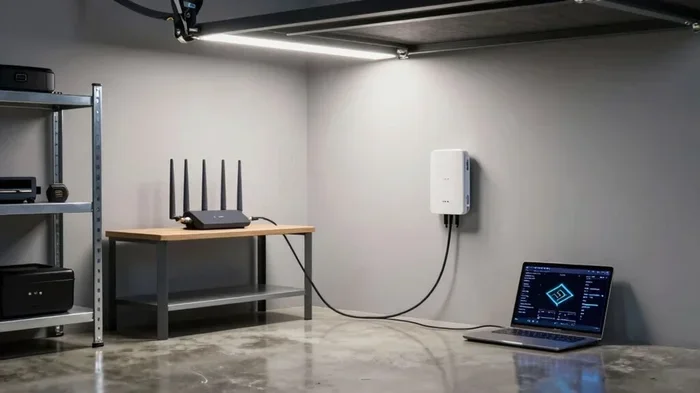
Do not place your Eero router on the floor. Signals spread outward and downward from the device, so floor placement wastes a lot of signal energy. Instead, put the Eero node on a shelf, a workbench, or mount it on a wall about 3 to 5 feet off the ground.
Elevating the device helps the WiFi signal travel more evenly across the garage. It also reduces the chance of the signal being blocked by tools, equipment, or vehicles parked on the floor.
Keep the Eero Away from Metal Objects
Since metal blocks WiFi signals, you need to keep your Eero device away from large metal surfaces. Do not place it behind a metal tool cabinet, next to a filing cabinet, or on a metal shelf. Even a car parked nearby can interfere with your wireless network performance.
Instead, choose a wooden shelf or a plastic storage bin as a home for your Eero node. These materials do not interfere with radio waves and allow the WiFi signal to pass through freely.
Use an Ethernet Cable for Wired Backhaul
If you have an Ethernet port in your garage, use it. Connecting your Eero node to the main router with an Ethernet cable gives you the strongest possible network performance. This is called wired backhaul, and it eliminates wireless signal loss entirely.
Wired backhaul is the best way to ensure your garage WiFi is as fast as the rest of your home. You can run an Ethernet cable through a wall, along the baseboard, or even through the attic. It takes a little more effort, but the results are worth it.
Common Mistakes People Make When Placing Eero in the Garage
Many homeowners make avoidable mistakes when setting up their Eero mesh system in the garage. These mistakes lead to weak signals, slow speeds, and frustration. Here are the most common ones to watch out for.
Hiding the Eero Inside a Closed Cabinet
It is tempting to hide your Eero device inside a closed cabinet to keep it out of sight. But closed cabinets block WiFi signals significantly. The metal and wood in cabinet walls act as shields that weaken the wireless network output.
Keep your Eero node in an open area where air can flow around it. A shelf or a tabletop works perfectly. If you must hide the device, use an open-faced shelf or a mesh storage bin that does not block radio waves.
Placing the Eero Near the Garage Door Opener
Garage door openers operate on the same frequency band as many WiFi devices (2.4 GHz). When your Eero router is placed right next to a garage door opener, the opener creates electromagnetic interference that disrupts your wireless signal.
Keep your Eero device at least 3 to 5 feet away from the garage door opener motor. This simple step can dramatically improve your WiFi signal strength in the garage.
Using an Indoor Eero in an Unheated Garage
Most Eero devices are designed for indoor use only. Unheated garages can experience extreme temperatures in winter and summer. These temperature extremes can damage the Eero node and shorten its lifespan.
If your garage is not temperature-controlled, place the Eero device inside the house near the garage wall or in a heated utility room that opens into the garage. This keeps the device safe while still extending WiFi coverage to the garage.
Ignoring Firmware Updates
Eero regularly releases firmware updates that improve network performance and fix bugs. Many people set up their Eero mesh system and forget about it. Over time, outdated firmware can cause slow speeds and connectivity issues.
Check for Eero updates regularly through the Eero app. Keeping your system updated ensures the best possible WiFi coverage and internet speed in your garage.
How to Test and Improve Your Garage WiFi After Setup
Once you have placed your Eero node in the garage, the next step is testing and optimizing your wireless network. You cannot know if your setup works without measuring the actual WiFi signal strength in the garage.
Run a Speed Test
Use a speed test app on your phone or laptop to check internet speed in different parts of the garage. Stand near the Eero device and run the test, then move to the far corner of the garage and test again. Compare the results to see how well your mesh WiFi system is performing.
If the speed drops significantly in the far corner, you may need to move the Eero node closer to the center of the garage or add a second node for better WiFi coverage.
Use the Eero App to Check Signal Strength
The Eero app gives you real-time data on signal strength for each node. Open the app and check the connection quality between your main router and the garage Eero node. If the signal is weak, try moving the node closer to the main router or consider adding an Eero Beacon as a relay point.
Add a Second Eero Node if Needed
If one Eero node is not enough to cover your entire garage, add a second one. This is especially common in large garages or detached garage setups. A second node creates an additional hop in the mesh network, boosting the WiFi signal to every corner.
You do not need to buy the same model as your main router. An Eero Beacon works well as a secondary node for extending WiFi coverage into the garage. It is smaller, more affordable, and designed specifically for this purpose.
Reduce WiFi Interference in the Garage
Other electronic devices can interfere with your wireless network. Keep your Eero node away from microwaves, baby monitors, cordless phones, and other wireless devices. Reducing interference improves WiFi signal strength and overall network performance.
If you live in a neighborhood with many WiFi networks, consider switching your Eero to the less congested 5 GHz band. The 5 GHz band offers faster speeds and less interference, though it has a shorter range than the 2.4 GHz band.
Eero Models Compared for Garage Use
Not all Eero models are the same when it comes to garage WiFi coverage. Here is a quick comparison of the most popular Eero devices and how they perform in garage environments.
| Feature | Eero Original | Eero Pro | Eero Beacon | Eero Pro 6E |
|---|---|---|---|---|
| WiFi Standard | WiFi 5 | WiFi 5 | WiFi 5 | WiFi 6E |
| Best For | Small garages | Large garages | Extending coverage | High-speed needs |
| Coverage Area | Up to 1,500 sq ft | Up to 2,500 sq ft | Up to 1,500 sq ft | Up to 2,500 sq ft |
| Price Range | Budget-friendly | Mid-range | Affordable | Premium |
| Ethernet Port | Yes | Yes | No | Yes |
| Mesh Performance | Good | Excellent | Good | Excellent |
For most garage setups, the Eero Pro or Eero Pro 6E delivers the best WiFi coverage. The Eero Beacon is a great budget option for smaller garages or when you just need a little extra signal boost.
Expert Tips for Maximum Garage WiFi Performance
Here are some expert-backed tips to get the most out of your Eero mesh system in the garage:
- Use the Eero app’s heat map feature to visualize WiFi coverage in your garage before and after setup.
- Restart your Eero nodes every few weeks to keep the network performance at its best.
- Name your 2.4 GHz and 5 GHz bands separately so you can choose the right band for your needs.
- Place the Eero node line-of-sight to the main router whenever possible for the strongest mesh connection.
- Consider a powerline adapter if running Ethernet is not an option. It sends internet through your home’s electrical wiring to the garage.
- Keep your Eiro firmware updated to benefit from the latest performance improvements and security patches.
- Test with multiple devices in the garage to ensure the wireless network handles all your connected gadgets.
Key Takeaways
- Eero works in garages: You can place an Eero device in a garage and keep your wireless network running strong with proper setup.
- Signal challenges exist: Thick walls, metal doors, and distance from the main router can weaken your WiFi signal significantly.
- Placement is everything: Where you position the Eero inside the garage determines how well the mesh network performs.
- Eero Beacon helps: Using an Eero Beacon as a secondary node can bridge the gap between your home and garage network.
- Avoid common mistakes: Hiding the device behind metal tools or placing it near interference sources kills your signal strength.
- Wired backhaul is best: Connecting your Eero via Ethernet gives the garage the strongest possible WiFi connection.
- Test before you commit: Always run a speed test in the garage after setup to confirm your home network is performing well.
Conclusion
So, can you put Eero in garage spaces and still keep your WiFi strong? Absolutely. The Eero mesh WiFi system is more than capable of extending reliable internet coverage to your garage. The key is understanding the unique challenges garages present and following smart placement strategies.
By placing your Eero node near the garage entrance, elevating it off the floor, keeping it away from metal objects, and using wired backhaul when possible, you can enjoy fast, stable WiFi in your garage. Avoid the common mistakes that weaken signal strength, and use the Eero app to monitor and optimize your home network performance.
Whether you use your garage for a workshop, a home gym, a smart home hub, or simply need connectivity for your car, the right Eero setup makes all the difference. Take the time to plan your placement, test your WiFi coverage, and make adjustments as needed. Your garage wireless network will thank you for it.
Start with these tips today, and turn your garage into a connected space that works as hard as you do.
Frequently Asked Questions
Can I put an Eero device outside in the garage?
Standard Eero devices are designed for indoor use only. They are not weatherproof and can be damaged by rain, extreme heat, or cold. If you want to place an Eero near the garage exterior, keep it inside a sheltered area like a covered porch or a heated utility room that opens into the garage.
How many Eero nodes do I need for my garage?
For a standard attached garage, one Eero node is usually enough. For large garages, detached garages, or garages with thick walls, you may need two nodes. Use the Eero app’s signal heat map to determine if one node covers the entire space or if you need an additional device.
Does a metal garage door block WiFi signals?
Yes, a closed metal garage door significantly blocks WiFi signals. When the door is closed, it acts like a Faraday cage that prevents radio waves from passing through. Keep the Eero node near the interior side of the garage and test your signal with the door both open and closed.
Can I use an Eero Beacon to extend WiFi to the garage?
Yes, an Eero Beacon works well for extending WiFi coverage to the garage. It is smaller and more affordable than the full Eero Pro units. Place the Beacon near the garage entrance to relay the signal from your main router into the garage space effectively.
Will placing Eero in the garage slow down my home network?
No, adding an Eero node in the garage does not slow down your home network. In fact, it improves overall performance by offloading devices from the main router. The mesh system distributes traffic intelligently across all nodes, which can actually speed up your network for devices throughout the home.
What is the best Eero model for garage WiFi coverage?
The Eero Pro 6E is the best choice for garage coverage due to its WiFi 6E support and strong signal range. However, the standard Eero Pro also works well for most garage setups. For smaller garages or budget options, the Eero Beacon is a solid and affordable choice that delivers reliable coverage.