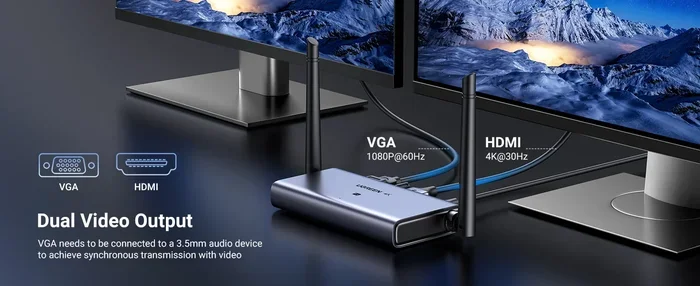
Can Wireless HDMI Support 4k And What You Need To Know
Yes, wireless HDMI can support 4K resolution, but not all wireless HDMI products are created equal. You need the right hardware, the right frequency band, and the right setup to get a true 4K experience without lag or signal drops. This guide breaks down exactly what you need to know about wireless HDMI 4K technology.
You want to cut the cord and go wireless with your home entertainment setup. The idea of streaming 4K content from your laptop, game console, or media player to your big screen TV without a single cable sounds amazing. But here is the big question: can wireless HDMI support 4K? The short answer is yes. But the full answer has some important details you need to know before you buy anything.
Wireless HDMI technology has come a long way in just the last few years. What used to be a clunky, expensive, and laggy experience has turned into a practical and reliable option for many households. Whether you are setting up a wireless home theater, presenting in a boardroom, or just want to simplify your living room, understanding wireless HDMI 4K capabilities is essential. Let us dive into everything you need to know.
Key Takeaways
- Wireless HDMI can deliver 4K: Modern wireless HDMI transmitters and receivers support 4K resolution at 30Hz or 60Hz depending on the model.
- Bandwidth matters: Look for products that use 5GHz or dual-band frequencies for the best 4K wireless streaming experience.
- Latency can be an issue: Some wireless HDMI solutions add delay, which matters for gaming and live content.
- HDCP compatibility is essential: Make sure your wireless HDMI adapter supports HDCP 2.2 for protected 4K content.
- Distance limits exist: Most wireless HDMI systems work best within 30 to 100 feet depending on the environment.
- Price varies widely: Budget options start around $50, while premium wireless HDMI systems can cost $300 or more.
📑 Table of Contents
- What Is Wireless HDMI and How Does It Work?
- Can Wireless HDMI Support 4K?
- What You Need for Wireless 4K HDMI
- Top Wireless HDMI Solutions for 4K
- Wireless HDMI vs. Wired HDMI: Which Is Better?
- Common Problems and How to Fix Them
- Quick Tips for Getting the Best Wireless HDMI 4K Experience
- Expert Insights on Wireless HDMI 4K Technology
- Key Takeaways
- Conclusion
What Is Wireless HDMI and How Does It Work?
Wireless HDMI is a wireless display technology that sends high-definition audio and video signals from a source device to a display without using a traditional HDMI cable. Instead of a physical cable running between your devices, a wireless HDMI system uses a transmitter and a receiver to send the signal through the air.
Here is how it works in simple terms. You plug a small transmitter into your source device, like a Blu-ray player or a laptop. The transmitter sends the audio and video signal wirelessly to a receiver connected to your TV or projector. The receiver then outputs the signal through a standard HDMI port. It is basically a wireless HDMI extender that replaces the cable between your devices.
Most wireless HDMI systems operate on either the 5GHz frequency band or a dual-band setup. The 5GHz band is important because it offers more bandwidth, which is critical for high-quality video. Some cheaper systems use 2.4GHz, but that frequency is crowded with Wi-Fi signals and other wireless devices, which can cause interference and signal drops.
The key components you will always find in a wireless HDMI setup are the HDMI transmitter and the HDMI receiver. These two pieces work together as a pair. Some brands also include additional accessories like wall mounts, power adapters, or control remotes to make setup easier.
How Wireless Video Transmission Works
Wireless video transmission in these systems uses a technology called millimeter wave or proprietary wireless protocols. The transmitter compresses the video and audio data, sends it through the air, and the receiver decompresses it in real time. This process happens so fast that you barely notice any delay in most cases.
Modern wireless HDMI products also use advanced error correction to maintain a stable connection. If the signal encounters minor interference, the system can recover without visible artifacts on your screen. This is a big improvement from earlier generations of wireless HDMI technology, which often suffered from dropouts and pixelation.
Can Wireless HDMI Support 4K?
This is the question everyone wants answered, and the answer is a genuine yes. Wireless HDMI can support 4K resolution, but there are important caveats. Not every wireless HDMI product on the market delivers true 4K quality. Some advertise 4K support but only provide 4K at 30Hz, which can feel choppy for fast-moving content like sports or action movies.
To get the best 4K experience wirelessly, you need a system that supports 4K at 60Hz. This refresh rate makes motion look smooth and natural, just like a wired HDMI connection. Systems that only offer 4K at 30Hz are fine for static content like presentations or slideshow viewing, but they fall short for entertainment use.
The bandwidth of the wireless signal is the biggest factor in determining whether a product can handle true 4K. High-bandwidth wireless HDMI systems use advanced compression and wider frequency channels to push enough data through the air to maintain 4K quality. Lower-end products may compress the signal more aggressively, which can reduce image quality.
4K Ultra HD vs. Standard 4K
It is worth noting that 4K Ultra HD specifically refers to a resolution of 3840 x 2160 pixels. Some wireless HDMI systems may support 4K in a broader sense but might not fully meet the Ultra HD standard. When shopping for a wireless HDMI adapter or system, always check the exact resolution and refresh rate specs to make sure you are getting true 4K Ultra HD support.
Does Wireless HDMI Support HDR and Dolby Vision?
Many premium wireless HDMI systems now support HDR (High Dynamic Range) and even Dolby Vision. These features dramatically improve color accuracy, contrast, and overall picture quality. If you are investing in a 4K setup, you want HDR support to get the full visual experience. Always check the product specifications for HDR compatibility before purchasing.
What You Need for Wireless 4K HDMI
Setting up a wireless 4K HDMI system requires more than just buying a transmitter and receiver. You need the right equipment, the right environment, and the right expectations. Here is what you need to know.
Compatible Source Devices
Your source device needs to output a 4K signal through its HDMI port. Most modern devices can do this, including:
- 4K Blu-ray players
- Gaming consoles like PlayStation 5 and Xbox Series X
- Streaming devices such as Apple TV 4K or NVIDIA Shield
- Laptops and desktop computers with 4K HDMI output
- Satellite or cable TV boxes that support 4K
If your source device cannot output 4K, no wireless HDMI system will magically create that resolution. Always verify that your source device supports 4K output before setting up a wireless system.
HDCP 2.2 Compatibility
HDCP (High-bandwidth Digital Content Protection) is a copy protection standard used by content creators and distributors. To watch 4K content from services like Netflix, Disney+, or Blu-ray discs, your wireless HDMI system must support HDCP 2.2.
Many budget wireless HDMI products do not include HDCP 2.2 support. This means you might get a black screen or reduced resolution when trying to play protected content. Always confirm HDCP 2.2 compatibility if you plan to stream or play copyrighted 4K content.
Display Requirements
Your TV or projector must also support 4K input. Most modern 4K TVs do, but some older models or budget displays may only accept 1080p signals. Make sure your display has an HDMI port that supports HDMI 2.0 or higher for full 4K compatibility.
Network and Environment Considerations
Wireless HDMI systems do not use your home Wi-Fi network. They create a dedicated point-to-point wireless link between the transmitter and receiver. This is actually a good thing because it means your wireless HDMI 4K stream does not compete with other devices on your network.
However, physical obstacles can affect performance. Walls, especially thick concrete or brick walls, can weaken the wireless signal. Metal objects and large appliances can also interfere with the signal path. For the best results, try to keep a clear line of sight between the transmitter and receiver.
Top Wireless HDMI Solutions for 4K
The market for wireless HDMI systems has grown significantly. Here are some of the most popular and reliable options for wireless 4K streaming.
Budget-Friendly Options
If you are looking for an affordable way to get wireless 4K, several options exist in the $50 to $150 range. These wireless HDMI dongles and adapters are great for basic use cases like screen mirroring or presenting slideshows. They may not deliver the full 4K at 60Hz experience, but they work well for casual viewing and basic tasks.
Mid-Range Systems
Mid-range wireless HDMI systems, typically priced between $150 and $300, offer a much better experience. These products usually support 4K at 60Hz, have lower latency, and include better error correction. Brands like AV Access, Magewell, and others offer reliable mid-range options that work well for most home entertainment setups.
Premium Systems
Premium wireless HDMI systems cost $300 or more but deliver the best possible wireless 4K experience. These systems offer near-zero latency, full HDR support, and can transmit 4K signals over longer distances. They are ideal for professional installations, high-end home theaters, and situations where reliability is critical.
| Category | Price Range | 4K Support | Latency | Best For |
|---|---|---|---|---|
| Budget | $50 – $150 | 4K at 30Hz | Moderate | Basic streaming and presentations |
| Mid-Range | $150 – $300 | 4K at 60Hz | Low | Home theater and gaming |
| Premium | $300+ | 4K at 60Hz + HDR | Near-zero | Professional and high-end setups |
Wireless HDMI vs. Wired HDMI: Which Is Better?
This is one of the most common questions people ask, and the honest answer is: it depends on your needs. Both wireless HDMI and traditional wired HDMI have strengths and weaknesses.
Advantages of Wireless HDMI
- No cables: You eliminate the hassle of running long cables through walls or across rooms.
- Flexibility: You can move your source device freely within the wireless range.
- Cleaner setup: No visible cables means a tidier, more aesthetically pleasing setup.
- Portability: Many wireless HDMI systems are compact and easy to transport.
Advantages of Wired HDMI
- Zero latency: A direct cable connection has no delay whatsoever.
- Maximum reliability: No signal drops or interference to worry about.
- Full bandwidth: Wired connections use the full HDMI bandwidth without compression.
- Lower cost: A quality HDMI cable costs a fraction of a wireless system.
When to Choose Wireless HDMI
Wireless HDMI makes the most sense when running a cable is impractical or impossible. If your TV is mounted on a wall and your devices are in a different room, wireless HDMI is a lifesaver. It is also great for temporary setups, outdoor movie nights, or situations where you frequently move your equipment around.
When Wired HDMI Is Still the Better Choice
If you are a serious gamer who cannot tolerate any input lag, wired HDMI is still the way to go. Competitive gamers and professionals who need pixel-perfect accuracy will always prefer a direct cable connection. For most casual users though, the difference is negligible with modern wireless systems.
Common Problems and How to Fix Them
Even the best wireless HDMI systems can run into issues. Here are the most common problems and practical solutions.
Signal Drops or Intermittent Connection
Signal drops are the most common complaint with wireless HDMI systems. The most frequent cause is interference from other wireless devices operating on the same frequency. Try moving the transmitter and receiver away from Wi-Fi routers, microwaves, and Bluetooth devices.
If you are using a 2.4GHz system, consider upgrading to a 5GHz model. The 5GHz band is much less congested and provides a more stable connection for wireless 4K streaming.
Latency or Input Lag
Latency is the delay between pressing a button on your remote or controller and seeing the action on screen. Some wireless HDMI systems add noticeable lag, which can be frustrating for gaming.
To reduce latency, look for systems specifically marketed as low-latency or gaming-friendly. Some products also have a dedicated game mode that optimizes the signal for minimal delay. Always check reviews for latency measurements before buying.
No Signal or Black Screen
A no-signal issue often points to an HDCP handshake problem. Try unplugging both the transmitter and receiver, wait 30 seconds, and plug them back in. Make sure all HDMI cables are firmly seated and that your source device is outputting a 4K signal.
If the problem persists, try lowering the resolution temporarily to see if the wireless connection stabilizes. Sometimes 4K signals are too demanding for a system that is near the edge of its range.
Poor Image Quality or Artifacts
Compression artifacts, pixelation, or color banding can occur when the wireless signal is weak or the system is struggling to maintain 4K quality. Moving the transmitter and receiver closer together can help. Reducing the resolution to 1080p temporarily can also help you determine if the issue is signal strength related.
Audio and Video Sync Issues
Occasionally, you may notice that audio and video are out of sync. This usually happens when the wireless signal is under heavy load. Check if any other wireless devices are operating nearby and temporarily disable them to see if the sync issue resolves.
Quick Tips for Getting the Best Wireless HDMI 4K Experience
- Use a dedicated 5GHz system: Avoid 2.4GHz wireless HDMI products for 4K content. The extra bandwidth makes a real difference.
- Keep line of sight: Place the transmitter and receiver where they can see each other clearly. Walls and obstacles weaken the signal.
- Check HDCP 2.2 support: This is non-negotiable if you want to watch protected 4K content from streaming services.
- Update firmware: Manufacturers often release firmware updates that improve performance and fix bugs. Always keep your wireless HDMI devices up to date.
- Use quality HDMI cables: Even though the connection between your device and the transmitter is wireless, the cables between your source device and the transmitter matter.
- Test before mounting: Set up your wireless HDMI system before permanently mounting your TV or projector. This lets you find the best positions for the transmitter and receiver.
Expert Insights on Wireless HDMI 4K Technology
Industry professionals consistently point out that wireless HDMI 4K technology has matured significantly. The gap between wireless and wired performance has narrowed considerably. According to AV installation experts, the best wireless HDMI systems today can deliver a viewing experience that is virtually indistinguishable from a wired connection for most content.
However, experts also caution that wireless HDMI is not a one-size-fits-all solution. The right system depends on your specific use case, budget, and environment. A home theater enthusiast with a dedicated viewing room has different needs than someone who just wants to occasionally cast their laptop screen to the TV.
Another expert recommendation is to always buy from reputable brands with solid customer support and warranty coverage. The wireless HDMI market has attracted many low-quality products that make exaggerated claims about performance. Stick with established brands and read real user reviews before making a purchase.
Professionals also emphasize the importance of understanding your environment. A wireless HDMI system that works perfectly in a small apartment with minimal interference might struggle in a large house with thick walls and many wireless devices. Testing the system in your actual space before committing is always a smart move.
Key Takeaways
- Wireless HDMI can deliver 4K: Modern wireless HDMI transmitters and receivers support 4K resolution at 30Hz or 60Hz depending on the model.
- Bandwidth matters: Look for products that use 5GHz or dual-band frequencies for the best 4K wireless streaming experience.
- Latency can be an issue: Some wireless HDMI solutions add delay, which matters for gaming and live content.
- HDCP compatibility is essential: Make sure your wireless HDMI adapter supports HDCP 2.2 for protected 4K content.
- Distance limits exist: Most wireless HDMI systems work best within 30 to 100 feet depending on the environment.
- Price varies widely: Budget options start around $50, while premium wireless HDMI systems can cost $300 or more.
- Wired is still king for gaming: If you need zero latency and maximum reliability, a wired HDMI connection remains the gold standard.
Conclusion
Can wireless HDMI support 4K? Absolutely. The technology has advanced to the point where wireless 4K HDMI streaming is a practical and reliable option for most users. Whether you are building a wireless home theater, setting up a presentation system, or just want to simplify your entertainment setup, wireless HDMI 4K solutions deliver impressive results.
The key is choosing the right system for your needs. Consider your budget, your room environment, your tolerance for latency, and the types of content you will be watching. A mid-range wireless HDMI system with 5GHz support, HDCP 2.2 compatibility, and 4K at 60Hz will serve most households exceptionally well.
Do not let the myths about wireless HDMI holding you back. The technology works, and it works well. With the right setup and expectations, you can enjoy stunning 4K content without a single cable cluttering your space. Wireless HDMI 4K is no longer a compromise. It is a genuine alternative that gives you freedom and flexibility without sacrificing picture quality.
Take the time to research your options, read reviews, and test your setup before finalizing your configuration. A little planning goes a long way toward a seamless wireless 4K experience that you will enjoy for years to come.
Frequently Asked Questions
Does wireless HDMI support 4K at 60Hz?
Yes, many modern wireless HDMI systems support 4K at 60Hz. However, this feature is typically found in mid-range and premium models. Budget wireless HDMI adapters may only support 4K at 30Hz, which can result in choppy motion for fast content.
Is wireless HDMI 4K good for gaming?
Wireless HDMI 4K can work for gaming, but latency is the main concern. Premium systems with near-zero latency are suitable for casual and most competitive gaming. If you are a hardcore competitive gamer, a wired HDMI connection is still the safest choice for the lowest input lag.
How far can wireless HDMI transmit 4K?
Most wireless HDMI systems transmit 4K signals effectively within 30 to 100 feet. The exact range depends on the product, the frequency band, and the physical environment. Walls and obstacles can significantly reduce the effective range.
Do I need HDCP 2.2 for wireless 4K?
Yes, HDCP 2.2 is required to watch protected 4K content from streaming services like Netflix, Disney+, and Blu-ray discs. Without HDCP 2.2 support on your wireless HDMI system, you may see a black screen or reduced resolution when playing protected content.
Can I use wireless HDMI for screen mirroring?
Yes, many wireless HDMI systems support screen mirroring from laptops, tablets, and smartphones. This makes them versatile tools for presentations, casual viewing, and sharing content on a larger display without needing a cable connection.
Does wireless HDMI work with Dolby Vision and HDR?
Premium wireless HDMI systems support HDR and Dolby Vision, which enhance color, contrast, and overall picture quality for 4K content. Always check the product specifications to confirm HDR and Dolby Vision compatibility before purchasing.