Do I Need A Modem For Fiber Internet Connection Guide
Do I need a modem for fiber internet? The short answer is yes, but it works differently than traditional internet. Fiber internet uses a special device called an ONT, which replaces the old-school modem. Your fiber provider usually gives you this equipment, but you can also buy your own in some cases. Let us walk through everything you need to know about fiber modems, routers, and setup.
You just signed up for fiber internet, and now you are staring at a box of equipment. The installation guide says something about an ONT, and you are wondering, do I need a modem for fiber internet? It is a fair question. Most of us grew up with cable modems and DSL connections, so the idea of a different device feels confusing.
The good news is that fiber internet is actually simpler than older connection types. You do not need a traditional cable modem. Instead, your fiber provider gives you a device called an ONT. This little box does the same job as a modem, but it works with light signals instead of electrical ones.
In this guide, we will break down everything you need to know. We will cover what an ONT is, how it differs from a regular modem, and what equipment you really need for your fiber connection. By the end, you will feel confident about your fiber setup and your home network.
Key Takeaways
- Fiber internet does not use a traditional modem: It requires an ONT (Optical Network Terminal) to convert light signals into internet data.
- Your ISP often provides the ONT and router: Most fiber providers include equipment in your plan, so check before buying anything.
- A modem and router serve different purposes: The ONT connects to the fiber line, while a router distributes the signal to your devices.
- You can buy your own compatible equipment: This can save money over time and give you more control over your home network.
- Fiber offers the fastest speeds available: With up to 10 Gbps potential, fiber broadband speed beats cable and DSL connections.
- Setup is simpler than you think: Once you understand the equipment, connecting fiber internet at home takes just a few steps.
- Avoid common setup mistakes: Using the wrong cables or skipping the ONT will prevent your fiber connection from working properly.
📑 Table of Contents
- What Is Fiber Internet and How Does It Work?
- Do You Actually Need A Modem For Fiber Internet?
- Modem Vs Router: Understanding The Difference
- What Equipment Do You Need For Fiber Internet?
- Setting Up Your Fiber Internet Connection
- Expert Insights On Fiber Internet Equipment
- Fiber Internet Speed And Performance Expectations
- Frequently Asked Questions
- Conclusion
What Is Fiber Internet and How Does It Work?
Before we answer the modem question, let us talk about how fiber internet actually works. Fiber optic internet uses thin glass or plastic cables to send data as pulses of light. This is very different from cable or DSL connections, which use electrical signals through copper wires.
The result is much faster speeds and more reliable connections. Fiber broadband speed can reach up to 10 gigabits per second in some areas. That is faster than most home internet plans will ever need.
How Fiber Optic Technology Differs From Cable and DSL
Cable internet uses coaxial cables, and DSL uses phone lines. Both rely on electrical signals. These signals degrade over distance, which slows your speed. Fiber optic cables do not have this problem. Light travels much faster and stays strong over long distances.
Here is a quick comparison of the three main types:
- Fiber Internet: Uses light through glass cables. Offers the fastest and most stable speeds.
- Cable Internet: Uses copper coaxial cables. Fast, but speeds drop during peak hours.
- DSL Internet: Uses phone lines. Slower speeds and limited distance from the provider hub.
Because fiber uses a completely different technology, it needs different equipment. That is where the ONT comes in.
Do You Actually Need A Modem For Fiber Internet?
So, do I need a modem for fiber internet? The answer is both yes and no. You need a device that connects your home to the internet, but it is not called a modem in the traditional sense. Fiber internet uses an ONT, which stands for Optical Network Terminal.
Think of the ONT as the fiber version of a modem. It takes the light signals from the fiber optic cable and turns them into data your devices can use. Without it, your fiber connection will not work at all.
The Role Of An ONT in Fiber Connections
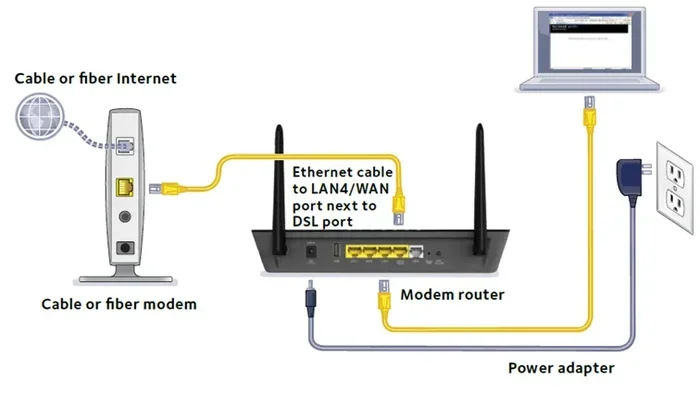
The ONT is the bridge between the fiber network and your home. It sits on the wall or near your main fiber entry point. A small fiber optic cable runs from outside into the ONT. The ONT then connects to your router through an ethernet cable.
Here is what the ONT does:
- Converts light signals to data: This is its main job.
- Provides a physical connection: It gives you an ethernet port to plug in your router.
- Manages the fiber link: It keeps the connection stable and secure.
Some people call the ONT a fiber modem, and that is not wrong. It does the same basic job. But it is important to know that you cannot use a regular cable modem with fiber. The technology is completely different.
Modem Vs Router: Understanding The Difference
Many people confuse modems and routers. They are not the same thing, even though they work together. Let us break it down simply.
A modem connects your home to the internet. A router distributes that internet connection to your devices. In a fiber setup, the ONT acts as the modem, and a separate router sends the signal around your home.
Gateway Devices That Combine Both
Some fiber providers offer a gateway device. This is a single box that acts as both the ONT and the router. It handles the fiber connection and broadcasts your Wi-Fi signal. Gateway devices are convenient, but they may not offer the best performance.
Here is a quick look at the pros and cons:
- Pros of a gateway: One device, fewer cables, simpler setup.
- Cons of a gateway: Less flexibility, harder to upgrade, may limit your wireless router performance.
If you want better control over your home network, you can use a separate ONT and router. This setup gives you more options and often better speeds.
What Equipment Do You Need For Fiber Internet?
Now that you know the ONT is the key piece, let us talk about what else you need. The equipment list for fiber internet is shorter than you might think.
Here is what a basic fiber setup requires:
- An ONT: Provided by your fiber ISP or purchased separately.
- A router: Either provided by your ISP or bought on your own.
- An ethernet cable: To connect the ONT to the router.
- A fiber optic cable: This runs from the wall to the ONT. Your provider handles this part.
ISP-Provided Equipment vs. Buying Your Own
Most fiber internet providers give you the ONT and router for free or for a small monthly fee. This is called ISP equipment. It is the easiest option because everything is pre-configured.
But buying your own equipment has benefits. You save money in the long run. You get to choose higher-quality gear. And you have full control over your home network settings.
Before you buy anything, check with your fiber provider. Some ISPs require you to use their equipment. Others let you bring your own compatible device. Always confirm this before making a purchase.
Quick Tips For Choosing Fiber Equipment
- Check compatibility: Not all routers work with every ONT. Make sure your gear is compatible.
- Look for Gigabit support: If you have a fast fiber plan, your router needs to handle those speeds.
- Consider Wi-Fi 6 or Wi-Fi 7: These newer wireless standards offer better performance for multiple devices.
- Ask your ISP about standalone options: Some providers let you rent just the ONT and use your own router.
Setting Up Your Fiber Internet Connection
Setting up fiber internet is easier than most people expect. You do not need to be a tech expert. Here is a simple walkthrough of the process.
Step-by-Step Installation Tips
- Find your fiber entry point: This is where the fiber optic cable enters your home. It is usually on an exterior wall.
- Install the ONT: Mount the ONT near the entry point. Your ISP installer usually handles this.
- Connect the fiber cable: The thin fiber line plugs directly into the ONT. Handle it carefully, as it is fragile.
- Link the ONT to your router: Use an ethernet cable to connect the ONT to your router.
- Power everything on: Plug in the ONT and router. Wait for the lights to stabilize.
- Run an internet speed test: Check that you are getting the speeds your plan promises.
That is it. No drivers to install. No CDs to insert. Just plug and play.
Common Mistakes People Make With Fiber Equipment
Even though setup is simple, people still make mistakes. Here are a few to avoid:
- Using a regular cable modem: A coaxial modem will not work with fiber. You must use an ONT.
- Skipping the ethernet connection: Some people try to set up Wi-Fi without a wired link between the ONT and router. This causes problems.
- Bending the fiber cable too sharply: Fiber cables are delicate. Sharp bends can break the inner fibers and kill your connection.
- Ignoring firmware updates: Keep your ONT and router updated for the best performance and security.
Expert Insights On Fiber Internet Equipment
We asked a few networking experts about fiber equipment choices. Here is what they had to say.
Most people overthink fiber setup, says one IT professional. They think they need special gear or technical skills. In reality, the ONT does all the heavy lifting. Your job is just to connect the router and enjoy the speeds.
Another expert points out that buying your own router is the best upgrade you can make. ISP-provided routers are often basic. A good standalone router can unlock your fiber plan’s full potential, especially for large homes with many devices.
The consensus among experts is clear. Fiber internet equipment is simple. The ONT replaces the old modem. A good router handles the rest. Focus on quality equipment, and your fiber connection will perform at its best.
Fiber Internet Speed And Performance Expectations
One of the biggest reasons people switch to fiber is the speed. But what can you really expect from a fiber connection in everyday use?
Most residential fiber plans offer speeds between 100 Mbps and 10 Gbps. Even the lower-end plans are significantly faster than cable or DSL. Upload speeds are also symmetric, meaning your upload speed matches your download speed. This is a huge advantage for video calls, streaming, and cloud backups.
To get the most out of your fiber connection, make sure your equipment can keep up. An older router with fast Ethernet ports (100 Mbps) will bottleneck a 1 Gbps fiber plan. Look for routers with Gigabit or multi-gigabit ports.
Also, consider the number of devices in your home. A smart home with dozens of connected gadgets needs a strong router. A mesh Wi-Fi system can help spread the signal evenly throughout your house.
Frequently Asked Questions
Can I use my old cable modem with fiber internet?
No, you cannot. Cable modems work with coaxial cables, and fiber internet uses light through glass cables. You need an ONT to make fiber work in your home. Using the wrong equipment will not connect to the internet.
Do fiber internet providers give you a modem?
Yes, most fiber ISPs provide an ONT and often a router as part of your service. Some charge a small monthly rental fee, while others include the equipment for free. Check with your specific fiber provider to confirm what they offer.
What is the difference between an ONT and a regular modem?
A regular modem converts electrical signals from copper cables into digital data. An ONT does the same job but with light signals from fiber optic cables. They serve the same purpose, but the technology inside them is completely different.
Can I buy my own ONT instead of renting from my ISP?
In some cases, yes. However, not all ONTs work with every fiber provider. Check with your ISP before purchasing a third-party ONT. Compatibility is key to making sure your fiber internet runs smoothly.
Do I need a router if I already have an ONT?
Yes, you do. The ONT connects your home to the internet, but it does not create a Wi-Fi network. You need a router to distribute the connection to your phones, laptops, smart TVs, and other devices. Some people use a gateway device that combines both functions.
Is fiber internet better than cable internet?
Yes, fiber internet is generally better. It offers faster speeds, more reliable connections, and symmetric upload and download speeds. Fiber is also less affected by weather and network congestion compared to cable internet. For most users, fiber is the best choice available today.
Conclusion
So, do I need a modem for fiber internet? You need an ONT, which serves the same purpose as a traditional modem. Your fiber provider will either supply this device or guide you on how to get one. Pair it with a good router, and you have everything you need for a fast, reliable fiber connection.
Fiber internet is the future of home connectivity. It is fast, stable, and easier to set up than older connection types. Once you understand the equipment, everything clicks into place. The ONT handles the fiber link, and your router spreads the signal around your home.
Take the time to choose the right equipment for your needs. Whether you use ISP-provided gear or invest in your own, the goal is the same. A strong, fast fiber connection that keeps everyone in your household connected. Start with the basics, avoid common setup mistakes, and enjoy the incredible speeds that fiber internet delivers.