Can Speakers Run On Usb Without Needing A Wall Plug
Can speakers run on USB? Absolutely. Many speakers can draw power directly from a USB port, removing the need for a wall plug entirely. USB-powered speakers are portable, easy to set up, and perfect for desktops, laptops, and outdoor trips. This guide explains how they work, their pros and cons, and how to choose the right one.
Have you ever been sitting at your desk, enjoying music through your USB-powered speakers, and suddenly thought, “Can speakers really run on USB without needing a wall plug?” It is a question more people are asking every day. With so many devices charging through USB ports now, it makes sense that portable speakers would follow the same trend.
The short answer is yes. Many speakers can run entirely on USB power. No wall outlet needed. No bulky power adapter. Just plug them in and start listening. But the full picture is a little more nuanced. Not all USB speakers are the same. Some are perfect for casual listening. Others fall flat when you push the volume higher. In this guide, we will walk you through everything you need to know about USB-powered audio. You will learn how they work, what types are available, what the pros and cons are, and how to pick the right pair for your needs.
Whether you are a student setting up a dorm room, a remote worker wanting a clean desk, or a music lover who values portability, this article has you covered. Let us dive in and explore the world of speakers that run on USB.
Key Takeaways
- USB speakers can run without a wall plug: They pull power directly from computers, laptops, or USB power banks.
- Bus-powered and self-powered USB speakers exist: Self-powered models deliver better sound and volume.
- Portability is the biggest advantage: You can take USB speakers anywhere without carrying extra cables.
- Power limits exist: USB ports supply limited wattage, which affects speaker size and volume.
- Sound quality varies widely: Expensive USB speakers outperform cheap ones in clarity and bass.
- Compatibility matters: Check your device’s USB output and speaker power needs before buying.
- Use a powered USB hub if needed: This solves low power issues from laptop or hub connections.
📑 Table of Contents
How Do USB-Powered Speakers Work?
Understanding how USB-powered speakers function is the first step toward making a smart purchase. The technology is simpler than most people think. When you plug a speaker into a USB port, the port delivers electrical power to the speaker’s internal amplifier. This amplifier then boosts the audio signal and sends it to the speaker drivers. That is it. No wall plug, no power brick, no extra cord.
Understanding USB Power Delivery
A standard USB 2.0 port delivers about 2.5 watts of power. USB 3.0 bumps that up to 4.5 watts. USB-C ports can deliver even more, sometimes up to 15 watts or more depending on the charger. This power is what keeps your computer speakers running. For small desktop speakers, this is usually more than enough. For larger speakers that need more power output, you may run into limitations. That is why some USB speakers include a built-in battery. They store energy and run independently for hours.
What Is Bus-Powered Audio?
You may hear the term “bus-powered” when shopping for USB speakers. This simply means the speaker draws all its power from the USB connection. It does not need any external power source. Think of it like a USB hub that powers your devices. Bus-powered active speakers are lightweight, compact, and great for basic tasks. They work well for video calls, casual music listening, and background audio. However, they may struggle with deep bass or high volume levels because of the limited USB power supply.
Types of Speakers That Can Run on USB
Not all USB speakers are created equal. There are several categories, and each serves a different purpose. Let us break them down so you can find the right fit.
Desktop USB Speakers
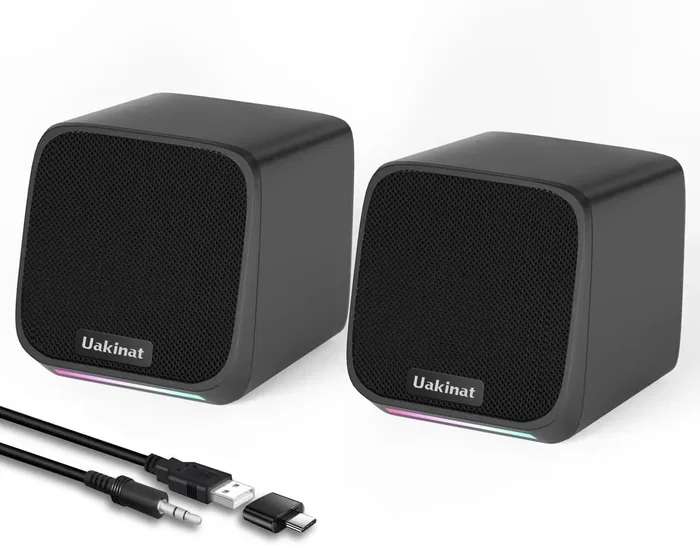
Desktop USB speakers are the most common type. They sit on your desk, plug directly into your computer, and deliver solid sound for everyday use. Brands like Logitech, Creative, and Anker make popular options. These speakers usually have a built-in USB cable and sometimes an auxiliary input for connecting phones or tablets. They are perfect for office workers, students, and anyone who wants a clean workspace without extra power cords.
Portable USB Speakers
Want to take your music on the go? Portable USB speakers are the answer. These compact units often double as battery-powered devices. You can charge them via USB, then unplug them and carry them to the beach, a picnic, or a camping trip. Many portable models also support Bluetooth speakers functionality, so you can stream wirelessly after charging them up. They bridge the gap between wired convenience and wireless freedom.
USB Speakers With Built-In Batteries
Some battery-powered USB speakers offer the best of both worlds. You can plug them into a USB port for continuous power and unlimited playback. Or you can charge the internal battery and use them unplugged. This flexibility is a game-changer. You get the convenience of a wall-plug-free setup with the freedom to move around. These speakers are ideal for outdoor gatherings, travel, and quick setups anywhere.
Benefits of USB-Powered Speakers
USB-powered speakers come with several advantages that make them appealing. Let us look at why so many people are making the switch.
Portability and Convenience
The biggest advantage is portability. You do not need to hunt for a wall outlet. Just plug your speaker into any USB port and you are ready to go. This makes USB speakers perfect for dorm rooms, shared offices, and travel. You can carry a small pair in your backpack and set up sound anywhere there is a computer or a USB power bank.
No Extra Power Cables
Less clutter on your desk is always a win. With USB speakers, you eliminate the need for a separate power adapter. One cable does the job of both power and audio. This keeps your workspace tidy and reduces cable mess. For people who value a clean, minimalist setup, this is a huge plus.
Easy Setup
Plugging in a USB speaker takes seconds. Most modern computers and laptops recognize USB audio devices instantly. You do not need to install special software in most cases. Just plug in, select the speaker as your audio output, and start listening. Some models may require a simple speaker driver update, but this is usually handled automatically by your operating system.
Cost-Effective Options
Many USB speakers are affordable. You can find solid options for under 30 dollars. They offer decent sound quality for the price. This makes them a great entry point for anyone who wants good audio without a big investment. They are also a smart choice for secondary rooms, kitchens, or bedrooms.
Limitations of USB Speakers
While USB speakers have many perks, they are not perfect. Understanding their limitations helps you set realistic expectations.
Power Limitations
A standard USB port cannot deliver a huge amount of power. This means large, high-volume speakers will struggle when running purely on USB. If you want loud, room-filling sound, a USB speaker alone may not cut it. The power output from a USB port is simply too low for big audio demands. You may notice distortion at higher volumes on smaller models.
Sound Quality Considerations
Budget USB speakers often sacrifice sound quality for convenience. They may sound thin or lack bass. If audio fidelity matters to you, you may need to invest in a higher-end model. Some premium USB speakers include built-in digital-to-analog converters, or DACs, which significantly improve sound quality. These models bridge the gap between convenience and performance.
Distance and Placement
Because USB speakers connect directly to your computer, your placement options are limited by cable length. You are generally stuck within a few feet of your device. This is fine for a desk setup. But if you want to place speakers across the room, you will need a longer USB cable or a different connection method. Some users solve this by using a USB extender cable.
How to Choose the Right USB Speaker
Picking the right USB-powered speaker depends on your needs. Here are the key factors to consider.
Power Requirements
Check how much power your speaker needs and compare it to your USB port’s output. A small desktop speaker with 2 to 5 watts will work fine on any standard USB port. Larger speakers with 10 watts or more may need a powered USB hub or a USB-C port with higher wattage delivery. Always check the product specifications before buying.
Sound Quality
Listen to reviews or, better yet, test the speaker in person if possible. Look for models that mention built-in DACs or high-quality driver units. A speaker with a frequency response range of at least 100 Hz to 20 kHz will cover most music genres well. If you love bass, look for speakers with dedicated bass drivers or passive radiators.
Compatibility
Make sure your speaker works with your devices. Most USB speakers work with Windows, Mac, and even some smart TVs and gaming consoles. If you plan to use it with a tablet or phone, check if it supports USB-C or if you need an adapter. USB audio compatibility is generally broad, but there are always exceptions.
Build Quality and Durability
Look for speakers with solid build quality, especially if you plan to move them around. Metal housings resist damage better than plastic. If you are using speakers outdoors, consider models with an IP rating for water and dust resistance. A sturdy design ensures your portable speakers last longer and perform reliably.
Extra Features
Some USB speakers come with extra features that add real value. Built-in microphones make them great for video calls. Volume controls on the speaker itself are always handy. Some models include LED lighting or multifunction buttons. Think about what features matter most to you and let that guide your choice.
Common Mistakes When Using USB Speakers
Even experienced users make mistakes with USB speakers. Here are some pitfalls to avoid.
Overloading USB Ports
Do not plug too many power-hungry devices into a single USB port. If you connect a high-power USB speaker to a hub that already powers a hard drive and a webcam, you may run into power issues. The speaker may cut out, produce crackling sounds, or not work at all. Use a powered USB hub to distribute power safely.
Ignoring Driver Updates
Sometimes USB speakers stop working or produce poor audio because of outdated drivers. Always check for speaker driver updates from the manufacturer’s website. Keeping your audio drivers current ensures the best performance and fixes known bugs. This is a simple step that many people overlook.
Skipping Quality Checks
Not all USB speakers are created equal. Cheap knockoff brands may look similar but deliver poor sound and unreliable connections. Stick with reputable brands and read user reviews before purchasing. A little research saves you from buying a pair of speakers that disappoint within weeks.
Using the Wrong USB Port
Not all USB ports are the same. A USB 3.0 port delivers more power than a USB 2.0 port. Using the right port can make a noticeable difference in speaker performance. If your speaker has a USB-C connector, make sure your device supports USB-C audio output. Using an incompatible port can lead to frustration and poor results.
Expert Tips for Better USB Speaker Performance
Want to get the most out of your USB-powered speakers? Here are some tips from audio enthusiasts and tech experts.
First, always use the shortest USB cable you can. Longer cables lose more power along the way, which can reduce speaker volume and clarity. A short, high-quality cable ensures maximum power reaches your speaker.
Second, place your speakers on a solid surface. Vibrations from thin or flimsy surfaces can muddy the sound. A sturdy desk or table helps your speakers produce cleaner audio. If you notice rattling or vibration, try moving them to a different surface.
Third, keep your drivers and firmware updated. Manufacturers often release updates that improve audio performance and fix bugs. Check the manufacturer’s website or companion app every few months for updates.
Fourth, if you need more volume or bass, consider adding a subwoofer. Some USB speaker systems come with a dedicated subwoofer that connects via USB or auxiliary cable. This gives you the deep, rich bass that small speakers alone cannot produce.
Finally, if you are using your speakers outdoors or away from a computer, invest in a high-quality USB power bank. A good power bank can keep your speakers running for hours, giving you true wireless freedom without sacrificing sound quality.
Conclusion
Can speakers run on USB? Yes, they absolutely can. USB-powered speakers offer a convenient, portable, and clutter-free alternative to traditional setups that require wall plugs. From compact desktop models to versatile portable options, there is a USB speaker for every need and budget. While they do have some limitations, such as power constraints and occasional sound quality trade-offs, the benefits far outweigh the drawbacks for most users.
By understanding how USB-powered audio works and following the tips in this guide, you can make a confident purchase and enjoy great sound wherever you go. No wall plug needed. Just plug in and play. Your ears will thank you.
So the next time someone asks, “Can speakers run on USB without a wall plug?” you will have all the answers. Share this guide with friends who are looking to simplify their audio setup. Happy listening.
Frequently Asked Questions
Can any speaker run on USB power?
Not all speakers can run on USB. Only speakers specifically designed with a USB power input can draw power this way. Most standard passive speakers need an external amplifier and cannot run on USB alone. Always check the product specifications to confirm USB power support before purchasing.
Do USB speakers sound as good as wall-powered speakers?
USB speakers can sound very good, but they often have power limitations that wall-powered speakers do not. Higher-end USB speakers with built-in DACs can deliver excellent sound quality. Budget USB speakers may sound thinner or lack deep bass compared to their wall-powered counterparts.
Can I use a USB hub to power my speakers?
Yes, you can use a USB hub, but a powered USB hub is recommended. An unpowered hub may not supply enough electricity for your speakers, leading to audio cutouts or low volume. A powered hub ensures stable and consistent power delivery to your USB-powered speakers.
How long can USB speakers run on a USB power bank?
Playback time depends on the speaker’s power consumption and the power bank’s capacity. Most small USB speakers can run for 6 to 12 hours on a fully charged power bank. Larger speakers with bigger drivers will drain the power bank faster. Check the speaker’s battery specs for exact estimates.
Are USB speakers good for gaming?
USB speakers can be great for gaming, especially compact desktop models. They offer easy setup and decent sound for casual gaming. For competitive or immersive gaming, dedicated gaming headsets or higher-end speaker systems may deliver better audio positioning and deeper bass.
Do I need to install software for USB speakers to work?
Most USB speakers work plug-and-play without any software. Your operating system recognizes them as audio devices automatically. Some advanced models may include companion software for equalizer settings or firmware updates, but this is optional and not required for basic playback.