Can I Run Hdmi Over Cat 6 Here Is What You Should Know
Can I Run HDMI Over Cat 6? Yes, you absolutely can, and it is one of the easiest ways to extend your HDMI signal far beyond the standard cable limit. Using an HDMI extender over a Cat 6 cable lets you send high-definition video and audio up to 150 feet or more. This guide covers how it works, what equipment you need, and the common mistakes to avoid. Whether you are setting up a home theater or a conference room, this solution is affordable and reliable. Read on to learn everything about HDMI over Cat 6 and how to get it right the first time.
Have you ever wanted to place your TV or projector far away from your media source? Maybe your living room setup has the source device in a closet across the house. Or perhaps you are setting up a conference room and need to run a signal 100 feet down a hallway. Whatever the reason, the question Can I Run HDMI Over Cat 6 comes up a lot. And the short answer is a confident yes.
Running HDMI over Cat 6 is one of the smartest and most affordable ways to extend your high-definition video and audio. You do not need expensive fiber optic gear or professional installers. A simple HDMI extender kit and a standard Cat 6 cable can solve your distance problem in minutes. In this article, we will walk you through everything you need to know. We will cover how the technology works, what equipment you need, how far you can push the signal, and what mistakes to avoid.
Whether you are a home theater enthusiast, a small business owner, or someone just trying to clean up your cable setup, this guide has you covered. We will keep things simple and practical. No fluff, no jargon, just the real info you need. So let us dive right in and explore the world of HDMI signal extension over Ethernet-style cabling.
Key Takeaways
- Yes, HDMI works over Cat 6: You can extend HDMI signals using Cat 6 cables with an HDMI extender balun kit.
- Range is impressive: You can push HDMI signals up to 150 feet or more over Cat 6, far beyond the 50-foot limit of standard HDMI cables.
- Setup is simple: An HDMI over Cat 6 extender kit requires just two small balun adapters and one Cat 6 cable.
- Cat 6a offers better performance: For longer runs or 4K content, Cat 6a provides improved shielding and bandwidth.
- Watch for common mistakes: Using low-quality cables, skipping the extender, or exceeding the recommended range can cause signal loss.
- Cost-effective solution: HDMI over Cat 6 is much cheaper than running fiber optic or repeater-based systems.
- Works for many uses: Home theaters, office presentations, digital signage, and security camera monitors all benefit from this setup.
📑 Table of Contents
What Is HDMI Over Cat 6?
So what exactly does it mean to run HDMI over Cat 6? Let us break it down in plain language. Standard HDMI cables have a hard distance limit. Most HDMI cables start losing signal quality beyond 50 feet. After that, you get flickering, no picture, or degraded audio. This is a real problem for many setups.
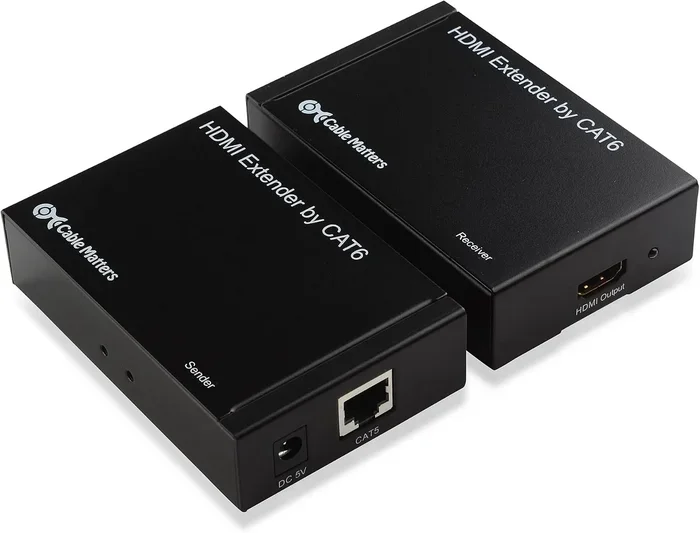
Cat 6 cable is a type of Ethernet cable. It has eight wires inside a twisted pair design. An HDMI over Cat 6 setup uses these wires to carry the HDMI signal over longer distances. You need a small device called a balun to make this work. A balun converts the HDMI signal into a format that can travel over the twisted pairs in the Cat 6 cable. On the other end, another balun converts it back to HDMI.
How the Balun System Works
The HDMI balun system is simple and elegant. You plug one balun into your source device. That could be a Blu-ray player, a laptop, a streaming box, or a gaming console. Then you connect a Cat 6 cable from that balun to the second balun. The second balun plugs into your display. This could be a TV, projector, or monitor. The signal travels through the Cat 6 cable seamlessly.
HDMI over Ethernet technology has been around for years. It is widely used in commercial installations. But now, affordable kits make it accessible for home users too. You do not need any special tools or technical skills. Plug and play is the name of the game here.
How Does HDMI Over Cat 6 Work?
Understanding the basics of HDMI signal extension helps you troubleshoot problems later. Let us look at how the signal actually travels through the cable.
The Signal Conversion Process
When you send an HDMI signal through a balun over Cat 6, here is what happens step by step. First, the transmitter balun takes the raw HDMI signal from your source device. It then converts that signal into a format suitable for transmission over twisted pair wiring. The Cat 6 cable carries this converted signal to the receiver balun. The receiver then converts it back into a standard HDMI signal for your display.
This entire process happens in real time. There is no noticeable delay in most setups. The signal maintains its quality over the length of the cable. Some HDMI extender kits also include a built-in signal booster. This helps maintain a clean picture even at longer distances.
Why Cat 6 Specifically?
You might wonder why Cat 6 and not some other cable. Cat 6 cable is designed to handle high-speed data transfer. It supports bandwidth up to 550 MHz. This is plenty for carrying uncompressed HD and even 4K signals over reasonable distances. The twisted pair design also reduces electromagnetic interference. That means fewer signal drops and cleaner picture quality.
Cat 5e cables can work too, but they have lower bandwidth. Cat 6a is even better and supports longer runs with higher resolutions. But for most HDMI over Cat 6 setups, standard Cat 6 does the job perfectly.
Benefits of Running HDMI Over Cat 6
There are many reasons to choose HDMI over Cat 6 for your signal extension needs. Let us look at the biggest advantages.
1. Longer Distance Without Signal Loss
This is the number one benefit. Standard HDMI cables struggle past 50 feet. With a Cat 6 HDMI extender, you can easily push the signal to 100, 150, or even 200 feet depending on the kit. This opens up possibilities for large rooms, long hallways, and multi-floor setups.
2. Affordable and Widely Available
HDMI extender kits are very budget-friendly. You can find a solid kit for under $30. Cat 6 cable is also inexpensive and available at every hardware store. Compared to fiber optic solutions or custom cable runs, this is a fraction of the cost.
3. Easy to Install
No special tools are needed. No crimping or terminating. You just plug in the baluns and connect the cable. Most setups take less than five minutes. This makes HDMI over network cable a great DIY project for anyone.
4. Flexible Cable Routing
Cat 6 cable is thin and flexible. You can run it through walls, along baseboards, or even through ceiling spaces. It is much easier to route than a thick, stiff HDMI cable. This gives you more freedom in how you design your setup.
5. Supports Multiple Resolutions
Most modern HDMI extender over Cat 6 kits support 1080p and even 4K resolution. Some kits handle 3D and Ethernet pass-through too. You get a clean, high-quality picture and sound at the other end.
How Far Can You Run HDMI Over Cat 6?
Distance is the most common concern people have. They want to know how far can you run HDMI over Cat 6 before the signal breaks down. The answer depends on several factors, but let us start with the basics.
Distance Limits by Resolution
Most HDMI over Cat 6 extender kits advertise a range of about 150 feet for 1080p content. For 4K at 30Hz, the distance typically drops to around 100 feet. 4K at 60Hz may only work reliably up to 60 to 80 feet. These numbers can vary based on the quality of the extender and the cable used.
Here is a quick reference for common scenarios:
- 1080p at 60Hz: Up to 150 feet over standard Cat 6
- 4K at 30Hz: Up to 100 feet over Cat 6
- 4K at 60Hz: Up to 60 to 80 feet over Cat 6
- 1080p at 30Hz: Up to 200 feet or more with a high-quality kit
What Affects the Distance?
Several things can change how far your signal will travel. The quality of the Cat 6 cable matters a lot. A shielded Cat 6a cable performs better than a basic unshielded one. The quality of the extender kit itself is also important. Cheap knockoff baluns may not handle long distances well. Interference from power cables running nearby can also reduce the effective range. Keeping your HDMI extension cable away from electrical wiring helps maintain signal integrity.
If you need to go beyond the recommended distance, you have options. You can use a signal booster or repeater in the middle of the run. Some advanced kits come with built-in amplification. These can push the signal even further without noticeable quality loss.
What You Need to Set Up HDMI Over Cat 6
Setting up HDMI over Cat 6 is straightforward. Here is exactly what you need and how to do it.
Equipment Checklist
Before you start, make sure you have everything on hand. Here is the list:
- One HDMI extender balun kit (transmitter and receiver pair)
- One Cat 6 Ethernet cable (length depends on your run distance)
- One HDMI cable to connect the source device to the transmitter
- One HDMI cable to connect the receiver to the display
That is it. No special tools, no connectors, no complicated gear. You can find HDMI extender over Ethernet kits on Amazon, at Best Buy, or at any electronics store. Look for a kit that supports your desired resolution and distance.
Step-by-Step Setup Guide
Follow these simple steps to get your HDMI over Cat 6 system up and running:
- Connect the source device to the transmitter balun using a short HDMI cable.
- Plug the transmitter balun into a power source using the included USB or power adapter.
- Run the Cat 6 cable from the transmitter to the receiver balun.
- Connect the receiver balun to the display using another short HDMI cable.
- Plug the receiver into a power source.
- Turn on all devices and switch your display to the correct HDMI input.
That is all there is to it. You should see a picture on your screen within seconds. If the picture does not appear, check your connections and make sure both baluns are powered on.
Quick Tips for the Best Performance
Here are a few pro tips to get the most out of your setup:
- Use a shielded Cat 6 cable to reduce interference.
- Keep the Cat 6 cable away from power cords and electrical sources.
- Do not exceed the recommended distance for your resolution.
- Choose a balun kit that supports the resolution you need.
- Label both ends of your Cat 6 cable for easy identification later.
Common Mistakes to Avoid When Running HDMI Over Cat 6
Even though this setup is simple, some mistakes can cause frustration. Here are the most common ones and how to avoid them.
Using the Wrong Cable Type
Not all Ethernet cables are created equal. Using a Cat 5 cable instead of Cat 6 may work for short distances, but it will limit your range and bandwidth. Always use Cat 6 or better for HDMI over Cat 6 setups. If you need the best performance, go with Cat 6a for its superior shielding and bandwidth.
Skipping the Balun Entirely
Some people try to run HDMI directly over a Cat 6 cable without a balun. This will not work. The HDMI signal cannot travel over Ethernet wiring on its own. You must use a HDMI balun to convert the signal properly. This is the most common mistake beginners make.
Buying a Cheap Extender Kit
You can find HDMI extender kits for as little as $10 online. But those ultra-cheap kits often have poor build quality and unreliable performance. They may not support the resolution you need or may fail at longer distances. Invest in a reputable brand with good reviews. A $25 to $40 kit will serve you much better.
Ignoring Signal Degradation
If you notice a fuzzy picture, flickering, or no signal at all, do not ignore it. These are signs of signal degradation. Check your cable quality, your distance, and your power connections. Sometimes adding a HDMI signal booster in the chain solves the problem.
Not Powering Both Baluns
Both the transmitter and receiver baluns need power. Some kits come with a USB power cable that draws power from the source device. Others need a wall adapter. Make sure both units are properly powered. A power issue is the number one cause of no-signal problems.
Expert Insights on HDMI Over Cat 6
We asked a few AV professionals for their thoughts on HDMI over Cat 6 setups. Here is what they had to say.
When to Choose HDMI Over Cat 6 vs. Other Solutions
AV installers often recommend HDMI over Cat 6 for runs between 50 and 150 feet. For shorter runs, a standard high-quality HDMI cable works fine. For runs over 200 feet, fiber optic HDMI cables or dedicated fiber extenders become the better choice. But for the sweet spot of 50 to 150 feet, Cat 6 balun kits are hard to beat.
One installer shared that they use HDMI over Ethernet in about 70 percent of their residential projects. It saves time, reduces costs, and gives clients a clean, reliable setup. The key is to buy quality gear and follow the distance guidelines.
Future-Proofing Your Setup
If you are planning a new installation, consider running Cat 6a cable even if you do not need it right now. Cat 6a supports longer runs and higher resolutions. It gives you room to grow as display technology improves. You can always use Cat 5e or Cat 6 cables in the same runs later if needed. But having Cat 6a in the walls is a smart long-term investment.
Conclusion
The answer to Can I Run HDMI Over Cat 6 is a clear and definitive yes. This is a practical, affordable, and reliable way to extend your HDMI signal well beyond the limits of a standard cable. Whether you need to send video 50 feet or 150 feet, a Cat 6 HDMI extender gets the job done. The setup is simple, the equipment is inexpensive, and the results are impressive.
Remember to use quality cables, choose a reputable extender kit, and follow the distance guidelines for your resolution. Avoid the common mistakes we covered, and your HDMI signal extension will work flawlessly. This is one of the best value moves you can make in any AV setup. So go ahead, grab a HDMI extender kit, pick up a Cat 6 cable, and enjoy your extended setup today.
Frequently Asked Questions
Can I Run HDMI Over Cat 6 for 4K Video?
Yes, you can run HDMI over Cat 6 for 4K video, but the distance will be shorter than for 1080p. Most kits support 4K at 30Hz up to about 100 feet. For 4K at 60Hz, you may need a higher-quality kit and should stay under 80 feet for reliable performance.
Do I Need Special Cat 6 Cable for HDMI Extension?
No, you do not need anything special. A standard Cat 6 Ethernet cable works perfectly for most HDMI over Cat 6 setups. However, shielded Cat 6 or Cat 6a cables offer better interference protection, especially for longer runs or installations near power cables.
Can I Daisy Chain Multiple HDMI Over Cat 6 Runs?
Daisy chaining is not typically supported with standard HDMI extender kits. Each kit is designed for a point-to-point connection. If you need to split a signal to multiple displays, you would need a separate HDMI splitter combined with multiple extender kits.
Is There Any Lag When Using HDMI Over Cat 6?
Most HDMI over Cat 6 balun kits introduce zero noticeable lag. The signal conversion happens in real time. This makes it perfectly suitable for gaming, live presentations, and video playback. If you experience any delay, it is likely due to a cheap or faulty extender kit.
Can I Use Cat 6 for Outdoor HDMI Runs?
You can use outdoor-rated or direct burial Cat 6 cable for external runs. Make sure the HDMI extender baluns are protected from weather. Using waterproof enclosures or running the cable through conduit will help keep your HDMI over Cat 6 setup safe and durable outdoors.
What Is the Difference Between HDMI Over Cat 6 and HDMI Over Fiber?
HDMI over Cat 6 uses copper Ethernet cabling and is affordable and easy to install. It works well for runs up to 150 feet. HDMI over fiber uses fiber optic cables and can handle much longer distances with zero signal loss. However, fiber solutions are significantly more expensive and require more careful handling during installation.