Can I Plug Thunderbolt 3 Into Thunderbolt 4 Easily
Yes, you can plug Thunderbolt 3 into Thunderbolt 4 and it will work perfectly. Thunderbolt 4 is backward compatible with Thunderbolt 3 devices, so your existing cables and accessories still function without any issues. However, you may not get the full Thunderbolt 4 speed boost unless both the port and the device support it.
You just got a shiny new laptop with a Thunderbolt 4 port. Maybe you saved up for it or got it as a work upgrade. Then it hits you. You have a bunch of Thunderbolt 3 cables, docks, and peripherals lying around. Can I plug Thunderbolt 3 into Thunderbolt 4? Will it even work? Or will you be stuck buying all new accessories?
The short answer is yes. You can absolutely plug Thunderbolt 3 into Thunderbolt 4. They are designed to work together. But there are a few things you should know before you start plugging things in and assuming everything will run at peak performance. Let us walk through it all in plain, simple terms.
Key Takeaways
- Full Backward Compatibility: Thunderbolt 4 ports accept Thunderbolt 3 cables and devices without any problems.
- Speed May Vary: A Thunderbolt 3 device will run at Thunderbolt 3 speeds, even when plugged into a Thunderbolt 4 port.
- Same Connector Shape: Both Thunderbolt 3 and Thunderbolt 4 use the same USB-C connector design.
- Docking Stations Work: Your Thunderbolt 3 dock will function fine with a Thunderbolt 4 laptop.
- No Special Cables Needed: You do not need to replace your Thunderbolt 3 cables when upgrading to Thunderbolt 4.
- USB4 Compatibility: Thunderbolt 4 also works with USB4 devices, giving you more flexibility.
- Check Both Ends: The speed you get depends on the capabilities of both the port and the device you are plugging in.
📑 Table of Contents
- What Is Thunderbolt 3?
- What Is Thunderbolt 4?
- Can I Plug Thunderbolt 3 Into Thunderbolt 4?
- Does Thunderbolt 4 Work with Thunderbolt 3 Docks and Cables?
- Thunderbolt 3 vs Thunderbolt 4: Side-by-Side Comparison
- What About USB4 and USB-C? How Do They Fit In?
- Real-World Examples: What Happens When You Plug Thunderbolt 3 Into Thunderbolt 4
- Common Mistakes People Make with Thunderbolt 3 and Thunderbolt 4
- Expert Tips for Getting the Most Out of Thunderbolt 3 and Thunderbolt 4
- Final Thoughts
What Is Thunderbolt 3?
Thunderbolt 3 is a connectivity standard made by Intel. It uses the USB-C connector shape, which is the small, oval-shaped port you see on many modern laptops and phones. Thunderbolt 3 launched back in 2015 and quickly became popular because of its versatility.
Here is what makes Thunderbolt 3 special:
- Data Transfer Speed: Up to 40 gigabits per second.
- Video Output: Supports one 4K display at 60Hz or two 4K displays at 30Hz.
- Power Delivery: Can charge your laptop up to 100 watts.
- Daisy Chaining: You can connect up to six devices in a chain from one port.
When you plug a Thunderbolt 3 cable into a Thunderbolt 3 port, you get all of these benefits. It is a powerful standard that still holds up well today. Many people still use Thunderbolt 3 docks, cables, and external GPUs every single day without any issues.
What Is Thunderbolt 4?
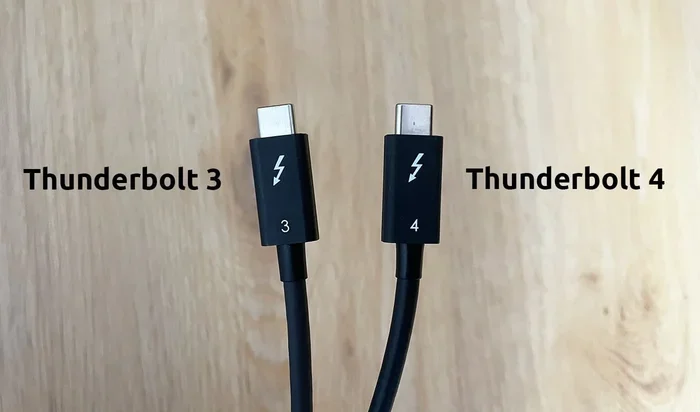
Thunderbolt 4 came out in 2020. It is the newer version of Intel’s Thunderbolt standard. It uses the exact same USB-C connector as Thunderbolt 3. So physically, you cannot tell them apart just by looking at the port or the cable.
Thunderbolt 4 builds on the foundation of Thunderbolt 3. Here are the key upgrades:
- Data Transfer Speed: Still up to 40 gigabits per second, but with stricter requirements for consistent performance.
- Video Output: Supports up to two 4K displays at 60Hz or one 8K display.
- Power Delivery: Still up to 100 watts, with better power delivery rules.
- Security: Includes Intel VT-d-based direct memory access protection for better security.
- Wake from Sleep: Thunderbolt 4 docks must be able to wake your laptop from sleep when a peripheral is connected.
The big takeaway is that Thunderbolt 4 raises the bar for minimum performance. Every Thunderbolt 4 device must meet these higher standards. But it does not change the physical connection. That is why Thunderbolt 3 and Thunderbolt 4 are so compatible with each other.
Can I Plug Thunderbolt 3 Into Thunderbolt 4?
This is the question that brought you here, and we have a clear answer for you. Yes, you can plug Thunderbolt 3 into Thunderbolt 4. The connector is physically identical. The USB-C shape works both ways. You will not damage anything. You will not break your port or your cable.
When you plug a Thunderbolt 3 device into a Thunderbolt 4 port, the connection works. Your external hard drive will still transfer files. Your monitor will still display your screen. Your keyboard and mouse will still work through the dock. Everything functions as expected.
However, here is the important part. Your Thunderbolt 3 device will run at Thunderbolt 3 speeds. It will not magically become faster just because you plugged it into a Thunderbolt 4 port. The connection will negotiate the highest speed that both devices support. Since your Thunderbolt 3 device tops out at 40 Gbps, that is the speed you will get.
Why Does This Happen?
Think of it like a highway. Thunderbolt 4 is a highway that can handle cars going up to 120 miles per hour. Thunderbolt 3 is a highway that handles up to 100 miles per hour. If you drive a Thunderbolt 3 car on a Thunderbolt 4 highway, you still go 100 miles per hour. The highway is capable of more, but your car limits the speed.
The same logic applies here. The Thunderbolt 4 port can handle Thunderbolt 4 speeds, but your Thunderbolt 3 device caps out at Thunderbolt 3 speeds. The connection works perfectly. You just do not get the extra Thunderbolt 4 benefits beyond what Thunderbolt 3 already offers.
Will I Lose Any Features?
No, you will not lose features by plugging Thunderbolt 3 into Thunderbolt 4. All the core capabilities remain intact. You still get 40 Gbps data transfer. You still get video output. You still get power delivery. The only things you miss out on are the Thunderbolt 4-specific enhancements, like the stricter minimum requirements for wake-from-sleep and DMA protection.
For most everyday users, this does not matter at all. Your workflow will feel exactly the same. You plug in your dock, connect your monitor, and get to work.
Does Thunderbolt 4 Work with Thunderbolt 3 Docks and Cables?
Yes, it does. Thunderbolt 4 is fully backward compatible with Thunderbolt 3 accessories. This includes:
- Thunderbolt 3 Docking Stations: Your Thunderbolt 3 dock will work with a Thunderbolt 4 laptop. You can connect multiple monitors, charge your laptop, and use peripherals all through one cable.
- Thunderbolt 3 Cables: Your existing Thunderbolt 3 cables work fine with Thunderbolt 4 ports. You do not need to buy new cables.
- Thunderbolt 3 External Drives: Your external storage devices will connect and work normally.
- Thunderbolt 3 Adapters: Any Thunderbolt 3 adapter or hub will function with a Thunderbolt 4 port.
This backward compatibility is one of the best things about the Thunderbolt ecosystem. Intel designed Thunderbolt 4 to work seamlessly with older Thunderbolt 3 gear. So you can upgrade your laptop or desktop without throwing away all your existing accessories.
When Should You Upgrade Your Cables?
You do not need to upgrade your Thunderbolt 3 cables just because you have a Thunderbolt 4 port. However, there are a few situations where a Thunderbolt 4 cable might make sense:
- You Are Buying New Cables Anyway: If you need to replace a damaged cable, going with Thunderbolt 4 gives you future-proofing.
- You Want the Best Performance: Thunderbolt 4 cables are tested to meet stricter performance standards. They guarantee full 40 Gbps speeds at longer cable lengths.
- You Are Building a Permanent Setup: If you are setting up a permanent workstation with a Thunderbolt 4 dock, using Thunderbolt 4 cables ensures you are getting the best possible experience.
But if your Thunderbolt 3 cables are working fine, keep using them. There is no urgent reason to replace them.
Thunderbolt 3 vs Thunderbolt 4: Side-by-Side Comparison
Let us compare Thunderbolt 3 and Thunderbolt 4 side by side. This will help you understand exactly what you gain and what you keep when you mix the two standards.
| Feature | Thunderbolt 3 | Thunderbolt 4 |
|---|---|---|
| Connector Type | USB-C | USB-C |
| Max Data Speed | 40 Gbps | 40 Gbps |
| Video Support | 1 x 4K at 60Hz or 2 x 4K at 30Hz | 2 x 4K at 60Hz or 1 x 8K |
| Power Delivery | Up to 100W | Up to 100W |
| Daisy Chain Support | Up to 6 devices | Up to 6 devices |
| Minimum Performance Requirements | Flexible | Strict and standardized |
| Security Features | Basic | Intel VT-d DMA protection |
| Wake from Sleep | Not required | Required for docks |
| Backward Compatible | Yes (with Thunderbolt 2) | Yes (with Thunderbolt 3) |
As you can see, Thunderbolt 4 is not a huge leap over Thunderbolt 3 in terms of raw speed. Both offer 40 Gbps. The real differences come down to minimum requirements, security, and video support. When you plug Thunderbolt 3 into Thunderbolt 4, you get the best of both worlds. Your older devices work, and your new port offers enhanced security and reliability.
What About USB4 and USB-C? How Do They Fit In?
This is where things can get a little confusing. USB4 is another standard that uses the USB-C connector. It was developed by the USB Implementers Forum, not Intel. But Thunderbolt 4 is built on top of the USB4 protocol. So Thunderbolt 4 devices are also USB4 compatible.
Here is how it all connects:
- USB-C: Just a connector shape. It does not tell you anything about the protocol inside.
- USB4: A protocol that runs over USB-C. It supports up to 40 Gbps.
- Thunderbolt 3: Intel’s protocol that runs over USB-C. It supports up to 40 Gbps.
- Thunderbolt 4: Intel’s newer protocol that runs over USB-C and USB4. It supports up to 40 Gbps with stricter requirements.
Because Thunderbolt 4 is built on USB4, it can also work with USB4 devices. When you plug a USB4 device into a Thunderbolt 4 port, it works. When you plug a Thunderbolt 3 device into a Thunderbolt 4 port, it also works. The ecosystem is designed to be flexible and user-friendly.
The key thing to remember is that USB-C does not always mean Thunderbolt. Not every USB-C port supports Thunderbolt speeds. Look for the lightning bolt icon next to the port to confirm it is a Thunderbolt port. Without that symbol, you might just have a standard USB-C port with slower speeds.
Real-World Examples: What Happens When You Plug Thunderbolt 3 Into Thunderbolt 4
Let us look at a few real-world scenarios. These examples will help you picture exactly what happens in everyday use.
Scenario 1: Connecting a Thunderbolt 3 Dock to a Thunderbolt 4 Laptop
You have a Thunderbolt 4 laptop, like a recent MacBook Pro or a Dell XPS. You also have a Thunderbolt 3 dock from a few years ago. You plug the Thunderbolt 3 cable from the dock into the Thunderbolt 4 port on your laptop. Everything works. Your external monitor turns on. Your keyboard and mouse connect. Your external hard drive is recognized. You charge your laptop through the dock. It is seamless.
The only thing you will notice is that if the dock has any Thunderbolt 4-specific features, they will not be available. But for basic docking, you will never know the difference.
Scenario 2: Using a Thunderbolt 3 External SSD with a Thunderbolt 4 Desktop
You have a Thunderbolt 4 desktop workstation. You plug in your Thunderbolt 3 external SSD. The drive mounts instantly. Transfer speeds will be the same as what you got with your Thunderbolt 3 laptop. You will not see any speed boost from the Thunderbolt 4 port. But the drive works perfectly for storing and accessing large files.
Scenario 3: Plugging a Thunderbolt 3 Cable into a Thunderbolt 4 Monitor
Some monitors now come with Thunderbolt 4 ports. You can connect your Thunderbolt 3 laptop to a Thunderbolt 4 monitor using a Thunderbolt 3 cable. The video signal transmits fine. The monitor displays your screen at the resolution your laptop supports. You can even use the monitor’s USB-C port to charge your laptop in some cases.
These examples show that mixing Thunderbolt 3 and Thunderbolt 4 is completely fine. You do not need to stress about compatibility.
Common Mistakes People Make with Thunderbolt 3 and Thunderbolt 4
Even though Thunderbolt 3 and Thunderbolt 4 are compatible, people still make mistakes. Here are a few to avoid:
Assuming All USB-C Ports Are Thunderbolt
This is the number one mistake. Not every USB-C port supports Thunderbolt. A regular USB-C port on a cheap laptop might look the same as a Thunderbolt port, but it will not deliver Thunderbolt speeds. Always look for the lightning bolt symbol.
Expecting Thunderbolt 3 Devices to Run Faster on Thunderbolt 4 Ports
Your Thunderbolt 3 device will not suddenly become faster on a Thunderbolt 4 port. The speed is determined by the device, not just the port. Do not buy a Thunderbolt 4 port expecting it to boost your older Thunderbolt 3 gear.
Using Non-Thunderbolt Cables for Thunderbolt Devices
A regular USB-C cable will not support Thunderbolt speeds. If you want Thunderbolt performance, you need a Thunderbolt-certified cable. It will have the Thunderbolt logo on it. Using a plain USB-C cable with a Thunderbolt device will limit your speeds to USB levels.
Ignoring Cable Length Limits
Thunderbolt cables have length limits for optimal performance. Active Thunderbolt 3 and Thunderbolt 4 cables can reach up to 2 meters at full speed. Passive cables are shorter. Using a cable that is too long without an active signal booster can cause speed drops or connection issues.
Expert Tips for Getting the Most Out of Thunderbolt 3 and Thunderbolt 4
Here are some practical tips from people who work with Thunderbolt technology every day:
- Label Your Cables: If you have both Thunderbolt 3 and Thunderbolt 4 cables, label them. It helps you know which ones are certified for full Thunderbolt speeds.
- Check Firmware Updates: Keep your laptop and dock firmware up to date. Manufacturers often release updates that improve Thunderbolt compatibility and performance.
- Use a Powered Dock: When connecting multiple devices through a dock, use a powered dock. This ensures stable power delivery and prevents bandwidth issues.
- Test Your Speeds: Use a tool like Blackmagic Disk Speed Test to check your actual transfer speeds. This helps you confirm that your Thunderbolt connection is performing as expected.
- Buy from Trusted Brands: Not all Thunderbolt accessories are created equal. Buy from reputable brands that are Intel Thunderbolt Certified.
- Keep a Spare Cable: Thunderbolt cables can be expensive. Keep a backup Thunderbolt 3 cable in your bag so you are never stuck without a working connection.
Final Thoughts
So, can I plug Thunderbolt 3 into Thunderbolt 4? Absolutely yes. The two standards are fully compatible. Your Thunderbolt 3 devices, cables, docks, and adapters will all work with Thunderbolt 4 ports. You do not need to replace anything. The connection is seamless and straightforward.
The main thing to keep in mind is that plugging a Thunderbolt 3 device into a Thunderbolt 4 port will not make your device faster. You will get the speeds your Thunderbolt 3 device supports. But for everyday use, this does not matter. The connection works, the features work, and you can keep using your existing gear without any headaches.
Thunderbolt 4 is a great upgrade for new laptops and desktops. But Thunderbolt 3 is still a strong, reliable standard that works just fine with the newer Thunderbolt 4 ecosystem. Whether you are a creative professional, a business user, or a casual consumer, you can mix and match Thunderbolt 3 and Thunderbolt 4 devices with confidence. The future of Thunderbolt is backward compatible, and that is great news for all of us who have invested in Thunderbolt accessories over the years.
So go ahead. Plug in your Thunderbolt 3 devices to your Thunderbolt 4 ports. You will be just fine. And if you ever do decide to upgrade to Thunderbolt 4 accessories down the road, you will be ready for the full experience.
Frequently Asked Questions
Do Thunderbolt 3 and Thunderbolt 4 use the same cable?
Yes, they use the same USB-C connector. A Thunderbolt 3 cable can be plugged into a Thunderbolt 4 port and vice versa. Both cables look identical and work interchangeably. However, Thunderbolt 4 cables are tested to meet stricter performance standards, so they may offer better reliability at longer lengths.
Will my Thunderbolt 3 external drive work with a Thunderbolt 4 Mac?
Yes, it will work perfectly. Thunderbolt 4 on Mac is fully backward compatible with Thunderbolt 3 drives. Your external drive will connect, mount, and transfer files at Thunderbolt 3 speeds. You do not need to do anything special to make it work.
Can I use a Thunderbolt 3 cable with a Thunderbolt 4 monitor?
Yes, you can. A Thunderbolt 3 cable will connect to a Thunderbolt 4 monitor without any issues. You will get video output and data transfer just like you would with a Thunderbolt 4 cable. The only difference is that you will not access Thunderbolt 4-specific features, which mostly apply to the host device rather than the cable itself.
Is Thunderbolt 4 faster than Thunderbolt 3?
In terms of maximum data speed, both Thunderbolt 3 and Thunderbolt 4 support up to 40 Gbps. Thunderbolt 4 is not faster in raw speed. However, Thunderbolt 4 has stricter minimum performance requirements, better video support, enhanced security features, and improved power delivery rules. So Thunderbolt 4 is more reliable and consistent, even if the top speed is the same.
Do I need Thunderbolt 4 cables for a Thunderbolt 4 laptop?
No, you do not need Thunderbolt 4 cables. Thunderbolt 3 cables work fine with Thunderbolt 4 laptops. Your existing Thunderbolt 3 cables will handle data transfer, video output, and charging without any problems. You only need Thunderbolt 4 cables if you are buying new ones and want the extra peace of mind that comes with stricter certification.
What happens if I plug a non-Thunderbolt USB-C device into a Thunderbolt 4 port?
It will work just like a regular USB-C connection. Your device will charge and transfer data, but at USB speeds, not Thunderbolt speeds. A Thunderbolt 4 port is backward compatible with USB devices. It does not force Thunderbolt speeds on non-Thunderbolt gear. The port automatically detects what is plugged in and adjusts accordingly.
=== CONCLUSION ===
Plugging Thunderbolt 3 into Thunderbolt 4 is easy, safe, and fully supported. You can use your existing Thunderbolt 3 accessories with a Thunderbolt 4 laptop or desktop without any compatibility issues. The connection works, the speeds are the same, and your devices function exactly as they always have. Thunderbolt 4 is designed to be backward compatible, which is great news for anyone who has built a Thunderbolt ecosystem over the years. So do not worry about upgrading. Your Thunderbolt 3 gear will work just fine with your new Thunderbolt 4 devices. Focus on what matters, and enjoy the seamless connectivity that Thunderbolt has always delivered.