Can A Broken Hdmi Port Still Work And How To Fix It
Yes, a broken HDMI port can still work in some cases, depending on the type and severity of the damage. You may still get a signal through loose connections, temporary fixes, or by using alternative cables and adapters. This guide explains exactly how to tell if your HDMI port is still functional and walks you through practical steps to fix a broken HDMI port at home or with professional help.
You plug in your HDMI cable and wait for the screen to light up. Nothing happens. You wiggle it. You try another port. Still nothing. Your heart sinks because you think your HDMI port is completely dead. But here is the thing a broken HDMI port can still work in many situations. The damage might be minor, temporary, or easy to fix. You just need to know what to look for and how to troubleshoot it.
This article covers everything you need to know about whether a damaged HDMI port can still function. We will walk through the signs of port failure, common causes, and step-by-step fixes you can try right now. Whether you are dealing with a loose HDMI connection or a completely snapped port, you will find practical solutions here. Let us get into it.
Key Takeaways
- A partially damaged HDMI port can still transmit a signal: minor bends or dirt don’t always mean total failure.
- Look for warning signs early: flickering screens, no signal errors, and loose connections hint at port damage.
- Try simple fixes first: cleaning, reseating cables, and using adapters can restore your display without spending money.
- Soldering or replacing the port works for serious damage: a technician can repair or swap out a broken HDMI port.
- Prevention saves you headaches: gentle handling and proper cable management keep your HDMI ports working for years.
- Alternative connections exist: DisplayPort, USB-C, and VGA can serve as backup options when HDMI fails.
📑 Table of Contents
What Happens When Your HDMI Port Breaks
An HDMI port is a small digital interface that carries both audio and video signals. When it breaks, the results can range from mild annoyance to total signal loss. Understanding what goes wrong helps you figure out the right fix.
A broken HDMI port does not always mean zero function. Sometimes the port still works intermittently. You might get a picture when you tilt the cable a certain way. Or the screen might flicker before settling on a signal. These are all signs that the port is damaged but not entirely dead.
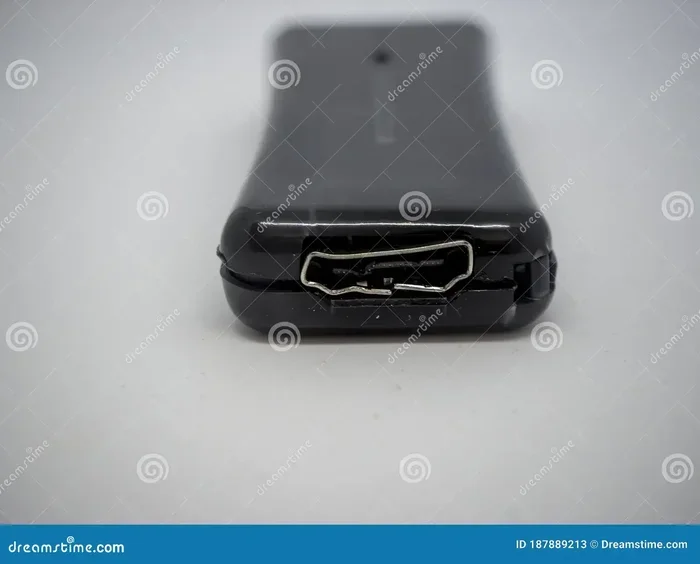
The internal pins inside the port can bend, corrode, or snap off. The solder joints connecting the port to the circuit board can crack. Dust and debris can build up inside the port over time. Each of these issues affects your display connection differently. And each has a different level of severity.
Types Of HDMI Port Damage
Not all damage is the same. Here are the most common types of HDMI port damage you might encounter:
- Bent pins: The tiny internal pins inside the port bend out of shape. This disrupts the signal but may still allow partial output.
- Loose port: The port wiggles or feels detached from the device. This usually means the solder joints are failing.
- Broken pins: One or more pins snap off completely. This can block certain resolutions or audio channels.
- Corrosion: Moisture or dirt causes oxidation on the contact points. This leads to intermittent or poor signal quality.
- Scratched contacts: The gold-plated contacts wear down over time, reducing signal strength.
Each type of damage has a different impact on whether your port can still work. A bent pin might still pass a signal at lower resolutions. A completely snapped pin might kill the connection entirely. Knowing which type you have is the first step toward fixing it.
Can A Broken HDMI Port Still Work
The short answer is yes, a broken HDMI port can still work. But it depends on what kind of break we are talking about. A port with a slightly bent pin might still send a video and audio signal to your display. A port with a cracked solder joint might work when the cable is positioned just right. Even a port that looks physically damaged on the outside might still function on the inside.
Here are some scenarios where a damaged HDMI port can still produce a signal:
- Intermittent contact: If the port makes partial contact with the cable, you might get a flickering or unstable picture. This happens when pins are bent but not fully broken.
- Lower resolution support: Some broken ports can still handle basic resolutions like 720p or 1080i but fail at 4K. The damaged pins might only affect certain data lanes.
- Audio-only output: In rare cases, a port with severe damage might still pass audio but lose video. This occurs when the video data pins are affected but the audio pins remain intact.
- Temporary function after reseating: Sometimes simply unplugging and replugging the cable restores the connection. This suggests the port is not fully broken.
- Working with a different cable: A thicker or more flexible cable might bypass the damaged area inside the port and still make contact.
So if you are asking yourself can a broken HDMI port still work, the answer is almost always yes, at least to some degree. The real question is how stable and reliable that connection will be.
When A Broken HDMI Port Will Not Work
There are also situations where a broken port simply cannot function anymore:
- All pins are snapped off: Without any pins making contact, no signal can pass through.
- Complete solder fracture: If the port is fully detached from the circuit board, it has no electrical connection at all.
- Severe corrosion: Heavy oxidation can eat through the contact points permanently.
- Burned or melted port: Electrical surges can melt the plastic and metal inside the port beyond repair.
In these cases, you will need either a port replacement or an alternative connection method. But even then, the device itself might still work perfectly. It is just the port that needs attention.
Common Signs Of HDMI Port Damage
Before you start fixing anything, you need to confirm that the HDMI port is actually the problem. Several symptoms point directly to port damage rather than a bad cable or device issue.
No Signal Error
The most obvious sign is your TV or monitor displaying a no signal or no input detected message. If you have tried multiple cables and the error persists, the port is likely the culprit. A working port should detect a cable immediately and display the source.
Flickering Or Intermittent Display
If your screen flickers, goes black for a second, or only shows a picture when you hold the cable at a specific angle, the port has a physical issue. This is one of the most common signs of a loose HDMI connection caused by a damaged port.
Distorted Picture Or Color Issues
A damaged port can cause color distortion, stripes, or a garbled image. This happens when some data pins are still working but others are not. The signal becomes incomplete, resulting in visual artifacts on your screen.
No Audio Along With Video
If your picture looks fine but you have no sound, the port might be partially broken. HDMI carries both audio and video through the same cable. Damaged pins can block the audio data lanes while leaving the video lanes functional.
Physical Damage To The Port
Sometimes you can see the damage with your own eyes. Look for bent pins, cracked plastic, or a port that feels loose when you gently push the cable in. If the port moves or wiggles, the solder joints are likely compromised.
How To Fix A Broken HDMI Port
Good news. You do not always need to replace the entire device. Many HDMI port repair methods are simple enough to do at home. Others might require a professional, but they are still affordable.
Step 1: Clean The Port
Dust and debris are the simplest cause of a failing display connection. Before assuming the port is broken, clean it carefully.
- Turn off the device and unplug the HDMI cable.
- Use a flashlight to look inside the port for dust or lint.
- Gently blow air into the port to remove loose particles.
- Use a wooden toothpick or anti-static brush to dislodge stubborn debris.
- Avoid using metal objects, which can bend the pins further.
This simple step fixes more problems than people realize. A dirty HDMI port can look broken but is really just blocked.
Step 2: Reseat The Cable
Sometimes the fix is as simple as unplugging and replugging the cable firmly. Make sure the cable clicks into place fully. A loose fit can cause intermittent signal loss that looks like a broken port.
Step 3: Try A Different Cable Or Device
Before assuming the port is broken, rule out other causes. Try a different HDMI cable and connect it to a different device. If the new cable works on another device, the problem is your original port. If the new cable also fails, the cable or source device might be the issue.
Step 4: Use An HDMI Adapter
If the port is partially damaged, an HDMI adapter can bypass the problem. A short HDMI extension cable or a right-angle adapter can change the angle of the connection and reduce stress on the damaged pins. This is a quick and cheap workaround.
Step 5: Solder Or Repair The Port
For more serious damage, you might need to open the device and repair the port directly. This involves:
- Opening the device casing carefully.
- Locating the damaged HDMI port on the circuit board.
- Reflowing the solder joints with a soldering iron.
- Replacing bent pins using a fine needle or pin replacement tool.
- Replacing the entire port if it is beyond repair.
HDMI port replacement is a skilled task. If you are not comfortable with soldering, take your device to a professional repair shop. The cost is usually between 30 and 100 dollars depending on the device.
Step 6: Use A USB-C Or DisplayPort Alternative
If your device supports it, you can skip the HDMI port entirely. Many modern laptops and monitors offer DisplayPort or USB-C alternatives that carry the same high-quality signal. An adapter can convert these connections to HDMI if needed.
Quick Tips For HDMI Port Repair
- Always power off the device before inspecting the port.
- Use an anti-static wrist strap when working inside electronics.
- Take photos before disassembling anything so you can reassemble correctly.
- Do not force the cable into a port that feels stuck or damaged.
- Use compressed air regularly to keep ports clean and dust-free.
Alternative Connection Solutions When HDMI Fails
If your HDMI port is beyond repair, you still have options. Modern devices offer several alternative digital interfaces that can deliver the same quality audio and video.
DisplayPort
DisplayPort is a popular alternative to HDMI, especially on computers and monitors. It supports high resolutions and refresh rates, including 4K at 144Hz. You can use a DisplayPort to HDMI adapter to connect to a TV or monitor with an HDMI input.
USB-C With DisplayPort Alt Mode
Many modern laptops and tablets use USB-C ports that support video output through DisplayPort Alt Mode. You simply need a USB-C to HDMI adapter or cable. This is one of the most versatile backup options available today.
VGA (For Older Displays)
If you are working with an older monitor, VGA can serve as a last resort. VGA is an analog connection and does not carry audio, so it is not ideal. But it will still produce a picture when digital options fail.
Wireless Display Options
Wireless solutions like Chromecast, Miracast, or Apple AirPlay can stream your screen without any cables at all. These are not as reliable for gaming or high-frame-rate content, but they work well for presentations and casual viewing.
| Connection Type | Audio Support | Max Resolution | Best For |
|---|---|---|---|
| HDMI | Yes | 4K at 120Hz | TVs, consoles, projectors |
| DisplayPort | Yes | 8K at 60Hz | PC monitors, workstations |
| USB-C Alt Mode | Yes | 4K at 144Hz | Laptops, tablets |
| VGA | No | 1080p | Older monitors |
| Wireless (Miracast/AirPlay) | Yes | 1080p | Casual streaming |
Preventing HDMI Port Damage
The best fix is prevention. Taking care of your HDMI ports can save you from headaches and repair costs down the road.
Handle Cables Gently
Never yank a cable out by pulling on the wire. Always grip the connector and pull it straight out. Yanking cables is one of the leading causes of bent HDMI pins and loose ports.
Use Cable Management
Keep cables organized and secured with clips or ties. Loose cables hanging from devices put stress on the port and can slowly pull it away from the circuit board over time.
Avoid Frequent Plugging And Unplugging
Every time you plug and unplug an HDMI cable, you wear down the contacts. If you do not need to disconnect frequently, leave the cable in place. Use a cable management solution to keep things tidy without constant disconnection.
Use High-Quality Cables
Cheap cables with poor fit can put uneven pressure on the port. Invest in well-made HDMI cables with a snug but not overly tight fit. Quality cables last longer and protect your ports from damage.
Keep Ports Clean
Dust is the enemy of electronic connections. Use compressed air to clean your ports every few months. This simple habit prevents debris from building up and causing signal loss or intermittent failures.
Use Port Covers When Traveling
If you travel with laptops or portable devices, use port covers or dust plugs. These small accessories protect your ports from dirt and damage during transport.
Taking these preventive steps keeps your HDMI connections strong and reliable for years. A little care goes a long way in avoiding the frustration of a broken port.
When To Seek Professional Help
Some HDMI port repair jobs are best left to the experts. If you have tried all the DIY fixes and still have no signal, it is time to consult a professional. Here are signs that you need expert help:
- The port is visibly cracked or broken off from the device.
- You have tried multiple cables and adapters with no success.
- The device is under warranty and you do not want to void it.
- You are not comfortable opening the device or soldering.
- The issue is intermittent and you cannot pinpoint the cause.
A professional technician can diagnose the exact problem with your broken HDMI port and offer the best repair solution. In many cases, the repair is quick and affordable. And it saves you from buying a new device prematurely.
Remember that can a broken HDMI port still work is not just a question of yes or no. It depends on the damage level, the device, and the fix you apply. With the right approach, you can often bring a damaged port back to life or find a workaround that keeps your display running smoothly.
Conclusion
Can a broken HDMI port still work? The answer is yes, in most cases. Minor damage like bent pins, dust buildup, or loose solder joints can still allow partial or intermittent signal transmission. The key is identifying the type of damage early and applying the right fix before it gets worse.
Start with simple solutions like cleaning the port, reseating the cable, and using adapters. If those do not work, consider soldering or professional repair. And if the port is truly beyond saving, alternative connections like DisplayPort, USB-C, or wireless streaming can keep you going.
Take care of your HDMI ports and they will take care of you. Handle cables gently, keep ports clean, and use quality accessories. These small habits prevent most port damage and extend the life of your devices. Now you know exactly what to do when your HDMI port stops working. Go ahead and try these steps. Your screen will thank you.
Frequently Asked Questions
Can a bent HDMI pin still transmit a signal?
Yes, a slightly bent pin can still make contact and transmit a signal. The quality may be reduced depending on which pins are affected. Gently straighten the pin with a toothpick or seek professional repair for severe bends.
How much does it cost to replace a broken HDMI port?
Professional HDMI port replacement typically costs between 30 and 100 dollars. The price varies based on the device type, the repair shop, and the complexity of the fix. Some repairs may be covered under warranty.
Can I use a different port if my HDMI port is broken?
Yes, if your device has multiple HDMI ports, try switching to another one. You can also use alternative connections like DisplayPort, USB-C, or a wireless display adapter to bypass the damaged port entirely.
Is it safe to open my device and repair the HDMI port myself?
It is safe if you have experience with electronics and soldering. Always power off the device, use anti-static precautions, and follow proper disassembly steps. If you are unsure, it is better to consult a professional technician.
What causes an HDMI port to break?
Common causes include physical impact, yanking cables forcefully, dust accumulation, moisture exposure, and electrical surges. Over time, regular wear and tear also loosens the port and weakens the solder joints.
Will a broken HDMI port affect video quality?
Yes, a damaged port can cause distorted images, color issues, flickering, or resolution drops. Some broken ports may only support lower resolutions while others lose audio or video entirely depending on which pins are affected.